Lenguaje
Nota:
El acceso a esta página requiere autorización. Puede intentar iniciar sesión o cambiar directorios.
El acceso a esta página requiere autorización. Puede intentar cambiar los directorios.
Los objetos CompositionLight se usan junto con SceneLightingEffect para simular la iluminación dinámica y la reflectividad.
Puedes aplicar luces a Visuals y UIElements XAML.
Aplicar luces a elementos UI de XAML
Los objetos XamlLight se usan para aplicar CompositionLights a UIElements de XAML de manera dinámica. XamlLight proporciona métodos para dirigirse a UIElements o Brochas de XAML, aplicar luces a árboles de UIElements y ayudar a administrar la vida útil de los recursos de CompositionLight en función de si están actualmente en uso.
- Si apunta un Pincel con un XamlLight, entonces las partes de cualquier UIElements que use ese pincel son iluminadas por la luz.
- Si aplica un UIElement con XamlLight, todo el UIElement y sus UIElements están iluminados por la luz.
Creación y uso de XamlLight
XamlLight es una clase base que se puede usar para crear luces personalizadas.
En este ejemplo se muestra la definición de un XamlLight personalizado que aplica un foco multicolor a UIElements y brushes específicos en WinUI.
public sealed class OrangeSpotLight : XamlLight
{
    // Register an attached property that lets you set a UIElement
    // or Brush as a target for this light type in markup.
    public static readonly DependencyProperty IsTargetProperty =
        DependencyProperty.RegisterAttached(
        "IsTarget",
        typeof(bool),
        typeof(OrangeSpotLight),
        new PropertyMetadata(null, OnIsTargetChanged)
    );

    public static void SetIsTarget(DependencyObject target, bool value)
    {
        target.SetValue(IsTargetProperty, value);
    }

    public static Boolean GetIsTarget(DependencyObject target)
    {
        return (bool)target.GetValue(IsTargetProperty);
    }

    // Handle attached property changed to automatically target and untarget UIElements and Brushes.
    private static void OnIsTargetChanged(DependencyObject obj, DependencyPropertyChangedEventArgs e)
    {
        var isAdding = (bool)e.NewValue;

        if (isAdding)
        {
            if (obj is UIElement)
            {
                XamlLight.AddTargetElement(GetIdStatic(), obj as UIElement);
            }
            else if (obj is Brush)
            {
                XamlLight.AddTargetBrush(GetIdStatic(), obj as Brush);
            }
        }
        else
        {
            if (obj is UIElement)
            {
                XamlLight.RemoveTargetElement(GetIdStatic(), obj as UIElement);
            }
            else if (obj is Brush)
            {
                XamlLight.RemoveTargetBrush(GetIdStatic(), obj as Brush);
            }
        }
    }

    protected override void OnConnected(UIElement newElement)
    {
        if (CompositionLight == null)
        {
            // OnConnected is called when the first target UIElement is shown on the screen.
            // This lets you delay creation of the composition object until it's actually needed.
            var spotLight = CompositionTarget.GetCompositorForCurrentThread().CreateSpotLight();
            spotLight.InnerConeColor = Colors.Orange;
            spotLight.OuterConeColor = Colors.Yellow;
            spotLight.InnerConeAngleInDegrees = 30;
            spotLight.OuterConeAngleInDegrees = 45;
            CompositionLight = spotLight;
        }
    }

    protected override void OnDisconnected(UIElement oldElement)
    {
        // OnDisconnected is called when there are no more target UIElements on the screen.
        // The CompositionLight should be disposed when no longer required.
        if (CompositionLight != null)
        {
            CompositionLight.Dispose();
            CompositionLight = null;
        }
    }

    protected override string GetId()
    {
        return GetIdStatic();
    }

    private static string GetIdStatic()
    {
        // This specifies the unique name of the light.
        // In most cases you should use the type's FullName.
        return typeof(OrangeSpotLight).FullName;
    }
}
// For the C++/WinRT code example below, you'll need to add a Midl File (.idl) file to your project.

// OrangeSpotLight.idl
namespace MyApp
{
    [default_interface]
    runtimeclass OrangeSpotLight : Microsoft.UI.Xaml.Media.XamlLight
    {
        OrangeSpotLight();
        static Microsoft.UI.Xaml.DependencyProperty IsTargetProperty{ get; };
        static Boolean GetIsTarget(Microsoft.UI.Xaml.DependencyObject target);
        static void SetIsTarget(Microsoft.UI.Xaml.DependencyObject target, Boolean value);
    }
}

// OrangeSpotLight.h
struct OrangeSpotLight : OrangeSpotLightT<OrangeSpotLight>
{
    OrangeSpotLight() = default;

    winrt::hstring GetId();

    static Microsoft::UI::Xaml::DependencyProperty IsTargetProperty() { return m_isTargetProperty; }

    static bool GetIsTarget(Microsoft::UI::Xaml::DependencyObject const& target)
    {
		return winrt::unbox_value<bool>(target.GetValue(m_isTargetProperty));
	}

    static void SetIsTarget(Microsoft::UI::Xaml::DependencyObject const& target, bool value)
    {
        target.SetValue(m_isTargetProperty, winrt::box_value(value));
    }

    void OnConnected(Microsoft::UI::Xaml::UIElement const& newElement);
    void OnDisconnected(Microsoft::UI::Xaml::UIElement const& oldElement);

    static void OnIsTargetChanged(Microsoft::UI::Xaml::DependencyObject const& d, Microsoft::UI::Xaml::DependencyPropertyChangedEventArgs const& e);

    inline static winrt::hstring GetIdStatic()
    {
        // This specifies the unique name of the light. In most cases you should use the type's full name.
        return winrt::xaml_typename<MyApp::OrangeSpotLight>().Name;
    }

private:
	static Microsoft::UI::Xaml::DependencyProperty m_isTargetProperty;
};

// OrangeSpotLight.cpp
Microsoft::UI::Xaml::DependencyProperty OrangeSpotLight::m_isTargetProperty =
    Microsoft::UI::Xaml::DependencyProperty::RegisterAttached(
        L"IsTarget",
        winrt::xaml_typename<bool>(),
        winrt::xaml_typename<MyApp::OrangeSpotLight>(),
        Microsoft::UI::Xaml::PropertyMetadata{ winrt::box_value(false), Microsoft::UI::Xaml::PropertyChangedCallback{ &OrangeSpotLight::OnIsTargetChanged } }
);

void OrangeSpotLight::OnConnected(Microsoft::UI::Xaml::UIElement const& /* newElement */)
{
    if (!CompositionLight())
    {
        // OnConnected is called when the first target UIElement is shown on the screen. This enables delaying composition object creation until it's actually necessary.
        auto spotLight{ Microsoft::UI::Xaml::Media::CompositionTarget::GetCompositorForCurrentThread().CreateSpotLight() };
        spotLight.InnerConeColor(Microsoft::UI::Colors::Orange());
        spotLight.OuterConeColor(Microsoft::UI::Colors::Yellow());
        spotLight.InnerConeAngleInDegrees(30);
        spotLight.OuterConeAngleInDegrees(45);
        CompositionLight(spotLight);
    }
}

void OrangeSpotLight::OnDisconnected(Microsoft::UI::Xaml::UIElement const& /* oldElement */)
{
    // OnDisconnected is called when there are no more target UIElements on the screen.
    // Dispose of composition resources when no longer in use.
    if (CompositionLight())
    {
        CompositionLight(nullptr);
    }
}

winrt::hstring OrangeSpotLight::GetId()
{
    return OrangeSpotLight::GetIdStatic();
}

void OrangeSpotLight::OnIsTargetChanged(Microsoft::UI::Xaml::DependencyObject const& d, Microsoft::UI::Xaml::DependencyPropertyChangedEventArgs const& e)
{
    auto uie{ d.try_as<Microsoft::UI::Xaml::UIElement>() };
    auto brush{ d.try_as<Microsoft::UI::Xaml::Media::Brush>() };

    auto isAdding = winrt::unbox_value<bool>(e.NewValue());
    if (isAdding)
    {

        if (uie)
        {
            Microsoft::UI::Xaml::Media::XamlLight::AddTargetElement(OrangeSpotLight::GetIdStatic(), uie);
        }
        else if (brush)
        {
            Microsoft::UI::Xaml::Media::XamlLight::AddTargetBrush(OrangeSpotLight::GetIdStatic(), brush);
        }
    }
    else
    {
        if (uie)
        {
            Microsoft::UI::Xaml::Media::XamlLight::RemoveTargetElement(OrangeSpotLight::GetIdStatic(), uie);
        }
        else if (brush)
        {
            Microsoft::UI::Xaml::Media::XamlLight::RemoveTargetBrush(OrangeSpotLight::GetIdStatic(), brush);
        }
    }
}

// MainPage.h
...
#include "OrangeSpotLight.h"
...
struct MainPage : MainPageT<MainPage>
{
    MainPage()
    {
        InitializeComponent();

		OrangeSpotLight::SetIsTarget(spotlitBrush(), true);
		OrangeSpotLight::SetIsTarget(spotlitUIElement(), true);
	}
...
};
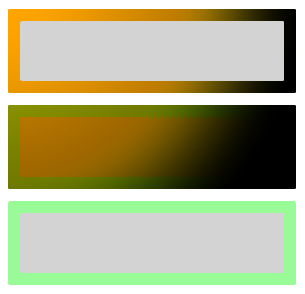
A continuación, puede aplicar esta luz a cualquier UIElement de XAML o Brush para iluminarlos. En este ejemplo se muestran diferentes usos potenciales.
Importante
Para C++/WinRT, quite las dos apariciones del local:OrangeSpotLight.IsTarget="True" en el marcado a continuación. Las propiedades adjuntas ya están establecidas en código subyacente.
<StackPanel Width="100">
    <StackPanel.Lights>
        <local:OrangeSpotLight/>
    </StackPanel.Lights>

    <!-- This border is lit by the OrangeSpotLight, but its content is not. -->
    <Border BorderThickness="4" Margin="2">
        <Border.BorderBrush>
            <SolidColorBrush x:Name="spotlitBrush" Color="White" local:OrangeSpotLight.IsTarget="True"/>
        </Border.BorderBrush>
        <Rectangle Fill="LightGray" Height="20"/>
    </Border>

    <!-- This border and its content are lit by the OrangeSpotLight. -->
    <Border x:Name="spotlitUIElement" BorderThickness="4" BorderBrush="PaleGreen" Margin="2"
            local:OrangeSpotLight.IsTarget="True">
        <Rectangle Fill="LightGray" Height="20"/>
    </Border>

    <!-- This border and its content are not lit by the OrangeSpotLight. -->
    <Border BorderThickness="4" BorderBrush="PaleGreen" Margin="2">
        <Rectangle Fill="LightGray" Height="20"/>
    </Border>
</StackPanel>
Los resultados de este XAML tienen este aspecto.
Importante
Si establece UIElement.Lights en el marcado, como se muestra en el ejemplo anterior, solo es compatible con aplicaciones que tienen una versión mínima que equivale a Windows 10 Creators Update o posterior. En el caso de las aplicaciones destinadas a versiones anteriores, las luces deben crearse en código subyacente.
Recursos adicionales
Colaborar con nosotros en GitHub
El origen de este contenido se puede encontrar en GitHub, donde también puede crear y revisar problemas y solicitudes de incorporación de cambios. Para más información, consulte nuestra guía para colaboradores.
