Block.LineStackingStrategy Propiedad
Definición
Importante
Parte de la información hace referencia a la versión preliminar del producto, que puede haberse modificado sustancialmente antes de lanzar la versión definitiva. Microsoft no otorga ninguna garantía, explícita o implícita, con respecto a la información proporcionada aquí.
Obtiene o establece cómo se determina un cuadro de línea para cada línea de texto dentro del elemento de contenido de flujo de nivel de bloque.
public:
 property System::Windows::LineStackingStrategy LineStackingStrategy { System::Windows::LineStackingStrategy get(); void set(System::Windows::LineStackingStrategy value); };
public System.Windows.LineStackingStrategy LineStackingStrategy { get; set; }member this.LineStackingStrategy : System.Windows.LineStackingStrategy with get, setPublic Property LineStackingStrategy As LineStackingStrategyValor de propiedad
Uno de los LineStackingStrategy valores que especifica cómo se determina un cuadro de línea para cada línea de texto dentro del elemento de contenido de flujo de nivel de bloque. El valor predeterminado es MaxHeight.
Ejemplos
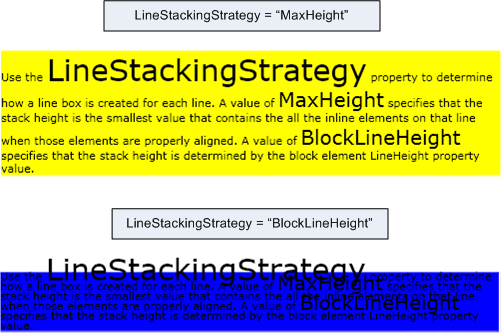
En el ejemplo siguiente se muestra cómo usar la LineStackingStrategy propiedad para determinar cómo se crean los cuadros de línea para las líneas de texto de .TextBlock El primero TextBlock tiene un LineStackingStrategy valor de MaxHeight y el segundo TextBlock tiene un valor de BlockLineHeight.
<Page xmlns="http://schemas.microsoft.com/winfx/2006/xaml/presentation"
  xmlns:x="http://schemas.microsoft.com/winfx/2006/xaml">
  <StackPanel>

    <!-- This TextBlock has a LineStackingStrategy set to "MaxHeight". -->
    <TextBlock LineStackingStrategy="MaxHeight" LineHeight="10" Width="500" TextWrapping="Wrap"
     Background="Yellow">
      Use the <Span FontSize="30">LineStackingStrategy</Span> property to determine how a line box is
      created for each line. A value of <Span FontSize="20">MaxHeight</Span> specifies that the stack
      height is the smallest value that contains all the inline elements on that line when those
      elements are properly aligned. A value of <Span FontSize="20">BlockLineHeight</Span> specifies
      that the stack height is determined by the block element LineHeight property value.
    </TextBlock>

    <!-- Here is the same TextBlock but the LineStackingStrategy is set to "BlockLineHeight". -->
    <TextBlock LineStackingStrategy="BlockLineHeight" LineHeight="10" Width="500" TextWrapping="Wrap"
     Background="Blue" Margin="0,40,0,0">
      Use the <Span FontSize="30">LineStackingStrategy</Span> property to determine how a line box is
      created for each line. A value of <Span FontSize="20">MaxHeight</Span> specifies that the stack
      height is the smallest value that contains all the inline elements on that line when those
      elements are properly aligned. A value of <Span FontSize="20">BlockLineHeight</Span> specifies
      that the stack height is determined by the block element LineHeight property value.
    </TextBlock>

  </StackPanel>
</Page>
En la ilustración siguiente se muestra el resultado del código anterior.
Comentarios
Esta propiedad de dependencia también tiene un uso de propiedad adjunta. En XAML, el uso es , donde el objeto es <object Block.LineStackingStrategy="value".../>un elemento de objeto (normalmente un elemento de flujo) contenido dentro de una Block clase derivada y el valor es un valor de cadena de la LineStackingStrategy enumeración. En el código, el uso de la propiedad adjunta es compatible con los GetLineStackingStrategy métodos y SetLineStackingStrategy . El uso de la propiedad adjunta no es común.
Información de la propiedad dependency
| Elemento | Importancia |
|---|---|
| Campo identificador | LineStackingStrategyProperty |
Propiedades de metadatos establecidas en true |
AffectsMeasure, AffectsRender |
