Note
Access to this page requires authorization. You can try signing in or changing directories.
Access to this page requires authorization. You can try changing directories.
This article describes the inbound and outbound mail routing options in Exchange hybrid deployments. For more information about hybrid, see Exchange Server hybrid deployments.
Important
Don't place servers, services, or devices that modify email messages between your on-premises Exchange servers and Microsoft 365. Secure mail flow between your on-premises Exchange organization and Microsoft 365 depends on information contained in messages sent between the organizations. Firewalls that allow SMTP traffic on TCP port 25 without modification are supported.
The examples in this article don't include Edge Transport servers. Edge Transport servers don't affect message routing between the on-premises organization, the cloud organization, and the internet. Edge Transport servers change message routing within the on-premises organization only. For more information, see Edge Transport servers with hybrid deployments.
Inbound messages from the internet
You need to decide if you want external messages from internet senders to be routed through Exchange Online or your on-premises organization. All messages from internet senders are initially delivered to the organization you select and are then routed to the recipient location. The ideal configuration depends on various factors:
- Are most of your mailboxes in the cloud or in on-premises Exchange?
- Do you want to use the built-in security features for all cloud mailboxes to protect your on-premises Exchange organization?
- Where is your compliance infrastructure configured?
The message path depends on how you decide to configure your MX record in your hybrid deployment. The Hybrid Configuration wizard doesn't configure routing for inbound internet messages. You need to manually configure your MX record if you want to change how inbound internet mail is delivered:
Point your MX record to Microsoft 365: We recommend this configuration for hybrid deployments. All messages sent to any recipient are routed through Exchange Online. This configuration is required to use the built-in security features for all cloud mailboxes to protect your on-premises Exchange organization.
Keep your MX record pointed to your on-premises organization: All messages sent to any recipient are routed through on-premises Exchange. This configuration can be helpful for organizations with an on-premises journaling solution. This configuration doesn't allow the built-in security features for all cloud mailboxes to protect your on-premises Exchange organization.
For more information, see Mail flow best practices for Exchange Online, Microsoft 365, and Office 365 (Overview).
Read the following sections to plan how to route inbound mail in your hybrid deployment.
Route incoming internet messages through the Exchange Online organization
The steps and diagrams in the following subsections illustrate the inbound message path when you point your MX record to Microsoft 365.
Important
You might need to purchase licenses for the Built-in security add-on for on-premises mailboxes if your on-premises recipients are protected by the the built-in security features for all cloud mailboxes. Contact your Microsoft reseller for more information.
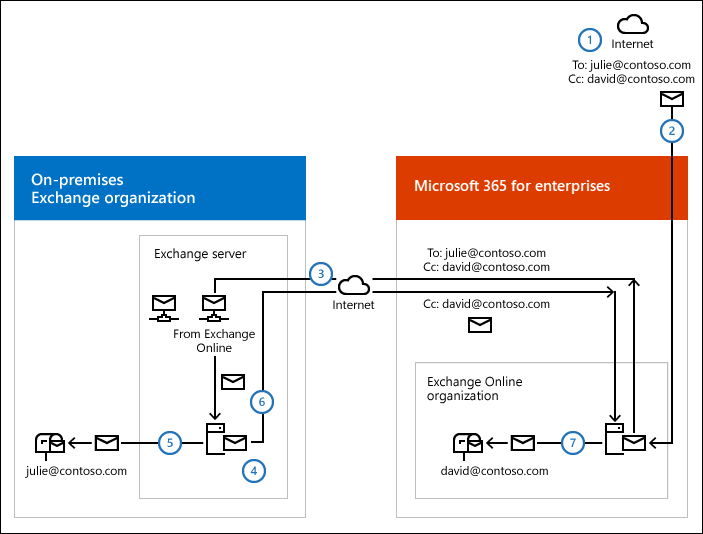
Centralized mail transport disabled (default)
An external sender on the internet sends a message to
julie@contoso.comanddavid@contoso.com. Julie's mailbox is in the on-premises Exchange organization. David's mailbox is in the Exchange Online organization.The MX record for contoso.com points to Microsoft 365, so the message is routed to the Exchange Online organization.
Exchange Online does a lookup for each recipient.
Exchange Online splits the message into two copies (also known as bifurcation). One copy of the message is delivered directly to David's mailbox in Exchange Online.
The other copy of the message is sent from Exchange Online to an on-premises Exchange server in the on-premises organization.
The receiving Exchange server sends the message to Julie's mailbox on the Exchange Mailbox server that hosts the active copy of the mailbox.
Centralized mail transport enabled
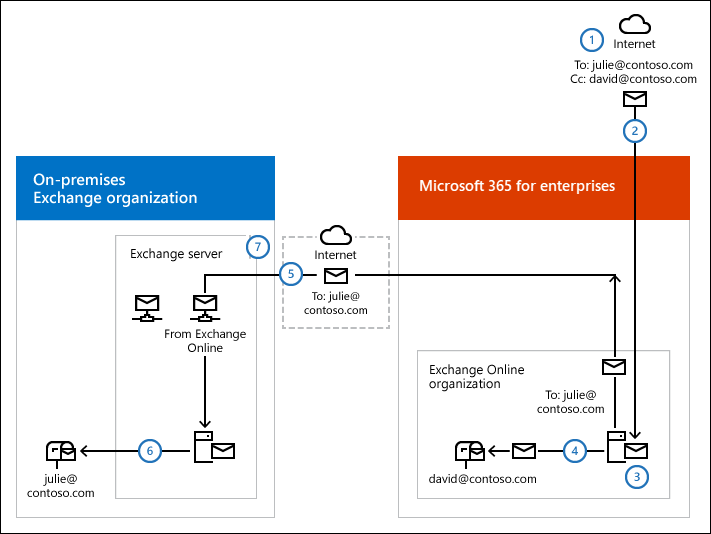
An external sender on the internet sends a message to
julie@contoso.comanddavid@contoso.com. Julie's mailbox is in the on-premises Exchange organization. David's mailbox is in the Exchange Online organization.The MX record for contoso.com points to Microsoft 365, so the message is routed to the Exchange Online organization.
Because centralized mail transport is enabled, Exchange Online routes the message to an on-premises Exchange server.
The receiving on-premises Exchange server does a lookup for each recipient.
The receiving on-premises Exchange server splits the message into two copies (also known as bifurcation). One copy of the message is delivered directly to Julie's mailbox on the Exchange Mailbox server that hosts the active copy of the mailbox.
The other copy of the message is sent from the receiving on-premises Exchange server back to the Exchange Online organization.
Exchange Online delivers the message to David's mailbox.
Route incoming internet messages through the on-premises Exchange 2010 organization
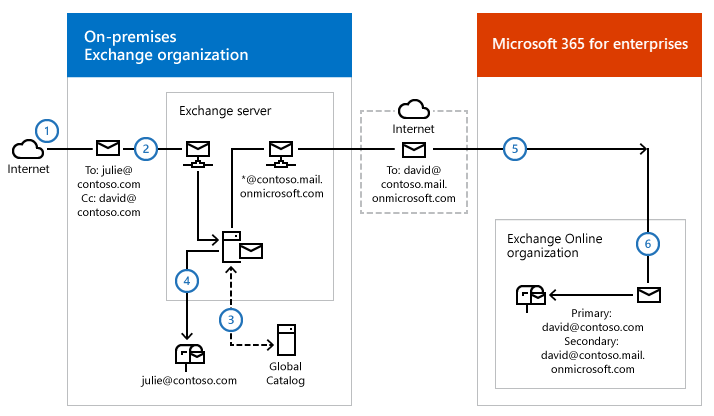
The following steps and diagram illustrate the inbound message path when you keep your MX record pointed to the on-premises Exchange organization.
An external sender on the internet sends a message to
julie@contoso.comanddavid@contoso.com. Julie's mailbox is in the on-premises Exchange organization. David's mailbox is in the Exchange Online organization and has the hybrid routing (secondary) addressdavid@contoso.mail.onmicrosoft.com.The MX record for contoso.com points to the on-premises Exchange organization, so the message is routed to an on-premises Exchange server.
The receiving on-premises Exchange server uses an on-premises global catalog server to do a lookup for each recipient.
The receiving on-premises Exchange server splits the message into two copies (also known as bifurcation). One copy of the message is delivered directly to Julie's mailbox on the Exchange Mailbox server that hosts the active copy of the mailbox.
The other copy of the message is sent using the
david@contoso.mail.onmicrosoft.comaddress from the receiving on-premises Exchange server to the Exchange Online organization via a Send connector configured with Transport Layer Security (TLS).Exchange Online delivers the message delivered to David's mailbox.
Outbound messages to the internet
You can also choose how to route outbound messages from Exchange Online senders. The Hybrid Configuration wizard has the following options:
Don't enable centralized mail transport: This value is the default. Route outbound messages from the Exchange Online organization directly to the internet. Use this option if you don't need to apply on-premises compliance policies or other processing rules to messages from Exchange Online senders.
Enable centralized mail transport: Route outbound messages from the Exchange Online organization through the on-premises Exchange organization. Messages sent to other recipients in the same Exchange Online organization aren't sent through the on-premises Exchange organization. Use this option to apply on-premises compliance policies or other processing rules to messages, regardless of whether recipients are in the Exchange Online organization or the on-premises Exchange organization.
Tip
We recommend centralized mail transport only for organizations with specific compliance needs. Otherwise, we don't typically recommend centralized mail transport.
Read the following sections to plan how to route outbound mail from Exchange Online to the internet in your hybrid deployment.
Outbound message routing from on-premises Exchange senders to external recipients
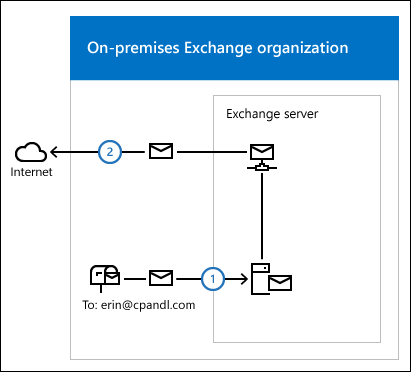
Messages from senders in on-premises Exchange are always sent to internet recipients using DNS, regardless of which outbound routing option you select in the Hybrid Configuration wizard. The following steps and diagram illustrate the message path from senders in on-premises Exchange to external recipients.
Julie has a mailbox in the on-premises Exchange organization and sends a message to the external internet recipient
erin@cpandl.com.The Exchange server looks up the MX record for the cpandl.com domain and sends the message to the specified email server on the internet.
Outbound message routing from Exchange Online to external recipients with centralized mail transport disabled (default)
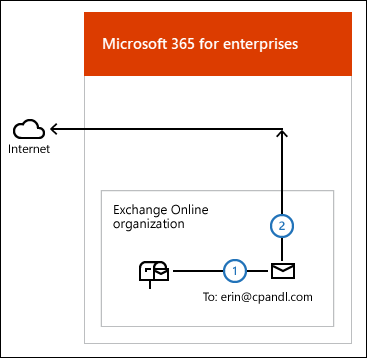
The following steps and diagram illustrate the outbound message path for messages from Exchange Online to an external recipient when you select Don't enable centralized mail transport in the Hybrid Configuration wizard, which is the default configuration.
David has a mailbox in the Exchange Online organization and sends a message to the external internet recipient
erin@cpandl.com.Exchange Online looks up the MX record for the cpandl.com domain and sends the message to the specified email server on the internet.
Outbound message routing from Exchange Online to external recipients with centralized mail transport enabled
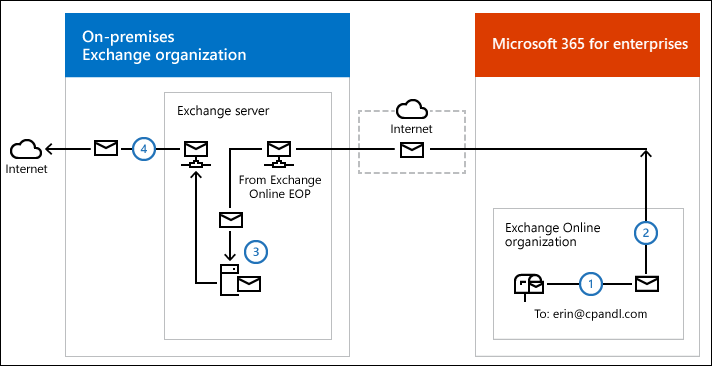
The following steps and diagram illustrate the outbound message path for messages from Exchange Online to an external recipient when you select Enable centralized mail transport in the Hybrid Configuration wizard.
David has a mailbox in the Exchange Online organization and sends a message to the external internet recipient
erin@cpandl.com.Exchange Online is configured to send messages to external recipients through the on-premises Exchange organization, so the message is routed to a designated on-premises Exchange server. The message is sent using TLS.
The receiving on-premises Exchange server applies compliance, anti-virus, and any other processes configured by the administrator to the message.
The receiving on-premises Exchange server looks up the MX record for the cpandl.com domain and sends the message to the specified email server on the internet.