Nóta
Teastaíonn údarú chun rochtain a fháil ar an leathanach seo. Is féidir leat triail a bhaint as shíniú isteach nó eolairí a athrú.
Teastaíonn údarú chun rochtain a fháil ar an leathanach seo. Is féidir leat triail a bhaint as eolairí a athrú.
Configuration settings that determine runtime behavior.
Pagination settings
| Property | Default | Description |
|---|---|---|
| runtime.pagination.max-page-size | Defines maximum records per page | |
| runtime.pagination.default-page-size | Sets default records per response |
REST settings
| Property | Default | Description |
|---|---|---|
| runtime.rest.path | "/api" |
Base path for REST endpoints |
| runtime.rest.enabled | true |
Allows enabling or disabling REST requests for all entities |
| runtime.rest.request-body-strict | true |
Disallows extraneous fields in request body when true |
GraphQL settings
| Property | Default | Description |
|---|---|---|
| runtime.graphql.allow-introspection | true |
Allows querying of underlying GraphQL schema |
| runtime.graphql.path | "/graphql" |
Base path for the GraphQL endpoint |
| runtime.graphql.enabled | true |
Allows enabling or disabling GraphQL requests for all entities |
| runtime.graphql.depth-limit | null |
Maximum allowed depth of a GraphQL query |
| runtime.graphql.multiple-mutations.create.enabled | false |
Allows multiple-create mutations for all entities |
Host settings
| Property | Default | Description |
|---|---|---|
| runtime.host.max-response-size-mb | 158 |
Maximum size (MB) of database response allowed in a single result |
| runtime.host.mode | "production" |
Running mode; "production" or "development" |
CORS settings
| Property | Default | Description |
|---|---|---|
| runtime.host.cors.origins | [] |
Allowed CORS origins |
| runtime.host.cors.allow-credentials | false |
Sets value for Access-Control-Allow-Credentials header |
Authentication settings
| Property | Default | Description |
|---|---|---|
| runtime.host.authentication.provider | Unauthenticated |
Authentication provider |
| runtime.host.authentication.jwt.audience | null |
JWT audience |
| runtime.host.authentication.jwt.issuer | null |
JWT issuer |
Cache settings
| Property | Default | Description |
|---|---|---|
| runtime.cache.enabled | false |
Enables caching of responses globally |
| runtime.cache.ttl-seconds | 5 |
Time to live (seconds) for global cache |
| runtime.cache.level-2.enabled | false |
Enables distributed level 2 cache globally |
| runtime.cache.level-2.provider | "redis" |
Distributed cache provider for level 2 cache |
| runtime.cache.level-2.connection-string | null |
Connection string for the level 2 cache provider |
| runtime.cache.level-2.partition | null |
Optional partition name for isolating distributed cache space |
Compression settings
| Property | Default | Description |
|---|---|---|
| runtime.compression.level | optimal |
HTTP response compression level (optimal, fastest, or none) |
Telemetry settings
| Property | Default | Description |
|---|---|---|
| runtime.telemetry.application-insights.connection-string | null |
Application Insights connection string |
| runtime.telemetry.application-insights.enabled | true |
Enables or disables Application Insights telemetry |
| runtime.telemetry.open-telemetry.endpoint | null |
OpenTelemetry collector URL |
| runtime.telemetry.open-telemetry.headers | {} |
OpenTelemetry export headers |
| runtime.telemetry.open-telemetry.service-name | "dab" |
OpenTelemetry service name |
| runtime.telemetry.open-telemetry.exporter-protocol | "grpc" |
OpenTelemetry protocol ("grpc" or "httpprotobuf") |
| runtime.telemetry.open-telemetry.enabled | true |
Enables or disables OpenTelemetry |
| runtime.telemetry.open-telemetry.enabled | true |
Enables or disables OpenTelemetry |
| runtime.telemetry.azure-log-analytics.enabled | false |
Enables or disables Azure Log Analytics |
| runtime.telemetry.azure-log-analytics.dab-identifier | "DabLogs" |
Identifier for DAB in Azure Log Analytics |
| runtime.telemetry.azure-log-analytics.flush-interval-seconds | 5 |
Interval between log batch pushes (seconds) |
| runtime.telemetry.azure-log-analytics.auth.custom-table-name | null |
Custom table name for Azure Log Analytics |
| runtime.telemetry.azure-log-analytics.auth.dcr-immutable-id | null |
Data collection rule immutable ID |
| runtime.telemetry.azure-log-analytics.auth.dce-endpoint | null |
Data collection endpoint URL |
| runtime.telemetry.file.enabled | false |
Enables or disables file sink logging |
| runtime.telemetry.file.path | "/logs/dab-log.txt" |
File path for telemetry logs |
| runtime.telemetry.file.rolling-interval | "Day" |
Rolling interval for log files |
| runtime.telemetry.file.retained-file-count-limit | 1 |
Maximum number of retained log files |
| runtime.telemetry.file.file-size-limit-bytes | 1048576 |
Maximum file size in bytes before rolling |
| runtime.telemetry.log-level.namespace | null |
Namespace-specific log level override |
| runtime.health.enabled | true |
Enables or disables the health check endpoint globally |
| runtime.health.roles | null |
Allowed roles for the comprehensive health endpoint |
| runtime.health.cache-ttl-seconds | 5 |
Time to live (seconds) for the health check report cache entry |
| runtime.health.max-query-parallelism | 4 |
Maximum concurrent health check queries (range: 1-8) |
MCP settings
| Property | Default | Description |
|---|---|---|
| runtime.mcp.enabled | true |
Enables or disables the MCP endpoint globally |
| runtime.mcp.path | "/mcp" |
Base path for the MCP endpoint |
| runtime.mcp.description | null |
Server description sent to MCP clients during initialization |
| runtime.mcp.dml-tools | true |
Enables or disables all DML tools, or an object for per-tool control |
| runtime.mcp.dml-tools.describe-entities | true |
Enables the describe_entities tool |
| runtime.mcp.dml-tools.create-record | true |
Enables the create_record tool |
| runtime.mcp.dml-tools.read-records | true |
Enables the read_records tool |
| runtime.mcp.dml-tools.update-record | true |
Enables the update_record tool |
| runtime.mcp.dml-tools.delete-record | true |
Enables the delete_record tool |
| runtime.mcp.dml-tools.execute-entity | true |
Enables the execute_entity tool |
| runtime.mcp.dml-tools.aggregate-records | true |
Enables the aggregate_records tool (boolean or object with query-timeout) |
Format overview
{
  "runtime": {
    "pagination": {
      "max-page-size": <integer|null> (default: `100000`),
      "default-page-size": <integer|null> (default: `100`)
    },
    "rest": {
      "path": <string> (default: "/api"),
      "enabled": <true>|<false>,
      "request-body-strict": <true>|<false> (default: `true`)
    },
    "graphql": {
      "path": <string> (default: "/graphql"),
      "enabled": <true>|<false>,
      "allow-introspection": <true>|<false>,
      "depth-limit": <integer|null> (default: `null`),
      "multiple-mutations": {
        "create": {
          "enabled": <true>|<false> (default: `false`)
        }
      }
    },
    "host": {
      "mode": <"production"> (default) | <"development">,
      "max-response-size-mb": <integer|null> (default: `158`),
      "cors": {
        "origins": [ "<string>" ],
        "allow-credentials": <true>|<false> (default: `false`)
      },
      "authentication": {
        "provider": <string> (default: "Unauthenticated"),
        "jwt": {
          "audience": "<string>",
          "issuer": "<string>"
        }
      }
    }
  },
    "compression": {
      "level": <"optimal"> (default) | <"fastest"> | <"none">
    },
    "cache": {
      "enabled": <true>|<false> (default: `false`),
      "ttl-seconds": <integer> (default: `5`),
      "level-2": {
        "enabled": <true>|<false> (default: `false`),
        "provider": <"redis">,
        "connection-string": <string>,
        "partition": <string>
      }
    },
    "telemetry": {
      "application-insights": {
        "connection-string": "<string>",
        "enabled": <true>|<false> (default: `true`)
      },
      "open-telemetry": {
        "endpoint": "<string>",
        "headers": "<string>",
        "service-name": <string> (default: "dab"),
        "exporter-protocol": <"grpc"> (default) | <"httpprotobuf">,
        "enabled": <true>|<false> (default: `true`)
      },
      "azure-log-analytics": {
        "enabled": <true>|<false> (default: `false`),
        "dab-identifier": <string> (default: "DabLogs"),
        "flush-interval-seconds": <integer> (default: `5`),
        "auth": {
          "custom-table-name": <string>,
          "dcr-immutable-id": <string>,
          "dce-endpoint": <string>
        }
      },
      "file": {
        "enabled": <true>|<false> (default: `false`),
        "path": <string> (default: "/logs/dab-log.txt"),
        "rolling-interval": <string> (default: "Day"),
        "retained-file-count-limit": <integer> (default: `1`),
        "file-size-limit-bytes": <integer> (default: `1048576`)
      },
      "log-level": {
        // namespace keys
        "<namespace>": <"trace"|"debug"|"information"|"warning"|"error"|"critical"|"none"|null>
      }
    },
    "health": {
      "enabled": <true>|<false> (default: `true`),
      "roles": [ "<string>" ],
      "cache-ttl-seconds": <integer> (default: `5`),
      "max-query-parallelism": <integer> (default: `4`)
    },
    "mcp": {
      "enabled": <true>|<false> (default: `true`),
      "path": <string> (default: `"/mcp"`),
      "description": <string>,
      "dml-tools": <true>|<false> | {
        "describe-entities": <true>|<false> (default: `true`),
        "create-record": <true>|<false> (default: `true`),
        "read-records": <true>|<false> (default: `true`),
        "update-record": <true>|<false> (default: `true`),
        "delete-record": <true>|<false> (default: `true`),
        "execute-entity": <true>|<false> (default: `true`),
        "aggregate-records": <true>|<false> | {
          "enabled": <true>|<false> (default: `true`),
          "query-timeout": <integer> (default: `30`)
        }
      }
    }
  }
}
Mode (Host runtime)
| Parent | Property | Type | Required | Default |
|---|---|---|---|---|
runtime |
host |
enum (production | development) |
❌ No | production |
Development behavior
- Enabled Nitro (formerly Banana Cake Pop) for GraphQL testing
- Enabled Swagger UI for REST testing
- Enabled anonymous health checks
- Increased logging verbosity (Debug)
Format
{
  "runtime": {
    "host": {
      "mode": "production" (default) | "development"
    }
  }
}
Maximum response size (Host runtime)
| Parent | Property | Type | Required | Default |
|---|---|---|---|---|
runtime.host |
max-response-size-mb |
integer | ❌ No | 158 |
Sets the maximum size (in megabytes) for any given result. As large responses can strain the system, max-response-size-mb caps the total size (different from row count) to prevent overload, which is especially with large columns like text or JSON.
| Value | Result |
|---|---|
| not set | Use default |
null |
Use default |
integer |
Any positive 32-bit integer |
<= 0 |
Not supported |
Format
{
  "runtime": {
    "host": {
      "max-response-size-mb": <integer; default: 158>
    }
  }
}
GraphQL (runtime)
| Parent | Property | Type | Required | Default |
|---|---|---|---|---|
runtime |
graphql |
object | ❌ No | - |
Global GraphQL configuration.
Nested properties
| Parent | Property | Type | Required | Default |
|---|---|---|---|---|
runtime.graphql |
enabled |
boolean | ❌ No | None |
runtime.graphql |
path |
string | ❌ No | "/graphql" |
runtime.graphql |
depth-limit |
integer | ❌ No | None (unlimited) |
runtime.graphql |
allow-introspection |
boolean | ❌ No | True |
runtime.graphql |
multiple-mutations.create.enabled |
boolean | ❌ No | False |
Property notes
- Subpaths aren't allowed for the
pathproperty. - Use
depth-limitto constrain nested queries. - Set
allow-introspectiontofalseto hide the GraphQL schema. - Use
multiple-mutationsto insert multiple entities in a single mutation.
Format
{
  "runtime": {
    "graphql": {
      "enabled": <true> (default) | <false>
      "depth-limit": <integer|null> (default: `null`),
      "path": <string> (default: /graphql),
      "allow-introspection": <true> (default) | <false>,
      "multiple-mutations": {
        "create": {
          "enabled": <true> | <false> (default)
        }
      }
    }
  }
}
Example: multiple mutations
Configuration
{
  "runtime": {
    "graphql": {
      "multiple-mutations": {
        "create": {
          "enabled": true
        }
      }
    }
  },
  "entities": {
    "User": {
      "source": "dbo.Users",
      "permissions": [
        {
          "role": "anonymous",
          "actions": ["create"] // entity permissions are required
        }
      ]
    }
  }
}
GraphQL mutation
mutation {
  createUsers(input: [
    { name: "Alice", age: 30, isAdmin: true },
    { name: "Bob", age: 25, isAdmin: false },
    { name: "Charlie", age: 35, isAdmin: true }
  ]) {
    id
    name
    age
    isAdmin
  }
}
REST (runtime)
| Parent | Property | Type | Required | Default |
|---|---|---|---|---|
runtime |
rest |
object | ❌ No | - |
Global REST configuration.
Nested properties
| Parent | Property | Type | Required | Default |
|---|---|---|---|---|
runtime.rest |
enabled |
boolean | ❌ No | None |
runtime.rest |
path |
string | ❌ No | "/api" |
runtime.rest |
request-body-strict |
boolean | ❌ No | True |
Property notes
- If global
enabledisfalse, individual entity-levelenableddoesn't matter. - The
pathproperty doesn't support subpath values like/api/data. request-body-strictwas introduced to help simplify .NET POCO objects.
request-body-strict |
Behavior |
|---|---|
true |
Extra fields in the request body cause a BadRequest exception. |
false |
Extra fields in the request body are ignored. |
Format
{
  "runtime": {
    "rest": {
      "enabled": <true> (default) | <false>,
      "path": <string> (default: /api),
      "request-body-strict": <true> (default) | <false>
    }
  }
}
Example: request-body-strict
- Columns with a
default()value are ignored duringINSERTonly when their value in the payload isnull. As a consequence,INSERToperations intodefault()columns, whenrequest-body-strictistrue, can't result in explicitnullvalues. To accomplish this behavior, anUPDATEoperation is required. - Columns with a
default()aren't ignored duringUPDATEregardless of payload value. - Computed columns are always ignored.
- Autogenerated columns are always ignored.
Sample table
CREATE TABLE Users (
    Id INT PRIMARY KEY IDENTITY, -- auto-generated column
    Name NVARCHAR(50) NOT NULL,
    Age INT DEFAULT 18, -- column with default
    IsAdmin BIT DEFAULT 0, -- column with default
    IsMinor AS IIF(Age <= 18, 1, 0) -- computed column
);
Request payload
{
  "Id": 999,
  "Name": "Alice",
  "Age": null,
  "IsAdmin": null,
  "IsMinor": false,
  "ExtraField": "ignored"
}
Insert behavior when request-body-strict = false
INSERT INTO Users (Name) VALUES ('Alice');
-- Default values for Age (18) and IsAdmin (0) are applied by the database.
-- IsMinor is ignored because it’s a computed column.
-- ExtraField is ignored.
-- The database generates the Id value.
Response payload
{
  "Id": 1,          // Auto-generated by the database
  "Name": "Alice",
  "Age": 18,        // Default applied
  "IsAdmin": false, // Default applied
  "IsMinor": true   // Computed
}
Update behavior when request-body-strict = false
UPDATE Users
SET Name = 'Alice Updated', Age = NULL
WHERE Id = 1;
-- IsMinor and ExtraField are ignored.
Response payload
{
  "Id": 1,
  "Name": "Alice Updated",
  "Age": null,
  "IsAdmin": false,
  "IsMinor": false // Recomputed by the database (false when age is `null`)
}
CORS (host runtime)
| Parent | Property | Type | Required | Default |
|---|---|---|---|---|
runtime.host |
cors |
object | ❌ No | - |
Global CORS configuration.
Tip
CORS stands for "Cross-Origin Resource Sharing." It's a browser security feature that controls whether web pages can make requests to a different domain than the one that served them.
Nested properties
| Parent | Property | Type | Required | Default |
|---|---|---|---|---|
runtime.host.cors |
allow-credentials |
boolean | ❌ No | False |
runtime.host.cors |
origins |
string array | ❌ No | None |
Note
The allow-credentials property sets the Access-Control-Allow-Credentials CORS header.
Format
{
  "runtime": {
    "host": {
      "cors": {
        "allow-credentials": <true> | <false> (default),
        "origins": ["<array-of-strings>"]
      }
    }
  }
}
Note
The wildcard * is valid as a value for origins.
Provider (Authentication host runtime)
| Parent | Property | Type | Required | Default |
|---|---|---|---|---|
runtime.host.authentication |
provider |
enum (Unauthenticated | StaticWebApps | AppService | EntraId | Custom | Simulator) |
❌ No | Unauthenticated |
Selects the authentication method. Each provider validates identity differently. For step-by-step setup, see the how-to guides in the following table.
Note
The Data API builder functionality described in this section is available in version 2.0 and later. For more information, see What's new in version 2.0.
Provider summary
| Provider | Use case | Identity source | How-to guide |
|---|---|---|---|
Unauthenticated |
DAB sits behind a trusted front end (default) | None—all requests run as anonymous |
Configure the Unauthenticated provider |
AppService |
Azure-hosted apps (EasyAuth) | X-MS-CLIENT-PRINCIPAL header |
Configure App Service authentication |
EntraID |
Microsoft Entra ID (Azure AD) | JWT bearer token | Configure Entra ID authentication |
Custom |
Third-party IdPs (Okta, Auth0) | JWT bearer token | Configure custom JWT authentication |
Simulator |
Local testing only | Simulated | Configure Simulator authentication |
Note
The EntraId provider was previously named AzureAd. The old name still works for compatibility.
Unauthenticated (default)
When Unauthenticated is set (or no provider is specified), DAB doesn't inspect or validate any JWT. All requests run as the anonymous role. A front-end service such as Azure API Management or an application gateway can still handle authentication or access policy before requests reach DAB, but DAB continues to authorize only as anonymous.
Important
When Unauthenticated is active, authenticated and custom roles defined in entity permissions are never activated. If your config contains those roles, DAB emits a warning at startup.
{
  "host": {
    "authentication": {
      "provider": "Unauthenticated"
    }
  }
}
AppService
Trusts identity headers injected by Azure App Service EasyAuth.
{
  "host": {
    "authentication": {
      "provider": "AppService"
    }
  }
}
EntraID
Validates JWT tokens issued by Microsoft Entra ID.
{
  "host": {
    "authentication": {
      "provider": "EntraId",
      "jwt": {
        "audience": "<application-id>",
        "issuer": "https://login.microsoftonline.com/<tenant-id>/v2.0"
      }
    }
  }
}
Custom
Validates JWT tokens from third-party identity providers.
{
  "host": {
    "authentication": {
      "provider": "Custom",
      "jwt": {
        "audience": "<api-audience>",
        "issuer": "https://<your-idp-domain>/"
      }
    }
  }
}
Simulator
Simulates authentication for local development and testing.
{
  "host": {
    "authentication": {
      "provider": "Simulator"
    }
  }
}
Important
The Simulator provider only works when runtime.host.mode is development. DAB fails to start if Simulator is configured in production mode.
Role selection
For all providers except Simulator, the X-MS-API-ROLE header selects which role to use from the authenticated user's claims. If omitted, the request uses the Authenticated system role. For details on role evaluation, see Authorization overview.
JWT (Authentication host runtime)
| Parent | Property | Type | Required | Default |
|---|---|---|---|---|
runtime.host.authentication |
jwt |
object | ❌ No | - |
Global JSON Web Token (JWT) configuration.
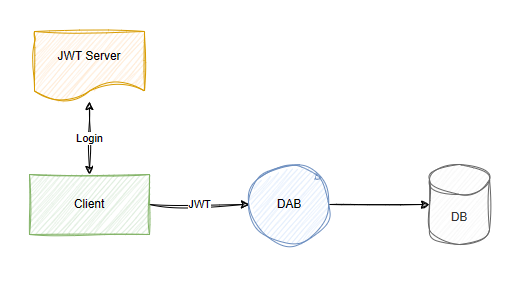
Nested properties
| Parent | Property | Type | Required | Default |
|---|---|---|---|---|
runtime.host.authentication.jwt |
audience |
string | ✔️ Yes* | None |
runtime.host.authentication.jwt |
issuer |
string | ✔️ Yes* | None |
* Both audience and issuer are required when the jwt object is present. The jwt object itself is required when the provider is EntraID, AzureAD, or Custom.
Format
{
  "runtime": {
    "host": {
      "authentication": {
        "jwt": {
          "audience": "<client-id>",
          "issuer": "<issuer-url>"
        }
      }
    }
  }
}
Pagination (Runtime)
| Parent | Property | Type | Required | Default |
|---|---|---|---|---|
runtime |
pagination |
object | ❌ No | - |
Global pagination limits for REST and GraphQL endpoints.
Nested properties
| Parent | Property | Type | Required | Default |
|---|---|---|---|---|
runtime.pagination |
max-page-size |
int | ❌ No | 100,000 |
runtime.pagination |
default-page-size |
int | ❌ No | 100 |
runtime.pagination |
next-link-relative |
boolean | ❌ No | false |
Max-page-size supported values
| Value | Result |
|---|---|
integer |
Any positive 32-bit integer is supported. |
0 |
Not supported. |
-1 |
Defaults to the maximum supported value. |
< -1 |
Not supported. |
Default-page-size supported values
| Value | Result |
|---|---|
integer |
Any positive integer less than the current max-page-size. |
0 |
Not supported. |
-1 |
Defaults to the current max-page-size setting. |
< -1 |
Not supported. |
Next-link-relative behavior
When next-link-relative is true, pagination nextLink values use relative URLs instead of absolute URLs.
| Value | Example |
|---|---|
false (default) |
"nextLink": "https://localhost:5001/api/users?$after=..." |
true |
"nextLink": "/api/users?$after=..." |
Format
{
  "runtime": {
    "pagination": {
      "max-page-size": <integer; default: 100000>,
      "default-page-size": <integer; default: 100>,
      "next-link-relative": <boolean; default: false>
    }
  }
}
Note
When the value is greater than max-page-size, the results are capped at max-page-size.
Example: Paging in REST
Request
GET https://localhost:5001/api/users
Response payload
{
  "value": [
    {
      "Id": 1,
      "Name": "Alice",
      "Age": 30,
      "IsAdmin": true,
      "IsMinor": false
    },
    {
      "Id": 2,
      "Name": "Bob",
      "Age": 17,
      "IsAdmin": false,
      "IsMinor": true
    }
  ],
  "nextLink": "https://localhost:5001/api/users?$after=W3siRW50aXR5TmFtZSI6InVzZXJzIiwiRmllbGROYW1lI=="
}
Request Next Page
GET https://localhost:5001/api/users?$after=W3siRW50aXR5TmFtZSI6InVzZXJzIiwiRmllbGROYW1lI==
Example: Paging in GraphQL
Request payload (Query)
query {
  users {
    items {
      Id
      Name
      Age
      IsAdmin
      IsMinor
    }
    hasNextPage
    endCursor
  }
}
Response payload
{
  "data": {
    "users": {
      "items": [
        {
          "Id": 1,
          "Name": "Alice",
          "Age": 30,
          "IsAdmin": true,
          "IsMinor": false
        },
        {
          "Id": 2,
          "Name": "Bob",
          "Age": 17,
          "IsAdmin": false,
          "IsMinor": true
        }
      ],
      "hasNextPage": true,
      "endCursor": "W3siRW50aXR5TmFtZSI6InVzZXJzIiwiRmllbGROYW1lI=="
    }
  }
}
Request Next Page
query {
  users(after: "W3siRW50aXR5TmFtZSI6InVzZXJzIiwiRmllbGROYW1lI==") {
    items {
      Id
      Name
      Age
      IsAdmin
      IsMinor
    }
    hasNextPage
    endCursor
  }
}
Example: Accessing max-page-size in Requests
Use the max-page-size value by setting $limit (REST) or first (GraphQL) to -1.
REST
GET https://localhost:5001/api/users?$limit=-1
GraphQL
query {
  users(first: -1) {
    items {
      ...
    }
  }
}
Compression (runtime)
Note
The Data API builder functionality described in this section is available in version 2.0 and later. For more information, see What's new in version 2.0.
| Parent | Property | Type | Required | Default |
|---|---|---|---|---|
runtime |
compression |
object | ❌ No | - |
HTTP response compression configuration. When enabled, DAB compresses response bodies to reduce payload sizes and improve transfer speeds.
Nested properties
| Parent | Property | Type | Required | Default |
|---|---|---|---|---|
runtime.compression |
level |
string | ❌ No | "optimal" |
Supported values for level
| Value | Description | Compression savings | Performance impact |
|---|---|---|---|
optimal |
Balances ratio and speed (default) | Gzip: 90.5% / Brotli: 92.2% | Moderate CPU usage, slight latency increase |
fastest |
Prioritizes speed over ratio | Gzip: 89.8% / Brotli: 91.1% | Low CPU usage, minimal latency |
none |
No compression | 0% (baseline: 12,673 bytes) | None |
Client HTTP headers
Compression is invoked by the client's Accept-Encoding header. Supported algorithms are Gzip and Brotli. The level setting configures the compression strategy when both the client and server support multiple algorithms.
Supported headers
| HTTP Header | Algorithm Used |
|---|---|
Accept-Encoding: gzip |
Gzip |
Accept-Encoding: br |
Brotli |
Format
{
  "runtime": {
    "compression": {
      "level": <"optimal"> (default) | <"fastest"> | <"none">
    }
  }
}
Example
{
  "runtime": {
    "compression": {
      "level": "optimal"
    }
  }
}
Cache (runtime)
| Parent | Property | Type | Required | Default |
|---|---|---|---|---|
runtime |
cache |
object | ❌ No | - |
Global Cache configuration.
Nested properties
| Parent | Property | Type | Required | Default |
|---|---|---|---|---|
runtime.cache |
enabled |
boolean | ❌ No | False |
runtime.cache |
ttl-seconds |
integer | ❌ No | 5 |
runtime.cache |
level-2 |
object | ❌ No | - |
| Parent | Property | Type | Required | Default |
|---|---|---|---|---|
runtime.cache.level-2 |
enabled |
boolean | ❌ No | False |
runtime.cache.level-2 |
provider |
string | ❌ No | redis |
runtime.cache.level-2 |
connection-string |
string | ❌ No | None |
runtime.cache.level-2 |
partition |
string | ❌ No | None |
Tip
The entity-level cache.ttl-seconds property defaults to this global value.
Tip
For end-to-end setup, cache-level behavior, and Redis examples, see Implement level 2 cache.
Format
{
  "runtime": {
    "cache":  {
      "enabled": <boolean>,
      "ttl-seconds": <integer>,
      "level-2": {
        "enabled": <boolean>,
        "provider": "redis",
        "connection-string": <string>,
        "partition": <string>
      }
    }
  }
}
Important
If global enabled is false, individual entity-level enabled doesn't matter.
When level-2.enabled is true, DAB uses the configured distributed cache provider in addition to local in-memory cache. An entity configured with cache level L1L2 checks local cache first, then distributed cache, before going to the database.
Telemetry (runtime)
| Parent | Property | Type | Required | Default |
|---|---|---|---|---|
runtime |
telemetry |
object | ❌ No | - |
Global telemetry configuration.
Nested properties
| Parent | Property | Type | Required | Default |
|---|---|---|---|---|
runtime.telemetry |
log-level |
dictionary | ❌ No | None |
runtime.telemetry |
application-insights |
object | ❌ No | - |
runtime.telemetry |
open-telemetry |
object | ❌ No | - |
runtime.telemetry |
azure-log-analytics |
object | ❌ No | - |
runtime.telemetry |
file |
object | ❌ No | - |
Configures logging verbosity per namespace. This configuration follows standard .NET logging conventions and allows granular control, though it assumes some familiarity with Data API builder internals. Data API builder is open source: https://aka.ms/dab
Format
{
  "runtime": {
    "telemetry": {
      "log-level": {
        "namespace": "log-level",
        "namespace": "log-level"
      }
    }
  }
}
Tip
log-level can be hot-reloaded in both development and production. It's currently the only property that supports hot reload in production.
Example
{
  "runtime": {
    "telemetry": {
      "log-level": {
        "Azure.DataApiBuilder.Core.Configurations.RuntimeConfigValidator": "debug",
        "Azure.DataApiBuilder.Core": "information",
        "default": "warning"
      }
    }
  }
}
Application Insights (telemetry)
| Parent | Property | Type | Required | Default |
|---|---|---|---|---|
runtime.telemetry |
application-insights |
object | ❌ No | - |
Configures logging to Application Insights.
Nested properties
| Parent | Property | Type | Required | Default |
|---|---|---|---|---|
runtime.telemetry.application-insights |
enabled |
boolean | ❌ No | true |
runtime.telemetry.application-insights |
connection-string |
string | ✔️ Yes | None |
Format
{
  "runtime": {
    "telemetry": {
      "application-insights": {
        "enabled": <true; default: true> | <false>
        "connection-string": <string>
      }
    }
  }
}
OpenTelemetry (telemetry)
| Parent | Property | Type | Required | Default |
|---|---|---|---|---|
runtime.telemetry |
open-telemetry |
object | ❌ No | - |
Configures logging to Open Telemetry.
Nested properties
| Parent | Property | Type | Required | Default |
|---|---|---|---|---|
runtime.telemetry.open-telemetry |
enabled |
boolean | ❌ No | true |
runtime.telemetry.open-telemetry |
endpoint |
string | ✔️ Yes | None |
runtime.telemetry.open-telemetry |
headers |
string | ❌ No | None |
runtime.telemetry.open-telemetry |
service-name |
string | ❌ No | "dab" |
runtime.telemetry.open-telemetry |
exporter-protocol |
enum (grpc | httpprotobuf) |
❌ No | grpc |
Multiple headers are , (comma) separated.
Format
{
  "runtime": {
    "telemetry": {
      "open-telemetry": {
        "enabled": <true> (default) | <false>,
        "endpoint": <string>,
        "headers": <string>,
        "service-name": <string> (default: "dab"),
        "exporter-protocol": <"grpc" (default) | "httpprotobuf">
      }
    }
  }
}
Example
{
  "runtime": {
    "telemetry": {
      "open-telemetry": {
        "enabled": true,
        // a gRPC endpoint example
        "endpoint": "http://localhost:4317",
        // an HTTP/protobuf endpoint example
        "endpoint": "http://localhost:4318/v1/metrics",
        "headers": "api-key=key,other-config-value=value",
        "service-name": "dab",
      }
    }
  }
}
Learn more about OTEL_EXPORTER_OTLP_HEADERS.
Note
gRPC (4317) is faster and supports streaming but requires more setup steps. HTTP/protobuf (4318) is simpler and easier to debug but less efficient.
Azure Log Analytics (telemetry)
| Parent | Property | Type | Required | Default |
|---|---|---|---|---|
runtime.telemetry |
azure-log-analytics |
object | ❌ No | - |
Configures logging to Azure Log Analytics via a data collection endpoint. When enabled, DAB sends telemetry data in batches at a configurable interval.
Note
The Data API builder functionality described in this section is available in version 2.0 and later. For more information, see What's new in version 2.0.
Nested properties
| Parent | Property | Type | Required | Default |
|---|---|---|---|---|
runtime.telemetry.azure-log-analytics |
enabled |
boolean | ❌ No | false |
runtime.telemetry.azure-log-analytics |
dab-identifier |
string | ❌ No | "DabLogs" |
runtime.telemetry.azure-log-analytics |
flush-interval-seconds |
integer | ❌ No | 5 |
runtime.telemetry.azure-log-analytics |
auth |
object | ✔️ Yes* | - |
* auth is required when enabled is true.
| Parent | Property | Type | Required | Default |
|---|---|---|---|---|
runtime.telemetry.azure-log-analytics.auth |
custom-table-name |
string | ✔️ Yes* | null |
runtime.telemetry.azure-log-analytics.auth |
dcr-immutable-id |
string | ✔️ Yes* | null |
runtime.telemetry.azure-log-analytics.auth |
dce-endpoint |
string | ✔️ Yes* | null |
* Required when enabled is true.
dab-identifier—a label passed to Log Analytics to help differentiate which logs come from Data API builder.flush-interval-seconds—the time interval (in seconds) between sending batches of telemetry data.custom-table-name—the name of the custom table in Azure Log Analytics where data is stored.dcr-immutable-id—the immutable ID of the data collection rule that defines how data is collected.dce-endpoint—the data collection endpoint URL used to send telemetry data.
Format
{
  "runtime": {
    "telemetry": {
      "azure-log-analytics": {
        "enabled": <true> | <false> (default),
        "dab-identifier": <string> (default: "DabLogs"),
        "flush-interval-seconds": <integer> (default: 5),
        "auth": {
          "custom-table-name": "<string>",
          "dcr-immutable-id": "<string>",
          "dce-endpoint": "<string>"
        }
      }
    }
  }
}
Example
{
  "runtime": {
    "telemetry": {
      "azure-log-analytics": {
        "enabled": true,
        "dab-identifier": "MyDabInstance",
        "flush-interval-seconds": 10,
        "auth": {
          "custom-table-name": "DabTelemetry_CL",
          "dcr-immutable-id": "dcr-abc123def456",
          "dce-endpoint": "https://my-dce.eastus-1.ingest.monitor.azure.com"
        }
      }
    }
  }
}
File (telemetry)
| Parent | Property | Type | Required | Default |
|---|---|---|---|---|
runtime.telemetry |
file |
object | ❌ No | - |
Configures writing telemetry logs to a local file. When enabled, DAB writes structured log output to the specified file path with configurable rolling intervals and size limits.
Note
The Data API builder functionality described in this section is available in version 2.0 and later. For more information, see What's new in version 2.0.
Nested properties
| Parent | Property | Type | Required | Default |
|---|---|---|---|---|
runtime.telemetry.file |
enabled |
boolean | ❌ No | false |
runtime.telemetry.file |
path |
string | ✔️ Yes* | "/logs/dab-log.txt" |
runtime.telemetry.file |
rolling-interval |
enum | ❌ No | "Day" |
runtime.telemetry.file |
retained-file-count-limit |
integer | ❌ No | 1 |
runtime.telemetry.file |
file-size-limit-bytes |
integer | ❌ No | 1048576 |
* path is required when enabled is true.
Rolling interval values
| Value | Description |
|---|---|
Minute |
New log file every minute |
Hour |
New log file every hour |
Day |
New log file every day (default) |
Month |
New log file every month |
Year |
New log file every year |
Infinite |
Never roll to a new file |
Format
{
  "runtime": {
    "telemetry": {
      "file": {
        "enabled": <true> | <false> (default),
        "path": <string> (default: "/logs/dab-log.txt"),
        "rolling-interval": <"Day"> (default) | <"Minute"> | <"Hour"> | <"Month"> | <"Year"> | <"Infinite">,
        "retained-file-count-limit": <integer> (default: 1),
        "file-size-limit-bytes": <integer> (default: 1048576)
      }
    }
  }
}
Example
{
  "runtime": {
    "telemetry": {
      "file": {
        "enabled": true,
        "path": "/var/log/dab/dab-telemetry.txt",
        "rolling-interval": "Hour",
        "retained-file-count-limit": 24,
        "file-size-limit-bytes": 5242880
      }
    }
  }
}
MCP (runtime)
| Parent | Property | Type | Required | Default |
|---|---|---|---|---|
runtime |
mcp |
object | ❌ No | - |
Configures the SQL Model Context Protocol (MCP) Server, which exposes database entities as MCP tools for AI agents.
Note
The Data API builder functionality described in this section is available in version 2.0 and later. For more information, see What's new in version 2.0.
Nested properties
| Parent | Property | Type | Required | Default |
|---|---|---|---|---|
runtime.mcp |
enabled |
boolean | ❌ No | true |
runtime.mcp |
path |
string | ❌ No | "/mcp" |
runtime.mcp |
description |
string | ❌ No | null |
runtime.mcp |
dml-tools |
boolean or object | ❌ No | true |
The dml-tools property accepts a boolean to enable or disable all tools, or an object to control individual tools:
| Parent | Property | Type | Required | Default |
|---|---|---|---|---|
runtime.mcp.dml-tools |
describe-entities |
boolean | ❌ No | true |
runtime.mcp.dml-tools |
create-record |
boolean | ❌ No | true |
runtime.mcp.dml-tools |
read-records |
boolean | ❌ No | true |
runtime.mcp.dml-tools |
update-record |
boolean | ❌ No | true |
runtime.mcp.dml-tools |
delete-record |
boolean | ❌ No | true |
runtime.mcp.dml-tools |
execute-entity |
boolean | ❌ No | true |
runtime.mcp.dml-tools |
aggregate-records |
boolean or object | ❌ No | true |
The aggregate-records tool accepts a boolean or an object with more settings:
| Parent | Property | Type | Required | Default | Range |
|---|---|---|---|---|---|
runtime.mcp.dml-tools.aggregate-records |
enabled |
boolean | ❌ No | true |
|
runtime.mcp.dml-tools.aggregate-records |
query-timeout |
integer | ❌ No | 30 |
1–600 seconds |
Format
{
  "runtime": {
    "mcp": {
      "enabled": <true> (default) | <false>,
      "path": <string> (default: "/mcp"),
      "description": <string>,
      "dml-tools": {
        "describe-entities": <true> | <false>,
        "create-record": <true> | <false>,
        "read-records": <true> | <false>,
        "update-record": <true> | <false>,
        "delete-record": <true> | <false>,
        "execute-entity": <true> | <false>,
        "aggregate-records": {
          "enabled": <true> | <false>,
          "query-timeout": <integer; default: 30>
        }
      }
    }
  }
}
Example
{
  "runtime": {
    "mcp": {
      "enabled": true,
      "dml-tools": {
        "describe-entities": true,
        "create-record": true,
        "read-records": true,
        "update-record": true,
        "delete-record": true,
        "execute-entity": true,
        "aggregate-records": {
          "enabled": true,
          "query-timeout": 30
        }
      }
    }
  }
}
To enable or disable all DML tools at once, set "dml-tools" to true or false.
When you disable a tool at the runtime level, the tool never appears in the MCP tools/list response and can't be invoked, regardless of entity-level permissions. For more information on individual DML tools, see Data manipulation language (DML) tools.
Using the CLI
dab configure --runtime.mcp.enabled true
dab configure --runtime.mcp.path "/mcp"
dab configure --runtime.mcp.dml-tools.describe-entities true
dab configure --runtime.mcp.dml-tools.create-record true
dab configure --runtime.mcp.dml-tools.read-records true
dab configure --runtime.mcp.dml-tools.update-record true
dab configure --runtime.mcp.dml-tools.delete-record true
dab configure --runtime.mcp.dml-tools.execute-entity true
dab configure --runtime.mcp.dml-tools.aggregate-records.enabled true
Health (runtime)
| Parent | Property | Type | Required | Default |
|---|---|---|---|---|
runtime |
health |
object | ❌ No | - |
Global health check endpoint (/health) configuration.
Nested properties
| Parent | Property | Type | Required | Default | Range/Notes |
|---|---|---|---|---|---|
runtime.health |
enabled |
boolean | ❌ No | true |
|
runtime.health |
roles |
string array | ✔️ Yes* | null |
*Required in production mode |
runtime.health |
cache-ttl-seconds |
integer | ❌ No | 5 |
Min: 0 |
runtime.health |
max-query-parallelism |
integer | ❌ No | 4 |
Min: One, Max: Eight (clamped) |
Behavior in development vs. production
| Condition | Development Behavior | Production Behavior |
|---|---|---|
health.enabled = false |
403 status |
403 status |
health.enabled = true |
Depends on role | Depends on role |
roles omitted or null |
Health displayed | 403 status |
current role not in roles |
403 status |
403 status |
current role in roles |
Health displayed | Health displayed |
roles includes anonymous |
Health displayed | Health displayed |
Format
{
  "health": {
    "enabled": <true> (default) | <false>,
    "roles": [ <string> ], // required in production
    "cache-ttl-seconds": <integer; default: 5>,
    "max-query-parallelism": <integer; default: 4>
  }
}
Note
If global enabled is false, individual entity-level enabled doesn't matter.
Example
{
  "health": {
    "enabled": true,
    "roles": ["admin", "support"],
    "cache-ttl-seconds": 10,
    "max-query-parallelism": 6
  }
}