Microsoft Foundry Agent Service usa tres componentes principales del entorno de ejecución: agents, conversations y responses, para activar interacciones con estado y multiturno. Un agente usa un modelo del catálogo de modelos Foundry, junto con instrucciones y herramientas. Una conversación conserva el historial entre turnos. Una respuesta es la salida que genera el agente cuando procesa la entrada.
Elija los componentes en función del comportamiento y el estado que su aplicación necesita:
| Componente |
Relación |
Úselo cuando |
|
Agente |
Proporciona un modelo reutilizable, instrucciones y herramientas para una respuesta. |
Varias solicitudes necesitan el mismo comportamiento o configuración de herramientas. |
|
Conversación |
Proporciona elementos de entrada y salida persistentes a las respuestas. |
Las interacciones posteriores necesitan un historial en el servidor. |
|
Respuesta |
Ejecuta un modelo o agente en la entrada y genera elementos de salida. |
Cada interacción necesita una unidad de ejecución, con o sin un agente o una conversación. |
Comience con una respuesta para una sola interacción. Añade un agente para un comportamiento reutilizable, una conversación para un historial persistente, o ambos. Para obtener detalles de implementación, vaya directamente a crear un agente, generar respuestas o trabajar con conversaciones y elementos de conversación.
Los componentes funcionan juntos en un ciclo de vida predecible. Por ejemplo, considere un asistente de soporte técnico que responda a una pregunta de seguimiento:
- La aplicación selecciona un agente que define las instrucciones y herramientas de soporte técnico.
- Crea una conversación y agrega la primera pregunta del cliente como elemento de entrada.
- Una respuesta ejecuta el agente en la conversación y añade elementos de salida.
- La siguiente respuesta usa la misma conversación, por lo que el agente puede responder a una pregunta de seguimiento en contexto.
Sin una conversación, la aplicación puede llevar el contexto hacia delante haciendo referencia a una respuesta almacenada anterior o reenviando elementos anteriores. El modo de streaming y en segundo plano cambia la forma en que la aplicación recibe una respuesta, no la relación entre agentes, conversaciones y respuestas.
En el diagrama siguiente se muestra cómo interactúan estos componentes en un bucle de agente típico.
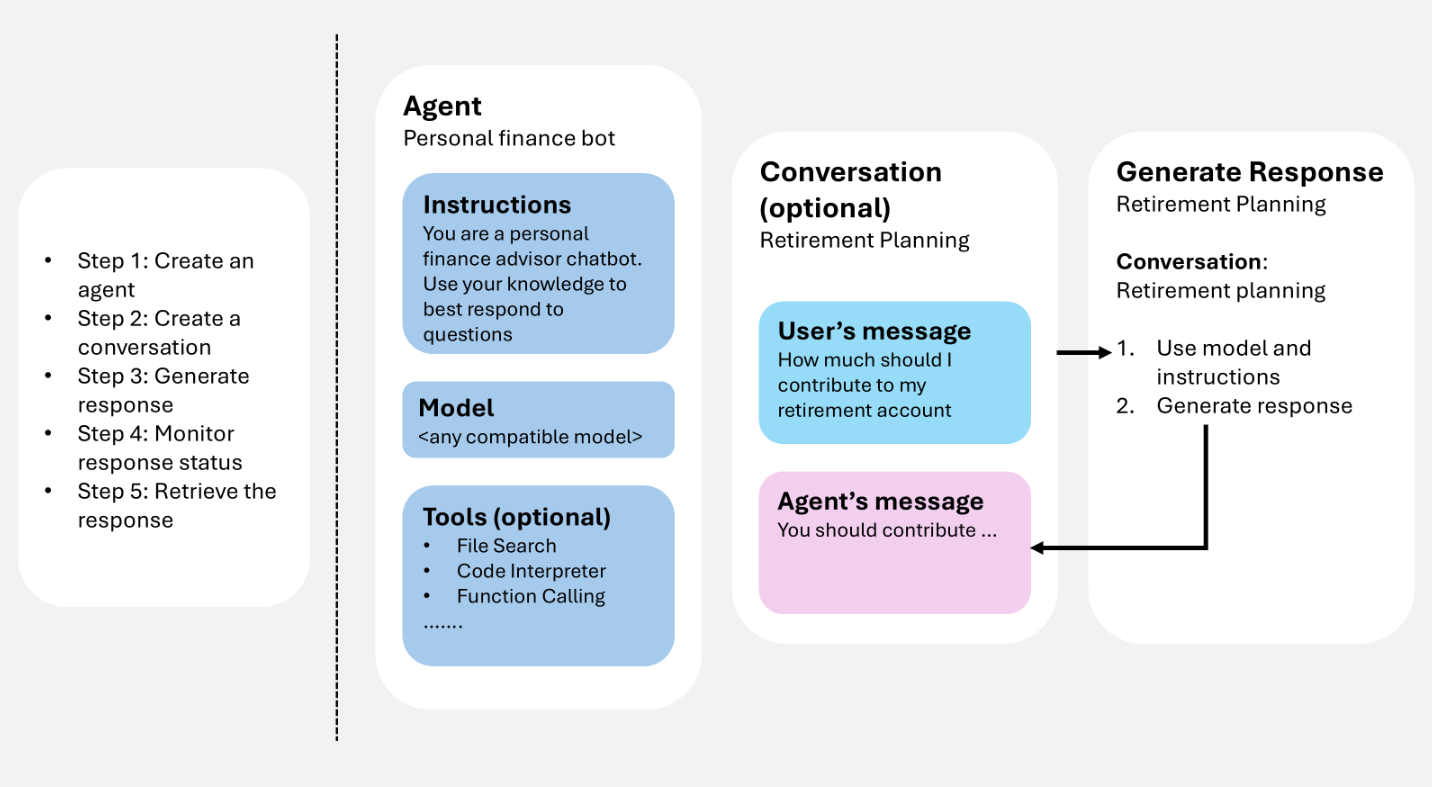
Proporciona entradas de usuario (y, opcionalmente, historial de conversaciones), el servicio genera una respuesta (incluidas las llamadas a herramientas cuando se configura) y los elementos resultantes se pueden reutilizar como contexto para el siguiente turno.
Si usas un agente de codificación como GitHub Copilot para diseñar cómo funcionan juntos los agentes, las conversaciones y las respuestas, la aptitud Microsoft Foundry puede ayudar a aplicar estos componentes al flujo de trabajo de la aplicación.
Requisitos previos
Para ejecutar los ejemplos de este artículo, necesita:
pip install "azure-ai-projects>=2.0.0"
pip install azure-identity
dotnet add package Azure.AI.Projects
dotnet add package Azure.AI.Projects.Agents
dotnet add package Azure.AI.Extensions.OpenAI
dotnet add package Azure.Identity
npm install @azure/ai-projects
npm install @azure/identity
Usa Node.js 22 o posterior con @azure/ai-projects la versión 2.8.0.
<dependency>
    <groupId>com.azure</groupId>
    <artifactId>azure-ai-agents</artifactId>
    <version>2.2.0</version>
</dependency>
<dependency>
    <groupId>com.azure</groupId>
    <artifactId>azure-identity</artifactId>
    <version>1.18.4</version>
</dependency>
No se requiere ninguna instalación del SDK. Use CLI de Azure para obtener un token de acceso:
az login
Creación de un agente
Un agente es una definición de orquestación persistente que combina modelos de IA, instrucciones, código, herramientas, parámetros y controles opcionales de seguridad o gobernanza.
Almacene agentes como activos con nombre y con control de versiones en Microsoft Foundry. Durante la generación de respuestas, la definición del agente funciona con el historial de interacción (conversación o respuesta anterior) para procesar y responder a la entrada del usuario.
En el ejemplo siguiente se crea un agente de indicación con un nombre, un modelo y unas instrucciones. Use el cliente del proyecto para la creación y el control de versiones del agente.
from azure.identity import DefaultAzureCredential
from azure.ai.projects import AIProjectClient
from azure.ai.projects.models import PromptAgentDefinition

# Format: "https://resource_name.services.ai.azure.com/api/projects/project_name"
PROJECT_ENDPOINT = "your_project_endpoint"

# Create project client to call Foundry API
project = AIProjectClient(
    endpoint=PROJECT_ENDPOINT,
    credential=DefaultAzureCredential(),
)

# Create a prompt agent
agent = project.agents.create_version(
    agent_name="my-agent",
    definition=PromptAgentDefinition(
        model="gpt-5-mini",
        instructions="You are a helpful assistant.",
    ),
)
print(f"Agent: {agent.name}, Version: {agent.version}")
using Azure.Identity;
using Azure.AI.Projects;

// Format: "https://resource_name.services.ai.azure.com/api/projects/project_name"
var projectEndpoint = "your_project_endpoint";

// Create project client to call Foundry API
AIProjectClient projectClient = new(
    endpoint: new Uri(projectEndpoint),
    tokenProvider: new DefaultAzureCredential());

// Create a prompt agent
ProjectsAgentVersion agent = await projectClient.AgentAdministrationClient
    .CreateAgentVersionAsync(
        agentName: "my-agent",
        options: new(
            new DeclarativeAgentDefinition("gpt-5-mini")
            {
                Instructions = "You are a helpful assistant.",
            }));
Console.WriteLine($"Agent: {agent.Name}, Version: {agent.Version}");
import { DefaultAzureCredential } from "@azure/identity";
import { AIProjectClient } from "@azure/ai-projects";

// Format: "https://resource_name.services.ai.azure.com/api/projects/project_name"
const PROJECT_ENDPOINT = "your_project_endpoint";

// Create project client to call Foundry API
const project = new AIProjectClient(PROJECT_ENDPOINT, new DefaultAzureCredential());

// Create a prompt agent
const agent = await project.agents.createVersion(
  "my-agent",
  {
    kind: "prompt",
    model: "gpt-5-mini",
    instructions: "You are a helpful assistant.",
  },
);
console.log(`Agent: ${agent.name}, Version: ${agent.version}`);
import com.azure.ai.agents.AgentsClientBuilder;
import com.azure.ai.agents.AgentsClient;
import com.azure.ai.agents.models.PromptAgentDefinition;
import com.azure.identity.DefaultAzureCredentialBuilder;

// Format: "https://resource_name.services.ai.azure.com/api/projects/project_name"
String projectEndpoint = "your_project_endpoint";

// Create agents client to call Foundry API
AgentsClient agentsClient = new AgentsClientBuilder()
    .credential(new DefaultAzureCredentialBuilder().build())
    .endpoint(projectEndpoint)
    .buildAgentsClient();

// Create a prompt agent
PromptAgentDefinition definition = new PromptAgentDefinition("gpt-5-mini");
definition.setInstructions("You are a helpful assistant.");

var agent = agentsClient.createAgentVersion("my-agent", definition);
System.out.println("Agent: " + agent.getName() + ", Version: " + agent.getVersion());
# Configuration
ENDPOINT="https://{resource_name}.services.ai.azure.com/api/projects/{project_name}"
ACCESS_TOKEN="$(az account get-access-token --resource https://ai.azure.com/ --query accessToken -o tsv)"

# Create a prompt agent
curl -X POST "${ENDPOINT}/agents?api-version=v1" \
  -H "Authorization: Bearer ${ACCESS_TOKEN}" \
  -H "Content-Type: application/json" \
  -d '{
    "name": "my-agent",
    "definition": {
      "kind": "prompt",
      "model": "gpt-5-mini",
      "instructions": "You are a helpful assistant."
    }
  }'
Nota
Los agentes ahora se identifican mediante el nombre del agente y la versión del agente. Ya no tienen un GUID llamado AgentID .
Para conocer otros tipos de agentes (hospedados), consulta Ciclo de vida del desarrollo de agentes.
Las herramientas amplían lo que un agente puede hacer más allá de generar texto. Al adjuntar herramientas a un agente, el agente puede llamar a servicios externos, ejecutar código, archivos de búsqueda y acceder a orígenes de datos durante la generación de respuestas, mediante herramientas como la búsqueda web o la llamada a funciones.
Puede adjuntar una o varias herramientas al crear un agente. Durante la generación de respuesta, el agente decide si se debe llamar a una herramienta en función de la entrada del usuario y sus instrucciones. En el ejemplo siguiente se crea un agente con una herramienta de búsqueda web adjunta.
from azure.identity import DefaultAzureCredential
from azure.ai.projects import AIProjectClient
from azure.ai.projects.models import PromptAgentDefinition, WebSearchTool

PROJECT_ENDPOINT = "your_project_endpoint"

project = AIProjectClient(
    endpoint=PROJECT_ENDPOINT,
    credential=DefaultAzureCredential(),
)

# Create an agent with a web search tool
agent = project.agents.create_version(
    agent_name="my-tool-agent",
    definition=PromptAgentDefinition(
        model="gpt-5-mini",
        instructions="You are a helpful assistant that can search the web.",
        tools=[WebSearchTool()],
    ),
)
print(f"Agent: {agent.name}, Version: {agent.version}")
using Azure.Identity;
using Azure.AI.Projects;

var projectEndpoint = "your_project_endpoint";

AIProjectClient projectClient = new(
    endpoint: new Uri(projectEndpoint),
    tokenProvider: new DefaultAzureCredential());

// Create an agent with a web search tool
ProjectsAgentVersion agent = await projectClient.AgentAdministrationClient
    .CreateAgentVersionAsync(
        agentName: "my-tool-agent",
        options: new(
            new DeclarativeAgentDefinition("gpt-5-mini")
            {
                Instructions = "You are a helpful assistant that can search the web.",
                Tools = { ResponseTool.CreateWebSearchTool() },
            }));
Console.WriteLine($"Agent: {agent.Name}, Version: {agent.Version}");
import { DefaultAzureCredential } from "@azure/identity";
import { AIProjectClient } from "@azure/ai-projects";

const PROJECT_ENDPOINT = "your_project_endpoint";
const project = new AIProjectClient(PROJECT_ENDPOINT, new DefaultAzureCredential());

// Create an agent with a web search tool
const agent = await project.agents.createVersion(
  "my-tool-agent",
  {
    kind: "prompt",
    model: "gpt-5-mini",
    instructions: "You are a helpful assistant that can search the web.",
    tools: [{ type: "web_search_preview" }],
  },
);
console.log(`Agent: ${agent.name}, Version: ${agent.version}`);
import com.azure.ai.agents.AgentsClientBuilder;
import com.azure.ai.agents.AgentsClient;
import com.azure.ai.agents.models.PromptAgentDefinition;
import com.azure.ai.agents.models.WebSearchPreviewTool;
import com.azure.identity.DefaultAzureCredentialBuilder;
import java.util.Collections;

String projectEndpoint = "your_project_endpoint";

AgentsClient agentsClient = new AgentsClientBuilder()
    .credential(new DefaultAzureCredentialBuilder().build())
    .endpoint(projectEndpoint)
    .buildAgentsClient();

// Create an agent with a web search tool
WebSearchPreviewTool webSearchTool = new WebSearchPreviewTool();
PromptAgentDefinition definition = new PromptAgentDefinition("gpt-5-mini");
definition.setInstructions("You are a helpful assistant that can search the web.");
definition.setTools(Collections.singletonList(webSearchTool));

var agent = agentsClient.createAgentVersion("my-tool-agent", definition);
System.out.println("Agent: " + agent.getName() + ", Version: " + agent.getVersion());
ENDPOINT="https://{resource_name}.services.ai.azure.com/api/projects/{project_name}"
ACCESS_TOKEN="$(az account get-access-token --resource https://ai.azure.com/ --query accessToken -o tsv)"

# Create an agent with a web search tool
curl -X POST "${ENDPOINT}/agents?api-version=v1" \
  -H "Authorization: Bearer ${ACCESS_TOKEN}" \
  -H "Content-Type: application/json" \
  -d '{
    "name": "my-tool-agent",
    "definition": {
      "kind": "prompt",
      "model": "gpt-5-mini",
      "instructions": "You are a helpful assistant that can search the web.",
      "tools": [{ "type": "web_search_preview" }]
    }
  }'
Para obtener la lista completa de las herramientas disponibles y cómo agregarlas a un cuadro de herramientas, consulte la información general del cuadro de herramientas. Para conocer los procedimientos recomendados, consulte Procedimientos recomendados para usar herramientas.
Generar respuestas
La generación de respuestas invoca al agente. El agente usa su configuración y cualquier historial proporcionado (conversación o respuesta anterior) para realizar tareas mediante una llamada a modelos y herramientas. Como parte de la generación de respuestas, el agente anexa elementos a la conversación.
También puede generar una respuesta sin definir un agente. En este caso, proporcionará todas las configuraciones directamente en la solicitud y las usará solo para esa respuesta. Este enfoque es útil para escenarios sencillos con herramientas mínimas.
Además, puede bifurcar la conversación en el primer identificador de respuesta o en el segundo identificador de respuesta.
Genera una respuesta con un agente
En el ejemplo siguiente se genera una respuesta mediante una referencia del agente y, a continuación, se envía una pregunta de seguimiento mediante la respuesta anterior como contexto.
from azure.identity import DefaultAzureCredential
from azure.ai.projects import AIProjectClient

# Format: "https://resource_name.services.ai.azure.com/api/projects/project_name"
PROJECT_ENDPOINT = "your_project_endpoint"
AGENT_NAME = "your_agent_name"

# Create clients to call Foundry API
project = AIProjectClient(
    endpoint=PROJECT_ENDPOINT,
    credential=DefaultAzureCredential(),
)
openai = project.get_openai_client(agent_name=AGENT_NAME)

# Generate a response using the agent
response = openai.responses.create(
    input="What is the largest city in France?",
)
print(response.output_text)

# Ask a follow-up question using the previous response
follow_up = openai.responses.create(
    previous_response_id=response.id,
    input="What is the population of that city?",
)
print(follow_up.output_text)
using Azure.Identity;
using Azure.AI.Projects;
using Azure.AI.Extensions.OpenAI;

// Format: "https://resource_name.services.ai.azure.com/api/projects/project_name"
var projectEndpoint = "your_project_endpoint";
var agentName = "your_agent_name";

// Create project client to call Foundry API
AIProjectClient projectClient = new(
    endpoint: new Uri(projectEndpoint),
    tokenProvider: new DefaultAzureCredential());

// Generate a response using the agent
ProjectResponsesClient responsesClient
    = projectClient.ProjectOpenAIClient.GetProjectResponsesClientForAgent(agentName);
ResponseResult response = await responsesClient.CreateResponseAsync(
    "What is the largest city in France?");
Console.WriteLine(response.GetOutputText());

// Ask a follow-up question using the previous response
ResponseResult followUp = await responsesClient.CreateResponseAsync(
    new CreateResponseOptions
    {
        PreviousResponseId = response.Id,
        InputItems = { ResponseItem.CreateUserMessageItem(
            "What is the population of that city?") },
    });
Console.WriteLine(followUp.GetOutputText());
import { DefaultAzureCredential } from "@azure/identity";
import { AIProjectClient } from "@azure/ai-projects";

// Format: "https://resource_name.services.ai.azure.com/api/projects/project_name"
const PROJECT_ENDPOINT = "your_project_endpoint";
const AGENT_NAME = "your_agent_name";

// Create clients to call Foundry API
const project = new AIProjectClient(PROJECT_ENDPOINT, new DefaultAzureCredential());
const openai = project.getOpenAIClient();

// Generate a response using the agent
const response = await openai.responses.create(
  { input: "What is the largest city in France?" },
  { body: { agent_reference: { name: AGENT_NAME, type: "agent_reference" } } },
);
console.log(response.output_text);

// Ask a follow-up question using the previous response
const followUp = await openai.responses.create(
  {
    input: "What is the population of that city?",
    previous_response_id: response.id,
  },
  { body: { agent_reference: { name: AGENT_NAME, type: "agent_reference" } } },
);
console.log(followUp.output_text);
import com.azure.ai.agents.*;
import com.azure.ai.agents.models.AgentReference;
import com.azure.ai.agents.models.AzureCreateResponseOptions;
import com.azure.identity.DefaultAzureCredentialBuilder;
import com.openai.models.responses.Response;
import com.openai.models.responses.ResponseCreateParams;

// Format: "https://resource_name.services.ai.azure.com/api/projects/project_name"
String projectEndpoint = "your_project_endpoint";
String agentName = "your_agent_name";

// Create clients to call Foundry API
AgentsClientBuilder builder = new AgentsClientBuilder()
    .credential(new DefaultAzureCredentialBuilder().build())
    .endpoint(projectEndpoint);
ResponsesClient responsesClient = builder.buildResponsesClient();

// Generate a response using the agent
AgentReference agentRef = new AgentReference(agentName);

Response response = responsesClient.createAzureResponse(
    new AzureCreateResponseOptions().setAgentReference(agentRef),
    ResponseCreateParams.builder()
        .input("What is the largest city in France?"));
System.out.println(response.output());

// Ask a follow-up question using the previous response
Response followUp = responsesClient.createAzureResponse(
    new AzureCreateResponseOptions().setAgentReference(agentRef),
    ResponseCreateParams.builder()
        .input("What is the population of that city?")
        .previousResponseId(response.id()));
System.out.println(followUp.output());
# Configuration
ENDPOINT="https://{resource_name}.services.ai.azure.com/api/projects/{project_name}"
ACCESS_TOKEN="$(az account get-access-token --resource https://ai.azure.com/ --query accessToken -o tsv)"
AGENT_NAME="your_agent_name"

# Generate a response using an agent
RESPONSE=$(curl -s -X POST "${ENDPOINT}/openai/v1/responses" \
  -H "Authorization: Bearer ${ACCESS_TOKEN}" \
  -H "Content-Type: application/json" \
  -d '{
    "input": "What is the largest city in France?",
    "agent_reference": {
      "name": "'"${AGENT_NAME}"'",
      "type": "agent_reference"
    }
  }')
RESPONSE_ID=$(echo "$RESPONSE" | jq -r '.id')

# Ask a follow-up question using the previous response
curl -X POST "${ENDPOINT}/openai/v1/responses" \
  -H "Authorization: Bearer ${ACCESS_TOKEN}" \
  -H "Content-Type: application/json" \
  -d '{
    "input": "What is the population of that city?",
    "previous_response_id": "'"${RESPONSE_ID}"'",
    "agent_reference": {
      "name": "'"${AGENT_NAME}"'",
      "type": "agent_reference"
    }
  }'
Cuando un agente usa herramientas durante la generación de respuestas, la salida de la respuesta contiene elementos de llamada de herramienta junto con el mensaje final. Puede iterar response.output para inspeccionar cada elemento y mostrar llamadas a herramientas (como búsquedas web, llamadas a funciones o búsquedas de archivos) antes de imprimir la respuesta de texto.
from azure.identity import DefaultAzureCredential
from azure.ai.projects import AIProjectClient

PROJECT_ENDPOINT = "your_project_endpoint"
AGENT_NAME = "your_agent_name"

project = AIProjectClient(
    endpoint=PROJECT_ENDPOINT,
    credential=DefaultAzureCredential(),
)
openai = project.get_openai_client(agent_name=AGENT_NAME)

response = openai.responses.create(
    input="What happened in the news today?",
)

# Print each output item, including tool calls
for item in response.output:
    if item.type == "web_search_call":
        print(f"[Tool] Web search: status={item.status}")
    elif item.type == "function_call":
        print(f"[Tool] Function call: {item.name}({item.arguments})")
    elif item.type == "file_search_call":
        print(f"[Tool] File search: status={item.status}")
    elif item.type == "message":
        print(f"[Assistant] {item.content[0].text}")
using Azure.Identity;
using Azure.AI.Projects;
using Azure.AI.Extensions.OpenAI;

var projectEndpoint = "your_project_endpoint";
var agentName = "your_agent_name";

AIProjectClient projectClient = new(
    endpoint: new Uri(projectEndpoint),
    tokenProvider: new DefaultAzureCredential());

ProjectResponsesClient responsesClient
    = projectClient.ProjectOpenAIClient.GetProjectResponsesClientForAgent(agentName);
ResponseResult response = await responsesClient.CreateResponseAsync(
    "What happened in the news today?");

// Print each output item, including tool calls
foreach (var item in response.OutputItems)
{
    switch (item)
    {
        case ResponseWebSearchCallItem webSearch:
            Console.WriteLine($"[Tool] Web search: status={webSearch.Status}");
            break;
        case ResponseFunctionCallItem functionCall:
            Console.WriteLine($"[Tool] Function call: {functionCall.Name}({functionCall.Arguments})");
            break;
        case ResponseFileSearchCallItem fileSearch:
            Console.WriteLine($"[Tool] File search: status={fileSearch.Status}");
            break;
        case ResponseOutputMessage message:
            Console.WriteLine($"[Assistant] {message.Content[0].Text}");
            break;
    }
}
import { DefaultAzureCredential } from "@azure/identity";
import { AIProjectClient } from "@azure/ai-projects";

const PROJECT_ENDPOINT = "your_project_endpoint";
const AGENT_NAME = "your_agent_name";

const project = new AIProjectClient(PROJECT_ENDPOINT, new DefaultAzureCredential());
const openai = project.getOpenAIClient();

const response = await openai.responses.create(
  { input: "What happened in the news today?" },
  { body: { agent_reference: { name: AGENT_NAME, type: "agent_reference" } } },
);

// Print each output item, including tool calls
for (const item of response.output) {
  switch (item.type) {
    case "web_search_call":
      console.log(`[Tool] Web search: status=${item.status}`);
      break;
    case "function_call":
      console.log(`[Tool] Function call: ${item.name}(${item.arguments})`);
      break;
    case "file_search_call":
      console.log(`[Tool] File search: status=${item.status}`);
      break;
    case "message":
      console.log(`[Assistant] ${item.content[0].text}`);
      break;
  }
}
import com.azure.ai.agents.*;
import com.azure.ai.agents.models.AgentReference;
import com.azure.ai.agents.models.AzureCreateResponseOptions;
import com.azure.identity.DefaultAzureCredentialBuilder;
import com.openai.models.responses.Response;
import com.openai.models.responses.ResponseCreateParams;
import com.openai.models.responses.ResponseOutputItem;

String projectEndpoint = "your_project_endpoint";
String agentName = "your_agent_name";

AgentsClientBuilder builder = new AgentsClientBuilder()
    .credential(new DefaultAzureCredentialBuilder().build())
    .endpoint(projectEndpoint);
ResponsesClient responsesClient = builder.buildResponsesClient();

AgentReference agentRef = new AgentReference(agentName);
Response response = responsesClient.createAzureResponse(
    new AzureCreateResponseOptions().setAgentReference(agentRef),
    ResponseCreateParams.builder()
        .input("What happened in the news today?"));

// Print each output item, including tool calls
for (ResponseOutputItem item : response.output()) {
    item.webSearchCall().ifPresent(ws ->
        System.out.println("[Tool] Web search: status=" + ws.status()));
    item.functionCall().ifPresent(fc ->
        System.out.println("[Tool] Function call: " + fc.name()
            + "(" + fc.arguments() + ")"));
    item.fileSearchCall().ifPresent(fs ->
        System.out.println("[Tool] File search: status=" + fs.status()));
    item.message().ifPresent(msg ->
        System.out.println("[Assistant] "
            + msg.content().get(0).asOutputText().text()));
}
ENDPOINT="https://{resource_name}.services.ai.azure.com/api/projects/{project_name}"
ACCESS_TOKEN="$(az account get-access-token --resource https://ai.azure.com/ --query accessToken -o tsv)"
AGENT_NAME="your_agent_name"

RESPONSE=$(curl -s -X POST "${ENDPOINT}/openai/v1/responses" \
  -H "Authorization: Bearer ${ACCESS_TOKEN}" \
  -H "Content-Type: application/json" \
  -d '{
    "input": "What happened in the news today?",
    "agent_reference": {
      "name": "'"${AGENT_NAME}"'",
      "type": "agent_reference"
    }
  }')

# Print each output item, including tool calls
echo "$RESPONSE" | jq -r '.output[] |
  if .type == "web_search_call" then "[Tool] Web search: status=\(.status)"
  elif .type == "function_call" then "[Tool] Function call: \(.name)(\(.arguments))"
  elif .type == "file_search_call" then "[Tool] File search: status=\(.status)"
  elif .type == "message" then "[Assistant] \(.content[0].text)"
  else "[Unknown] \(.type)"
  end'
Generar una respuesta sin almacenar
De forma predeterminada, el servicio almacena el historial de respuestas en el lado del servidor, para que pueda referirse a previous_response_id en el contexto de múltiples turnos. Si configura store en false, el servicio no persiste la respuesta. Debe arrastrar el contexto de la conversación por su cuenta, pasando los elementos de salida anteriores como entrada a la siguiente solicitud.
Este enfoque es útil cuando necesita un control total sobre el estado de la conversación, quiere minimizar los datos almacenados o trabajar en un entorno de retención de datos cero.
from azure.identity import DefaultAzureCredential
from azure.ai.projects import AIProjectClient

PROJECT_ENDPOINT = "your_project_endpoint"
AGENT_NAME = "your_agent_name"

project = AIProjectClient(
    endpoint=PROJECT_ENDPOINT,
    credential=DefaultAzureCredential(),
)
openai = project.get_openai_client(agent_name=AGENT_NAME)

# Generate a response without storing
response = openai.responses.create(
    input="What is the largest city in France?",
    store=False,
)
print(response.output_text)

# Carry forward context client-side by passing previous output as input
follow_up = openai.responses.create(
    input=[
        {"role": "user", "content": "What is the largest city in France?"},
        {"role": "assistant", "content": response.output_text},
        {"role": "user", "content": "What is the population of that city?"},
    ],
    store=False,
)
print(follow_up.output_text)
using Azure.Identity;
using Azure.AI.Projects;
using Azure.AI.Extensions.OpenAI;

var projectEndpoint = "your_project_endpoint";
var agentName = "your_agent_name";

AIProjectClient projectClient = new(
    endpoint: new Uri(projectEndpoint),
    tokenProvider: new DefaultAzureCredential());

// Generate a response without storing
ProjectResponsesClient responsesClient
    = projectClient.ProjectOpenAIClient.GetProjectResponsesClientForAgent(agentName);
ResponseResult response = await responsesClient.CreateResponseAsync(
    new CreateResponseOptions
    {
        InputItems = { ResponseItem.CreateUserMessageItem(
            "What is the largest city in France?") },
        Store = false,
    });
Console.WriteLine(response.GetOutputText());

// Carry forward context client-side by passing previous output as input
ResponseResult followUp = await responsesClient.CreateResponseAsync(
    new CreateResponseOptions
    {
        InputItems =
        {
            ResponseItem.CreateUserMessageItem(
                "What is the largest city in France?"),
            ResponseItem.CreateAssistantMessageItem(
                response.GetOutputText()),
            ResponseItem.CreateUserMessageItem(
                "What is the population of that city?"),
        },
        Store = false,
    });
Console.WriteLine(followUp.GetOutputText());
import { DefaultAzureCredential } from "@azure/identity";
import { AIProjectClient } from "@azure/ai-projects";

const PROJECT_ENDPOINT = "your_project_endpoint";
const AGENT_NAME = "your_agent_name";

const project = new AIProjectClient(PROJECT_ENDPOINT, new DefaultAzureCredential());
const openai = project.getOpenAIClient();

// Generate a response without storing
const response = await openai.responses.create(
  { input: "What is the largest city in France?", store: false },
  { body: { agent_reference: { name: AGENT_NAME, type: "agent_reference" } } },
);
console.log(response.output_text);

// Carry forward context client-side by passing previous output as input
const followUp = await openai.responses.create(
  {
    input: [
      { role: "user", content: "What is the largest city in France?" },
      { role: "assistant", content: response.output_text },
      { role: "user", content: "What is the population of that city?" },
    ],
    store: false,
  },
  { body: { agent_reference: { name: AGENT_NAME, type: "agent_reference" } } },
);
console.log(followUp.output_text);
import com.azure.ai.agents.*;
import com.azure.ai.agents.models.AgentReference;
import com.azure.ai.agents.models.AzureCreateResponseOptions;
import com.azure.identity.DefaultAzureCredentialBuilder;
import com.openai.models.responses.Response;
import com.openai.models.responses.ResponseCreateParams;
import com.openai.models.responses.EasyInputMessage;
import java.util.List;

String projectEndpoint = "your_project_endpoint";
String agentName = "your_agent_name";

AgentsClientBuilder builder = new AgentsClientBuilder()
    .credential(new DefaultAzureCredentialBuilder().build())
    .endpoint(projectEndpoint);
ResponsesClient responsesClient = builder.buildResponsesClient();

// Generate a response without storing
AgentReference agentRef = new AgentReference(agentName);

Response response = responsesClient.createAzureResponse(
    new AzureCreateResponseOptions().setAgentReference(agentRef),
    ResponseCreateParams.builder()
        .input("What is the largest city in France?")
        .store(false));
System.out.println(response.output());

// Carry forward context client-side by passing previous output as input
Response followUp = responsesClient.createAzureResponse(
    new AzureCreateResponseOptions().setAgentReference(agentRef),
    ResponseCreateParams.builder()
        .inputOfResponse(List.of(
            EasyInputMessage.builder()
                .role(EasyInputMessage.Role.USER)
                .content("What is the largest city in France?").build(),
            EasyInputMessage.builder()
                .role(EasyInputMessage.Role.ASSISTANT)
                .content(response.outputText()).build(),
            EasyInputMessage.builder()
                .role(EasyInputMessage.Role.USER)
                .content("What is the population of that city?").build()))
        .store(false));
System.out.println(followUp.output());
ENDPOINT="https://{resource_name}.services.ai.azure.com/api/projects/{project_name}"
ACCESS_TOKEN="$(az account get-access-token --resource https://ai.azure.com/ --query accessToken -o tsv)"
AGENT_NAME="your_agent_name"

# Generate a response without storing
RESPONSE=$(curl -s -X POST "${ENDPOINT}/openai/v1/responses" \
  -H "Authorization: Bearer ${ACCESS_TOKEN}" \
  -H "Content-Type: application/json" \
  -d '{
    "input": "What is the largest city in France?",
    "store": false,
    "agent_reference": {
      "name": "'"${AGENT_NAME}"'",
      "type": "agent_reference"
    }
  }')
OUTPUT_TEXT=$(echo "$RESPONSE" | jq -r '.output[] | select(.type=="message") | .content[0].text')

# Carry forward context client-side by passing previous output as input
curl -X POST "${ENDPOINT}/openai/v1/responses" \
  -H "Authorization: Bearer ${ACCESS_TOKEN}" \
  -H "Content-Type: application/json" \
  -d '{
    "input": [
      {"role": "user", "content": "What is the largest city in France?"},
      {"role": "assistant", "content": "'"${OUTPUT_TEXT}"'"},
      {"role": "user", "content": "What is the population of that city?"}
    ],
    "store": false,
    "agent_reference": {
      "name": "'"${AGENT_NAME}"'",
      "type": "agent_reference"
    }
  }'
Conversaciones y elementos de conversación
Las conversaciones son objetos duraderos con identificadores únicos. Después de la creación, puede reutilizarlos entre sesiones.
Las conversaciones almacenan elementos, que pueden incluir mensajes, llamadas a herramientas, salidas de herramientas y otros datos.
Creación de una conversación
En el ejemplo siguiente se crea una conversación con un mensaje de usuario inicial. Use el cliente openAI (obtenido del cliente del proyecto) para las conversaciones y respuestas.
from azure.identity import DefaultAzureCredential
from azure.ai.projects import AIProjectClient

# Format: "https://resource_name.services.ai.azure.com/api/projects/project_name"
PROJECT_ENDPOINT = "your_project_endpoint"

# Create clients to call Foundry API
project = AIProjectClient(
    endpoint=PROJECT_ENDPOINT,
    credential=DefaultAzureCredential(),
)
openai = project.get_openai_client()

# Create a conversation with an initial user message
conversation = openai.conversations.create(
    items=[
        {
            "type": "message",
            "role": "user",
            "content": "What is the largest city in France?",
        }
    ],
)
print(f"Conversation ID: {conversation.id}")
using Azure.Identity;
using Azure.AI.Projects;
using Azure.AI.Extensions.OpenAI;

// Format: "https://resource_name.services.ai.azure.com/api/projects/project_name"
var projectEndpoint = "your_project_endpoint";

// Create project client to call Foundry API
AIProjectClient projectClient = new(
    endpoint: new Uri(projectEndpoint),
    tokenProvider: new DefaultAzureCredential());

// Create a conversation
ProjectConversation conversation
    = await projectClient.ProjectOpenAIClient.GetProjectConversationsClient().CreateProjectConversationAsync();
Console.WriteLine($"Conversation ID: {conversation.Id}");
import { DefaultAzureCredential } from "@azure/identity";
import { AIProjectClient } from "@azure/ai-projects";

// Format: "https://resource_name.services.ai.azure.com/api/projects/project_name"
const PROJECT_ENDPOINT = "your_project_endpoint";

// Create clients to call Foundry API
const project = new AIProjectClient(PROJECT_ENDPOINT, new DefaultAzureCredential());
const openai = project.getOpenAIClient();

// Create a conversation with an initial user message
const conversation = await openai.conversations.create({
  items: [
    {
      type: "message",
      role: "user",
      content: "What is the largest city in France?",
    },
  ],
});
console.log(`Conversation ID: ${conversation.id}`);
import com.azure.ai.agents.AgentsClientBuilder;
import com.azure.identity.DefaultAzureCredentialBuilder;
import com.openai.models.conversations.Conversation;
import com.openai.services.blocking.ConversationService;

// Format: "https://resource_name.services.ai.azure.com/api/projects/project_name"
String projectEndpoint = "your_project_endpoint";

// Create conversations client to call Foundry API
ConversationService conversationService = new AgentsClientBuilder()
    .credential(new DefaultAzureCredentialBuilder().build())
    .endpoint(projectEndpoint)
    .buildOpenAIClient()
    .conversations();

// Create a conversation
Conversation conversation = conversationService.create();
System.out.println("Conversation ID: " + conversation.id());
# Configuration
ENDPOINT="https://{resource_name}.services.ai.azure.com/api/projects/{project_name}"
ACCESS_TOKEN="$(az account get-access-token --resource https://ai.azure.com/ --query accessToken -o tsv)"

# Create a conversation with an initial user message
curl -X POST "${ENDPOINT}/openai/v1/conversations" \
  -H "Authorization: Bearer ${ACCESS_TOKEN}" \
  -H "Content-Type: application/json" \
  -d '{
    "items": [
      {
        "type": "message",
        "role": "user",
        "content": "What is the largest city in France?"
      }
    ]
  }'
Cuándo usar una conversación
Use una conversación cuando desee:
-
Continuidad multiturno: Mantenga un historial estable a través de turnos sin tener que reconstruir el contexto por sí mismo.
-
Continuidad entre sesiones: reutilice la misma conversación para un usuario que devuelva más adelante.
-
Depuración más sencilla: inspeccione lo que ha ocurrido a lo largo del tiempo (por ejemplo, llamadas a herramientas y resultados).
Cuando se usa una conversación para generar una respuesta (con o sin un agente), la conversación completa se proporciona como entrada al modelo. A continuación, la respuesta generada se anexa a la misma conversación.
Nota
Si la conversación supera el tamaño de contexto admitido del modelo, el modelo truncará automáticamente el contexto de entrada. La propia conversación no se trunca, sino que solo se usa un subconjunto de ella para generar la respuesta.
Si no crea una conversación, puede crear flujos multiturno mediante el resultado de una respuesta anterior como punto de partida para la siguiente solicitud. Este enfoque proporciona más flexibilidad que el patrón basado en subprocesos anterior, donde el estado estaba estrechamente acoplado a los objetos de subproceso. Para obtener instrucciones de migración, consulte Migración al SDK de agentes.
Tipos de elementos de conversación
Las conversaciones almacenan elementos en lugar de solo mensajes de chat. Los elementos capturan lo que sucedió durante la generación de respuesta para que el siguiente turno pueda reutilizar ese contexto.
Entre los tipos de elementos comunes se incluyen:
-
Elementos de mensaje: mensajes de usuario o asistente.
-
Elementos relacionados con llamadas de herramienta: registros de invocaciones de herramienta que el agente intentó.
-
Elementos de salida de la herramienta: salidas devueltas por herramientas (por ejemplo, resultados de recuperación).
-
Elementos de salida: el contenido de respuesta que se muestra de nuevo al usuario.
Agregar elementos a una conversación
Después de crear una conversación, use conversations.items.create() para agregar mensajes de usuario posteriores u otros elementos.
# Add a follow-up message to an existing conversation
openai.conversations.items.create(
    conversation_id=conversation.id,
    items=[
        {
            "type": "message",
            "role": "user",
            "content": "What about Germany?",
        }
    ],
)
// In C#, send follow-up input directly
// through the responses client
var followUp = await responsesClient.CreateResponseAsync(
    "What about Germany?");
Console.WriteLine(followUp.GetOutputText());
// Add a follow-up message to an existing conversation
await openai.conversations.items.create(
  conversation.id,
  {
    items: [
      {
        type: "message",
        role: "user",
        content: "What about Germany?",
      },
    ],
  },
);
// In Java, send follow-up input directly
// through the responses client
AgentReference agentRef = new AgentReference("my-agent");

Response followUp = responsesClient.createAzureResponse(
    new AzureCreateResponseOptions().setAgentReference(agentRef),
    ResponseCreateParams.builder()
        .input("What about Germany?"));
System.out.println(followUp.output());
# Add items to an existing conversation
CONVERSATION_ID="conv_abc123"

curl -X POST "${ENDPOINT}/openai/v1/conversations/${CONVERSATION_ID}/items" \
  -H "Authorization: Bearer ${ACCESS_TOKEN}" \
  -H "Content-Type: application/json" \
  -d '{
    "items": [
      {
        "type": "message",
        "role": "user",
        "content": "What about Germany?"
      }
    ]
  }'
Uso de una conversación con un agente
Combine una conversación con una referencia de agente para mantener el historial entre varios turnos. Agente procesa todos los elementos de la conversación y adjunta automáticamente el resultado.
from azure.identity import DefaultAzureCredential
from azure.ai.projects import AIProjectClient

PROJECT_ENDPOINT = "your_project_endpoint"
AGENT_NAME = "your_agent_name"

# Create clients to call Foundry API
project = AIProjectClient(
    endpoint=PROJECT_ENDPOINT,
    credential=DefaultAzureCredential(),
)
openai = project.get_openai_client(agent_name=AGENT_NAME)

# Create a conversation for multi-turn chat
conversation = openai.conversations.create()

# First turn
response = openai.responses.create(
    conversation=conversation.id,
    input="What is the largest city in France?",
)
print(response.output_text)

# Follow-up turn in the same conversation
follow_up = openai.responses.create(
    conversation=conversation.id,
    input="What is the population of that city?",
)
print(follow_up.output_text)
using Azure.Identity;
using Azure.AI.Projects;
using Azure.AI.Extensions.OpenAI;

var projectEndpoint = "your_project_endpoint";
var agentName = "your_agent_name";

AIProjectClient projectClient = new(
    endpoint: new Uri(projectEndpoint),
    tokenProvider: new DefaultAzureCredential());

// Create a conversation for multi-turn chat
ProjectConversation conversation
    = await projectClient.ProjectOpenAIClient.GetProjectConversationsClient().CreateProjectConversationAsync();

// First turn
ProjectResponsesClient responsesClient
    = projectClient.ProjectOpenAIClient.GetProjectResponsesClientForAgent(
        agentName, conversation);
ResponseResult response = await responsesClient.CreateResponseAsync(
    "What is the largest city in France?");
Console.WriteLine(response.GetOutputText());

// Follow-up turn in the same conversation
ResponseResult followUp = await responsesClient.CreateResponseAsync(
    "What is the population of that city?");
Console.WriteLine(followUp.GetOutputText());
import { DefaultAzureCredential } from "@azure/identity";
import { AIProjectClient } from "@azure/ai-projects";

const PROJECT_ENDPOINT = "your_project_endpoint";
const AGENT_NAME = "your_agent_name";

const project = new AIProjectClient(PROJECT_ENDPOINT, new DefaultAzureCredential());
const openai = project.getOpenAIClient();

// Create a conversation for multi-turn chat
const conversation = await openai.conversations.create();

// First turn
const response = await openai.responses.create(
  { conversation: conversation.id, input: "What is the largest city in France?" },
  { body: { agent_reference: { name: AGENT_NAME, type: "agent_reference" } } },
);
console.log(response.output_text);

// Follow-up turn in the same conversation
const followUp = await openai.responses.create(
  { conversation: conversation.id, input: "What is the population of that city?" },
  { body: { agent_reference: { name: AGENT_NAME, type: "agent_reference" } } },
);
console.log(followUp.output_text);
import com.azure.ai.agents.*;
import com.azure.ai.agents.models.AgentReference;
import com.azure.ai.agents.models.AzureCreateResponseOptions;
import com.azure.identity.DefaultAzureCredentialBuilder;
import com.openai.models.conversations.Conversation;
import com.openai.models.responses.Response;
import com.openai.models.responses.ResponseCreateParams;
import com.openai.services.blocking.ConversationService;

String projectEndpoint = "your_project_endpoint";
String agentName = "your_agent_name";

AgentsClientBuilder builder = new AgentsClientBuilder()
    .credential(new DefaultAzureCredentialBuilder().build())
    .endpoint(projectEndpoint);
ResponsesClient responsesClient = builder.buildResponsesClient();
ConversationService conversationService
    = builder.buildOpenAIClient().conversations();

// Create a conversation for multi-turn chat
Conversation conversation = conversationService.create();

// First turn
AgentReference agentRef = new AgentReference(agentName);
Response response = responsesClient.createAzureResponse(
    new AzureCreateResponseOptions().setAgentReference(agentRef),
    ResponseCreateParams.builder()
        .conversation(conversation.id())
        .input("What is the largest city in France?"));
System.out.println(response.output());

// Follow-up turn in the same conversation
Response followUp = responsesClient.createAzureResponse(
    new AzureCreateResponseOptions().setAgentReference(agentRef),
    ResponseCreateParams.builder()
        .conversation(conversation.id())
        .input("What is the population of that city?"));
System.out.println(followUp.output());
ENDPOINT="https://{resource_name}.services.ai.azure.com/api/projects/{project_name}"
ACCESS_TOKEN="$(az account get-access-token --resource https://ai.azure.com/ --query accessToken -o tsv)"
AGENT_NAME="your_agent_name"

# Create a conversation
CONVERSATION=$(curl -s -X POST "${ENDPOINT}/openai/v1/conversations" \
  -H "Authorization: Bearer ${ACCESS_TOKEN}" \
  -H "Content-Type: application/json" \
  -d '{}')
CONVERSATION_ID=$(echo "$CONVERSATION" | jq -r '.id')

# First turn
curl -s -X POST "${ENDPOINT}/openai/v1/responses" \
  -H "Authorization: Bearer ${ACCESS_TOKEN}" \
  -H "Content-Type: application/json" \
  -d '{
    "input": "What is the largest city in France?",
    "conversation": "'"${CONVERSATION_ID}"'",
    "agent_reference": {
      "name": "'"${AGENT_NAME}"'",
      "type": "agent_reference"
    }
  }'

# Follow-up turn in the same conversation
curl -X POST "${ENDPOINT}/openai/v1/responses" \
  -H "Authorization: Bearer ${ACCESS_TOKEN}" \
  -H "Content-Type: application/json" \
  -d '{
    "input": "What is the population of that city?",
    "conversation": "'"${CONVERSATION_ID}"'",
    "agent_reference": {
      "name": "'"${AGENT_NAME}"'",
      "type": "agent_reference"
    }
  }'
Para obtener ejemplos que muestran cómo funcionan juntas las conversaciones y las respuestas en el código, consulte Creación y uso de memoria en foundry Agent Service.
Streaming y respuestas en segundo plano
En el caso de las operaciones de larga duración, puede devolver resultados incrementalmente mediante streaming o ejecutar completamente en modo asincrónico mediante background. En estos casos, normalmente se supervisa la respuesta hasta que finaliza y, a continuación, se consumen los elementos de salida finales.
Transmisión de una respuesta
El streaming devuelve resultados parciales a medida que se generan. Este enfoque es útil para mostrar la salida a los usuarios en tiempo real.
from azure.identity import DefaultAzureCredential
from azure.ai.projects import AIProjectClient

# Format: "https://resource_name.services.ai.azure.com/api/projects/project_name"
PROJECT_ENDPOINT = "your_project_endpoint"
AGENT_NAME = "your_agent_name"

# Create clients to call Foundry API
project = AIProjectClient(
    endpoint=PROJECT_ENDPOINT,
    credential=DefaultAzureCredential(),
)
openai = project.get_openai_client(agent_name=AGENT_NAME)

# Stream a response using the agent
stream = openai.responses.create(
    input="Explain how agents work in one paragraph.",
    stream=True,
)
for event in stream:
    if hasattr(event, "delta") and event.delta:
        print(event.delta, end="", flush=True)
using Azure.Identity;
using Azure.AI.Projects;
using Azure.AI.Extensions.OpenAI;

// Format: "https://resource_name.services.ai.azure.com/api/projects/project_name"
var projectEndpoint = "your_project_endpoint";
var agentName = "your_agent_name";

// Create project client to call Foundry API
AIProjectClient projectClient = new(
    endpoint: new Uri(projectEndpoint),
    tokenProvider: new DefaultAzureCredential());

// Stream a response using the agent
ProjectResponsesClient responsesClient
    = projectClient.ProjectOpenAIClient.GetProjectResponsesClientForAgent(agentName);
await foreach (StreamingResponseUpdate update
    in responsesClient.CreateResponseStreamingAsync(
        "Explain how agents work in one paragraph."))
{
    if (update is StreamingResponseOutputTextDeltaUpdate textDelta)
    {
        Console.Write(textDelta.Delta);
    }
}
import { DefaultAzureCredential } from "@azure/identity";
import { AIProjectClient } from "@azure/ai-projects";

// Format: "https://resource_name.services.ai.azure.com/api/projects/project_name"
const PROJECT_ENDPOINT = "your_project_endpoint";
const AGENT_NAME = "your_agent_name";

// Create clients to call Foundry API
const project = new AIProjectClient(PROJECT_ENDPOINT, new DefaultAzureCredential());
const openai = project.getOpenAIClient();

// Stream a response using the agent
const stream = await openai.responses.create(
  { input: "Explain how agents work in one paragraph.", stream: true },
  { body: { agent_reference: { name: AGENT_NAME, type: "agent_reference" } } },
);
for await (const event of stream) {
  if (event.type === "response.output_text.delta") {
    process.stdout.write(event.delta);
  }
}
import com.azure.ai.agents.*;
import com.azure.ai.agents.models.AgentReference;
import com.azure.ai.agents.models.AzureCreateResponseOptions;
import com.azure.core.util.IterableStream;
import com.azure.identity.DefaultAzureCredentialBuilder;
import com.openai.models.responses.ResponseCreateParams;
import com.openai.models.responses.ResponseStreamEvent;

// Format: "https://resource_name.services.ai.azure.com/api/projects/project_name"
String projectEndpoint = "your_project_endpoint";
String agentName = "your_agent_name";

AgentsClientBuilder builder = new AgentsClientBuilder()
    .credential(new DefaultAzureCredentialBuilder().build())
    .endpoint(projectEndpoint);
ResponsesClient responsesClient = builder.buildResponsesClient();

// Stream a response using the agent
AgentReference agentRef = new AgentReference(agentName);
IterableStream<ResponseStreamEvent> events =
    responsesClient.createStreamingAzureResponse(
        new AzureCreateResponseOptions()
            .setAgentReference(agentRef),
        ResponseCreateParams.builder()
            .input("Explain how agents work in one paragraph."));
for (ResponseStreamEvent event : events) {
    event.outputTextDelta()
        .ifPresent(textEvent ->
            System.out.print(textEvent.delta()));
}
# Configuration
ENDPOINT="https://{resource_name}.services.ai.azure.com/api/projects/{project_name}"
ACCESS_TOKEN="$(az account get-access-token --resource https://ai.azure.com/ --query accessToken -o tsv)"
AGENT_NAME="your_agent_name"

# Stream a response using an agent (returns server-sent events)
curl -N -X POST "${ENDPOINT}/openai/v1/responses" \
  -H "Authorization: Bearer ${ACCESS_TOKEN}" \
  -H "Content-Type: application/json" \
  -d '{
    "input": "Explain how agents work in one paragraph.",
    "stream": true,
    "agent_reference": {
      "name": "'"${AGENT_NAME}"'",
      "type": "agent_reference"
    }
  }'
Para obtener más información sobre los modos de respuesta y cómo consumir resultados, consulte API de respuestas.
Ejecución de un agente en modo en segundo plano
El modo de fondo ejecuta el agente de forma asincrónica, lo que resulta útil para tareas de ejecución prolongada, como el razonamiento complejo o la generación de imágenes. Establezca background en true y luego sondee el estado de la respuesta hasta que se complete.
from time import sleep
from azure.identity import DefaultAzureCredential
from azure.ai.projects import AIProjectClient

PROJECT_ENDPOINT = "your_project_endpoint"
AGENT_NAME = "your_agent_name"

# Create clients to call Foundry API
project = AIProjectClient(
    endpoint=PROJECT_ENDPOINT,
    credential=DefaultAzureCredential(),
)
openai = project.get_openai_client(agent_name=AGENT_NAME)

# Start a background response using the agent
response = openai.responses.create(
    input="Write a detailed analysis of renewable energy trends.",
    background=True,
)

# Poll until the response completes
while response.status in ("queued", "in_progress"):
    sleep(2)
    response = openai.responses.retrieve(response.id)

print(response.output_text)
using Azure.Identity;
using Azure.AI.Projects;
using Azure.AI.Extensions.OpenAI;

var projectEndpoint = "your_project_endpoint";
var agentName = "your_agent_name";

AIProjectClient projectClient = new(
    endpoint: new Uri(projectEndpoint),
    tokenProvider: new DefaultAzureCredential());

// Start a background response using the agent
ProjectResponsesClient responsesClient
    = projectClient.ProjectOpenAIClient.GetProjectResponsesClientForAgent(agentName);
ResponseResult response = await responsesClient.CreateResponseAsync(
    new CreateResponseOptions
    {
        InputItems = { ResponseItem.CreateUserMessageItem(
            "Write a detailed analysis of renewable energy trends.") },
        Background = true,
    });

// Poll until the response completes
while (response.Status is "queued" or "in_progress")
{
    await Task.Delay(2000);
    response = await responsesClient.RetrieveResponseAsync(response.Id);
}
Console.WriteLine(response.GetOutputText());
import { DefaultAzureCredential } from "@azure/identity";
import { AIProjectClient } from "@azure/ai-projects";

const PROJECT_ENDPOINT = "your_project_endpoint";
const AGENT_NAME = "your_agent_name";

const project = new AIProjectClient(PROJECT_ENDPOINT, new DefaultAzureCredential());
const openai = project.getOpenAIClient();

// Start a background response using the agent
let response = await openai.responses.create(
  {
    input: "Write a detailed analysis of renewable energy trends.",
    background: true,
  },
  { body: { agent_reference: { name: AGENT_NAME, type: "agent_reference" } } },
);

// Poll until the response completes
while (response.status === "queued" || response.status === "in_progress") {
  await new Promise((r) => setTimeout(r, 2000));
  response = await openai.responses.retrieve(response.id);
}
console.log(response.output_text);
import com.azure.ai.agents.*;
import com.azure.ai.agents.models.AgentReference;
import com.azure.ai.agents.models.AzureCreateResponseOptions;
import com.azure.identity.DefaultAzureCredentialBuilder;
import com.openai.models.responses.Response;
import com.openai.models.responses.ResponseCreateParams;
import com.openai.models.responses.ResponseStatus;

String projectEndpoint = "your_project_endpoint";
String agentName = "your_agent_name";

// Create clients to call Foundry API
AgentsClientBuilder builder = new AgentsClientBuilder()
    .credential(new DefaultAzureCredentialBuilder().build())
    .endpoint(projectEndpoint);
ResponsesClient responsesClient = builder.buildResponsesClient();

// Start a background response using the agent
AgentReference agentRef = new AgentReference(agentName);

Response response = responsesClient.createAzureResponse(
  new AzureCreateResponseOptions().setAgentReference(agentRef),
  ResponseCreateParams.builder()
    .input("Write a detailed analysis of renewable energy trends.")
    .background(true));

while (response.status().orElse(null) == ResponseStatus.QUEUED
  || response.status().orElse(null) == ResponseStatus.IN_PROGRESS) {
  Thread.sleep(1000);
  response = responsesClient.getResponseService().retrieve(response.id());
}

System.out.println("Response status: " + response.status().orElse(null));
System.out.println(response.output());
ENDPOINT="https://{resource_name}.services.ai.azure.com/api/projects/{project_name}"
ACCESS_TOKEN="$(az account get-access-token --resource https://ai.azure.com/ --query accessToken -o tsv)"
AGENT_NAME="your_agent_name"

# Start a background response using an agent
RESPONSE=$(curl -s -X POST "${ENDPOINT}/openai/v1/responses" \
  -H "Authorization: Bearer ${ACCESS_TOKEN}" \
  -H "Content-Type: application/json" \
  -d '{
    "input": "Write a detailed analysis of renewable energy trends.",
    "background": true,
    "agent_reference": {
      "name": "'"${AGENT_NAME}"'",
      "type": "agent_reference"
    }
  }')
RESPONSE_ID=$(echo "$RESPONSE" | jq -r '.id')

# Poll until the response completes
STATUS=$(echo "$RESPONSE" | jq -r '.status')
while [ "$STATUS" = "queued" ] || [ "$STATUS" = "in_progress" ]; do
  sleep 2
  RESPONSE=$(curl -s -X GET "${ENDPOINT}/openai/v1/responses/${RESPONSE_ID}" \
    -H "Authorization: Bearer ${ACCESS_TOKEN}")
  STATUS=$(echo "$RESPONSE" | jq -r '.status')
done
echo "$RESPONSE" | jq -r '.output[0].content[0].text'
Asociar memoria a un agente (versión preliminar)
La memoria proporciona a los agentes la capacidad de conservar información entre sesiones, por lo que pueden personalizar las respuestas y recuperar las preferencias del usuario a lo largo del tiempo. Sin memoria, cada conversación comienza desde cero.
Foundry Agent Service proporciona una solución de memoria administrada (versión preliminar) que se configura a través de almacenes de memoria. Un almacén de memoria define qué tipos de información debe conservar el agente. Incluya un almacén de memoria en el agente y el agente usará memorias almacenadas como contexto adicional durante la generación de respuestas.
En el ejemplo siguiente se crea un almacén de memoria y se adjunta a un agente.
from azure.identity import DefaultAzureCredential
from azure.ai.projects import AIProjectClient
from azure.ai.projects.models import (
    MemoryStoreDefaultDefinition,
    MemoryStoreDefaultOptions,
)

PROJECT_ENDPOINT = "your_project_endpoint"

project = AIProjectClient(
    endpoint=PROJECT_ENDPOINT,
    credential=DefaultAzureCredential(),
)

# Create a memory store
options = MemoryStoreDefaultOptions(
    chat_summary_enabled=True,
    user_profile_enabled=True,
)
definition = MemoryStoreDefaultDefinition(
    chat_model="gpt-5.2",
    embedding_model="text-embedding-3-small",
    options=options,
)
memory_store = project.beta.memory_stores.create(
    name="my_memory_store",
    definition=definition,
    description="Memory store for my agent",
)
print(f"Memory store: {memory_store.name}")
using Azure.Identity;
using Azure.AI.Projects;

#pragma warning disable AAIP001

var projectEndpoint = "your_project_endpoint";

AIProjectClient projectClient = new(
    new Uri(projectEndpoint),
    new DefaultAzureCredential());

// Create a memory store
MemoryStoreDefaultDefinition memoryStoreDefinition = new(
    chatModel: "gpt-5.2",
    embeddingModel: "text-embedding-3-small");
memoryStoreDefinition.Options = new(
    userProfileEnabled: true,
    chatSummaryEnabled: true);

MemoryStore memoryStore = await projectClient.MemoryStores
    .CreateMemoryStoreAsync(
        name: "my_memory_store",
        definition: memoryStoreDefinition,
        description: "Memory store for my agent");
Console.WriteLine($"Memory store: {memoryStore.Name}");
import { DefaultAzureCredential } from "@azure/identity";
import { AIProjectClient } from "@azure/ai-projects";

const PROJECT_ENDPOINT = "your_project_endpoint";
const project = new AIProjectClient(PROJECT_ENDPOINT, new DefaultAzureCredential());

// Create a memory store
const memoryStore = await project.beta.memoryStores.create(
  "my_memory_store",
  {
    kind: "default",
    chat_model: "gpt-5.2",
    embedding_model: "text-embedding-3-small",
    options: {
      user_profile_enabled: true,
      chat_summary_enabled: true,
    },
  },
  { description: "Memory store for my agent" },
);
console.log(`Memory store: ${memoryStore.name}`);
import com.azure.ai.agents.AgentsClientBuilder;
import com.azure.ai.agents.BetaMemoryStoresClient;
import com.azure.ai.agents.models.MemoryStoreDefaultDefinition;
import com.azure.ai.agents.models.MemoryStoreDetails;
import com.azure.identity.DefaultAzureCredentialBuilder;

String projectEndpoint = "your_project_endpoint";

// Create memory stores client
BetaMemoryStoresClient memoryStoresClient = new AgentsClientBuilder()
    .credential(new DefaultAzureCredentialBuilder().build())
    .endpoint(projectEndpoint)
    .beta()
    .buildBetaMemoryStoresClient();

// Create a memory store
MemoryStoreDefaultDefinition definition =
    new MemoryStoreDefaultDefinition("gpt-5.2", "text-embedding-3-small");
MemoryStoreDetails memoryStore = memoryStoresClient
    .createMemoryStore("my_memory_store", definition,
        "Memory store for my agent", null);
System.out.println("Memory store: " + memoryStore.getName());
ENDPOINT="https://{resource_name}.services.ai.azure.com/api/projects/{project_name}"
API_VERSION="2025-11-15-preview"
ACCESS_TOKEN="$(az account get-access-token --resource https://ai.azure.com/ --query accessToken -o tsv)"

# Create a memory store
curl -X POST "${ENDPOINT}/memory_stores?api-version=${API_VERSION}" \
  -H "Authorization: Bearer ${ACCESS_TOKEN}" \
  -H "Content-Type: application/json" \
  -d '{
    "name": "my_memory_store",
    "description": "Memory store for my agent",
    "definition": {
      "kind": "default",
      "chat_model": "gpt-5.2",
      "embedding_model": "text-embedding-3-small",
      "options": {
        "chat_summary_enabled": true,
        "user_profile_enabled": true
      }
    }
  }'
Para obtener detalles conceptuales, consulte Memory in Foundry Agent Service. Para obtener instrucciones de implementación completas, consulte Creación y uso de memoria.
Seguridad y control de datos
Dado que las conversaciones y respuestas pueden conservar las salidas de herramientas y contenido proporcionados por el usuario, trate los datos en tiempo de ejecución como los datos de la aplicación:
-
Evite almacenar secretos en mensajes o historial de conversaciones. Use conexiones y almacenes de secretos administrados en su lugar (por ejemplo, Set up a Key Vault connection).
-
Use privilegios mínimos para el acceso a herramientas. Cuando una herramienta accede a sistemas externos, el agente puede leer o enviar datos a través de esa herramienta.
-
Tener cuidado con los servicios que no son de Microsoft. Si el agente llama a herramientas respaldadas por servicios no proporcionados por Microsoft, algunos datos pueden ser transferidos a esos servicios. Para conocer las consideraciones relacionadas, consulte la introducción al cuadro de herramientas.
Límites y restricciones
Los límites pueden depender del modelo, la región y las herramientas que adjunte (por ejemplo, la disponibilidad de streaming y la compatibilidad con herramientas). Para obtener disponibilidad y restricciones actuales para las respuestas, consulte Api de respuestas.
Contenido relacionado