Nota
O acceso a esta páxina require autorización. Pode tentar iniciar sesión ou modificar os directorios.
O acceso a esta páxina require autorización. Pode tentar modificar os directorios.
Analog control that enables the player to interact similar to a laptop touchpad.
Properties
type - "touchpad"
axis - object or array. A single axis or array of axes that describe the mapping of this touchpad control.
action - object, optional. An action to invoked on touch in addition to the axis mapping.
renderAsButton - boolean, optional. Default to false. Set to true to render the touchpad visually as a button.
enabled - boolean, optional. Defaults to true. Sets the visual state of the control to enabled/disabled. A disabled control will still receive input from the player, but NOT change the visual style based on the input.
visible - boolean, optional. Defaults to true. Determines whether the control is displayed to the player to interact with. To change during game play see Changing touch layouts using game state.
styles - object, optional. Customization of the visual representation of the control. The styles are represented as an object per state that can be styled.
The button control can have the following states styled:
default- The base style.disabled- The style when the control is disabled. If not specfied, then when the control is disabled, a transformation will be applied to the default style to make it appear disabled.idle- Applied when the player is NOT interacting with the control.moving- Applied when the when the player is touching the control and noactionis defined.activated- Applied when the when the player is touching the control and anactionis defined.
Styling properties per state
opacity - number, optional. The opacity to be applied to the control. Default to 1.0 for all states but disabled.
background - object, optional. Can either be a color or image asset.
faceImage - object, optional. Can either be an icon or image asset.
Asset dimensions
For each of the style objects that accept image assets, a given asset is provided at a base resolution and at 1.5x, 2.0x, 3.0x, and 4.0x scales of that base resolution. The resolution of a given image must be less or equal to the following maximum resolutions:
| Object | @1.0x | @1.5x | @2.0x | @3.0x | @4.0x |
|---|---|---|---|---|---|
| faceImage | 60x60 | 90x90 | 120x120 | 180x180 | 240x240 |
| background (renderAsButton = true) | 60x60 | 90x90 | 120x120 | 180x180 | 240x240 |
| background (renderAsButton = false) | 120x120 | 90x90 | 240x240 | 360x360 | 480x480 |
Remarks
The touchpad is best used for non-sticky, no-deadzone output — typically the look camera in a first/third-person perspective game.
For games that support mouse input, the touchpad can be used with relative mouse to provide a more tuned look camera experience.
Styling remarks
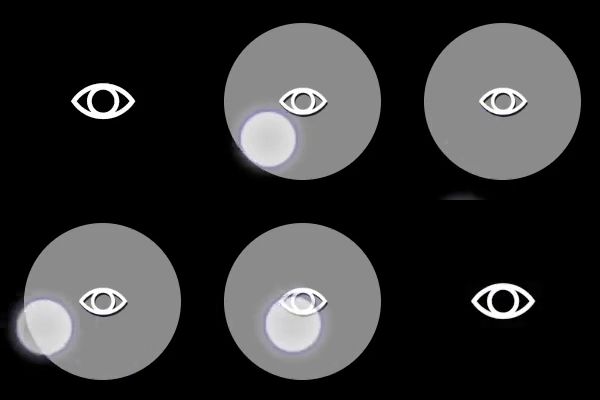
When renderAsButton is true:
- When in the
activatedstate, thefaceImageis displayed 25% smaller. - There are labels and default styling for the background color for buttons that do not use custom assets and have a single action of
gamepadX,gamepadY,gamepadA, orgamepadB.
Samples
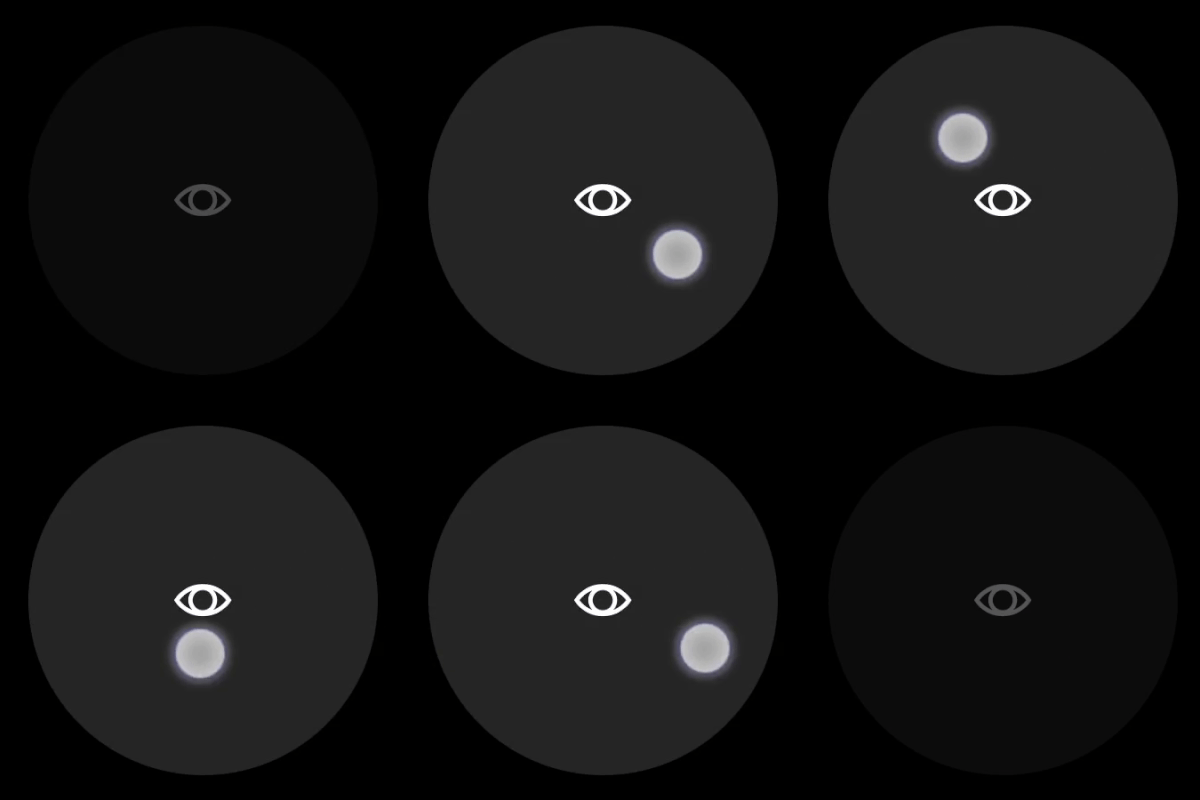
Example 1: Touchpad with a look icon
Figure 1. Touchpad Control
{
    "type": "touchpad",
    "axis": {
        "input": "axisXY",
        "output": "rightJoystick",
        "sensitivity": 3
    },
    "styles": {
        "default" : {
            "faceImage" : {
                "type": "icon",
                "value": "look"
            }
        }
    }
}
Example 2: Touchpad with a look icon that is rendered as a button
Figure 1. Button Touchpad Control
{
    "type": "touchpad",
    "renderAsButton": true,
    "axis": {
        "input": "axisXY",
        "output": "rightJoystick",
        "sensitivity": 3
    },
    "styles": {
        "default" : {
            "faceImage" : {
                "type": "icon",
                "value": "look"
            }
        }
    }
}
Requirements
Layout Version: 1.0+ (Styling available from layout version 3.0+)