LineStackingStrategy Enumerazione
Definizione
Importante
Alcune informazioni sono relative alla release non definitiva del prodotto, che potrebbe subire modifiche significative prima della release definitiva. Microsoft non riconosce alcuna garanzia, espressa o implicita, in merito alle informazioni qui fornite.
Descrive un meccanismo in base al quale viene determinata una casella di riga per ogni riga.
public enum class LineStackingStrategypublic enum LineStackingStrategytype LineStackingStrategy = Public Enum LineStackingStrategy- Ereditarietà
Campi
| Nome | Valore | Descrizione |
|---|---|---|
| BlockLineHeight | 0 | L'altezza dello stack è determinata dal valore della proprietà altezza riga elemento blocco. |
| MaxHeight | 1 | L'altezza dello stack è il valore più piccolo che contiene tutti gli elementi inline su tale riga quando tali elementi sono allineati correttamente. |
Esempio
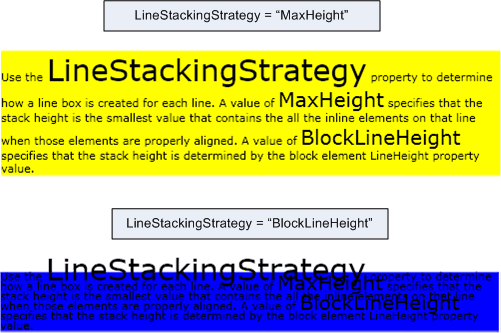
Nell'esempio seguente viene illustrato come utilizzare la LineStackingStrategy proprietà per determinare come vengono create le caselle di riga per le righe di testo di un oggetto TextBlock. Il primo TextBlock ha un LineStackingStrategy valore MaxHeight e il secondo TextBlock ha un valore BlockLineHeight.
<Page xmlns="http://schemas.microsoft.com/winfx/2006/xaml/presentation"
  xmlns:x="http://schemas.microsoft.com/winfx/2006/xaml">
  <StackPanel>

    <!-- This TextBlock has a LineStackingStrategy set to "MaxHeight". -->
    <TextBlock LineStackingStrategy="MaxHeight" LineHeight="10" Width="500" TextWrapping="Wrap"
     Background="Yellow">
      Use the <Span FontSize="30">LineStackingStrategy</Span> property to determine how a line box is
      created for each line. A value of <Span FontSize="20">MaxHeight</Span> specifies that the stack
      height is the smallest value that contains all the inline elements on that line when those
      elements are properly aligned. A value of <Span FontSize="20">BlockLineHeight</Span> specifies
      that the stack height is determined by the block element LineHeight property value.
    </TextBlock>

    <!-- Here is the same TextBlock but the LineStackingStrategy is set to "BlockLineHeight". -->
    <TextBlock LineStackingStrategy="BlockLineHeight" LineHeight="10" Width="500" TextWrapping="Wrap"
     Background="Blue" Margin="0,40,0,0">
      Use the <Span FontSize="30">LineStackingStrategy</Span> property to determine how a line box is
      created for each line. A value of <Span FontSize="20">MaxHeight</Span> specifies that the stack
      height is the smallest value that contains all the inline elements on that line when those
      elements are properly aligned. A value of <Span FontSize="20">BlockLineHeight</Span> specifies
      that the stack height is determined by the block element LineHeight property value.
    </TextBlock>

  </StackPanel>
</Page>
La figura seguente mostra il risultato del codice precedente.