Nota
L'accesso a questa pagina richiede l'autorizzazione. Puoi provare ad accedere o a cambiare directory.
L'accesso a questa pagina richiede l'autorizzazione. Puoi provare a cambiare directory.
Note
Community interest groups have now moved from Yammer to Microsoft Viva Engage. To join a Viva Engage community and take part in the latest discussions, fill out the Request access to Finance and Operations Viva Engage Community form and choose the community you want to join.
This article provides an overview of the elements of role-based security in finance and operations.
In role-based security, you don't grant access to individual users, only to security roles. Assign users to roles. A user assigned to a security role has access to the set of privileges associated with that role. A user not assigned to any role has no privileges.
In finance and operations apps, role-based security aligns with the structure of the business. Assign users to security roles based on their responsibilities in the organization and their participation in business processes. The administrator grants access to the duties that users in a role perform, not to the program elements that users must use.
Because you can set up rules for automatic role assignment, the administrator doesn't need to be involved every time a user's responsibilities change. After you set up security roles and rules, business managers can control day-to-day user access based on business data.
Overview of role-based security
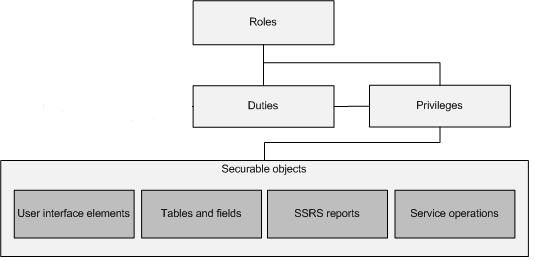
This section provides an overview of the elements of role-based security. The security model is hierarchical, and each element in the hierarchy represents a different level of detail. Permissions represent access to individual securable objects, such as menu items and tables. Privileges are composed of permissions and represent access to tasks, such as canceling payments and processing deposits. Duties are composed of privileges and represent parts of a business process, such as maintaining bank transactions. Both duties and privileges can be assigned to roles to grant access to finance and operations.
The following illustration shows the elements of role-based security and their relationships.
Security roles
Assign at least one security role to each user so they can access finance and operations. The security roles that you assign to a user determine the duties they can perform and the parts of the user interface they can view.
Administrators can apply data security policies to limit the data that users in a role can access. For example, a user in a role might access data only from a single organization. The administrator can also specify the level of access that users in a role have to current, past, and future records. For example, users in a role can be assigned privileges that allow them to view records for all periods, but that allow them to modify records only for the current period.
By managing access through security roles, administrators save time because they don't have to manage access separately for each user. Define security roles one time for all organizations. In addition, users can be automatically assigned to roles based on business data. For example, the administrator can set up a rule that associates a Human resources position with a security role. Anytime that users are assigned to that position, those users are automatically added to the appropriate security roles.
You can organize security roles into a hierarchy. The role hierarchy allows the administrator to define a role based on another role. For example, the sales manager role could be defined as a parent role of the manager role and the salesperson role. A parent role automatically inherits the duties, privileges, and conditions that are assigned to its child roles. Therefore, a user who is assigned to the parent role can perform all of the tasks that users in the child roles can perform. A role can have one or more child roles or one or more parent roles.
By default, sample security roles are provided. All functionality is associated with at least one of the sample security roles. The administrator can assign users to the sample security roles, modify the sample security roles to fit the needs of the business, or create new security roles. By default, the sample roles aren't arranged in a hierarchy.
Duties
Duties correspond to parts of a business process. The administrator assigns duties to security roles. Assign a duty to more than one role.
In the security model, duties contain privileges. For example, the Maintain bank transactions duty contains the Generate deposit slips and Cancel payments privileges. Although you can assign both duties and privileges to security roles, use duties to grant access to finance and operations.
You can assign related duties to separate roles. These duties are said to be segregated. By segregating duties, you can better comply with regulatory requirements, such as those from Sarbanes-Oxley (SOX), International Financial Reporting Standards (IFRS), and the United States Food and Drug Administration (FDA). In addition, segregation of duties helps reduce the risk of fraud, and helps you detect errors or irregularities.
Default duties are provided. The administrator can modify the privileges that are associated with a duty, or create new duties.
Privileges
In the security model, a privilege specifies the level of access that is required to perform a job, solve a problem, or complete an assignment. Although you can assign privileges directly to roles, assign only duties to roles. Assign duties to roles so the privileges are first grouped together into a duty, which makes it easier to maintain.
A privilege contains permissions to individual application objects, such as user interface elements and tables. For example, the Cancel payments privilege contains permissions to the menu items, fields, and tables that are required to cancel payments.
By default, privileges are provided for all features in finance and operations. The administrator can modify the permissions that are associated with a privilege, or create new privileges.
Permissions
You access each function, such as a form or a service, through an entry point. Menu items, web content items, and service operations are referred to collectively as entry points.
In the security model, permissions group the securable objects and access levels that are required to run a function. This group includes any tables, fields, forms, or server-side methods that the entry point accesses.
Manage security objects after a service update in Dynamics 365
To ensure your security objects are updated and aligned with the latest service update, consider following these general steps after a service update.
- Review the updated security roles. Check the release notes or documentation provided with the service update to understand any changes to the standard security roles.
- Audit current security settings. Before making any changes, audit your current security configurations to understand the baseline permissions and access rights.
- Test changes in a sandbox environment. Apply the service update to a nonproduction environment first to see how the changes affect your security roles and business processes.
- Update custom security roles. If you have custom security roles, update them to ensure they align with the new standard role definitions.
- Reassign roles if necessary. After updating, reassign the security roles to your users as needed to ensure they have the appropriate access.
- Monitor and audit post-update. Continuously monitor the system and audit the security role assignments post-update to ensure everything is functioning as expected.