Nota
L'accesso a questa pagina richiede l'autorizzazione. È possibile provare ad accedere o modificare le directory.
L'accesso a questa pagina richiede l'autorizzazione. È possibile provare a modificare le directory.
Novità dell'operatore automatico (ultimi sei mesi)
Niente di nuovo negli ultimi sei mesi.
Prerequisiti
Installare PowerShell nel computer.
Configurare il computer per Windows PowerShell
Modulo MSTeams installato
Install-Module -Name MicrosoftTeams -Force -AllowClobberModulo Microsoft Graph installato
Install-Module -Name Microsoft.Graph -Force -AllowClobber
Assicurarsi di avere i diritti di amministrazione del tenant.
Acquistare Telefono di Microsoft Teams.
Le code di chiamate menzionate in questo articolo sono state configurate usando la guida Creazione di Code di chiamata con i cmdlet di PowerShell.
Nota
Alcuni dei cmdlet menzionati in questo articolo potrebbero far parte della versione di anteprima pubblica del modulo PowerShell di Teams. Per altre informazioni, vedere Installare l'anteprima pubblica di PowerShell per Teams e anche vedere Note sulla versione di PowerShell per Microsoft Teams.
Gli utenti che hanno già installato il modulo MicrosoftTeams devono Update-Module MicrosoftTeams verificare che sia installata la versione più aggiornata.
Scenario
Viene generato il flusso di chiamata dell'operatore automatico seguente:
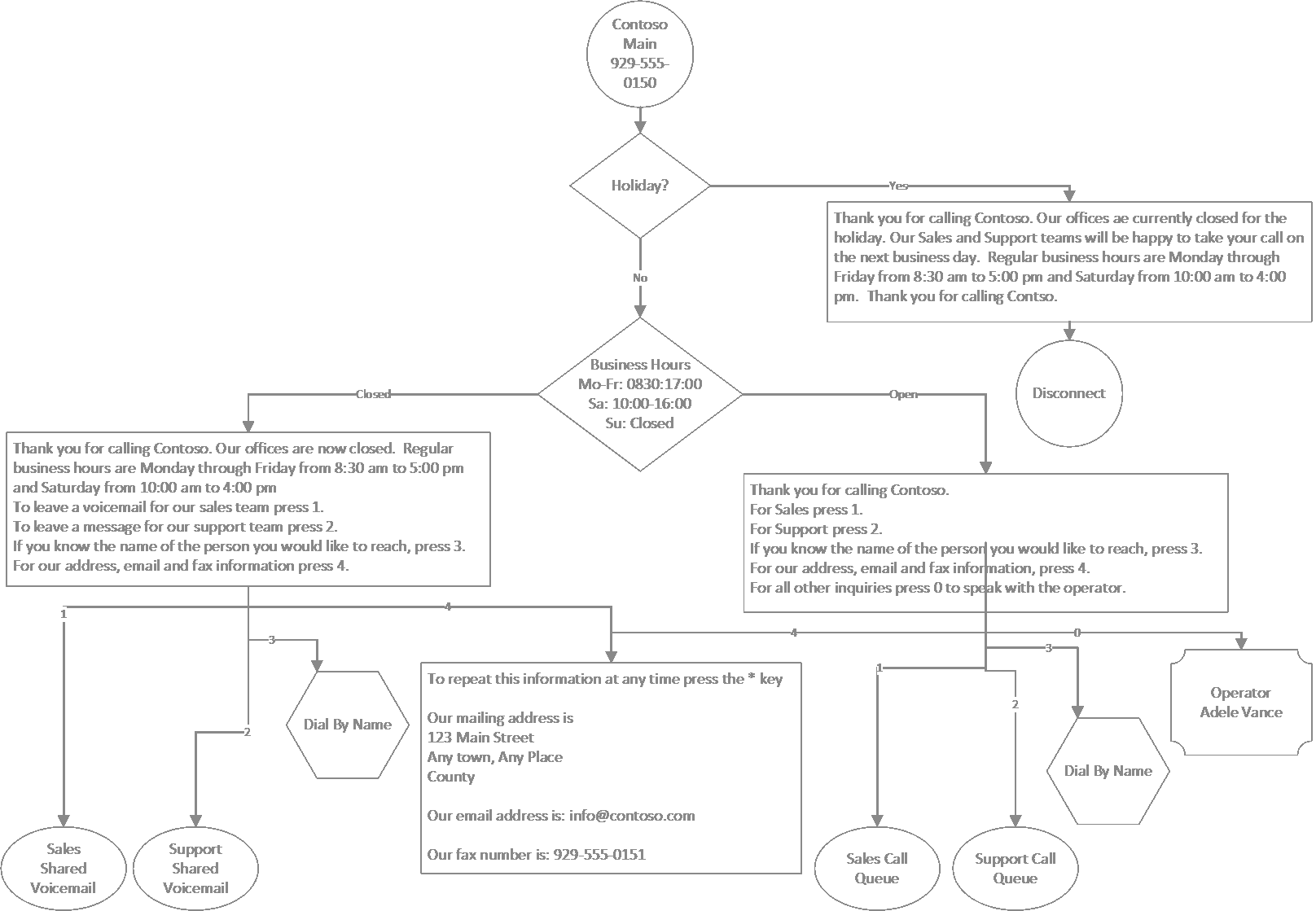
Informazioni utili sulla configurazione:
Operatore automatico: Contoso Main
- Operatore: Adele Vance
- Abilita gli input vocali: disattivato
- Ricerca nella directory: nessuna
- Festività:
- Gennaio 1, 2022
- Dicembre 24, 2022
- Dicembre 25, 2022
Operatore automatico: Contoso Componi per nome
- Operatore: Adele Vance
- Fuso orario: UTC
- Lingua: Inglese Stati Uniti
- Abilita gli input vocali: Attivato
- Messaggio di saluto: nessuno
- Menu: TTS, "Pronuncia o inserisci il nome della persona che desideri contattare. Per tornare al menu precedente premere 9"
- Ricerca nella directory: Componi per nome
- Ambito di composizione: Membri di Sales & Support
Accesso
Quando richiesto, immettere le credenziali di amministratore di Teams.
$credential = Get-Credential
Connect-MicrosoftTeams -Credential $credential
Connect-MgGraph -Credential $credential
Ottenere informazioni sull'operatore
$operatorID = (Get-CsOnlineUser -Identity "sip:adele@contoso.com").Identity

$operatorEntity = New-CsAutoAttendantCallableEntity -Identity $operatorID -Type User
Componi per nome Operatore automatico - Creazione di account di risorse
Creare un account di risorsa qui in modo che sia possibile farvi riferimento nell'operatore automatico principale. In un secondo momento è possibile creare l'operatore automatico effettivo per nome.
Ottenere i tipi di licenza
Get-MgSubscribedSku
Creare e assegnare un account di risorsa
In questo caso, non è necessario un numero di telefono perché la coda delle chiamate è annidata dietro un operatore automatico.
- ID applicazione
- Operatore automatico: ce933385-9390-45d1-9512-c8d228074e07
- Coda di chiamata: 11cd3e2e-fccb-42ad-ad00-878b93575e07
New-CsOnlineApplicationInstance -UserPrincipalName ContosoDialByNameAA-RA@contoso.com -DisplayName "Contoso Dial By Name AA" -ApplicationID "ce933385-9390-45d1-9512-c8d228074e07"

Update-MgUser -UserId "ContosoDialByNameAA-RA@contoso.com" -UsageLocation US

Set-MgUserLicense -UserId "ContosoDialByNameAA-RA@contoso.com" -AddLicenses @(contoso:PHONESYSTEM_VIRTUALUSER) -RemoveLicenses @()

$dialByNameApplicationInstanceID = (Get-CsOnlineUser "ContosoDialByNameAA-RA@contoso.com").Identity
Operatore automatico menu principale Contoso
Creare pianificazioni per le festività
$dtr = New-CsOnlineDateTimeRange -Start "24/12/2022" -End "25/12/2022"

$christmasSchedule = New-CsOnlineSchedule -Name "Christmas" -FixedSchedule -DateTimeRanges @($dtr)

$dtr = New-CsOnlineDateTimeRange -Start "01/01/2022" -End "02/01/2022"

$newyearSchedule = New-CsOnlineSchedule -Name "New Year" -FixedSchedule -DateTimeRanges @($dtr)
Crea una richiesta di informazioni su indirizzo, fax ed Email
$addressPrompt = New-CsAutoAttendantPrompt -TextToSpeechPrompt "To repeat this information at any time press the * key. Our mailing address is: 123 Main Street, Any town, Any Place, County. Our email address is: info@contoso.com. Our fax number is: 929-555-0151"
Creare Prompt per le festività e opzioni di menu
$christmasGreetingPrompt = New-CsAutoAttendantPrompt -TextToSpeechPrompt "Thank you for calling Contoso. Our offices ae currently closed for the Christmas holiday. Our Sales and Support teams will be happy to take your call on the next business day. Regular business hours are Monday through Friday from 8:30 am to 5:00 pm and Saturday from 10:00 am to 4:00 pm eastern time. Thank you for calling Contoso."

$christmasMenuOption = New-CsAutoAttendantMenuOption -Action DisconnectCall -DtmfResponse Automatic

$christmasMenu = New-CsAutoAttendantMenu -Name "Christmas Menu" -MenuOptions @($christmasMenuOption)

$christmasCallFlow = New-CsAutoAttendantCallFlow -Name "Christmas" -Greetings @($christmasGreetingPrompt) -Menu $christmasMenu

$christmasCallHandlingAssociation = New-CsAutoAttendantCallHandlingAssociation -Type Holiday -ScheduleId $christmasSchedule.Id -CallFlowId $christmasCallFlow.Id

$newyearGreetingPrompt = New-CsAutoAttendantPrompt -TextToSpeechPrompt "Thank you for calling Contoso. Our offices ae currently closed for the New Year's holiday. Our Sales and Support teams will be happy to take your call on the next business day. Regular business hours are Monday through Friday from 8:30 am to 5:00 pm and Saturday from 10:00 am to 4:00 pm eastern time. Thank you for calling Contoso."

$newyearMenuOption = New-CsAutoAttendantMenuOption -Action DisconnectCall -DtmfResponse Automatic

$newyearMenu = New-CsAutoAttendantMenu -Name "New Year Menu" -MenuOptions @($newyearMenuOption)

$newyearCallFlow = New-CsAutoAttendantCallFlow -Name "New Year" -Greetings @($newyearGreetingPrompt) -Menu $newyearMenu

$newyearCallHandlingAssociation = New-CsAutoAttendantCallHandlingAssociation -Type Holiday -ScheduleId $newyearSchedule.Id -CallFlowId $newyearCallFlow.Id
Creare pianificazioni fuori orario
$timerangeMoFr = New-CsOnlineTimeRange -Start 08:30 -end 17:00

$timerangeSa = New-CsOnlineTimeRange -Start 10:00 -end 16:00

$afterHoursSchedule = New-CsOnlineSchedule -Name "After Hours Schedule" -WeeklyRecurrentSchedule -MondayHours @($timerangeMoFr) -TuesdayHours @($timerangeMoFr) -WednesdayHours @($timerangeMoFr) -ThursdayHours @($timerangeMoFr) -FridayHours @($timerangeMoFr) -SaturdayHours @($timerangeSa) -Complement
Crea prompt e opzioni di menu fuori orario lavorativo
$afterHoursGreetingPrompt = New-CsAutoAttendantPrompt -TextToSpeechPrompt "Thank you for calling Contoso. Our offices are now closed. Regular business hours are Monday through Friday from 8:30 am to 5:00 pm and Saturday from 10:00 am to 4:00 pm eastern time."

$afterHoursMenuPrompt = New-CsAutoAttendantPrompt -TextToSpeechPrompt "To leave a voicemail for our sales team press 1. To leave a message for our support team press 2. If you know the name of the person you would like to reach, press 3. For our address, email and fax information press 4."

$afterHoursMenuOption1Target = (Get-Team -displayname "Sales").GroupID

$afterHoursMenuOption1Entity = New-CsAutoAttendantCallableEntity -Identity $afterHoursMenuOption1Target -Type SharedVoiceMail -EnableTranscription -EnableSharedVoicemailSystemPromptSuppression

$afterHoursMenuOption1 = New-CsAutoAttendantMenuOption -Action TransferCallToTarget -DtmfResponse Tone1 -CallTarget $afterHoursMenuOption1Entity

$afterHoursMenuOption2Target = (Get-Team -displayname "Support").GroupID

$afterHoursMenuOption2Entity = New-CsAutoAttendantCallableEntity -Identity $afterHoursMenuOption2Target -Type SharedVoicemail -EnableTranscription -EnableSharedVoicemailSystemPromptSuppression

$afterHoursMenuOption2 = New-CsAutoAttendantMenuOption -Action TransferCallToTarget -DtmfResponse Tone2 -CallTarget $afterHoursMenuOption2Entity

$dialbynameAAOption3Target = (Get-CsOnlineUser -Identity "ContosoDialByNameAA-RA@contoso.com").Identity

$dialbynameAAMenuOption3Entity = New-CsAutoAttendantCallableEntity -Identity $dialbynameAAOption3Target -Type applicationendpoint

$dialbynameAAMenuOption3 = New-CsAutoAttendantMenuOption -Action TransferCallToTarget -DtmfResponse Tone3 -CallTarget $dialbynameAAMenuOption3Entity

$afterHoursMenuOption4 = New-CsAutoAttendantMenuOption -Action Announcement -DtmfResponse Tone4 -Prompt $addressPrompt
Menu Crea fuori orario e flusso di chiamata
$afterHoursMenu = New-CsAutoAttendantMenu -Name "After Hours Menu" -MenuOptions @($afterHoursMenuOption1, $afterHoursMenuOption2, $dialbynameAAMenuOption3, $afterHoursMenuOption4) -Prompt $afterHoursMenuPrompt

$afterHoursCallFlow = New-CsAutoAttendantCallFlow -Name "After Hours Call Flow" -Greetings @($afterHoursGreetingPrompt) -Menu $afterHoursMenu

$afterHoursCallHandlingAssociation = New-CsAutoAttendantCallHandlingAssociation -Type AfterHours -ScheduleId $afterHoursSchedule.Id -CallFlowId $afterHoursCallFlow.Id
Crea Prompt e opzioni di menu per gli orari di apertura
$openHoursGreetingPrompt = New-CsAutoAttendantPrompt -TextToSpeechPrompt " Thank you for calling Contoso."

$openHoursMenuPrompt = New-CsAutoAttendantPrompt -TextToSpeechPrompt "For Sales press 1. For Support press 2. If you know the name of the person you would like to reach, press 3. For our address, email and fax information, press 4. For all other inquiries press 0 to speak with the operator."

$openHoursMenuOption1Target = (Get-CsOnlineUser "Sales-RA@contoso.com").Identity

$openHoursMenuOption1Entity = New-CsAutoAttendantCallableEntity -Identity $openHoursMenuOption1Target -Type applicationendpoint

$openHoursMenuOption1 = New-CsAutoAttendantMenuOption -Action TransferCallToTarget -DtmfResponse Tone1 -CallTarget $openHoursMenuOption1Entity

$openHoursMenuOption2Target = (Get-CsOnlineUser "Support-RA@contoso.com").Identity

$openHoursMenuOption2Entity = New-CsAutoAttendantCallableEntity -Identity $openHoursMenuOption2Target -Type applicationendpoint

$openHoursMenuOption2 = New-CsAutoAttendantMenuOption -Action TransferCallToTarget -DtmfResponse Tone2 -CallTarget $openHoursMenuOption2Entity

$openHoursMenuOption4 = New-CsAutoAttendantMenuOption -Action Announcement -DtmfResponse Tone4 -Prompt $addressPrompt

$openHoursMenuOption0 = New-CsAutoAttendantMenuOption -Action TransferCallToOperator -DtmfResponse Tone0
Menu Crea orario di apertura
$openHoursMenu = New-CsAutoAttendantMenu -Name "Open Hours Menu" -MenuOptions @($openHoursMenuOption1, $openHoursMenuOption2, $dialbynameAAMenuOption3, $openHoursMenuOption4, $openHoursMenuOption0) -Prompt $openHoursMenuPrompt

$openHoursCallFlow = New-CsAutoAttendantCallFlow -Name "Open Hours Call Flow" -Greetings @($openHoursGreetingPrompt) -Menu $openHoursMenu
Crea operatore automatico
$autoAttendant = New-CsAutoAttendant -Name "Contoso Main" -DefaultCallFlow $openHoursCallFlow -CallFlows @($afterHoursCallFlow, $christmasCallFlow, $newyearCallFlow) -CallHandlingAssociations @($afterHoursCallHandlingAssociation, $christmasCallHandlingAssociation, $newyearCallHandlingAssociation) -LanguageId "en-US" -TimeZoneId "Eastern Standard Time" -Operator $operatorEntity
Ottenere i tipi di licenza
Get-MgSubscribedSku
Creare e assegnare un account di risorsa
- ID applicazione
- Operatore automatico: ce933385-9390-45d1-9512-c8d228074e07
- Coda di chiamata: 11cd3e2e-fccb-42ad-ad00-878b93575e07
New-CsOnlineApplicationInstance -UserPrincipalName ContosoMainAA-RA@contoso.com -DisplayName "Contoso Main AA" -ApplicationID "ce933385-9390-45d1-9512-c8d228074e07"

Update-MgUser -UserId "ContosoMainAA-RA@contoso.com" -UsageLocation US

$Sku = Get-MgSubscribedSku -All | Where SkuPartNumber -eq 'contoso:PHONESYSTEM_VIRTUALUSER'
$addLicenses = @(
@{SkuId = $Sku.SkuId}
)

Set-MgUserLicense -UserId 'ContosoDialByNameAA-RA@contoso.com' -AddLicenses $addLicenses -RemoveLicenses @()

$applicationInstanceID = (Get-CsOnlineUser "ContosoMainAA-RA@contoso.com").Identity

$autoAttendantID = (Get-CsAutoAttendant -NameFilter "Contoso Main").Identity

New-CsOnlineApplicationInstanceAssociation -Identities @($applicationInstanceID) -ConfigurationID $autoAttendantID -ConfigurationType AutoAttendant
Ottenere l'elenco dei numeri di servizio non assegnati
Get-CsPhoneNumberAssignment -PstnAssignmentStatus Unassigned -CapabilitiesContain VoiceApplicationAssignment
Assegna numero di telefono disponibile
La posizione di utilizzo assegnata al numero di telefono deve corrispondere alla posizione di utilizzo assegnata all'account di risorsa.
Set-CsPhoneNumberAssignment -Identity ContosoMainAA-RA@contoso.com -PhoneNumber +{spare number from output of above command} -PhoneNumberType CallingPlan
Componi per nome Operatore automatico - Completamento
Crea ambito di chiamata
$salesGroupID = Find-CsGroup -SearchQuery "Sales" | % { $_.Id }

$supportGroupID = Find-CsGroup -SearchQuery "Support" | % { $_.Id }

$dialScope = New-CsAutoAttendantDialScope -GroupScope -GroupIds @($salesGroupID, $supportGroupID)
Crea Prompt e opzioni di menu
$dialByNameMenuPrompt = New-CsAutoAttendantPrompt -TextToSpeechPrompt "Please say or enter the name of the person you would like to reach. To return to the previous menu press 9."

$dialByNameMenuOption9Target = (Get-CsOnlineUser "ContosoMainAA-RA@contoso.com").Identity

$dialByNameMenuOption9Entity = New-CsAutoAttendantCallableEntity -Identity $dialByNameMenuOption9Target -Type applicationendpoint

$dialByNameMenuOption9 = New-CsAutoAttendantMenuOption -Action TransferCallToTarget -DtmfResponse Tone9 -CallTarget $dialByNameMenuOption9Entity

$dialByNameMenu = New-CsAutoAttendantMenu -Name "Contoso Dial By Name AA" -MenuOptions @($dialByNameMenuOption9) -Prompt $dialByNameMenuPrompt

$dialByNameMenu = New-CsAutoAttendantMenu -Name "Contoso Dial By Name AA" -MenuOptions @($dialByNameMenuOption9) -Prompt $dialByNameMenuPrompt -EnableDialByName -DirectorySearchMethod ByName

$dialByNameCallFlow = New-CsAutoAttendantCallFlow -Name "Contoso Dial By Name Call Flow" -Menu $dialByNameMenu

$dialByNameAutoAttendant = New-CsAutoAttendant -Name "Contoso Dial By Name" -DefaultCallFlow $dialByNameCallFlow -LanguageId "en-US" -TimeZoneId "UTC" -Operator $operatorEntity -EnableVoiceResponse -InclusionScope $dialScope
Assegna account di risorsa
New-CsOnlineApplicationInstanceAssociation -Identities @($dialByNameApplicationInstanceID) -ConfigurationID $dialByNameAutoAttendant.Id -ConfigurationType AutoAttendant
Articoli correlati
Pianificare per Teams Operatori automatici e code di chiamate