Buongiorno a tutti, spero riusciate ad aiutarmi con questo problema.
Negli ultimi mesi, a volte capita che dopo aver avviato o riattivato il computer, questo giri molto lentamente o che mentre gira lentamente lo schermo sfarfalli per un istante. Passato un po' di tempo dall'avvio poi mi compare un pop up che mi segnala un errore del tipo Microsoft .NET Framework e il computer torna a funzionare correttamente - ma nel frattempo, magari ho perso 1 ora di lavoro per questo problema.
Ho provato a seguire alcune guide o altri thread sugli errori NET framework, ma da quanto ho capito questi errori sono specifici per alcuni tipi di applicazioni, quindi una soluzione non sembrerebbe valida per tutti i casi.
In più, sempre seguendo le istruzioni di una discussione di Microsoft answers, in cui si Consigliava di svuotare le cartelle preftech e temp in C:\Windows, ho scoperto che non riesco a svuotare queste cartelle.
Comunque, ho scaricato e installato gli ultimi aggiornamenti del sistema - non so più che pesci pigliare. Qui sotto posto le specifiche del mio sistema e i dettagli del pop up di errore.
Operating System
Windows 10 Home 64-bit

Computer type: Notebook

Installation Date: 22/09/2020 23:44:15

Serial Number: \*\*\*\*\*\*\*\*\*\*\*\*\*\*\*\*\*\*\*\*\*\*\*

	Windows Security Center

		User Account Control (UAC)	Enabled

		Notify level	0 - Never Notify

	Windows Update

		AutoUpdate	Notify prior to download

	Windows Defender

		Windows Defender	Disabled

	Firewall

		Firewall	Enabled

		Display Name	Norton Security

	Antivirus

			Windows Defender

				Antivirus	Disabled

				Virus Signature Database	Up to date

			Norton Security

				Antivirus	Enabled

				Virus Signature Database	Up to date

	.NET Frameworks installed

		v4.8 Full

		v4.8 Client

	Internet Explorer

		Version	11.789.19041.0

	PowerShell

		Version	5.1.19041.1

	Java

			Java Runtime Environment

				Path	C:\Program Files (x86)\Java\jre1.8.0\_231\bin\java.exe

				Version	8.0

				Update	231

				Build	11

			Java Runtime Environment

				Path	C:\Program Files (x86)\Java\jre1.8.0\_281\bin\java.exe

				Version	8.0

				Update	281

				Build	09
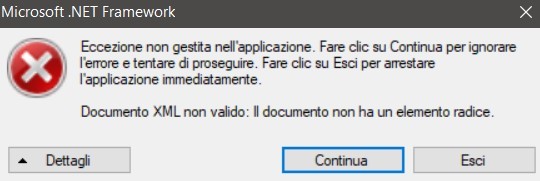
Le informazioni su come richiamare il debug JIT (Just-In-Time) anziché questa finestra
sono riportate in fondo al messaggio.
************** Testo dell'eccezione **************
System.Xml.XmlException: Documento XML non valido: Il documento non ha un elemento radice.
in System.Xml.XmlDocument.Save(String filename)
in HPSSFUpdater.UpgradeUpdater.IsUpdateNeeded()
in HPSSFUpdater.View.MainWindow._bgWorker_DoWork(Object sender, DoWorkEventArgs e)
in System.ComponentModel.BackgroundWorker.OnDoWork(DoWorkEventArgs e)
in System.ComponentModel.BackgroundWorker.WorkerThreadStart(Object argument)
************** Assembly caricati **************
mscorlib
Versione assembly: 4.0.0.0
Versione Win32: 4.8.4360.0 built by: NET48REL1LAST_C
Base di codice: file:///C:/Windows/Microsoft.NET/Framework64/v4.0.30319/mscorlib.dll
HPSSFUpdater
Versione assembly: 8.11.0.1
Versione Win32: 8.11.0.1
Base di codice: file:///C:/Program%20Files%20(x86)/Hewlett-Packard/HP%20Support%20Solutions/Modules/HPSSFUpdater.exe
System
Versione assembly: 4.0.0.0
Versione Win32: 4.8.4360.0 built by: NET48REL1LAST_C
Base di codice: file:///C:/WINDOWS/Microsoft.Net/assembly/GAC_MSIL/System/v4.0_4.0.0.0__b77a5c561934e089/System.dll
System.Windows.Forms
Versione assembly: 4.0.0.0
Versione Win32: 4.8.4341.0 built by: NET48REL1LAST_C
Base di codice: file:///C:/WINDOWS/Microsoft.Net/assembly/GAC_MSIL/System.Windows.Forms/v4.0_4.0.0.0__b77a5c561934e089/System.Windows.Forms.dll
System.Drawing
Versione assembly: 4.0.0.0
Versione Win32: 4.8.4084.0 built by: NET48REL1
Base di codice: file:///C:/WINDOWS/Microsoft.Net/assembly/GAC_MSIL/System.Drawing/v4.0_4.0.0.0__b03f5f7f11d50a3a/System.Drawing.dll
System.Configuration
Versione assembly: 4.0.0.0
Versione Win32: 4.8.4190.0 built by: NET48REL1LAST_B
Base di codice: file:///C:/WINDOWS/Microsoft.Net/assembly/GAC_MSIL/System.Configuration/v4.0_4.0.0.0__b03f5f7f11d50a3a/System.Configuration.dll
System.Core
Versione assembly: 4.0.0.0
Versione Win32: 4.8.4360.0 built by: NET48REL1LAST_C
Base di codice: file:///C:/WINDOWS/Microsoft.Net/assembly/GAC_MSIL/System.Core/v4.0_4.0.0.0__b77a5c561934e089/System.Core.dll
System.Xml
Versione assembly: 4.0.0.0
Versione Win32: 4.8.4084.0 built by: NET48REL1
Base di codice: file:///C:/WINDOWS/Microsoft.Net/assembly/GAC_MSIL/System.Xml/v4.0_4.0.0.0__b77a5c561934e089/System.Xml.dll
WindowsBase
Versione assembly: 4.0.0.0
Versione Win32: 4.8.4360.0 built by: NET48REL1LAST_C
Base di codice: file:///C:/WINDOWS/Microsoft.Net/assembly/GAC_MSIL/WindowsBase/v4.0_4.0.0.0__31bf3856ad364e35/WindowsBase.dll
mscorlib.resources
Versione assembly: 4.0.0.0
Versione Win32: 4.8.4084.0 built by: NET48REL1
Base di codice: file:///C:/WINDOWS/Microsoft.Net/assembly/GAC_MSIL/mscorlib.resources/v4.0_4.0.0.0_it_b77a5c561934e089/mscorlib.resources.dll
System.resources
Versione assembly: 4.0.0.0
Versione Win32: 4.8.4084.0 built by: NET48REL1
Base di codice: file:///C:/WINDOWS/Microsoft.Net/assembly/GAC_MSIL/System.resources/v4.0_4.0.0.0_it_b77a5c561934e089/System.resources.dll
HP.SSF.Config
Versione assembly: 3.6.8.5
Versione Win32: 3.6.8.5
Base di codice: file:///C:/Program%20Files%20(x86)/Hewlett-Packard/HP%20Support%20Solutions/Modules/UpdaterTemp/HPSSFUpdater/HP.SSF.Config1.dll
HP.SupportFramework.Common
Versione assembly: 8.0.0.0
Versione Win32: 8.16.22.11
Base di codice: file:///C:/WINDOWS/assembly/GAC_MSIL/HP.SupportFramework.Common/8.0.0.0__41bdec5abf54f6dc/HP.SupportFramework.Common.dll
System.xml.resources
Versione assembly: 4.0.0.0
Versione Win32: 4.8.4084.0 built by: NET48REL1
Base di codice: file:///C:/WINDOWS/Microsoft.Net/assembly/GAC_MSIL/System.Xml.resources/v4.0_4.0.0.0_it_b77a5c561934e089/System.Xml.resources.dll
System.Windows.Forms.resources
Versione assembly: 4.0.0.0
Versione Win32: 4.8.4084.0 built by: NET48REL1
Base di codice: file:///C:/WINDOWS/Microsoft.Net/assembly/GAC_MSIL/System.Windows.Forms.resources/v4.0_4.0.0.0_it_b77a5c561934e089/System.Windows.Forms.resources.dll
************** Debug JIT **************
Per abilitare il debug JIT, è necessario impostare il valore
jitDebugging nella sezione system.windows.forms del file di configurazione
dell'applicazione o del computer (machine.config).
L'applicazione inoltre deve essere compilata con il debug
abilitato.
Ad esempio:
<configuration>
<system.windows.forms jitDebugging="true" />
</configuration>
Quando il debug JIT è abilitato, tutte le eccezioni non gestite
vengono inviate al debugger JIT registrato nel computer,
anziché essere gestite da questa finestra di dialogo.
' cx='32' cy='32' r='32' /%3E%3Ctext x='50%25' y='55%25' dominant-baseline='middle' text-anchor='middle' fill='%23FFF' %3EA%3C/text%3E%3C/svg%3E)
