Nota
L'accesso a questa pagina richiede l'autorizzazione. È possibile provare ad accedere o modificare le directory.
L'accesso a questa pagina richiede l'autorizzazione. È possibile provare a modificare le directory.
Questo avvio rapido mostra il modo più veloce per vedere funzionare la chat Web PubSub. Generi un URL di accesso client nel portale Azure, poi usi l'SDK client per connetterti, creare una stanza e inviare un messaggio senza codice server.
Prerequisiti
- Una risorsa Azure Web PubSub con spazio di archiviazione configurato e Chat abilitata. Se non l'hai ancora fatto, vedi Configura spazio di archiviazione e abilita la chat.
- Node.js versione 20 o successiva.
Ottieni un token di accesso client dal portale
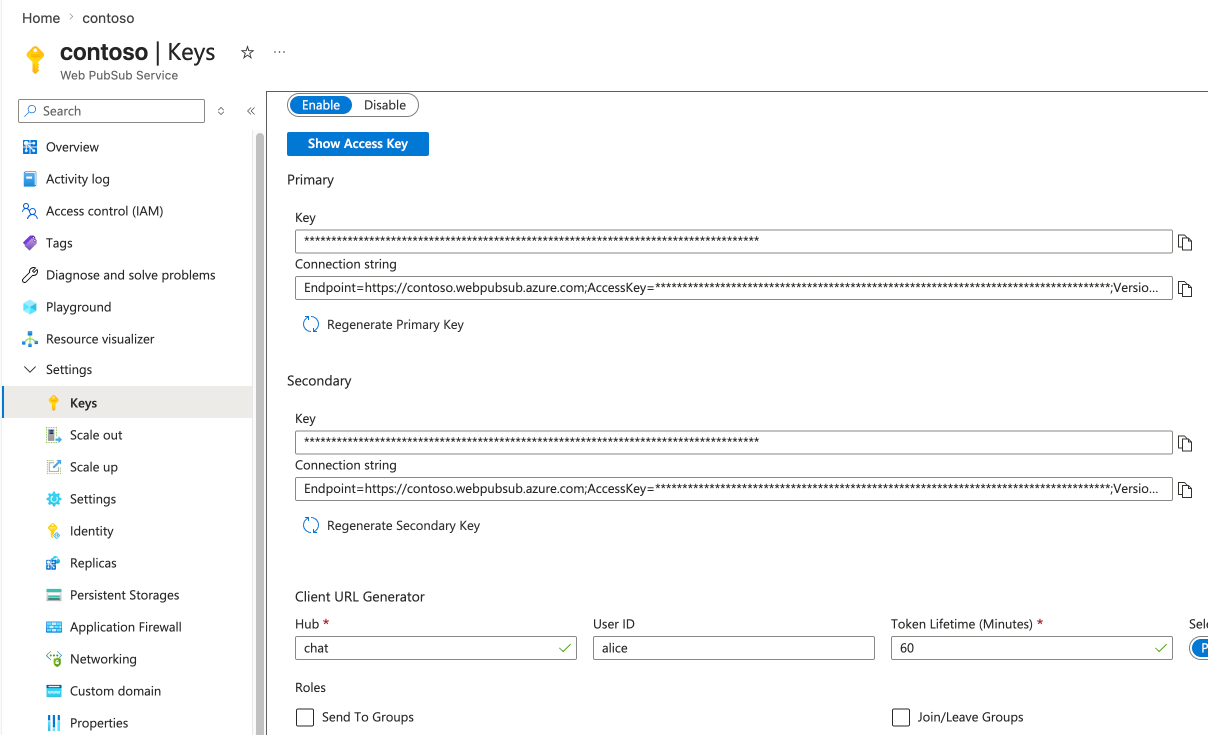
Un client si connette a un hub di chat con un URL di accesso del client che include la sua identità utente. Per un test veloce, generane uno nel portale.
- Nel portale Azure, apri la tua risorsa Web PubSub.
- Nel menu a sinistra, seleziona la sezione Keys, quindi Client URL Generator.
- Imposta Hub sul nome del Chat Hub che hai aggiunto, ad esempio
chat. - Imposta ID utente su un nome qualsiasi, ad esempio
alice. La chat usa questo come identità utente. - Copia l'URL di accesso al client.
Installare l'SDK client
Crea un progetto e installa l'SDK client.
mkdir chat-quickstart
cd chat-quickstart
npm init -y
npm install @azure/web-pubsub-chat-client
Connettiti, crea una stanza e invia un messaggio
Salvare il codice seguente come index.mjs. Sostituisci <client-access-url> con l'URL che hai copiato dal portale.
import { ChatClient } from "@azure/web-pubsub-chat-client";

// Paste the client access URL you generated in the portal.
const clientAccessUrl = "<client-access-url>";

async function main() {
  // Connect to chat hub.
  const client = await ChatClient.start(clientAccessUrl);
  console.log(`Connected as ${client.userId}`);

  // Print messages as they arrive.
  client.on("message", (event) => {
    const message = event.message;
    console.log(`${message.createdBy}: ${message.content.text}`);
  });

  // Create a room. You're added to it automatically.
  const room = await client.createRoom("My first room", []);
  console.log(`Created room ${room.roomId}`);

  // Send a message to the room.
  await client.sendToRoom(room.roomId, "Hello, Chat!");

  // Read the room's history back from your storage.
  console.log("History:");
  for await (const message of client.listRoomMessages(room.roomId)) {
    console.log(`  ${message.createdBy}: ${message.content.text}`);
  }

  // Disconnect.
  await client.stop();
}

main().catch(console.error);
Eseguilo:
node index.mjs
Viene visualizzato un output simile al seguente:
Connected as alice
Created room <room-id>
alice: Hello, Chat!
History:
  alice: Hello, Chat!
Note
In questo avvio rapido si è usato un token del portale. Per la produzione, emetti i token dal tuo server. Vedi Autentica e connetti i client.