Nota
L'accesso a questa pagina richiede l'autorizzazione. È possibile provare ad accedere o modificare le directory.
L'accesso a questa pagina richiede l'autorizzazione. È possibile provare a modificare le directory.
La figura seguente mostra un servizio Windows Communication Foundation (WCF) e un client protetti tramite la sicurezza a livello di messaggio. Il servizio viene autenticato con un certificato X.509. Il client esegue l'autenticazione usando un nome utente e una password.
Per un'applicazione di esempio, vedere Message Security User Name.
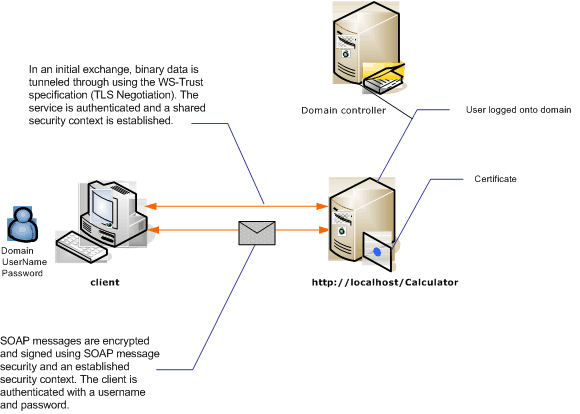
| Caratteristica | Descrizione |
|---|---|
| Modalità di sicurezza | Messaggio |
| Interoperabilità | Solo Windows Communication Foundation (WCF) |
| Autenticazione (server) | La negoziazione iniziale richiede l'autenticazione server |
| Autenticazione (client) | Nome utente/password |
| Integrità | Sì, uso del contesto di sicurezza condiviso |
| Riservatezza | Sì, uso del contesto di sicurezza condiviso |
| Trasporto | Protocollo HTTP |
| Vincolo | WSHttpBinding |
Servizio
Il codice e la configurazione seguenti devono essere eseguiti in modo indipendente. Esegui una delle operazioni seguenti:
Creare un servizio autonomo usando il codice senza alcuna configurazione.
Creare un servizio usando la configurazione fornita, ma non definire alcun endpoint.
Codice
Il codice seguente illustra come creare un endpoint di servizio che usa la sicurezza dei messaggi.
// Create the binding.
WSHttpBinding binding = new WSHttpBinding();
binding.Security.Mode = SecurityMode.Message;
binding.Security.Message.ClientCredentialType =
     MessageCredentialType.UserName;

// Create the URI for the endpoint.
Uri httpUri = new Uri("http://localhost/Calculator");

// Create the service host.
ServiceHost myServiceHost =
    new ServiceHost(typeof(Calculator), httpUri);
myServiceHost.AddServiceEndpoint(typeof(ICalculator), binding, "");

// Specify a certificate to authenticate the service.
myServiceHost.Credentials.ServiceCertificate.
    SetCertificate(StoreLocation.LocalMachine,
    StoreName.My,
    X509FindType.FindBySubjectName,
    "Contoso.com");

myServiceHost.Open();
Console.WriteLine("Listening...");
Console.ReadLine();

// Close the service.
myServiceHost.Close();
' Create the binding.
Dim binding As New WSHttpBinding()
binding.Security.Mode = SecurityMode.Message
binding.Security.Message.ClientCredentialType = MessageCredentialType.UserName

' Create the URI for the endpoint.
Dim httpUri As New Uri("http://localhost/Calculator")

' Create the service host.
Dim myServiceHost As New ServiceHost(GetType(ServiceModel.Calculator), httpUri)
myServiceHost.AddServiceEndpoint(GetType(ICalculator), binding, "")

' Specify a certificate to authenticate the service.
myServiceHost.Credentials.ServiceCertificate.SetCertificate(StoreLocation.LocalMachine, _
StoreName.My, X509FindType.FindBySubjectName, "Contoso.com")

myServiceHost.Open()
Console.WriteLine("Listening...")
Console.ReadLine()

' Close the service.
myServiceHost.Close()
Configurazione
È possibile usare la configurazione seguente anziché il codice:
<?xml version="1.0" encoding="utf-8"?>
<configuration>
  <system.serviceModel>
    <behaviors>
      <serviceBehaviors>
        <behavior name="ServiceCredentialsBehavior">
          <serviceCredentials>
            <serviceCertificate findValue="Contoso.com"
                                storeLocation="LocalMachine"
                                storeName="My"
                                x509FindType="FindBySubjectName" />
          </serviceCredentials>
        </behavior>
      </serviceBehaviors>
    </behaviors>
    <services>
      <service behaviorConfiguration="ServiceCredentialsBehavior"
               name="ServiceModel.Calculator">
        <endpoint address="http://localhost/Calculator"
                  binding="wsHttpBinding"
                  bindingConfiguration="MessageAndUserName"
                  name="SecuredByTransportEndpoint"
                  contract="ServiceModel.ICalculator" />
      </service>
    </services>
    <bindings>
      <wsHttpBinding>
        <binding name="MessageAndUserName">
          <security mode="Message">
            <message clientCredentialType="UserName" />
          </security>
        </binding>
      </wsHttpBinding>
    </bindings>
    <client />
  </system.serviceModel>
</configuration>
Cliente
Codice
Il codice seguente crea il client. L'associazione riguarda la protezione della modalità messaggio e il tipo di credenziale client è impostato su UserName. Il nome utente e la password possono essere specificati solo usando il codice (non è configurabile). Il codice per restituire il nome utente e la password non vengono visualizzati qui perché devono essere eseguiti a livello di applicazione. Ad esempio, utilizzare una finestra di dialogo di Windows Forms per chiedere all'utente di fornire i dati.
// Create the binding.
WSHttpBinding myBinding = new WSHttpBinding();
myBinding.Security.Mode = SecurityMode.Message;
myBinding.Security.Message.ClientCredentialType =
    MessageCredentialType.UserName;

// Create the endpoint address.
EndpointAddress ea = new
    EndpointAddress("http://machineName/Calculator");

// Create the client.
CalculatorClient cc =
    new CalculatorClient(myBinding, ea);

// Set the user name and password. The code to
// return the user name and password is not shown here. Use
// an interface to query the user for the information.
cc.ClientCredentials.UserName.UserName = ReturnUsername();
cc.ClientCredentials.UserName.Password = ReturnPassword();

// Begin using the client.
try
{
    cc.Open();
    Console.WriteLine(cc.Add(200, 1111));
    Console.ReadLine();

    // Close the client.
    cc.Close();
}
' Create the binding.
Dim myBinding As New WSHttpBinding()
myBinding.Security.Mode = SecurityMode.Message
myBinding.Security.Message.ClientCredentialType = _
   MessageCredentialType.UserName

' Create the endpoint address.
Dim ea As New EndpointAddress("http://machineName/Calculator")

' Create the client.
Dim cc As New CalculatorClient(myBinding, ea)

' Set the user name and password. The code to
' return the user name and password is not shown here. Use
' an interface to query the user for the information.
cc.ClientCredentials.UserName.UserName = ReturnUsername()
cc.ClientCredentials.UserName.Password = ReturnPassword()

' Begin using the client.
Try
    cc.Open()

    Console.WriteLine(cc.Add(100, 11))
    Console.ReadLine()

    ' Close the client.
    cc.Close()
Catch tex As TimeoutException
    Console.WriteLine(tex.Message)
    cc.Abort()
Catch cex As CommunicationException
    Console.WriteLine(cex.Message)
    cc.Abort()
Finally
    Console.WriteLine("Closed the client")
    Console.ReadLine()
End Try
Configurazione
Il codice seguente configura il client. L'associazione riguarda la protezione della modalità messaggio e il tipo di credenziale client è impostato su UserName. Il nome utente e la password possono essere specificati solo usando il codice (non è configurabile).
<?xml version="1.0" encoding="utf-8"?>
<configuration>
  <system.serviceModel>
    <bindings>
      <wsHttpBinding>
        <binding name="WSHttpBinding_ICalculator" >
          <security mode="Message">
            <message clientCredentialType="UserName" />
          </security>
        </binding>
      </wsHttpBinding>
    </bindings>
    <client>
      <endpoint address="http://machineName/Calculator"
                binding="wsHttpBinding"
                bindingConfiguration="WSHttpBinding_ICalculator"
                contract="ICalculator"
                name="WSHttpBinding_ICalculator">
        <identity>
          <dns value ="Contoso.com" />
        </identity>
      </endpoint>
    </client>
  </system.serviceModel>
</configuration>