Nota
L'accesso a questa pagina richiede l'autorizzazione. È possibile provare ad accedere o modificare le directory.
L'accesso a questa pagina richiede l'autorizzazione. È possibile provare a modificare le directory.
This article describes how to enable duplicate payment protection functionality in a payment connector that manages the integration with a payment terminal in Microsoft Dynamics 365 Commerce. A payment connector is an extension library that is written to integrate the POS with a payment terminal.
- Required reading - List of articles that you should read before starting the implementation of the duplicate payment protection functionality in a payment connector.
- Prerequisites - List of prerequisites to enable duplicate payment protection in a payment connector implementation.
- Understanding duplicate payment protection flows - Describes the various flows where the duplicate payment protection is invoked in the POS.
- Implement duplicate payment requests - Describes the various payment-related requests that need to be implemented to support the duplicate payment protection feature.
Required reading
Be sure to read the following article before enabling duplicate payment protection for a given payment connector.
- Create an end-to-end payment integration for a payment terminal - The duplicate payment protection feature builds on the payment integration for a payment terminal described in this article.
Prerequisites
Meet the following prerequisites before enabling duplicate payment protection for a payment connector implementation.
Support for unique transaction scope in payment terminal or payment gateway/processor
To enable support for duplicate payment protection, the corresponding payment terminal or payment gateway/processor must support unique transaction scopes. This support usually comes through a unique payment reference identifier that the payment terminal or payment gateway/processor generates before the payment starts. Without support for this unique identifier, the connector can't uniquely match a previously initiated transaction with a successful payment authorization. This match is at the core of the duplicate payment protection feature.
Understanding duplicate payment protection flows
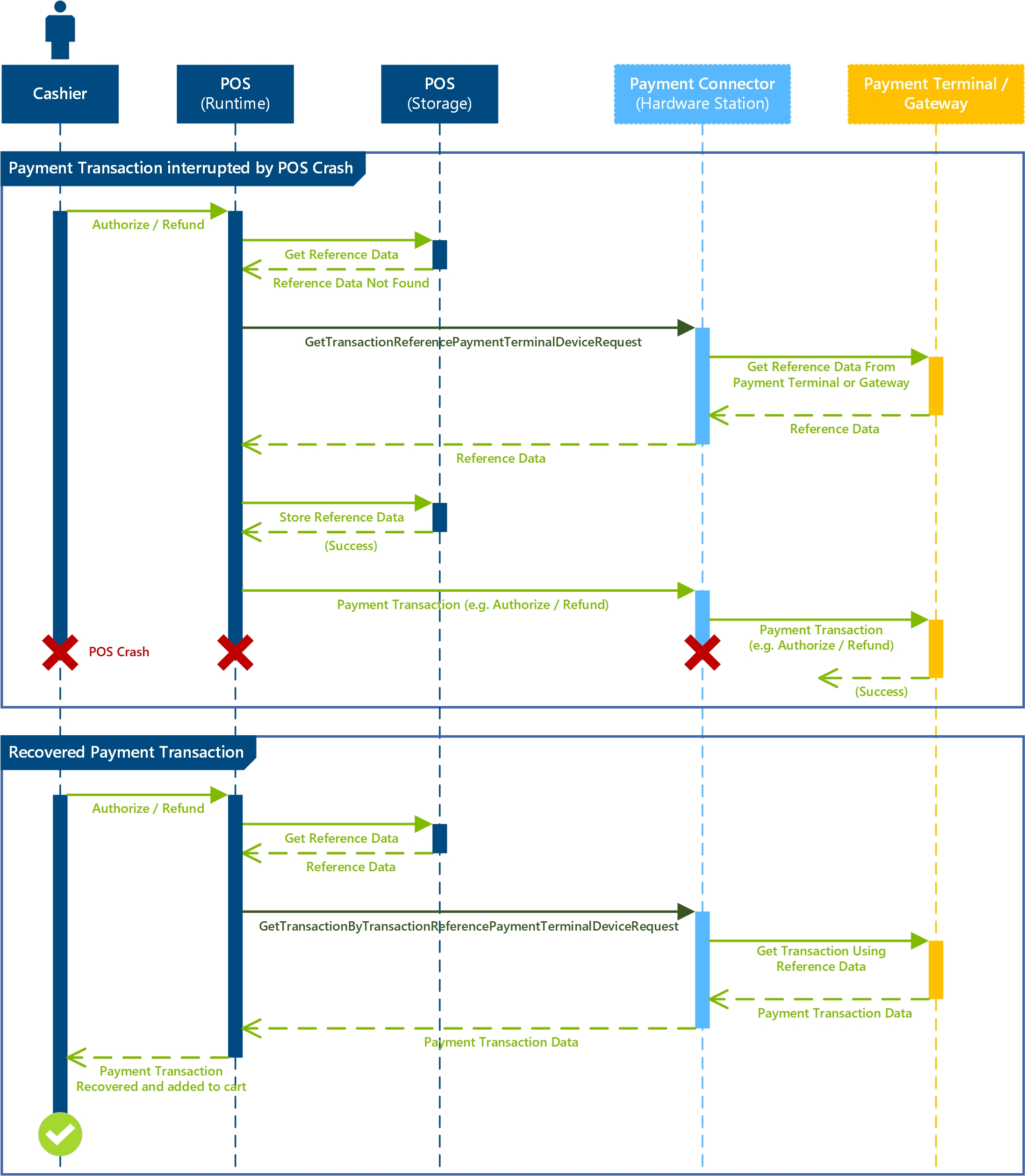
Retail POS uses the new requests GetTransactionReferencePaymentTerminalDeviceRequest and GetTransactionByTransactionReferencePaymentTerminalDeviceRequest in various scenarios across the POS. For example, Retail POS uses these requests immediately before it sends an Authorize request to the payment connector. These requests detect and recover successfully processed payments through the payment connector before Retail POS sends a new payment request. The following diagram shows a simple scenario where a payment request is successfully processed through the payment connector but Retail POS crashes before it can receive the response. Subsequently, Retail POS recovers the previously processed payment through the duplicate payment protection feature.
Supported POS flows
The following list describes all of the POS flows where the GetTransactionByTransactionReferencePaymentTerminalDeviceRequest recovers an existing payment. These flows are the most commonly executed flows when Retail POS crashes or loses connectivity to the payment terminal or payment gateway during the processing of a payment transaction.
- Cashier invokes payment for any amount using a card payment
- Cashier invokes payment for any amount using a cash payment
- Cashier attempts to void a line on the cart
- Cashier attempts to void the transaction
- Cashier attempts to suspend the transaction
Implement duplicate payment requests
The following sample illustrates the requests on the INamedRequestHandler payment connector implementation that are required to fully enable the duplicate payment protection feature.
namespace Contoso.Commerce.HardwareStation.PaymentSample
{
    /// <summary>
    /// <c>Simulator</c> manager payment device class.
    /// </summary>
    public class PaymentDeviceSample : INamedRequestHandler
    {
        /// <summary>
        /// Gets the collection of supported request types by this handler.
        /// </summary>
        public IEnumerable<Type> SupportedRequestTypes
        {
            get
            {
                return new[]
                {
                    // New request types specific to the duplicate payment protection feature.
                    typeof(GetTransactionReferencePaymentTerminalDeviceRequest),
                    typeof(GetTransactionByTransactionReferencePaymentTerminalDeviceRequest),

                    // Extended with new functionality.
                    typeof(AuthorizePaymentTerminalDeviceRequest)
                };
            }
        }

        /// <summary>
        /// Executes the payment device simulator operation based on the incoming request type.
        /// </summary>
        /// <param name="request">The payment terminal device simulator request message.</param>
        /// <returns>Returns the payment terminal device simulator response.</returns>
        public Response Execute(Microsoft.Dynamics.Commerce.Runtime.Messages.Request request)
        {
            ThrowIf.Null(request, nameof(request));

            Type requestType = request.GetType();

            if (requestType == typeof(GetTransactionReferencePaymentTerminalDeviceRequest))
            {
                return this.GetTransactionReference((GetTransactionReferencePaymentTerminalDeviceRequest)request);
            }
            else if (requestType == typeof(GetTransactionByTransactionReferencePaymentTerminalDeviceRequest))
            {
                return this.GetTransactionByTransactionReference((GetTransactionByTransactionReferencePaymentTerminalDeviceRequest)request);
            }
            else if (requestType == typeof(AuthorizePaymentTerminalDeviceRequest))
            {
                return this.AuthorizePayment((AuthorizePaymentTerminalDeviceRequest)request);
            }
            ...

            return new NullResponse();
        }
    }
}
GetTransactionReferencePaymentTerminalDeviceRequest / GetTransactionReferencePaymentTerminalDeviceResponse
Description
Retail POS invokes the GetTransactionReferencePaymentTerminalDeviceRequest at the beginning of a payment transaction and sets the scope of the payment. The scope of this request ends once the payment line is successfully added to the cart or an error, indicating that a card can't be used and is returned from the payment connector. The corresponding GetTransactionReferencePaymentTerminalDeviceResponse response contains the corresponding unique identifier generated by the payment connector to look up a payment transaction. Don't cache the generated ID in the payment connector implementation because the ID must survive the application's restarts. Typically, the payment gateway generates the ID.
Request signature
public GetTransactionReferencePaymentTerminalDeviceRequest(string lockToken, string posTerminalId, string eftTerminalId);
Request variables
| Variable | Description |
|---|---|
| lockToken | Unique token value generated when the payment terminal is initially locked for the transaction. |
| posTerminalId | Unique name of the POS register. |
| eftTerminalId | EFT POS terminal number configured either on the POS register or the shared Hardware Station. |
Response signature
public GetTransactionReferencePaymentTerminalDeviceResponse(string id);
Response variables
| Variable | Description |
|---|---|
| id | Unique identifier used for the scope of the payment transaction. |
PaymentTransactionReferenceData
After Retail POS executes GetTransactionReferencePaymentTerminalDeviceRequest, it creates a new instance of the PaymentTransactionReferenceData class. This instance holds the necessary contextual data for the POS to maintain the duplicate payment protection scope. The POS stores and maintains this variable, and uses it to check for existing transactions during key payment operations.
Properties
| Variable | Description |
|---|---|
| Command | Payment related command that the POS invoked. Possible values are Sale, Refund, Activate, or Load. |
| IdFromConnector | Unique identifier that the GetTransactionReferencePaymentTerminalDeviceRequest generates. |
| InitiatedDate | Date and time when the original payment-related transaction starts. |
| UniqueTransactionId | Unique identifier for the cart transaction (not specific to a payment itself). |
| Amount | Amount of the payment transaction that the POS handles. |
AuthorizePaymentTerminalDeviceRequest
Description
The AuthorizePaymentTerminalDeviceRequest parameter now includes a new constructor that supports the new request, PaymentTransactionReferenceData. This parameter maintains the contextual reference data and stamps the authorization request to the payment terminal or payment gateway or processor with the unique identifier that the payment connector generates. The POS uses this identifier to query for and identify duplicate payments.
GetTransactionByTransactionReferencePaymentTerminalDeviceRequest / GetTransactionByTransactionReferencePaymentTerminalDeviceResponse
Retail POS invokes GetTransactionByTransactionReferencePaymentTerminalDeviceRequest immediately before certain payment-related operations to check if an existing payment transaction is already handled by the payment terminal or payment gateway/processor. If the payment connector finds an existing transaction, it returns that transaction and stops subsequent calls to the connector from triggering a new transaction.
Request signature
public GetTransactionByTransactionReferencePaymentTerminalDeviceRequest(string lockToken, PaymentTransactionReferenceData transactionReferenceData);
Request variables
| Variable | Description |
|---|---|
| lockToken | Unique token value generated when the payment terminal is initially locked for the transaction. |
| transactionReferenceData | Property bag containing various properties used to uniquely identify a payment transaction. For more information, see the section PaymentTransactionReferenceData in this article. |
Response signature
public GetTransactionByTransactionReferencePaymentTerminalDeviceResponse(PaymentInfo paymentInfo);
Response variables
| Variable | Description |
|---|---|
| paymentInfo | The recovered payment transaction. This transaction is identical to the payment response returned for any other payment request, such as Authorize or Refund. |