Nota
L'accesso a questa pagina richiede l'autorizzazione. È possibile provare ad accedere o modificare le directory.
L'accesso a questa pagina richiede l'autorizzazione. È possibile provare a modificare le directory.
Questo articolo illustra le due azioni geospaziali in Pianificazione risorse universali, illustra come creare un plug-in personalizzato per queste azioni e fornisce esempi di un plug-in personalizzato di esempio che usa l'API Di Google Maps per i dati geospaziali.
Parametri di input e output per azioni geospaziali
Per la scrittura del plug-in personalizzato, dovrai prendere in considerazione i parametri di input e output per le azioni geospaziali in modo da sapere quali dati passare e i dati di output previsti nel codice del plug-in.
È possibile visualizzare i parametri di input e output per le due azioni geospaziali in due modi:
-
Contenuto di riferimento per azioni API Web: visualizza informazioni di riferimento sulle azioni geospaziali in Pianificazione risorse universale.
Microsoft.Dynamics.CRM.msdyn_RetrieveDistanceMatrix
- Definizione dell'azione: visualizzare la definizione dell'azione in Dynamics 365 per informazioni sui parametri di input/output, incluse le informazioni che indicano se un parametro è obbligatorio o facoltativo.
Nota
I tipi e le operazioni dell'API Web indicati in questo articolo sono disponibili nell'ambiente in uso. Puoi esplorarli usando il documento di servizio del tuo ambiente o Insomnia. Per altre informazioni, vedere Documenti del servizio API Web e Utilizzare Insomnia con l'API Web di Microsoft Dataverse.
Visualizzare una definizione di azione
Passare a Power Apps e selezionare la soluzione.
Aprire Processi e cercare il nome dell'azione, ad esempio Pianificazione risorse - Indirizzo geocodice o Pianificazione risorse - Recupera matrice di distanza.
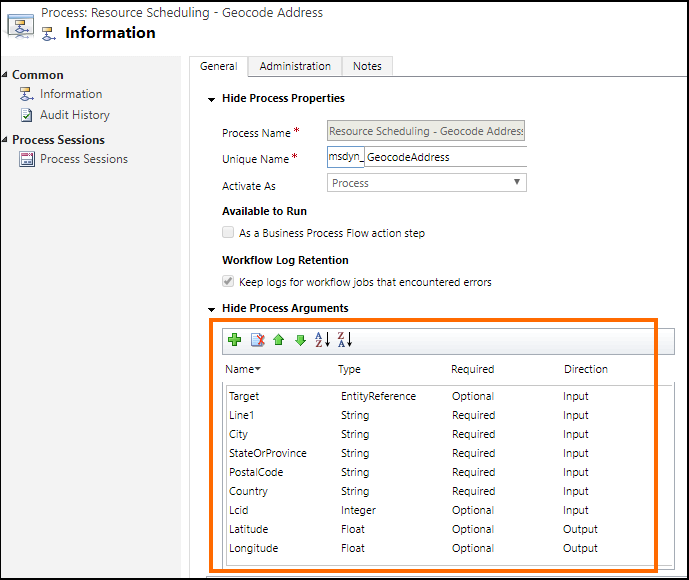
Aprire il nome dell'azione. Ad esempio, lo screenshot mostra la definizione dell'azione Pianificazione risorse - Indirizzo geocodice (msdyn_GeocodeAddress) in cui l'area evidenziata fornisce informazioni sui parametri di input e output:
Scrittura del plug-in personalizzato
I plug-in sono classi personalizzate che implementano l'interfaccia IPlugin. Per creare un plug-in, passare a Sviluppo plug-in
Un esempio di plug-in personalizzato viene fornito per il riferimento che dimostra come utilizzare l'API Google Maps per fornire dati geospaziali per le operazioni di campo anziché l'API Bing Maps predefinita. Per altre informazioni , vedere Esempio: Plug-in personalizzato per usare l'API Google Maps come provider di dati geospaziali.
Il codice seguente in ogni plug-in di esempio utilizza dati dell'API Google:
Metodo ExecuteGeocodeAddress nel file di plug-in msdyn_GeocodeAddress.cs
public void ExecuteGeocodeAddress(IPluginExecutionContext pluginExecutionContext, IOrganizationService organizationService, ITracingService tracingService)
{
    //Contains 5 fields (string) for individual parts of an address
    ParameterCollection InputParameters = pluginExecutionContext.InputParameters;
    // Contains 2 fields (double) for resultant geolocation
    ParameterCollection OutputParameters = pluginExecutionContext.OutputParameters;
    //Contains 1 field (int) for status of previous and this plugin
    ParameterCollection SharedVariables = pluginExecutionContext.SharedVariables;

    tracingService.Trace("ExecuteGeocodeAddress started. InputParameters = {0}, OutputParameters = {1}", InputParameters.Count().ToString(), OutputParameters.Count().ToString());


    try
    {
        // If a plugin earlier in the pipeline has already geocoded successfully, quit
        if ((double)OutputParameters[LatitudeKey] != 0d || (double)OutputParameters[LongitudeKey] != 0d) return;

        // Get user Lcid if request did not include it
        int Lcid = (int)InputParameters[LcidKey];
        string _address = string.Empty;
        if (Lcid == 0)
        {
            var userSettingsQuery = new QueryExpression("usersettings");
            userSettingsQuery.ColumnSet.AddColumns("uilanguageid", "systemuserid");
            userSettingsQuery.Criteria.AddCondition("systemuserid", ConditionOperator.Equal, pluginExecutionContext.InitiatingUserId);
            var userSettings = organizationService.RetrieveMultiple(userSettingsQuery);
            if (userSettings.Entities.Count > 0)
                Lcid = (int)userSettings.Entities[0]["uilanguageid"];
        }

        // Arrange the address components in a single comma-separated string, according to LCID
        _address = GisUtility.FormatInternationalAddress(Lcid,
            (string)InputParameters[Address1Key],
            (string)InputParameters[PostalCodeKey],
            (string)InputParameters[CityKey],
            (string)InputParameters[StateKey],
            (string)InputParameters[CountryKey]);

        // Make Geocoding call to Google API
        WebClient client = new WebClient();
        var url = $"https://{GoogleConstants.GoogleApiServer}{GoogleConstants.GoogleGeocodePath}/json?address={_address}&key={GoogleConstants.GoogleApiKey}";
        tracingService.Trace($"Calling {url}\n");
        string response = client.DownloadString(url);   // Post ...

        tracingService.Trace("Parsing response ...\n");
        DataContractJsonSerializer jsonSerializer = new DataContractJsonSerializer(typeof(GeocodeResponse));    // Deserialize response json
        object objResponse = jsonSerializer.ReadObject(new MemoryStream(Encoding.UTF8.GetBytes(response)));     // Get response as an object
        GeocodeResponse geocodeResponse = objResponse as GeocodeResponse;       // Unbox into our data contracted class for response

        tracingService.Trace("Response Status = " + geocodeResponse.Status + "\n");
        if (geocodeResponse.Status != "OK")
            throw new ApplicationException($"Server {GoogleConstants.GoogleApiServer} application error (Status {geocodeResponse.Status}).");

        tracingService.Trace("Checking geocodeResponse.Result...\n");
        if (geocodeResponse.Results != null)
        {
            if (geocodeResponse.Results.Count() == 1)
            {
                tracingService.Trace("Checking geocodeResponse.Result.Geometry.Location...\n");
                if (geocodeResponse.Results.First()?.Geometry?.Location != null)
                {
                    tracingService.Trace("Setting Latitude, Longitude in OutputParameters...\n");

                    // update output parameters
                    OutputParameters[LatitudeKey] = geocodeResponse.Results.First().Geometry.Location.Lat;
                    OutputParameters[LongitudeKey] = geocodeResponse.Results.First().Geometry.Location.Lng;

                }
                else throw new ApplicationException($"Server {GoogleConstants.GoogleApiServer} application error (missing Results[0].Geometry.Location)");
            }
            else throw new ApplicationException($"Server {GoogleConstants.GoogleApiServer} application error (more than 1 result returned)");
        }
        else throw new ApplicationException($"Server {GoogleConstants.GoogleApiServer} application error (missing Results)");
    }
    catch (Exception ex)
    {
        // Signal to subsequent plugins in this message pipeline that geocoding failed here.
        OutputParameters[LatitudeKey] = 0d;
        OutputParameters[LongitudeKey] = 0d;

        //TODO: You may need to decide which caught exceptions will rethrow and which ones will simply signal geocoding did not complete.
        throw new InvalidPluginExecutionException(string.Format("Geocoding failed at {0} with exception -- {1}: {2}"
            , GoogleConstants.GoogleApiServer, ex.GetType().ToString(), ex.Message), ex);
    }

}
Metodo ExecuteDistanceMatrix nel file di plug-in msdyn_RetrieveDistanceMatrix.cs
public void ExecuteDistanceMatrix(IPluginExecutionContext pluginExecutionContext, IOrganizationService organizationService, ITracingService tracingService)
{
    //Contains 2 fields (EntityCollection) for sources and targets
    ParameterCollection InputParameters = pluginExecutionContext.InputParameters;
    // Contains 1 field (EntityCollection) for results
    ParameterCollection OutputParameters = pluginExecutionContext.OutputParameters;
    //Contains 1 field (int) for status of previous and this plugin
    ParameterCollection SharedVariables = pluginExecutionContext.SharedVariables;

    tracingService.Trace("ExecuteDistanceMatrix started.  InputParameters = {0},OutputParameters = {1}", InputParameters.Count().ToString(), OutputParameters.Count().ToString());

    try
    {
        // If a plugin earlier in the pipeline has already retrieved a distance matrix successfully, quit
        if (OutputParameters[MatrixKey] != null)
            if (((EntityCollection)OutputParameters[MatrixKey]).Entities != null)
                if (((EntityCollection)OutputParameters[MatrixKey]).Entities.Count > 0) return;

        // Make Distance Matrix call to Google API
        WebClient client = new WebClient();
        var url = String.Format($"https://{GoogleConstants.GoogleApiServer}{GoogleConstants.GoogleDistanceMatrixPath}/json"
            + "?units=imperial"
            + $"&origins={string.Join("|", ((EntityCollection)InputParameters[SourcesKey]).Entities.Select(e => e.GetAttributeValue<double?>("latitude") + "," + e.GetAttributeValue<double?>("longitude")))}"
            + $"&destinations={string.Join("|", ((EntityCollection)InputParameters[TargetsKey]).Entities.Select(e => e.GetAttributeValue<double?>("latitude") + "," + e.GetAttributeValue<double?>("longitude")))}"
            + $"&key={GoogleConstants.GoogleApiKey}");
        tracingService.Trace($"Calling {url}\n");
        string response = client.DownloadString(url);   // Post ...

        tracingService.Trace("Parsing response ...\n");
        DataContractJsonSerializer jsonSerializer = new DataContractJsonSerializer(typeof(DistanceMatrixResponse));    // Deserialize response json
        object objResponse = jsonSerializer.ReadObject(new MemoryStream(Encoding.UTF8.GetBytes(response)));     // Get response as an object
        DistanceMatrixResponse distancematrixResponse = objResponse as DistanceMatrixResponse;       // Unbox as our data contracted class for response

        tracingService.Trace("Response Status = " + distancematrixResponse.Status + "\n");
        if (distancematrixResponse.Status != "OK")
            throw new ApplicationException($"Server {GoogleConstants.GoogleApiServer} application error (Status={distancematrixResponse.Status}). {distancematrixResponse.ErrorMessage}");

        tracingService.Trace("Checking distancematrixResponse.Results...\n");
        if (distancematrixResponse.Rows != null)
        {
            tracingService.Trace("Parsing distancematrixResponse.Results.Elements...\n");

            // build and update output parameter
            var result = new EntityCollection();
            result.Entities.AddRange(distancematrixResponse.Rows.Select(r => ToEntity(r.Columns.Select(c => ToEntity(c.Status, c.Duration, c.Distance)).ToArray())));
            OutputParameters[MatrixKey] = result;

        }
        else throw new ApplicationException($"Server {GoogleConstants.GoogleApiServer} application error (missing Rows)");
    }
    catch (Exception ex)
    {
        // Signal to subsequent plugins in this message pipeline that retrieval of distance matrix failed here.
        OutputParameters[MatrixKey] = null;

        //TODO: You may need to decide which caught exceptions will rethrow and which ones will simply signal geocoding did not complete.
        throw new InvalidPluginExecutionException(string.Format("Geocoding failed at {0} with exception -- {1}: {2}"
            , GoogleConstants.GoogleApiServer, ex.GetType().ToString(), ex.Message), ex);
    }

    // For debugging purposes, throw an exception to see the details of the parameters
    CreateExceptionWithDetails("Debugging...", InputParameters, OutputParameters, SharedVariables);
}
Dopo aver scritto il codice plug-in personalizzato, compilare il progetto per generare un assembly plug-in (.dll). Usa questo assembly per registrare il plug-in nella Pianificazione risorse universale per le azioni geospaziali.