Nota
L'accesso a questa pagina richiede l'autorizzazione. È possibile provare ad accedere o modificare le directory.
L'accesso a questa pagina richiede l'autorizzazione. È possibile provare a modificare le directory.
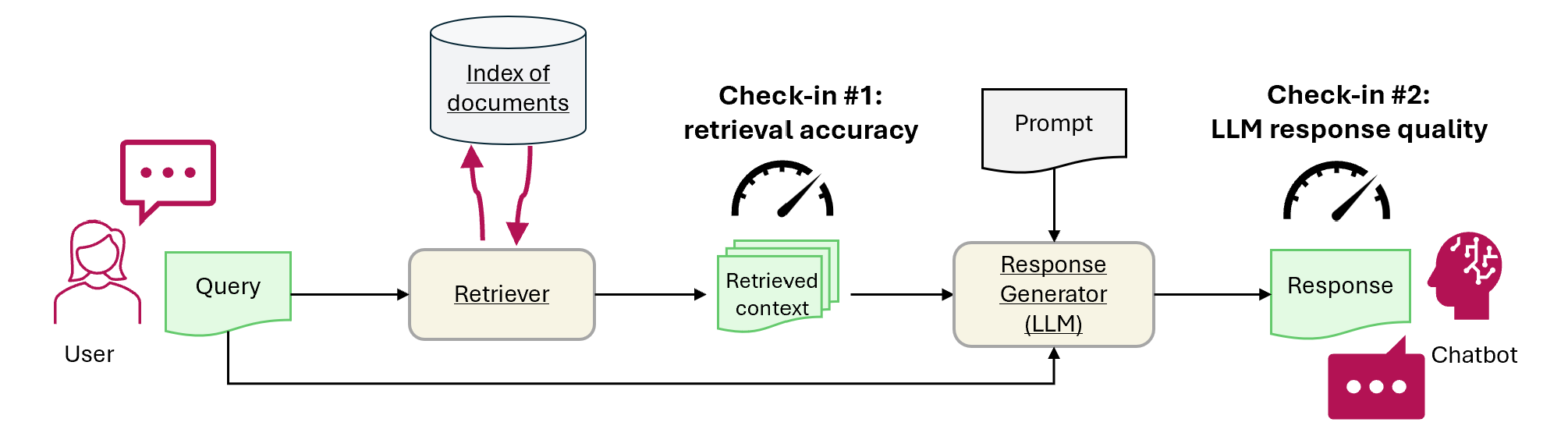
Questa esercitazione illustra come usare Fabric per valutare le prestazioni dell'applicazione RAG. La valutazione è incentrata su due componenti rag principali: il retriever (Ricerca di intelligenza artificiale di Azure) e il generatore di risposte (un LLM che usa la query dell'utente, il contesto recuperato e un prompt per generare una risposta). Ecco i passaggi principali:
- Configurare Azure OpenAI e i servizi di Ricerca di intelligenza artificiale di Azure
- Caricare dati dal set di dati di controllo di qualità di CMU degli articoli di Wikipedia per creare un benchmark
- Eseguire un test preliminare con una singola query per confermare che il sistema RAG funzioni da un capo all'altro
- Definire metriche deterministiche e assistita dall'intelligenza artificiale per la valutazione
- Check-in 1: Valutare le prestazioni del retriever usando l'accuratezza del top-N
- Check-in 2: Valutare le prestazioni del generatore di risposte usando metriche di aderenza, pertinenza e somiglianza
- Visualizzare e archiviare i risultati della valutazione in OneLake per riferimento futuro e valutazione in corso
Prerequisiti
Prima di iniziare questo tutorial, completa la guida passo-passo per la generazione aumentata del recupero in Fabric.
Per eseguire il notebook sono necessari questi servizi:
- Microsoft Fabric
- Aggiungi una lakehouse a questo notebook (essa contiene i dati che hai aggiunto nell'esercitazione precedente).
- Azure AI Studio per OpenAI
- Ricerca di intelligenza artificiale di Azure (contiene i dati indicizzati nell'esercitazione precedente).
Nell'esercitazione precedente, hai caricato i dati nel lakehouse e hai creato un indice di documenti usato dal sistema RAG. Utilizza l'indice in questo esercizio per apprendere le tecniche fondamentali per valutare le prestazioni RAG e identificare potenziali problemi. Se non è stato creato o rimosso un indice, seguire la guida introduttiva per completare il prerequisito.
Configurare l'accesso ad Azure OpenAI e Ricerca di intelligenza artificiale di Azure
Definire gli endpoint e le chiavi necessarie. Importare le librerie e le funzioni necessarie. Creare un'istanza dei client per Azure OpenAI e Ricerca di intelligenza artificiale di Azure. Definire una funzione wrapper con un prompt per interrogare il sistema RAG.
# Enter your Azure OpenAI service values
aoai_endpoint = "https://<your-resource-name>.openai.azure.com" # TODO: Provide the Azure OpenAI resource endpoint (replace <your-resource-name>)
aoai_key = "" # TODO: Fill in your API key from Azure OpenAI
aoai_deployment_name_embeddings = "text-embedding-ada-002"
aoai_model_name_query = "gpt-4-32k"
aoai_model_name_metrics = "gpt-4-32k"
aoai_api_version = "2024-02-01"

# Setup key accesses to Azure AI Search
aisearch_index_name = "" # TODO: Create a new index name: must only contain lowercase, numbers, and dashes
aisearch_api_key = "" # TODO: Fill in your API key from Azure AI Search
aisearch_endpoint = "https://.search.windows.net" # TODO: Provide the url endpoint for your created Azure AI Search
import warnings
warnings.filterwarnings("ignore", category=DeprecationWarning)

import os, requests, json

from datetime import datetime, timedelta
from azure.core.credentials import AzureKeyCredential
from azure.search.documents import SearchClient

from pyspark.sql import functions as F
from pyspark.sql.functions import to_timestamp, current_timestamp, concat, col, split, explode, udf, monotonically_increasing_id, when, rand, coalesce, lit, input_file_name, regexp_extract, concat_ws, length, ceil
from pyspark.sql.types import StructType, StructField, StringType, IntegerType, TimestampType, ArrayType, FloatType
from pyspark.sql import Row
import pandas as pd
from azure.search.documents.indexes import SearchIndexClient
from azure.search.documents.models import (
    VectorizedQuery,
)
from azure.search.documents.indexes.models import (
    SearchIndex,
    SearchField,
    SearchFieldDataType,
    SimpleField,
    SearchableField,
    SemanticConfiguration,
    SemanticPrioritizedFields,
    SemanticField,
    SemanticSearch,
    VectorSearch,
    HnswAlgorithmConfiguration,
    HnswParameters,
    VectorSearchProfile,
    VectorSearchAlgorithmKind,
    VectorSearchAlgorithmMetric,
)

import openai
from openai import AzureOpenAI
import uuid
import matplotlib.pyplot as plt
from synapse.ml.featurize.text import PageSplitter
import ipywidgets as widgets
from IPython.display import display as w_display
Output della cella:StatementMeta(, 21cb8cd3-7742-4c1f-8339-265e2846df1d, 6, Finished, Available, Finished)
# Configure access to OpenAI endpoint
openai.api_type = "azure"
openai.api_key = aoai_key
openai.api_base = aoai_endpoint
openai.api_version = aoai_api_version

# Create client for accessing embedding endpoint
embed_client = AzureOpenAI(
    api_version=aoai_api_version,
    azure_endpoint=aoai_endpoint,
    api_key=aoai_key,
)

# Create client for accessing chat endpoint
chat_client = AzureOpenAI(
    azure_endpoint=aoai_endpoint,
    api_key=aoai_key,
    api_version=aoai_api_version,
)

# Configure access to Azure AI Search
search_client = SearchClient(
    aisearch_endpoint,
    aisearch_index_name,
    credential=AzureKeyCredential(aisearch_api_key)
)
Output della cella:StatementMeta(, 21cb8cd3-7742-4c1f-8339-265e2846df1d, 7, Finished, Available, Finished)
Le funzioni seguenti implementano i due componenti RAG principali: retriever (get_context_source) e generatore di risposte (get_answer). Il codice è simile all'esercitazione precedente. Il topN parametro consente di impostare il numero di risorse pertinenti da recuperare (questa esercitazione usa 3, ma il valore ottimale può variare in base al set di dati):
# Implement retriever
def get_context_source(question, topN=3):
    """
    Retrieves contextual information and sources related to a given question using embeddings and a vector search.
    Parameters:
    question (str): The question for which the context and sources are to be retrieved.
    topN (int, optional): The number of top results to retrieve. Default is 3.

    Returns:
    List: A list containing two elements:
        1. A string with the concatenated retrieved context.
        2. A list of retrieved source paths.
    """
    embed_client = openai.AzureOpenAI(
        api_version=aoai_api_version,
        azure_endpoint=aoai_endpoint,
        api_key=aoai_key,
    )

    query_embedding = embed_client.embeddings.create(input=question, model=aoai_deployment_name_embeddings).data[0].embedding

    vector_query = VectorizedQuery(vector=query_embedding, k_nearest_neighbors=topN, fields="Embedding")

    results = search_client.search(
        vector_queries=[vector_query],
        top=topN,
    )

    retrieved_context = ""
    retrieved_sources = []
    for result in results:
        retrieved_context += result['ExtractedPath'] + "\n" + result['Chunk'] + "\n\n"
        retrieved_sources.append(result['ExtractedPath'])

    return [retrieved_context, retrieved_sources]

# Implement response generator
def get_answer(question, context):
    """
    Generates a response to a given question using provided context and an Azure OpenAI model.

    Parameters:
        question (str): The question that needs to be answered.
        context (str): The contextual information related to the question that will help generate a relevant response.

    Returns:
        str: The response generated by the Azure OpenAI model based on the provided question and context.
    """
    messages = [
        {
            "role": "system",
            "content": "You are a chat assistant. Use provided text to ground your response. Give a one-word answer when possible ('yes'/'no' is OK where appropriate, no details). Unnecessary words incur a $500 penalty."
        }
    ]

    messages.append(
        {
            "role": "user",
            "content": question + "\n" + context,
        },
    )

    chat_client = openai.AzureOpenAI(
        azure_endpoint=aoai_endpoint,
        api_key=aoai_key,
        api_version=aoai_api_version,
    )

    chat_completion = chat_client.chat.completions.create(
        model=aoai_model_name_query,
        messages=messages,
    )

    return chat_completion.choices[0].message.content
Output della cella:StatementMeta(, 21cb8cd3-7742-4c1f-8339-265e2846df1d, 8, Finished, Available, Finished)
Dataset
La versione 1.2 del set di dati della Carnegie Mellon University Question-Answer è un corpus di articoli di Wikipedia con domande e risposte reali scritte manualmente. È ospitato in Archivio BLOB di Azure sotto la licenza GFDL. Il set di dati usa una tabella con questi campi:
-
ArticleTitle: nome dell'articolo di Wikipedia le domande e le risposte provengono da -
Question: domanda scritta manualmente sull'articolo -
Answer: risposta scritta manualmente in base all'articolo -
DifficultyFromQuestioner: valutazione della difficoltà assegnata dall'autore della domanda -
DifficultyFromAnswerer: valutazione della difficoltà assegnata dall'analizzatore; può differire daDifficultyFromQuestioner -
ExtractedPath: percorso dell'articolo originale (un articolo può avere più coppie di domande-risposte) -
text: testo dell'articolo di Wikipedia pulito
Scaricare i file LICENSE-S08 e LICENSE-S09 dallo stesso percorso per i dettagli della licenza.
Storia e citazione
Usare questa citazione per il set di dati:
CMU Question/Answer Dataset, Release 1.2
August 23, 2013
Noah A. Smith, Michael Heilman, and Rebecca Hwa
Question Generation as a Competitive Undergraduate Course Project
In Proceedings of the NSF Workshop on the Question Generation Shared Task and Evaluation Challenge, Arlington, VA, September 2008.
Available at http://www.cs.cmu.edu/~nasmith/papers/smith+heilman+hwa.nsf08.pdf.
Original dataset acknowledgments:
This research project was supported by NSF IIS-0713265 (to Smith), an NSF Graduate Research Fellowship (to Heilman), NSF IIS-0712810 and IIS-0745914 (to Hwa), and Institute of Education Sciences, U.S. Department of Education R305B040063 (to Carnegie Mellon).
cmu-qa-08-09 (modified version)
June 12, 2024
Amir Jafari, Alexandra Savelieva, Brice Chung, Hossein Khadivi Heris, Journey McDowell
This release uses the GNU Free Documentation License (GFDL) (http://www.gnu.org/licenses/fdl.html).
The GNU license applies to all copies of the dataset.
Creare un benchmark
Importare il benchmark. Per questa demo, usare il sottoinsieme di domande dai bucket S08/set1 e S08/set2. Per mantenere una domanda per articolo, applicare df.dropDuplicates(["ExtractedPath"]). Rimuovere le domande duplicate. Il processo di cura aggiunge etichette di difficoltà; questo esempio li limita a medium.
df = spark.sql("SELECT * FROM data_load_tests.cmu_qa")

# Filter the DataFrame to include the specified paths
df = df.filter((col("ExtractedPath").like("S08/data/set1/%")) | (col("ExtractedPath").like("S08/data/set2/%")))

# Keep only medium-difficulty questions.
df = df.filter(col("DifficultyFromQuestioner") == "medium")


# Drop duplicate questions and source paths.
df = df.dropDuplicates(["Question"])
df = df.dropDuplicates(["ExtractedPath"])

num_rows = df.count()
num_columns = len(df.columns)
print(f"Number of rows: {num_rows}, Number of columns: {num_columns}")

# Persist the DataFrame
df.persist()
display(df)
Risultato cella:StatementMeta(, 21cb8cd3-7742-4c1f-8339-265e2846df1d, 9, Finished, Available, Finished)Number of rows: 20, Number of columns: 7SynapseWidget(Synapse.DataFrame, 47aff8cb-72f8-4a36-885c-f4f3bb830a91)
Il risultato è un dataframe con 20 righe, ovvero il benchmark demo. I campi chiave sono Question, Answer (risposta di riferimento curata dall'uomo) e ExtractedPath (il documento di origine). Modificare i filtri per includere altre domande e variare la difficoltà per un esempio più realistico. Mettilo alla prova.
Eseguire un semplice test end-to-end
Iniziare con un test di fumo end-to-end di generazione aumentata di recupero (RAG).
question = "How many suborders are turtles divided into?"
retrieved_context, retrieved_sources = get_context_source(question)
answer = get_answer(question, retrieved_context)
print(answer)
Output della cella:StatementMeta(, 21cb8cd3-7742-4c1f-8339-265e2846df1d, 10, Finished, Available, Finished)Three
Questo smoke test consente di individuare problemi nell'implementazione rag, ad esempio credenziali non corrette, un indice vettoriale mancante o vuoto o interfacce di funzione incompatibili. Se il test non riesce, verificare la presenza di problemi. Output previsto: Three. Se il test di fumo viene superato, andare alla sezione successiva per valutare ulteriormente RAG.
Stabilire le metriche
Definire una metrica deterministica per valutare il retriever. È ispirato dai motori di ricerca. Controlla se l'elenco delle origini recuperate include l'origine della verità di base. Questa metrica è un punteggio di accuratezza top-N perché il topN parametro imposta il numero di origini recuperate.
def get_retrieval_score(target_source, retrieved_sources):
    if target_source in retrieved_sources:
        return 1
    else:
        return 0
Output della cella:StatementMeta(, 21cb8cd3-7742-4c1f-8339-265e2846df1d, 11, Finished, Available, Finished)
In base al benchmark, la risposta è contenuta nell'origine con ID "S08/data/set1/a9". Il test della funzione nell'esempio eseguito sopra restituisce 1, come previsto, perché si trovava nei primi tre blocchi di testo pertinenti.
print("Retrieved sources:", retrieved_sources)
get_retrieval_score("S08/data/set1/a9", retrieved_sources)
Risultato cella:StatementMeta(, 21cb8cd3-7742-4c1f-8339-265e2846df1d, 12, Finished, Available, Finished)Retrieved sources: ['S08/data/set1/a9', 'S08/data/set1/a9', 'S08/data/set1/a5']1
Questa sezione definisce le metriche assistita dall'intelligenza artificiale. Il modello di richiesta include alcuni esempi di input (CONTEXT e ANSWER) e l'output suggerito, noto anche come modello con pochi scatti. È la stessa richiesta usata in Azure AI Studio. Altre informazioni sono disponibili in Metriche di valutazione predefinite. Questa demo usa le groundedness metriche e relevance , in genere, sono le più utili e affidabili per la valutazione dei modelli GPT. Altre metriche possono essere utili ma offrono meno intuizioni, ad esempio le risposte non devono essere simili a essere corrette, quindi similarity i punteggi possono essere fuorvianti. La scala per tutte le metriche è da 1 a 5. Più alto è meglio. Groundedness accetta solo due input (contesto e risposta generata), mentre le altre due metriche usano anche la verità di base per la valutazione.
def get_groundedness_metric(context, answer):
    """Get the groundedness score from the LLM using the context and answer."""

    groundedness_prompt_template = """
    You are presented with a CONTEXT and an ANSWER about that CONTEXT. Decide whether the ANSWER is entailed by the CONTEXT by choosing one of the following ratings:
    1. 5: The ANSWER follows logically from the information contained in the CONTEXT.
    2. 1: The ANSWER is logically false from the information contained in the CONTEXT.
    3. an integer score between 1 and 5 and if such integer score does not exist, use 1: It is not possible to determine whether the ANSWER is true or false without further information. Read the passage of information thoroughly and select the correct answer from the three answer labels. Read the CONTEXT thoroughly to ensure you know what the CONTEXT entails. Note the ANSWER is generated by a computer system, it can contain certain symbols, which should not be a negative factor in the evaluation.
    Independent Examples:
    ## Example Task #1 Input:
    "CONTEXT": "Some are reported as not having been wanted at all.", "QUESTION": "", "ANSWER": "All are reported as being completely and fully wanted."
    ## Example Task #1 Output:
    1
    ## Example Task #2 Input:
    "CONTEXT": "Ten new television shows appeared during the month of September. Five of the shows were sitcoms, three were hourlong dramas, and two were news-magazine shows. By January, only seven of these new shows were still on the air. Five of the shows that remained were sitcoms.", "QUESTION": "", "ANSWER": "At least one of the shows that were cancelled was an hourlong drama."
    ## Example Task #2 Output:
    5
    ## Example Task #3 Input:
    "CONTEXT": "In Quebec, an allophone is a resident, usually an immigrant, whose mother tongue or home language is neither French nor English.", "QUESTION": "", "ANSWER": "In Quebec, an allophone is a resident, usually an immigrant, whose mother tongue or home language is not French."
    5
    ## Example Task #4 Input:
    "CONTEXT": "Some are reported as not having been wanted at all.", "QUESTION": "", "ANSWER": "All are reported as being completely and fully wanted."
    ## Example Task #4 Output:
    1
    ## Actual Task Input:
    "CONTEXT": {context}, "QUESTION": "", "ANSWER": {answer}
    Reminder: The return values for each task should be correctly formatted as an integer between 1 and 5. Do not repeat the context and question.  Don't explain the reasoning. The answer should include only a number: 1, 2, 3, 4, or 5.
    Actual Task Output:
    """

    metric_client = openai.AzureOpenAI(
        api_version=aoai_api_version,
        azure_endpoint=aoai_endpoint,
        api_key=aoai_key,
    )

    messages = [
        {
            "role": "system",
            "content": "You are an AI assistant. You will be given the definition of an evaluation metric for assessing the quality of an answer in a question-answering task. Your job is to compute an accurate evaluation score using the provided evaluation metric."
        },
        {
            "role": "user",
            "content": groundedness_prompt_template.format(context=context, answer=answer)
        }
    ]

    metric_completion = metric_client.chat.completions.create(
        model=aoai_model_name_metrics,
        messages=messages,
        temperature=0,
    )

    return metric_completion.choices[0].message.content
Output della cella:StatementMeta(, 21cb8cd3-7742-4c1f-8339-265e2846df1d, 13, Finished, Available, Finished)
def get_relevance_metric(context, question, answer):
    relevance_prompt_template = """
    Relevance measures how well the answer addresses the main aspects of the question, based on the context. Consider whether all and only the important aspects are contained in the answer when evaluating relevance. Given the context and question, score the relevance of the answer between one to five stars using the following rating scale:
    One star: the answer completely lacks relevance
    Two stars: the answer mostly lacks relevance
    Three stars: the answer is partially relevant
    Four stars: the answer is mostly relevant
    Five stars: the answer has perfect relevance

    This rating value should always be an integer between 1 and 5. So the rating produced should be 1 or 2 or 3 or 4 or 5.

    context: Marie Curie was a Polish-born physicist and chemist who pioneered research on radioactivity and was the first woman to win a Nobel Prize.
    question: What field did Marie Curie excel in?
    answer: Marie Curie was a renowned painter who focused mainly on impressionist styles and techniques.
    stars: 1

    context: The Beatles were an English rock band formed in Liverpool in 1960, and they are widely regarded as the most influential music band in history.
    question: Where were The Beatles formed?
    answer: The band The Beatles began their journey in London, England, and they changed the history of music.
    stars: 2

    context: The recent Mars rover, Perseverance, was launched in 2020 with the main goal of searching for signs of ancient life on Mars. The rover also carries an experiment called MOXIE, which aims to generate oxygen from the Martian atmosphere.
    question: What are the main goals of Perseverance Mars rover mission?
    answer: The Perseverance Mars rover mission focuses on searching for signs of ancient life on Mars.
    stars: 3

    context: The Mediterranean diet is a commonly recommended dietary plan that emphasizes fruits, vegetables, whole grains, legumes, lean proteins, and healthy fats. Studies have shown that it offers numerous health benefits, including a reduced risk of heart disease and improved cognitive health.
    question: What are the main components of the Mediterranean diet?
    answer: The Mediterranean diet primarily consists of fruits, vegetables, whole grains, and legumes.
    stars: 4

    context: The Queen's Royal Castle is a well-known tourist attraction in the United Kingdom. It spans over 500 acres and contains extensive gardens and parks. The castle was built in the 15th century and has been home to generations of royalty.
    question: What are the main attractions of the Queen's Royal Castle?
    answer: The main attractions of the Queen's Royal Castle are its expansive 500-acre grounds, extensive gardens, parks, and the historical castle itself, which dates back to the 15th century and has housed generations of royalty.
    stars: 5

    Don't explain the reasoning. The answer should include only a number: 1, 2, 3, 4, or 5.

    context: {context}
    question: {question}
    answer: {answer}
    stars:
    """

    metric_client = openai.AzureOpenAI(
        api_version=aoai_api_version,
        azure_endpoint=aoai_endpoint,
        api_key=aoai_key,
    )


    messages = [
        {
            "role": "system",
            "content": "You are an AI assistant. You are given the definition of an evaluation metric for assessing the quality of an answer in a question-answering task. Compute an accurate evaluation score using the provided evaluation metric."
        },
        {
            "role": "user",
            "content": relevance_prompt_template.format(context=context, question=question, answer=answer)
        }
    ]

    metric_completion = metric_client.chat.completions.create(
        model=aoai_model_name_metrics,
        messages=messages,
        temperature=0,
    )

    return metric_completion.choices[0].message.content
Output della cella:StatementMeta(, 21cb8cd3-7742-4c1f-8339-265e2846df1d, 14, Finished, Available, Finished)
def get_similarity_metric(question, ground_truth, answer):
    similarity_prompt_template = """
    Equivalence, as a metric, measures the similarity between the predicted answer and the correct answer. If the information and content in the predicted answer is similar or equivalent to the correct answer, then the value of the Equivalence metric should be high, else it should be low. Given the question, correct answer, and predicted answer, determine the value of Equivalence metric using the following rating scale:
    One star: the predicted answer is not at all similar to the correct answer
    Two stars: the predicted answer is mostly not similar to the correct answer
    Three stars: the predicted answer is somewhat similar to the correct answer
    Four stars: the predicted answer is mostly similar to the correct answer
    Five stars: the predicted answer is completely similar to the correct answer

    This rating value should always be an integer between 1 and 5. So the rating produced should be 1 or 2 or 3 or 4 or 5.

    The examples below show the Equivalence score for a question, a correct answer, and a predicted answer.

    question: What is the role of ribosomes?
    correct answer: Ribosomes are cellular structures responsible for protein synthesis. They interpret the genetic information carried by messenger RNA (mRNA) and use it to assemble amino acids into proteins.
    predicted answer: Ribosomes participate in carbohydrate breakdown by removing nutrients from complex sugar molecules.
    stars: 1

    question: Why did the Titanic sink?
    correct answer: The Titanic sank after it struck an iceberg during its maiden voyage in 1912. The impact caused the ship's hull to breach, allowing water to flood into the vessel. The ship's design, lifeboat shortage, and lack of timely rescue efforts contributed to the tragic loss of life.
    predicted answer: The sinking of the Titanic was a result of a large iceberg collision. This caused the ship to take on water and eventually sink, leading to the death of many passengers due to a shortage of lifeboats and insufficient rescue attempts.
    stars: 2

    question: What causes seasons on Earth?
    correct answer: Seasons on Earth are caused by the tilt of the Earth's axis and its revolution around the Sun. As the Earth orbits the Sun, the tilt causes different parts of the planet to receive varying amounts of sunlight, resulting in changes in temperature and weather patterns.
    predicted answer: Seasons occur because of the Earth's rotation and its elliptical orbit around the Sun. The tilt of the Earth's axis causes regions to be subjected to different sunlight intensities, which leads to temperature fluctuations and alternating weather conditions.
    stars: 3

    question: How does photosynthesis work?
    correct answer: Photosynthesis is a process by which green plants and some other organisms convert light energy into chemical energy. This occurs as light is absorbed by chlorophyll molecules, and then carbon dioxide and water are converted into glucose and oxygen through a series of reactions.
    predicted answer: In photosynthesis, sunlight is transformed into nutrients by plants and certain microorganisms. Light is captured by chlorophyll molecules, followed by the conversion of carbon dioxide and water into sugar and oxygen through multiple reactions.
    stars: 4

    question: What are the health benefits of regular exercise?
    correct answer: Regular exercise can help maintain a healthy weight, increase muscle and bone strength, and reduce the risk of chronic diseases. It also promotes mental well-being by reducing stress and improving overall mood.
    predicted answer: Routine physical activity can contribute to maintaining ideal body weight, enhancing muscle and bone strength, and preventing chronic illnesses. In addition, it supports mental health by alleviating stress and augmenting general mood.
    stars: 5

    Don't explain the reasoning. The answer should include only a number: 1, 2, 3, 4, or 5.

    question: {question}
    correct answer:{ground_truth}
    predicted answer: {answer}
    stars:
    """

    metric_client = openai.AzureOpenAI(
        api_version=aoai_api_version,
        azure_endpoint=aoai_endpoint,
        api_key=aoai_key,
    )

    messages = [
        {
            "role": "system",
            "content": "You are an AI assistant. You will be given the definition of an evaluation metric for assessing the quality of an answer in a question-answering task. Your job is to compute an accurate evaluation score using the provided evaluation metric."
        },
        {
            "role": "user",
            "content": similarity_prompt_template.format(question=question, ground_truth=ground_truth, answer=answer)
        }
    ]

    metric_completion = metric_client.chat.completions.create(
        model=aoai_model_name_metrics,
        messages=messages,
        temperature=0,
    )

    return metric_completion.choices[0].message.content
Output della cella:StatementMeta(, 21cb8cd3-7742-4c1f-8339-265e2846df1d, 15, Finished, Available, Finished)
Testare la metrica di pertinenza:
get_relevance_metric(retrieved_context, question, answer)
Output della cella:StatementMeta(, 21cb8cd3-7742-4c1f-8339-265e2846df1d, 16, Finished, Available, Finished)'2'
Un punteggio pari a 5 indica che la risposta è rilevante. Il codice seguente ottiene la metrica di somiglianza:
get_similarity_metric(question, 'three', answer)
Output della cella:StatementMeta(, 21cb8cd3-7742-4c1f-8339-265e2846df1d, 17, Finished, Available, Finished)'5'
Un punteggio pari a 5 indica che la risposta corrisponde alla risposta verificata curata da un esperto umano. I punteggi delle metriche assistita dall'intelligenza artificiale possono variare con lo stesso input. Sono più veloci rispetto all'uso dei giudici umani.
Valutare le prestazioni RAG sul benchmark Q&A
Creare wrapper di funzione da eseguire su larga scala. Eseguire il wrapping di ogni funzione che termina con _udf (breve per user-defined function) in modo che sia conforme ai requisiti di Spark (@udf(returnType=StructType([ ... ]))) ed esegua calcoli su dati di grandi dimensioni più velocemente nel cluster.
# UDF wrappers for RAG components
@udf(returnType=StructType([
    StructField("retrieved_context", StringType(), True),
    StructField("retrieved_sources", ArrayType(StringType()), True)
]))
def get_context_source_udf(question, topN=3):
    return get_context_source(question, topN)

@udf(returnType=StringType())
def get_answer_udf(question, context):
    return get_answer(question, context)


# UDF wrapper for retrieval score
@udf(returnType=StringType())
def get_retrieval_score_udf(target_source, retrieved_sources):
    return get_retrieval_score(target_source, retrieved_sources)


# UDF wrappers for AI-assisted metrics
@udf(returnType=StringType())
def get_groundedness_metric_udf(context, answer):
    return get_groundedness_metric(context, answer)

@udf(returnType=StringType())
def get_relevance_metric_udf(context, question, answer):
    return get_relevance_metric(context, question, answer)

@udf(returnType=StringType())
def get_similarity_metric_udf(question, ground_truth, answer):
    return get_similarity_metric(question, ground_truth, answer)
Output della cella:StatementMeta(, 21cb8cd3-7742-4c1f-8339-265e2846df1d, 18, Finished, Available, Finished)
Check-in n. 1: prestazioni del sistema di recupero.
Il codice seguente crea le result colonne e retrieval_score nel dataframe di benchmark. Queste colonne includono la risposta generata da RAG e un indicatore del fatto che il contesto fornito all'LLM includa l'articolo su cui si basa la domanda.
df = df.withColumn("result", get_context_source_udf(df.Question)).select(df.columns+["result.*"])
df = df.withColumn('retrieval_score', get_retrieval_score_udf(df.ExtractedPath, df.retrieved_sources))
print("Aggregate Retrieval score: {:.2f}%".format((df.where(df["retrieval_score"] == 1).count() / df.count()) * 100))
display(df.select(["question", "retrieval_score",  "ExtractedPath", "retrieved_sources"]))
Risultato cella:StatementMeta(, 21cb8cd3-7742-4c1f-8339-265e2846df1d, 19, Finished, Available, Finished)Aggregate Retrieval score: 100.00%SynapseWidget(Synapse.DataFrame, 14efe386-836a-4765-bd88-b121f32c7cfc)
Per tutte le domande, il retriever recupera il contesto corretto e nella maggior parte dei casi è la prima voce. Ricerca di intelligenza artificiale di Azure offre buone prestazioni. Ci si potrebbe chiedere perché, in alcuni casi, il contesto ha due o tre valori identici. Questo non è un errore: significa che il retriever recupera frammenti dello stesso articolo che non rientrano in un blocco durante la suddivisione.
Comunicazione n. 2: Prestazioni del generatore di risposte
Passare la domanda e il contesto all'LLM per generare una risposta. Archiviarlo nella generated_answer colonna nel dataframe:
df = df.withColumn('generated_answer', get_answer_udf(df.Question, df.retrieved_context))
Output della cella:StatementMeta(, 21cb8cd3-7742-4c1f-8339-265e2846df1d, 20, Finished, Available, Finished)
Usare la risposta generata, la risposta corretta, la domanda e il contesto per calcolare le metriche. Visualizzare i risultati della valutazione per ogni coppia di domande-risposta:
df = df.withColumn('gpt_groundedness', get_groundedness_metric_udf(df.retrieved_context, df.generated_answer))
df = df.withColumn('gpt_relevance', get_relevance_metric_udf(df.retrieved_context, df.Question, df.generated_answer))
df = df.withColumn('gpt_similarity', get_similarity_metric_udf(df.Question, df.Answer, df.generated_answer))
display(df.select(["question", "answer", "generated_answer", "retrieval_score", "gpt_groundedness","gpt_relevance", "gpt_similarity"]))
Output della cella:StatementMeta(, 21cb8cd3-7742-4c1f-8339-265e2846df1d, 21, Finished, Available, Finished)SynapseWidget(Synapse.DataFrame, 22b97d27-91e1-40f3-b888-3a3399de9d6b)
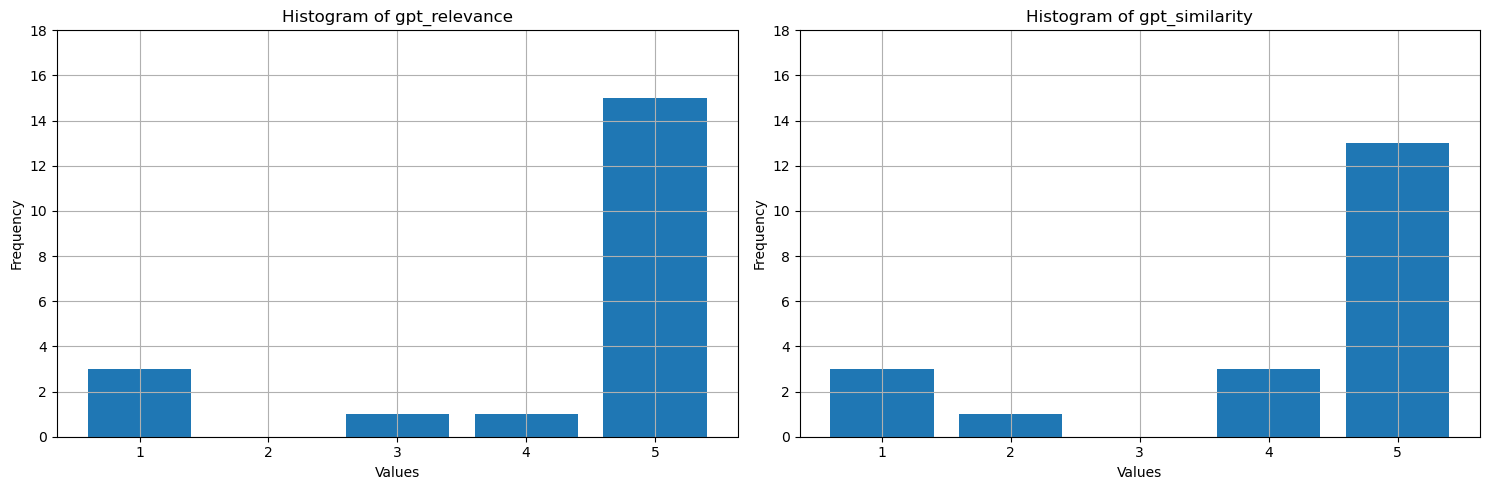
Cosa vengono visualizzati questi valori? Per renderli più facili da interpretare, traccia istogrammi di fondamento, pertinenza e somiglianza. Il LLM è più prolisso rispetto alle risposte veritiere umane, cosa che riduce la metrica di somiglianza; circa la metà delle risposte sono semanticamente corrette ma ricevono quattro stelle, considerate per lo più simili. La maggior parte dei valori per tutte e tre le metriche sono 4 o 5, il che suggerisce che le prestazioni RAG sono buone. Ci sono alcuni outlier, ad esempio per la domanda How many species of otter are there?, il modello ha generato There are 13 species of otter, che è corretto con alta rilevanza e similarità (5). Per qualche motivo, GPT lo ha considerato poco giustificato nel contesto dato e gli ha assegnato una stella. Negli altri tre casi con almeno una metrica assistita dall'intelligenza artificiale con una valutazione di una stella, il punteggio basso indica una risposta sbagliata. LLM a volte commette errori di valutazione, ma solitamente valuta correttamente.
# Convert Spark DataFrame to Pandas DataFrame
pandas_df = df.toPandas()

selected_columns = ['gpt_groundedness', 'gpt_relevance', 'gpt_similarity']
trimmed_df = pandas_df[selected_columns].astype(int)

# Define a function to plot histograms for the specified columns
def plot_histograms(dataframe, columns):
    # Set up the figure size and subplots
    plt.figure(figsize=(15, 5))
    for i, column in enumerate(columns, 1):
        plt.subplot(1, len(columns), i)
        # Filter the dataframe to only include rows with values 1, 2, 3, 4, 5
        filtered_df = dataframe[dataframe[column].isin([1, 2, 3, 4, 5])]
        filtered_df[column].hist(bins=range(1, 7), align='left', rwidth=0.8)
        plt.title(f'Histogram of {column}')
        plt.xlabel('Values')
        plt.ylabel('Frequency')
        plt.xticks(range(1, 6))
        plt.yticks(range(0, 20, 2))


# Call the function to plot histograms for the specified columns
plot_histograms(trimmed_df, selected_columns)

# Show the plots
plt.tight_layout()
plt.show()
Output della cella:StatementMeta(, 21cb8cd3-7742-4c1f-8339-265e2846df1d, 24, Finished, Available, Finished)
Come passaggio finale, salvare i risultati del benchmark in una tabella nel lakehouse. Questo passaggio è facoltativo ma altamente consigliato, che rende i risultati più utili. Quando si modifica un elemento nell'insieme RAG (ad esempio, modificare il prompt, aggiornare l'indice o usare un modello GPT diverso nel generatore di risposte), misura l'impatto, quantifica i miglioramenti e rileva le regressioni.
# create name of experiment that is easy to refer to
friendly_name_of_experiment = "rag_tutorial_experiment_1"

# Note the current date and time
time_of_experiment = current_timestamp()

# Generate a unique GUID for all rows
experiment_id = str(uuid.uuid4())

# Add two new columns to the Spark DataFrame
updated_df = df.withColumn("execution_time", time_of_experiment) \
                        .withColumn("experiment_id", lit(experiment_id)) \
                        .withColumn("experiment_friendly_name", lit(friendly_name_of_experiment))

# Store the updated DataFrame in the default lakehouse as a table named 'rag_experiment_runs'
table_name = "rag_experiment_run_demo1"
updated_df.write.format("parquet").mode("append").saveAsTable(table_name)
Output della cella:StatementMeta(, 21cb8cd3-7742-4c1f-8339-265e2846df1d, 28, Finished, Available, Finished)
Tornare ai risultati dell'esperimento in qualsiasi momento per esaminarli, confrontarli con i nuovi esperimenti e scegliere la configurazione più adatta per la produzione.
Riassunto
Usare le metriche assistita dall'intelligenza artificiale e la frequenza di recupero top-N per creare la soluzione di generazione di recupero aumentata (RAG).