Nota
L'accesso a questa pagina richiede l'autorizzazione. È possibile provare ad accedere o modificare le directory.
L'accesso a questa pagina richiede l'autorizzazione. È possibile provare a modificare le directory.
You can change the format in which a value is displayed in the Watch, Autos, and Locals windows by using format specifiers.
You can also use format specifiers in the Immediate window, the Command window, in tracepoints, and even in source windows. If you pause on an expression in those windows, the result appears in a DataTip. The DataTip display reflects the format specifier.
Note
When the Visual Studio native debugger changed to a new debugging engine, some new format specifiers were added and some old ones were removed. The older debugger is still used when you do interop (mixed native and managed) debugging with C++/CLI.
Set format specifiers
We'll use the following example code:
int main() {
    int my_var1 = 0x0065;
    int my_var2 = 0x0066;
    int my_var3 = 0x0067;
}
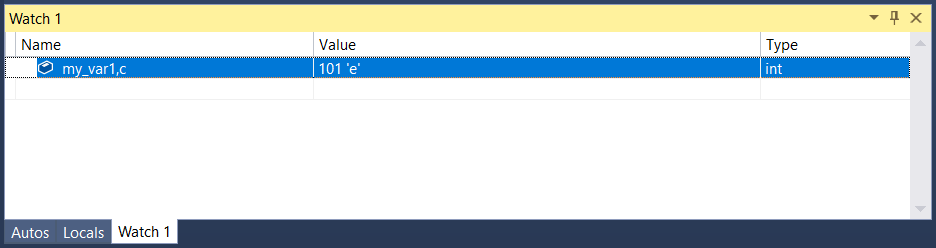
Add the my_var1 variable to the Watch window while debugging, Debug > Windows > Watch > Watch 1. Next, right-click the variable and select Hexadecimal Display. Now the Watch window shows the value 0x0065. To see this value expressed as a character rather than an integer, first right-click and deselect Hexadecimal Display. Then add the character format specifier , c in the Name column after the variable name. The Value column now shows 101 'e'.
Format specifiers
The following tables describe the format specifiers that you can use in Visual Studio. Specifiers in bold are only supported for the new debugger, and not for interop debugging with C++/CLI.
Note
When the hv format specifier is present, the debugger attempts to determine the length of the buffer and display that number of elements. Because it is not always possible for the debugger to find the exact buffer size of an array, you should use a size specifier (pBuffer,[bufferSize]) whenever possible. The hv format specifier is useful when the buffer size is not readily available.
Size specifiers for pointers as arrays
If you have a pointer to an object you want to view as an array, you can use an integer or an expression to specify the number of array elements.
| Specifier | Format | Original Watch Value | Value Displayed |
|---|---|---|---|
| n | Decimal or hexadecimal integer | pBuffer,[32] pBuffer,[0x20] |
Displays pBuffer as a 32 element array. |
| [exp] | A valid C++ expression that evaluates to an integer. | pBuffer,[bufferSize] | Displays pBuffer as an array of bufferSize elements. |
| expand(n) | A valid C++ expression that evaluates to an integer | pBuffer, expand(2) | Displays the third element of pBuffer |
Format specifiers for interop debugging with C++/CLI
Size specifier for pointers as arrays in interop debugging with C++/CLI
If you have a pointer to an object you want to view as an array, you can use an integer to specify the number of array elements.
| Specifier | Format | Expression | Value Displayed |
|---|---|---|---|
| n | Decimal integer | pBuffer[32] | Displays pBuffer as a 32-element array. |