Con Windows ML, alcuni provider di esecuzione (EP) vengono scaricati, installati e condivisi in modo dinamico a livello di sistema tramite le API di Windows ML ExecutionProviderCatalog e vengono aggiornati automaticamente. Per vedere quali EP sono disponibili, vedere Provider di esecuzione di Windows ML.
Questa pagina illustra come installare gli EP di Windows ML nel dispositivo di un utente usando il catalogo EP. Per l'approccio alternativo di raggruppare direttamente gli EP nella tua app, vedi Porta i tuoi EP. Per scegliere tra queste opzioni, vedere Windows ML EPs e bring-your-own.
Dopo l'installazione, è necessario registrare gli EP di Windows ML con ONNX Runtime prima di usarli.
Installare tutti gli EPS compatibili
Per lo sviluppo iniziale, risulta utile semplicemente chiamare EnsureAndRegisterCertifiedAsync(), che scaricherà e installerà tutti gli EP disponibili per il dispositivo dell'utente e quindi registra tutti gli EP con il runtime ONNX in una singola chiamata. Si noti che alla prima esecuzione questo metodo può richiedere più secondi o anche minuti a seconda della velocità di rete e degli EPS che devono essere scaricati.
// Get the default ExecutionProviderCatalog
var catalog = ExecutionProviderCatalog.GetDefault();

// Ensure execution providers compatible with device are present (downloads if necessary)
// and then registers all present execution providers with ONNX Runtime
await catalog.EnsureAndRegisterCertifiedAsync();
// Get the default ExecutionProviderCatalog
winrt::Microsoft::Windows::AI::MachineLearning::ExecutionProviderCatalog catalog =
    winrt::Microsoft::Windows::AI::MachineLearning::ExecutionProviderCatalog::GetDefault();

// Ensure execution providers compatible with device are present (downloads if necessary)
// and then registers all present execution providers with ONNX Runtime
catalog.EnsureAndRegisterCertifiedAsync().get();
Le API C non supportano una singola EnsureAndRegisterCertifiedAsync() chiamata. Seguire invece le istruzioni per scaricare e registrare un EP specifico.
# Please DO NOT use this API. It won't register EPs to the python ort env.
Trova tutti gli EPs compatibili
È possibile visualizzare gli EPS (inclusi gli EPS non installati) disponibili per il dispositivo dell'utente chiamando il FindAllProviders() metodo .
ExecutionProviderCatalog catalog = ExecutionProviderCatalog.GetDefault();

// Find all available EPs (including non-installed EPs)
ExecutionProvider[] providers = catalog.FindAllProviders();

foreach (var provider in providers)
{
    Console.WriteLine($"{provider.Name}: {provider.ReadyState}");
}
auto catalog = ExecutionProviderCatalog::GetDefault();

// Find all available EPs (including non-installed EPs)
auto providers = catalog.FindAllProviders();

for (auto const& provider : providers)
{
    std::wcout << provider.Name() << L": " << static_cast<int>(provider.ReadyState()) << std::endl;
}
#include <WinMLEpCatalog.h>

// Context structure to track enumeration state
struct EnumContext
{
    bool needsDownload;
};

// Callback to check if any providers need downloading
BOOL CALLBACK CheckDownloadNeededCallback(
    WinMLEpHandle ep,
    const WinMLEpInfo* info,
    void* context)
{
    if (info == nullptr) return TRUE; // Skip invalid entries
    EnumContext* ctx = static_cast<EnumContext*>(context);
    if (info->readyState == WinMLEpReadyState_NotPresent)
    {
        ctx->needsDownload = true;
        return FALSE; // Stop enumeration early
    }
    return TRUE; // Continue enumeration
}

void DiscoverProviders()
{
    WinMLEpCatalogHandle catalog = nullptr;
    HRESULT hr = WinMLEpCatalogCreate(&catalog);
    if (FAILED(hr)) return;

    EnumContext ctx = { false };

    // Check if any providers need to be downloaded
    WinMLEpCatalogEnumProviders(catalog, CheckDownloadNeededCallback, &ctx);

    if (ctx.needsDownload)
    {
        // There are new EPs available; decide how your app wants to handle that.
        // See "Install a specific EP" below for download and registration.
    }

    WinMLEpCatalogRelease(catalog);
}
# winml: winui3.microsoft.windows.ai.machinelearning
catalog = winml.ExecutionProviderCatalog.get_default()

# Find all available EPs (including non-installed EPs)
providers = catalog.find_all_providers()

for provider in providers:
    print(f"{provider.name}: {provider.ready_state}")
I provider di esecuzione restituiti variano in base al dispositivo dell'utente e ai provider di esecuzione disponibili. In un dispositivo Qualcomm compatibile senza provider di esecuzione attualmente installati, il codice precedente restituisce quanto segue...
QNNExecutionProvider: NotPresent
Ogni ExecutionProvider ha una proprietà ReadyState che indica lo stato corrente nel dispositivo. Comprendere questi stati consente di determinare quali azioni devono essere eseguite dall'app.
| ReadyState |
Definizione |
Passaggi successivi |
NotPresent |
L'EP non è installato nel dispositivo client. |
Chiamare EnsureReadyAsync() per scaricare e installare l'EP e aggiungerlo al grafico delle dipendenze di runtime dell'app. |
NotReady |
L'EP è installato nel dispositivo client, ma non è stato aggiunto al grafico delle dipendenze di runtime dell'app. |
Chiamare EnsureReadyAsync() per aggiungere l'EP al grafico delle dipendenze di runtime dell'app. |
Ready |
Il modulo EP viene installato nel dispositivo client ed è stato aggiunto al grafico delle dipendenze di runtime dell'applicazione. |
Chiamare TryRegister() per registrare l'EP con ONNX Runtime. |
Installare un EP specifico
Se è presente un executionProvider specifico che l'app vuole usare e il relativo ReadyState è NotPresent, è possibile scaricarlo e installarlo chiamando EnsureReadyAsync().
Si userà FindAllProviders() prima di tutto per ottenere tutti gli EPS compatibili e quindi è possibile chiamare EnsureReadyAsync() su un determinato ExecutionProvider per scaricare il provider di esecuzione specifico e chiamare TryRegister() per registrare il provider di esecuzione specifico.
// Download and install a NotPresent EP
var result = await provider.EnsureReadyAsync();

// Check that the download and install was successful
bool installed = result.Status == ExecutionProviderReadyResultState.Success;
Si userà FindAllProviders() prima di tutto per ottenere tutti gli EPS compatibili e quindi è possibile chiamare EnsureReadyAsync() su un determinato ExecutionProvider per scaricare il provider di esecuzione specifico e chiamare TryRegister() per registrare il provider di esecuzione specifico.
// Download and install a NotPresent EP
auto result = provider.EnsureReadyAsync().get();

// Check that the download and install was successful
bool installed = result.Status() == ExecutionProviderReadyResultState::Success;
Si utilizzerà il metodo WinMLEpCatalogFindProvider per richiedere un provider di esecuzione specifico. Successivamente, è possibile chiamare WinMLEpEnsureReady passando WinMLEpHandle per scaricare il provider di esecuzione specifico. Quindi, utilizzare WinMLEpGetLibraryPathSize e WinMLEpGetLibraryPath per ottenere il percorso del provider di esecuzione e registrarlo con ONNX Runtime utilizzando RegisterExecutionProviderLibrary.
#include <WinMLEpCatalog.h>
#include <onnxruntime_cxx_api.h>
#include <filesystem>
#include <string>

// Assumes an Ort::Env has already been created
// Ort::Env env(ORT_LOGGING_LEVEL_ERROR, "MyApp");

WinMLEpCatalogHandle catalog = nullptr;
HRESULT hr = WinMLEpCatalogCreate(&catalog);
if (FAILED(hr)) return;

// Find the QNN provider
WinMLEpHandle qnnProvider = nullptr;
hr = WinMLEpCatalogFindProvider(catalog, "QNN", nullptr, &qnnProvider);

if (SUCCEEDED(hr) && qnnProvider != nullptr)
{
    // Ensure it's ready (download if necessary)
    hr = WinMLEpEnsureReady(qnnProvider);

    if (SUCCEEDED(hr))
    {
        // Get the library path for registration
        size_t pathSize = 0;
        WinMLEpGetLibraryPathSize(qnnProvider, &pathSize);

        std::string libraryPathUtf8(pathSize, '\0');
        WinMLEpGetLibraryPath(qnnProvider, pathSize, libraryPathUtf8.data(), nullptr);

        // Register with ONNX Runtime
        std::filesystem::path libraryPath(libraryPathUtf8);
        env.RegisterExecutionProviderLibrary("QNN", libraryPath.wstring());
    }
}

WinMLEpCatalogRelease(catalog);
Si userà find_all_providers() prima di tutto per ottenere tutti gli EPS compatibili e quindi è possibile chiamare ensure_ready_async() su un determinato ExecutionProvider per scaricare il provider di esecuzione specifico e usare ONNX Runtime per register_execution_provider_library registrare il provider di esecuzione specifico.
# Download and install a NotPresent EP
result = provider.ensure_ready_async().get()

# Check that the download and install was successful
installed = result.status == winml.ExecutionProviderReadyResultState.SUCCESS
Installazione con stato di avanzamento
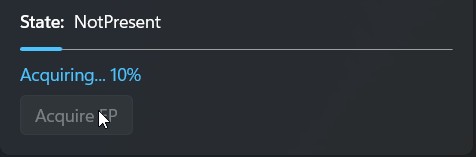
Le API per scaricare e installare gli EP includono callback che forniscono aggiornamenti sullo stato del progresso, in modo da poter visualizzare indicatori di avanzamento per mantenere gli utenti informati.
// Start the download and install of a NotPresent EP
var operation = provider.EnsureReadyAsync();

// Listen to progress callback
operation.Progress = (asyncInfo, progressInfo) =>
{
    // Dispatch to UI thread (varies based on UI platform)
    _dispatcherQueue.TryEnqueue(() =>
    {
        // progressInfo is out of 100, convert to 0-1 range
        double normalizedProgress = progressInfo / 100.0;

        // Display the progress to the user
        Progress = normalizedProgress;
    };
};

// Await for the download and install to complete
var result = await operation;

// Check that the download and install was successful
bool installed = result.Status == ExecutionProviderReadyResultState.Success;
// Start the download and install of a NotPresent EP
auto operation = provider.EnsureReadyAsync();

// Listen to progress callback
operation.Progress([this](auto const& asyncInfo, double progressInfo)
{
    // Dispatch to UI thread (varies based on UI platform)
    dispatcherQueue.TryEnqueue([this, progressInfo]()
    {
        // progressInfo is out of 100, convert to 0-1 range
        double normalizedProgress = progressInfo / 100.0;

        // Display the progress to the user
        Progress(normalizedProgress);
    });
});

// Await for the download and install to complete
auto result = operation.get();

// Check that the download and install was successful
bool installed = result.Status() == ExecutionProviderReadyResultState::Success;
#include <WinMLEpCatalog.h>
#include <WinMLAsync.h>
#include <iostream>
#include <format>

// Progress callback — called periodically during download
void CALLBACK OnProgress(WinMLAsyncBlock* async, double progress)
{
    // progress is out of 100, convert to 0-1 range
    double normalizedProgress = progress / 100.0;

    // Display the progress to the user
    std::cout << std::format("Progress: {:.0f}%\n", normalizedProgress * 100);
}

// Completion callback — called when the download finishes
void CALLBACK OnComplete(WinMLAsyncBlock* async)
{
    HRESULT hr = WinMLAsyncGetStatus(async, FALSE);
    if (SUCCEEDED(hr))
    {
        std::cout << "Download complete!\n";
    }
    else
    {
        std::cout << std::format("Download failed: 0x{:08X}\n", static_cast<uint32_t>(hr));
    }
}

// Start the async download with progress
WinMLAsyncBlock async = {};
async.callback = OnComplete;
async.progress = OnProgress;

HRESULT hr = WinMLEpEnsureReadyAsync(ep, &async);
if (SUCCEEDED(hr))
{
    // Wait for the async operation to complete
    WinMLAsyncGetStatus(&async, TRUE);
}

WinMLAsyncClose(&async);
# Start the download and install of a NotPresent EP
operation = provider.ensure_ready_async()

# Listen to progress callback
def on_progress(async_info, progress_info):
    # progress_info is out of 100, convert to 0-1 range
    normalized_progress = progress_info / 100.0

    # Display the progress to the user
    print(f"Progress: {normalized_progress:.0%}")

operation.progress = on_progress

# Await for the download and install to complete
result = operation.get()

# Check that the download and install was successful
installed = result.status == winml.ExecutionProviderReadyResultState.SUCCESS
Passaggi successivi
Dopo aver installato i provider di esecuzione, vedere Registrare gli EP di Windows ML per informazioni su come registrarli per l'utilizzo con ONNX Runtime.
Esempio di app di produzione
Per le applicazioni di produzione, di seguito è riportato un esempio di ciò che l'app potrebbe voler fare per offrire a se stessi e agli utenti il controllo su quando si verificano i download. È possibile verificare se i nuovi provider di esecuzione sono disponibili e scaricarli in modo condizionale prima della registrazione:
using Microsoft.Windows.AI.MachineLearning;

var catalog = ExecutionProviderCatalog.GetDefault();

// Filter to the EPs our app supports/uses
var providers = catalog.FindAllProviders().Where(p =>
    p.Name == "MIGraphXExecutionProvider" ||
    p.Name == "VitisAIExecutionProvider" ||
    p.Name == "OpenVINOExecutionProvider" ||
    p.Name == "QNNExecutionProvider" ||
    p.Name == "NvTensorRtRtxExecutionProvider"
);

if (providers.Any(p => p.ReadyState == ExecutionProviderReadyState.NotPresent))
{
    // Show UI to user asking if they want to download new execution providers
    bool userWantsToDownload = await ShowDownloadDialogAsync();

    if (userWantsToDownload)
    {
        // Download all EPs
        foreach (var p in providers)
        {
            if (p.ReadyState == ExecutionProviderReadyState.NotPresent)
            {
                // Ignore result handling here; production code could inspect status
                await p.EnsureReadyAsync();
            }
        }

        // And register all EPs
        await catalog.RegisterCertifiedAsync();
    }
    else
    {
        // Register only already-present EPs
        await catalog.RegisterCertifiedAsync();
    }
}
using namespace winrt::Microsoft::Windows::AI::MachineLearning;

auto catalog = ExecutionProviderCatalog::GetDefault();
auto allProviders = catalog.FindAllProviders();

// Filter to the EPs our app supports/uses
std::vector<ExecutionProvider> targetProviders;
for (auto const& p : allProviders)
{
    auto name = p.Name();
    if (name == L"VitisAIExecutionProvider" ||
        name == L"OpenVINOExecutionProvider" ||
        name == L"QNNExecutionProvider" ||
        name == L"NvTensorRtRtxExecutionProvider")
    {
        targetProviders.push_back(p);
    }
}

bool needsDownload = false;
for (auto const& p : targetProviders)
{
    if (p.ReadyState() == ExecutionProviderReadyState::NotPresent)
    {
        needsDownload = true;
        break;
    }
}

if (needsDownload)
{
    // Show UI to user or check application settings to confirm download
    bool userWantsToDownload = ShowDownloadDialog();
    if (userWantsToDownload)
    {
        // Download only the missing target providers
        for (auto const& p : targetProviders)
        {
            if (p.ReadyState() == ExecutionProviderReadyState::NotPresent)
            {
                // Ignore result handling here; production code could inspect status
                p.EnsureReadyAsync().get();
            }
        }
        // Register all (both previously present and newly downloaded) providers
        catalog.RegisterCertifiedAsync().get();
    }
    else
    {
        // User deferred download; register only already-present providers
        catalog.RegisterCertifiedAsync().get();
    }
}
else
{
    // All target EPs already present
    catalog.RegisterCertifiedAsync().get();
}
#include <WinMLEpCatalog.h>
#include <onnxruntime_cxx_api.h>
#include <filesystem>
#include <string>
#include <cstring>
// List of provider names our app supports
const char* targetProviderNames[] = {
"VitisAIExecutionProvider",
"OpenVINOExecutionProvider",
"QNNExecutionProvider",
"NvTensorRtRtxExecutionProvider"
};
const size_t targetProviderCount = sizeof(targetProviderNames) / sizeof(targetProviderNames[0]);
bool IsTargetProvider(const char* name)
{
for (size_t i = 0; i < targetProviderCount; i++)
{
if (strcmp(name, targetProviderNames[i]) == 0)
return true;
}
return false;
}
// Context for enumeration callbacks
struct ProductionContext
{
bool needsDownload;
bool userWantsToDownload;
Ort::Env* env;
};
// Check if any target providers need downloading
BOOL CALLBACK CheckTargetProvidersCallback(
WinMLEpHandle ep,
const WinMLEpInfo* info,
void* context)
{
if (info == nullptr || info->name == nullptr) return TRUE; // Skip invalid entries
ProductionContext* ctx = static_cast<ProductionContext*>(context);
if (IsTargetProvider(info->name) && info->readyState == WinMLEpReadyState_NotPresent)
{
ctx->needsDownload = true;
}
return TRUE; // Continue to check all providers
}
// Download missing and register ready target providers
BOOL CALLBACK ProcessTargetProvidersCallback(
WinMLEpHandle ep,
const WinMLEpInfo* info,
void* context)
{
if (info == nullptr || info->name == nullptr) return TRUE; // Skip invalid entries
ProductionContext* ctx = static_cast<ProductionContext*>(context);
if (!IsTargetProvider(info->name))
return TRUE; // Skip non-target providers
// Download if user agreed and provider is not present
if (ctx->userWantsToDownload && info->readyState == WinMLEpReadyState_NotPresent)
{
WinMLEpEnsureReady(ep);
}
// Re-check state and register if ready
WinMLEpReadyState currentState;
WinMLEpGetReadyState(ep, ¤tState);
if (currentState == WinMLEpReadyState_Ready)
{
// Get the library path
size_t pathSize = 0;
WinMLEpGetLibraryPathSize(ep, &pathSize);
std::string libraryPathUtf8(pathSize, '\0');
WinMLEpGetLibraryPath(ep, pathSize, libraryPathUtf8.data(), nullptr);
// Register with ONNX Runtime
std::filesystem::path libraryPath(libraryPathUtf8);
ctx->env->RegisterExecutionProviderLibrary(info->name, libraryPath.wstring());
}
return TRUE;
}
void ProductionAppExample(Ort::Env& env, bool userWantsToDownload)
{
WinMLEpCatalogHandle catalog = nullptr;
HRESULT hr = WinMLEpCatalogCreate(&catalog);
if (FAILED(hr)) return;
ProductionContext ctx = { false, userWantsToDownload, &env };
// First pass: check if any target providers need downloading
WinMLEpCatalogEnumProviders(catalog, CheckTargetProvidersCallback, &ctx);
if (ctx.needsDownload && !userWantsToDownload)
{
// TODO: Show UI to user asking if they want to download
// ctx.userWantsToDownload = ShowDownloadDialog();
}
// Second pass: download (if requested) and register target providers
WinMLEpCatalogEnumProviders(catalog, ProcessTargetProvidersCallback, &ctx);
WinMLEpCatalogRelease(catalog);
}
# remove the msvcp140.dll from the winrt-runtime package.
# So it does not cause issues with other libraries.
from pathlib import Path
from importlib import metadata
site_packages_path = Path(str(metadata.distribution('winrt-runtime').locate_file('')))
dll_path = site_packages_path / 'winrt' / 'msvcp140.dll'
if dll_path.exists():
    dll_path.unlink()

from winui3.microsoft.windows.applicationmodel.dynamicdependency.bootstrap import (
    InitializeOptions,
    initialize
)
import winui3.microsoft.windows.ai.machinelearning as winml
import onnxruntime as ort

with initialize(options=InitializeOptions.ON_NO_MATCH_SHOW_UI):
    catalog = winml.ExecutionProviderCatalog.get_default()
    # Filter EPs that the app supports
    providers = [provider for provider in catalog.find_all_providers() if provider.name in [
        'VitisAIExecutionProvider',
        'OpenVINOExecutionProvider',
        'QNNExecutionProvider',
        'NvTensorRtRtxExecutionProvider'
    ]]

    # Download and make ready missing EPs if the user wants to
    if any(provider.ready_state == winml.ExecutionProviderReadyState.NOT_PRESENT for provider in providers):
        # Ask the user if they want to download the missing packages
        if user_wants_to_download:
            for provider in [provider for provider in providers if provider.ready_state == winml.ExecutionProviderReadyState.NOT_PRESENT]:
                provider.ensure_ready_async().get()

    # Make ready the existing EPs
    for provider in [provider for provider in providers if provider.ready_state == winml.ExecutionProviderReadyState.NOT_READY]:
        provider.ensure_ready_async().get()

    # Register all ready EPs
    for provider in [provider for provider in providers if provider.ready_state == winml.ExecutionProviderReadyState.READY]:
        ort.register_execution_provider_library(provider.name, provider.library_path)
Vedere anche