Lingua
Nota
L'accesso a questa pagina richiede l'autorizzazione. È possibile provare ad accedere o modificare le directory.
L'accesso a questa pagina richiede l'autorizzazione. È possibile provare a modificare le directory.
Gli oggetti CompositionLight vengono usati insieme a SceneLightingEffect per simulare l'illuminazione dinamica e la riflettività.
Puoi applicare luci a Visuals e a UIElement XAML.
Applicazione di luci a UIElements XAML
Gli oggetti XamlLight vengono usati per applicare CompositionLights per illuminare dinamicamente i UIElements XAML. XamlLight fornisce metodi per la destinazione di UIElements o pennelli XAML, l'applicazione di luci agli alberi di UIElement e la gestione della durata delle risorse CompositionLight in base al fatto che siano attualmente in uso.
- Se si usa un Brush con un XamlLight, le parti di qualsiasi UIElement che utilizza tale Brush vengono illuminate dalla luce.
- Se si applica a un UIElement una XamlLight, l'intero UIElement e i suoi elementi figlio sono tutti illuminati dalla luce.
Creazione e uso di xamlLight
XamlLight è una classe di base che può essere usata per creare luci personalizzate.
In questo esempio viene illustrata la definizione di un XamlLight personalizzato che applica un riflettore multicolore agli UIElements e ai Pennelli di destinazione in WinUI.
public sealed class OrangeSpotLight : XamlLight
{
    // Register an attached property that lets you set a UIElement
    // or Brush as a target for this light type in markup.
    public static readonly DependencyProperty IsTargetProperty =
        DependencyProperty.RegisterAttached(
        "IsTarget",
        typeof(bool),
        typeof(OrangeSpotLight),
        new PropertyMetadata(null, OnIsTargetChanged)
    );

    public static void SetIsTarget(DependencyObject target, bool value)
    {
        target.SetValue(IsTargetProperty, value);
    }

    public static Boolean GetIsTarget(DependencyObject target)
    {
        return (bool)target.GetValue(IsTargetProperty);
    }

    // Handle attached property changed to automatically target and untarget UIElements and Brushes.
    private static void OnIsTargetChanged(DependencyObject obj, DependencyPropertyChangedEventArgs e)
    {
        var isAdding = (bool)e.NewValue;

        if (isAdding)
        {
            if (obj is UIElement)
            {
                XamlLight.AddTargetElement(GetIdStatic(), obj as UIElement);
            }
            else if (obj is Brush)
            {
                XamlLight.AddTargetBrush(GetIdStatic(), obj as Brush);
            }
        }
        else
        {
            if (obj is UIElement)
            {
                XamlLight.RemoveTargetElement(GetIdStatic(), obj as UIElement);
            }
            else if (obj is Brush)
            {
                XamlLight.RemoveTargetBrush(GetIdStatic(), obj as Brush);
            }
        }
    }

    protected override void OnConnected(UIElement newElement)
    {
        if (CompositionLight == null)
        {
            // OnConnected is called when the first target UIElement is shown on the screen.
            // This lets you delay creation of the composition object until it's actually needed.
            var spotLight = CompositionTarget.GetCompositorForCurrentThread().CreateSpotLight();
            spotLight.InnerConeColor = Colors.Orange;
            spotLight.OuterConeColor = Colors.Yellow;
            spotLight.InnerConeAngleInDegrees = 30;
            spotLight.OuterConeAngleInDegrees = 45;
            CompositionLight = spotLight;
        }
    }

    protected override void OnDisconnected(UIElement oldElement)
    {
        // OnDisconnected is called when there are no more target UIElements on the screen.
        // The CompositionLight should be disposed when no longer required.
        if (CompositionLight != null)
        {
            CompositionLight.Dispose();
            CompositionLight = null;
        }
    }

    protected override string GetId()
    {
        return GetIdStatic();
    }

    private static string GetIdStatic()
    {
        // This specifies the unique name of the light.
        // In most cases you should use the type's FullName.
        return typeof(OrangeSpotLight).FullName;
    }
}
// For the C++/WinRT code example below, you'll need to add a Midl File (.idl) file to your project.

// OrangeSpotLight.idl
namespace MyApp
{
    [default_interface]
    runtimeclass OrangeSpotLight : Microsoft.UI.Xaml.Media.XamlLight
    {
        OrangeSpotLight();
        static Microsoft.UI.Xaml.DependencyProperty IsTargetProperty{ get; };
        static Boolean GetIsTarget(Microsoft.UI.Xaml.DependencyObject target);
        static void SetIsTarget(Microsoft.UI.Xaml.DependencyObject target, Boolean value);
    }
}

// OrangeSpotLight.h
struct OrangeSpotLight : OrangeSpotLightT<OrangeSpotLight>
{
    OrangeSpotLight() = default;

    winrt::hstring GetId();

    static Microsoft::UI::Xaml::DependencyProperty IsTargetProperty() { return m_isTargetProperty; }

    static bool GetIsTarget(Microsoft::UI::Xaml::DependencyObject const& target)
    {
		return winrt::unbox_value<bool>(target.GetValue(m_isTargetProperty));
	}

    static void SetIsTarget(Microsoft::UI::Xaml::DependencyObject const& target, bool value)
    {
        target.SetValue(m_isTargetProperty, winrt::box_value(value));
    }

    void OnConnected(Microsoft::UI::Xaml::UIElement const& newElement);
    void OnDisconnected(Microsoft::UI::Xaml::UIElement const& oldElement);

    static void OnIsTargetChanged(Microsoft::UI::Xaml::DependencyObject const& d, Microsoft::UI::Xaml::DependencyPropertyChangedEventArgs const& e);

    inline static winrt::hstring GetIdStatic()
    {
        // This specifies the unique name of the light. In most cases you should use the type's full name.
        return winrt::xaml_typename<MyApp::OrangeSpotLight>().Name;
    }

private:
	static Microsoft::UI::Xaml::DependencyProperty m_isTargetProperty;
};

// OrangeSpotLight.cpp
Microsoft::UI::Xaml::DependencyProperty OrangeSpotLight::m_isTargetProperty =
    Microsoft::UI::Xaml::DependencyProperty::RegisterAttached(
        L"IsTarget",
        winrt::xaml_typename<bool>(),
        winrt::xaml_typename<MyApp::OrangeSpotLight>(),
        Microsoft::UI::Xaml::PropertyMetadata{ winrt::box_value(false), Microsoft::UI::Xaml::PropertyChangedCallback{ &OrangeSpotLight::OnIsTargetChanged } }
);

void OrangeSpotLight::OnConnected(Microsoft::UI::Xaml::UIElement const& /* newElement */)
{
    if (!CompositionLight())
    {
        // OnConnected is called when the first target UIElement is shown on the screen. This enables delaying composition object creation until it's actually necessary.
        auto spotLight{ Microsoft::UI::Xaml::Media::CompositionTarget::GetCompositorForCurrentThread().CreateSpotLight() };
        spotLight.InnerConeColor(Microsoft::UI::Colors::Orange());
        spotLight.OuterConeColor(Microsoft::UI::Colors::Yellow());
        spotLight.InnerConeAngleInDegrees(30);
        spotLight.OuterConeAngleInDegrees(45);
        CompositionLight(spotLight);
    }
}

void OrangeSpotLight::OnDisconnected(Microsoft::UI::Xaml::UIElement const& /* oldElement */)
{
    // OnDisconnected is called when there are no more target UIElements on the screen.
    // Dispose of composition resources when no longer in use.
    if (CompositionLight())
    {
        CompositionLight(nullptr);
    }
}

winrt::hstring OrangeSpotLight::GetId()
{
    return OrangeSpotLight::GetIdStatic();
}

void OrangeSpotLight::OnIsTargetChanged(Microsoft::UI::Xaml::DependencyObject const& d, Microsoft::UI::Xaml::DependencyPropertyChangedEventArgs const& e)
{
    auto uie{ d.try_as<Microsoft::UI::Xaml::UIElement>() };
    auto brush{ d.try_as<Microsoft::UI::Xaml::Media::Brush>() };

    auto isAdding = winrt::unbox_value<bool>(e.NewValue());
    if (isAdding)
    {

        if (uie)
        {
            Microsoft::UI::Xaml::Media::XamlLight::AddTargetElement(OrangeSpotLight::GetIdStatic(), uie);
        }
        else if (brush)
        {
            Microsoft::UI::Xaml::Media::XamlLight::AddTargetBrush(OrangeSpotLight::GetIdStatic(), brush);
        }
    }
    else
    {
        if (uie)
        {
            Microsoft::UI::Xaml::Media::XamlLight::RemoveTargetElement(OrangeSpotLight::GetIdStatic(), uie);
        }
        else if (brush)
        {
            Microsoft::UI::Xaml::Media::XamlLight::RemoveTargetBrush(OrangeSpotLight::GetIdStatic(), brush);
        }
    }
}

// MainPage.h
...
#include "OrangeSpotLight.h"
...
struct MainPage : MainPageT<MainPage>
{
    MainPage()
    {
        InitializeComponent();

		OrangeSpotLight::SetIsTarget(spotlitBrush(), true);
		OrangeSpotLight::SetIsTarget(spotlitUIElement(), true);
	}
...
};
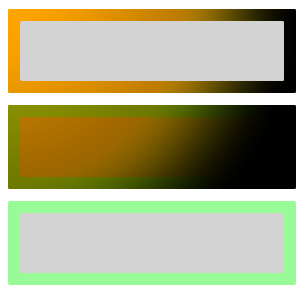
Puoi quindi applicare questa luce a qualsiasi UIElement XAML o Pennello per accenderli. In questo esempio vengono illustrati diversi utilizzi potenziali.
Importante
Per C++/WinRT, rimuovere le due occorrenze di local:OrangeSpotLight.IsTarget="True" dal markup seguente. Le proprietà associate sono già impostate nel code-behind.
<StackPanel Width="100">
    <StackPanel.Lights>
        <local:OrangeSpotLight/>
    </StackPanel.Lights>

    <!-- This border is lit by the OrangeSpotLight, but its content is not. -->
    <Border BorderThickness="4" Margin="2">
        <Border.BorderBrush>
            <SolidColorBrush x:Name="spotlitBrush" Color="White" local:OrangeSpotLight.IsTarget="True"/>
        </Border.BorderBrush>
        <Rectangle Fill="LightGray" Height="20"/>
    </Border>

    <!-- This border and its content are lit by the OrangeSpotLight. -->
    <Border x:Name="spotlitUIElement" BorderThickness="4" BorderBrush="PaleGreen" Margin="2"
            local:OrangeSpotLight.IsTarget="True">
        <Rectangle Fill="LightGray" Height="20"/>
    </Border>

    <!-- This border and its content are not lit by the OrangeSpotLight. -->
    <Border BorderThickness="4" BorderBrush="PaleGreen" Margin="2">
        <Rectangle Fill="LightGray" Height="20"/>
    </Border>
</StackPanel>
I risultati di questo codice XAML hanno un aspetto simile al seguente.
Importante
L'impostazione di UIElement.Lights nel markup come illustrato nell'esempio precedente è supportata solo per le app con una versione minima uguale a Windows 10 Creators Update o versioni successive. Per le app destinate alle versioni precedenti, le luci devono essere create nel code-behind.
Risorse aggiuntive
Collabora con noi su GitHub
L'origine di questo contenuto è disponibile in GitHub, in cui è anche possibile creare ed esaminare i problemi e le richieste pull. Per ulteriori informazioni, vedere la guida per i collaboratori.
