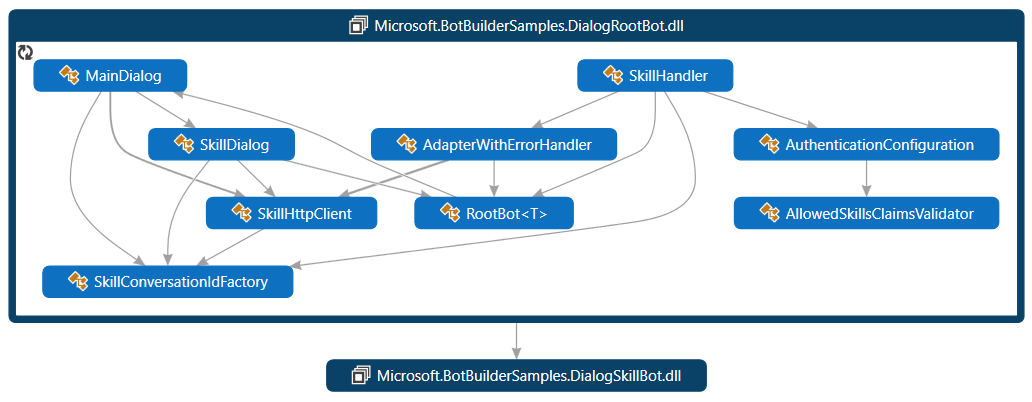
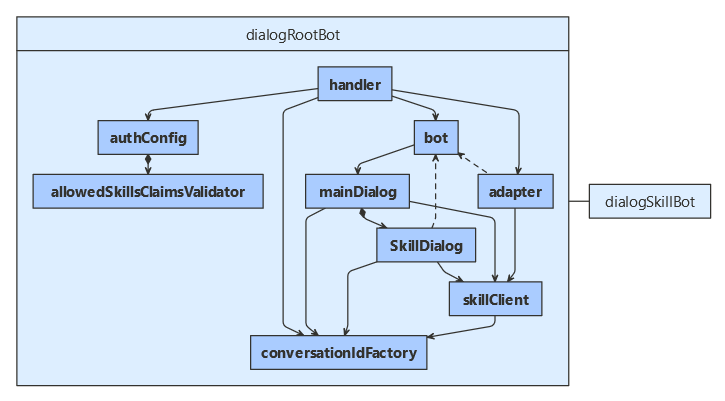
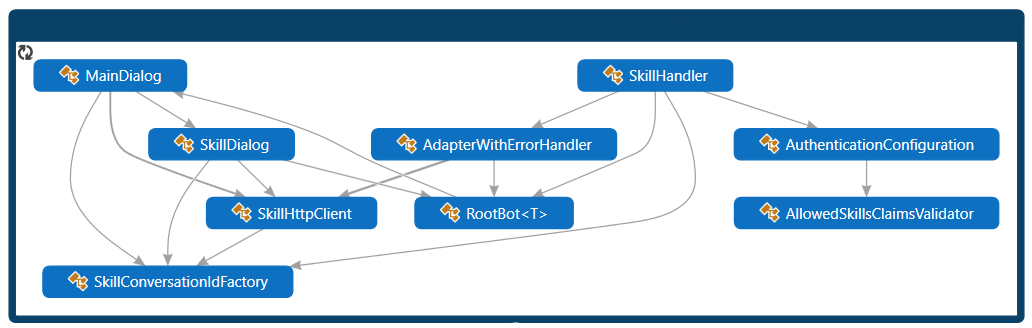
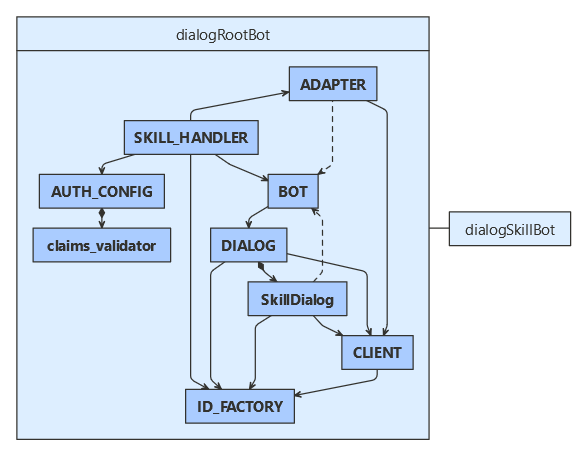
必要に応じて、ルート ボットのアプリ ID とパスワードを追加し、エコー スキル ボット用のアプリ ID を BotFrameworkSkills 配列に追加します。
MicrosoftAppId=
MicrosoftAppPassword=
server.port=3978
SkillhostEndpoint=http://localhost:3978/api/skills/
#replicate these three entries, incrementing the index value [0] for each successive Skill that is added.
BotFrameworkSkills[0].Id=DialogSkillBot
BotFrameworkSkills[0].AppId=
BotFrameworkSkills[0].SkillEndpoint=http://localhost:39783/api/messages
dialog-root-bot/config.py
必要に応じて、ルート ボットのアプリ ID とパスワードを追加し、エコー スキル ボット用のアプリ ID を追加します。
// Helper method that creates and adds SkillDialog instances for the configured skills.
private void AddSkillDialogs(ConversationState conversationState, SkillConversationIdFactoryBase conversationIdFactory, SkillsConfiguration skillsConfig, string botId)
{
    foreach (var skillInfo in _skillsConfig.Skills.Values)
    {
        // Create the dialog options.
        var skillDialogOptions = new SkillDialogOptions
        {
            BotId = botId,
            ConversationIdFactory = conversationIdFactory,
            SkillClient = _auth.CreateBotFrameworkClient(),
            SkillHostEndpoint = skillsConfig.SkillHostEndpoint,
            ConversationState = conversationState,
            Skill = skillInfo
        };

        // Add a SkillDialog for the selected skill.
        AddDialog(new SkillDialog(skillDialogOptions, skillInfo.Id));
    }
}
dialogRootBot/dialogs/mainDialog.js
MainDialog クラスは、ComponentDialog から派生したものです。
会話の状態に加えて、ダイアログにはルート ボットの ID と、スキル会話 ID ファクトリ、スキル HTTP クライアント、およびスキル構成オブジェクトへの参照が必要です。 このコードでは、ユーザー環境からボットの ID が取得されます。
// Render a prompt to select the skill to call.
private async Task<DialogTurnResult> SelectSkillStepAsync(WaterfallStepContext stepContext, CancellationToken cancellationToken)
{
    // Create the PromptOptions from the skill configuration which contain the list of configured skills.
    var messageText = stepContext.Options?.ToString() ?? "What skill would you like to call?";
    var repromptMessageText = "That was not a valid choice, please select a valid skill.";
    var options = new PromptOptions
    {
        Prompt = MessageFactory.Text(messageText, messageText, InputHints.ExpectingInput),
        RetryPrompt = MessageFactory.Text(repromptMessageText, repromptMessageText, InputHints.ExpectingInput),
        Choices = _skillsConfig.Skills.Select(skill => new Choice(skill.Value.Id)).ToList()
    };

    // Prompt the user to select a skill.
    return await stepContext.PromptAsync("SkillPrompt", options, cancellationToken);
}
dialogRootBot/dialogs/mainDialog.js
/**
 * Render a prompt to select the skill to call.
 */
async selectSkillStep(stepContext) {
    // Create the PromptOptions from the skill configuration which contains the list of configured skills.
    const messageText = stepContext.options && stepContext.options.text ? stepContext.options.text : 'What skill would you like to call?';
    const repromptMessageText = 'That was not a valid choice, please select a valid skill.';
    const options = {
        prompt: MessageFactory.text(messageText, messageText, InputHints.ExpectingInput),
        retryPrompt: MessageFactory.text(repromptMessageText, repromptMessageText, InputHints.ExpectingInput),
        choices: Object.keys(this.skillsConfig.skills)
    };

    // Prompt the user to select a skill.
    return await stepContext.prompt(SKILL_PROMPT, options);
}
DialogRootBot\Dialogs\MainDialog.java
public CompletableFuture<DialogTurnResult> selectSkillStep(WaterfallStepContext stepContext) {
    String messageText = "What skill would you like to call?";
    // Create the PromptOptions from the skill configuration which contain the list
    // of configured skills.
    if (stepContext.getOptions() != null) {
        messageText = stepContext.getOptions().toString();
    }
    String repromptMessageText = "That was not a valid choice, please select a valid skill.";
    PromptOptions options = new PromptOptions();
    options.setPrompt(MessageFactory.text(messageText, messageText, InputHints.EXPECTING_INPUT));
    options
        .setRetryPrompt(MessageFactory.text(repromptMessageText, repromptMessageText, InputHints.EXPECTING_INPUT));

    List<Choice> choicesList = new ArrayList<Choice>();
    for (BotFrameworkSkill skill : _skillsConfig.getSkills().values()) {
        choicesList.add(new Choice(skill.getId()));
    }
    options.setChoices(choicesList);

    // Prompt the user to select a skill.
    return stepContext.prompt("SkillPrompt", options);
}
dialog-root-bot/dialogs/main_dialog.py
async def _select_skill_action_step(
    self, step_context: WaterfallStepContext
) -> DialogTurnResult:
    """
    Render a prompt to select the action for the skill.
    """

    # Get the skill info based on the selected skill.
    selected_skill_id = step_context.result.value
    selected_skill = self._skills_config.SKILLS.get(selected_skill_id)

    # Remember the skill selected by the user.
    step_context.values[self._selected_skill_key] = selected_skill

    # Create the PromptOptions with the actions supported by the selected skill.
    message_text = (
        f"Select an action # to send to **{selected_skill.id}** or just type in a message "
        f"and it will be forwarded to the skill"
    )
    options = PromptOptions(
        prompt=MessageFactory.text(
            message_text, message_text, InputHints.expecting_input
        ),
        choices=self._get_skill_actions(selected_skill),
    )

    # Prompt the user to select a skill action.
    return await step_context.prompt("SkillActionPrompt", options)
// Render a prompt to select the action for the skill.
private async Task<DialogTurnResult> SelectSkillActionStepAsync(WaterfallStepContext stepContext, CancellationToken cancellationToken)
{
    // Get the skill info based on the selected skill.
    var selectedSkillId = ((FoundChoice)stepContext.Result).Value;
    var selectedSkill = _skillsConfig.Skills.FirstOrDefault(s => s.Value.Id == selectedSkillId).Value;

    // Remember the skill selected by the user.
    stepContext.Values[_selectedSkillKey] = selectedSkill;

    // Create the PromptOptions with the actions supported by the selected skill.
    var messageText = $"Select an action # to send to **{selectedSkill.Id}** or just type in a message and it will be forwarded to the skill";
    var options = new PromptOptions
    {
        Prompt = MessageFactory.Text(messageText, messageText, InputHints.ExpectingInput),
        Choices = GetSkillActions(selectedSkill)
    };

    // Prompt the user to select a skill action.
    return await stepContext.PromptAsync("SkillActionPrompt", options, cancellationToken);
}
// Helper method to create Choice elements for the actions supported by the skill.
private IList<Choice> GetSkillActions(BotFrameworkSkill skill)
{
    // Note: the bot would probably render this by reading the skill manifest.
    // We are just using hardcoded skill actions here for simplicity.

    var choices = new List<Choice>();
    switch (skill.Id)
    {
        case "DialogSkillBot":
            choices.Add(new Choice(SkillActionBookFlight));
            choices.Add(new Choice(SkillActionBookFlightWithInputParameters));
            choices.Add(new Choice(SkillActionGetWeather));
            break;
    }

    return choices;
}
// This validator defaults to Message if the user doesn't select an existing option.
private Task<bool> SkillActionPromptValidator(PromptValidatorContext<FoundChoice> promptContext, CancellationToken cancellationToken)
{
    if (!promptContext.Recognized.Succeeded)
    {
        // Assume the user wants to send a message if an item in the list is not selected.
        promptContext.Recognized.Value = new FoundChoice { Value = SkillActionMessage };
    }

    return Task.FromResult(true);
}
dialogRootBot/dialogs/mainDialog.js
/**
 * Render a prompt to select the action for the skill.
 */
async selectSkillActionStep(stepContext) {
    // Get the skill info based on the selected skill.
    const selectedSkillId = stepContext.result.value;
    const selectedSkill = this.skillsConfig.skills[selectedSkillId];

    // Remember the skill selected by the user.
    stepContext.values[this.selectedSkillKey] = selectedSkill;

    // Create the PromptOptions with the actions supported by the selected skill.
    const messageText = `Select an action # to send to **${ selectedSkill.id }** or just type in a message and it will be forwarded to the skill`;
    const options = {
        prompt: MessageFactory.text(messageText, messageText, InputHints.ExpectingInput),
        choices: this.getSkillActions(selectedSkill)
    };

    // Prompt the user to select a skill action.
    return await stepContext.prompt(SKILL_ACTION_PROMPT, options);
}

/**
 * Helper method to create Choice elements for the actions supported by the skill.
 */
getSkillActions(skill) {
    // Note: The bot would probably render this by reading the skill manifest.
    // We are just using hardcoded skill actions here for simplicity.
    const choices = [];
    switch (skill.id) {
        case 'DialogSkillBot':
            choices.push({ value: SKILL_ACTION_BOOK_FLIGHT });
            choices.push({ value: SKILL_ACTION_BOOK_FLIGHT_WITH_INPUT_PARAMETERS });
            choices.push({ value: SKILL_ACTION_GET_WEATHER });
            break;
    }

    return choices;
}

/**
 * This validator defaults to Message if the user doesn't select an existing option.
 */
async skillActionPromptValidator(promptContext) {
    if (!promptContext.recognized.succeeded) {
        promptContext.recognized.value = { value: SKILL_ACTION_MESSAGE };
    }

    return true;
}
DialogRootBot\Dialogs\MainDialog.java
public CompletableFuture<DialogTurnResult> selectSkillActionStep(WaterfallStepContext stepContext) {
    // Get the skill info super. on the selected skill.
    String selectedSkillId = ((FoundChoice) stepContext.getResult()).getValue();
    BotFrameworkSkill selectedSkill = _skillsConfig.getSkills()
        .values()
        .stream()
        .filter(x -> x.getId().equals(selectedSkillId))
        .findFirst()
        .get();

    // Remember the skill selected by the user.
    stepContext.getValues().put(_selectedSkillKey, selectedSkill);

    // Create the PromptOptions with the actions supported by the selected skill.
    String messageText = String.format(
        "Select an action # to send to **%n** or just type in a " + "message and it will be forwarded to the skill",
        selectedSkill.getId()
    );
    PromptOptions options = new PromptOptions();
    options.setPrompt(MessageFactory.text(messageText, messageText, InputHints.EXPECTING_INPUT));
    options.setChoices(getSkillActions(selectedSkill));

    // Prompt the user to select a skill action.
    return stepContext.prompt("SkillActionPrompt", options);
}
private List<Choice> getSkillActions(BotFrameworkSkill skill) {
    // Note: the bot would probably render this by reading the skill manifest.
    // We are just using hardcoded skill actions here for simplicity.

    List<Choice> choices = new ArrayList<Choice>();
    switch (skill.getId()) {
        case "DialogSkillBot":
            choices.add(new Choice(SkillActionBookFlight));
            choices.add(new Choice(SkillActionBookFlightWithInputParameters));
            choices.add(new Choice(SkillActionGetWeather));
            break;
    }

    return choices;
}
addDialog(new ChoicePrompt("SkillActionPrompt", (promptContext) -> {
    if (!promptContext.getRecognized().getSucceeded()) {
        // Assume the user wants to send a message if an item in the list is not
        // selected.
        FoundChoice foundChoice = new FoundChoice();
        foundChoice.setValue(SkillActionMessage);
        promptContext.getRecognized().setValue(foundChoice);
    }
    return CompletableFuture.completedFuture(true);
}, ""));
dialog-root-bot/dialogs/main_dialog.py
async def _select_skill_action_step(
    self, step_context: WaterfallStepContext
) -> DialogTurnResult:
    """
    Render a prompt to select the action for the skill.
    """

    # Get the skill info based on the selected skill.
    selected_skill_id = step_context.result.value
    selected_skill = self._skills_config.SKILLS.get(selected_skill_id)

    # Remember the skill selected by the user.
    step_context.values[self._selected_skill_key] = selected_skill

    # Create the PromptOptions with the actions supported by the selected skill.
    message_text = (
        f"Select an action # to send to **{selected_skill.id}** or just type in a message "
        f"and it will be forwarded to the skill"
    )
    options = PromptOptions(
        prompt=MessageFactory.text(
            message_text, message_text, InputHints.expecting_input
        ),
        choices=self._get_skill_actions(selected_skill),
    )

    # Prompt the user to select a skill action.
    return await step_context.prompt("SkillActionPrompt", options)

def _get_skill_actions(self, skill: BotFrameworkSkill) -> List[Choice]:
    """
    Helper method to create Choice elements for the actions supported by the skill.
    """

    # Note: the bot would probably render this by reading the skill manifest.
    # We are just using hardcoded skill actions here for simplicity.

    choices = []
    if skill.id == "DialogSkillBot":
        choices.append(Choice(self._skill_action_book_flight))
        choices.append(Choice(self._skill_action_book_flight_with_input_parameters))
        choices.append(Choice(self._skill_action_get_weather))

    return choices

async def _skill_action_prompt_validator(
    self, prompt_context: PromptValidatorContext
) -> bool:
    """
    This validator defaults to Message if the user doesn't select an existing option.
    """

    if not prompt_context.recognized.succeeded:
        # Assume the user wants to send a message if an item in the list is not selected.
        prompt_context.recognized.value = FoundChoice(
            self._skill_action_message, None, None
        )

    return True
// Starts the SkillDialog based on the user's selections.
private async Task<DialogTurnResult> CallSkillActionStepAsync(WaterfallStepContext stepContext, CancellationToken cancellationToken)
{
    var selectedSkill = (BotFrameworkSkill)stepContext.Values[_selectedSkillKey];

    Activity skillActivity;
    switch (selectedSkill.Id)
    {
        case "DialogSkillBot":
            skillActivity = CreateDialogSkillBotActivity(((FoundChoice)stepContext.Result).Value, stepContext.Context);
            break;

        // We can add other case statements here if we support more than one skill.
        default:
            throw new Exception($"Unknown target skill id: {selectedSkill.Id}.");
    }

    // Create the BeginSkillDialogOptions and assign the activity to send.
    var skillDialogArgs = new BeginSkillDialogOptions { Activity = skillActivity };

    // Save active skill in state.
    await _activeSkillProperty.SetAsync(stepContext.Context, selectedSkill, cancellationToken);

    // Start the skillDialog instance with the arguments.
    return await stepContext.BeginDialogAsync(selectedSkill.Id, skillDialogArgs, cancellationToken);
}
dialogRootBot/dialogs/mainDialog.js
/**
 * Starts the SkillDialog based on the user's selections.
 */
async callSkillActionStep(stepContext) {
    const selectedSkill = stepContext.values[this.selectedSkillKey];

    let skillActivity;
    switch (selectedSkill.id) {
        case 'DialogSkillBot':
            skillActivity = this.createDialogSkillBotActivity(stepContext.result.value, stepContext.context);
            break;
        // We can add other case statements here if we support more than one skill.
        default:
            throw new Error(`Unknown target skill id: ${ selectedSkill.id }`);
    }

    // Create the BeginSkillDialogOptions and assign the activity to send.
    const skillDialogArgs = { activity: skillActivity };

    // Save active skill in state.
    await this.activeSkillProperty.set(stepContext.context, selectedSkill);

    // Start the skillDialog instance with the arguments.
    return await stepContext.beginDialog(selectedSkill.id, skillDialogArgs);
}
DialogRootBot\Dialogs\MainDialog.java
public CompletableFuture<DialogTurnResult> callSkillActionStep(WaterfallStepContext stepContext) {
    BotFrameworkSkill selectedSkill = (BotFrameworkSkill) stepContext.getValues().get(_selectedSkillKey);

    Activity skillActivity;
    switch (selectedSkill.getId()) {
        case "DialogSkillBot":
            skillActivity = createDialogSkillBotActivity(
                ((FoundChoice) stepContext.getResult()).getValue(),
                stepContext.getContext()
            );
            break;

        // We can add other case statements here if we support more than one skill.
        default:
            throw new RuntimeException(String.format("Unknown target skill id: %s.", selectedSkill.getId()));
    }

    // Create the BeginSkillDialogOptions and assign the activity to send.
    BeginSkillDialogOptions skillDialogArgs = new BeginSkillDialogOptions();
    skillDialogArgs.setActivity(skillActivity);

    // Save active skill in state.
    activeSkillProperty.set(stepContext.getContext(), selectedSkill);

    // Start the skillDialog instance with the arguments.
    return stepContext.beginDialog(selectedSkill.getId(), skillDialogArgs);
}
dialog-root-bot/dialogs/main_dialog.py
async def _call_skill_action_step(
    self, step_context: WaterfallStepContext
) -> DialogTurnResult:
    """
    Starts the SkillDialog based on the user's selections.
    """

    selected_skill: BotFrameworkSkill = step_context.values[
        self._selected_skill_key
    ]

    if selected_skill.id == "DialogSkillBot":
        skill_activity = self._create_dialog_skill_bot_activity(
            step_context.result.value, step_context.context
        )
    else:
        raise Exception(f"Unknown target skill id: {selected_skill.id}.")

    # Create the BeginSkillDialogOptions and assign the activity to send.
    skill_dialog_args = BeginSkillDialogOptions(skill_activity)

    # Save active skill in state.
    await self._active_skill_property.set(step_context.context, selected_skill)

    # Start the skillDialog instance with the arguments.
    return await step_context.begin_dialog(selected_skill.id, skill_dialog_args)
// The SkillDialog has ended, render the results (if any) and restart MainDialog.
private async Task<DialogTurnResult> FinalStepAsync(WaterfallStepContext stepContext, CancellationToken cancellationToken)
{
    var activeSkill = await _activeSkillProperty.GetAsync(stepContext.Context, () => null, cancellationToken);

    // Check if the skill returned any results and display them.
    if (stepContext.Result != null)
    {
        var message = $"Skill \"{activeSkill.Id}\" invocation complete.";
        message += $" Result: {JsonConvert.SerializeObject(stepContext.Result)}";
        await stepContext.Context.SendActivityAsync(MessageFactory.Text(message, message, inputHint: InputHints.IgnoringInput), cancellationToken: cancellationToken);
    }

    // Clear the skill selected by the user.
    stepContext.Values[_selectedSkillKey] = null;

    // Clear active skill in state.
    await _activeSkillProperty.DeleteAsync(stepContext.Context, cancellationToken);

    // Restart the main dialog with a different message the second time around.
    return await stepContext.ReplaceDialogAsync(InitialDialogId, $"Done with \"{activeSkill.Id}\". \n\n What skill would you like to call?", cancellationToken);
}
dialogRootBot/dialogs/mainDialog.js
/**
 * The SkillDialog has ended, render the results (if any) and restart MainDialog.
 */
async finalStep(stepContext) {
    const activeSkill = await this.activeSkillProperty.get(stepContext.context, () => null);

    // Check if the skill returned any results and display them.
    if (stepContext.result != null) {
        let message = `Skill "${ activeSkill.id }" invocation complete.`;
        message += `\nResult: ${ JSON.stringify(stepContext.result, null, 2) }`;
        await stepContext.context.sendActivity(message, message, InputHints.IgnoringInput);
    }

    // Clear the skill selected by the user.
    stepContext.values[this.selectedSkillKey] = null;

    // Clear active skill in state.
    await this.activeSkillProperty.delete(stepContext.context);

    // Restart the main dialog with a different message the second time around.
    return await stepContext.replaceDialog(this.initialDialogId, { text: `Done with "${ activeSkill.id }". \n\n What skill would you like to call?` });
}
DialogRootBot\Dialogs\MainDialog.java
public CompletableFuture<DialogTurnResult> finalStep(WaterfallStepContext stepContext) {
    return activeSkillProperty.get(stepContext.getContext(), () -> null).thenCompose(activeSkill -> {
        if (stepContext.getResult() != null) {
            String jsonResult = "";
            try {
                jsonResult =
                    new JacksonAdapter().serialize(stepContext.getResult()).replace("{", "").replace("}", "");
            } catch (IOException e) {
                e.printStackTrace();
            }
            String message =
                String.format("Skill \"%s\" invocation complete. Result: %s", activeSkill.getId(), jsonResult);
            stepContext.getContext().sendActivity(MessageFactory.text(message, message, InputHints.IGNORING_INPUT));
        }

        // Clear the skill selected by the user.
        stepContext.getValues().put(_selectedSkillKey, null);

        // Clear active skill in state.
        activeSkillProperty.delete(stepContext.getContext());

        // Restart the main dialog with a different message the second time around.
        return stepContext.replaceDialog(
            getInitialDialogId(),
            String.format("Done with \"%s\". \n\n What skill would you like to call?", activeSkill.getId())
        );
    });
    // Check if the skill returned any results and display them.
}
dialog-root-bot/dialogs/main_dialog.py
async def _final_step(self, step_context: WaterfallStepContext) -> DialogTurnResult:
    """
    The SkillDialog has ended, render the results (if any) and restart MainDialog.
    """

    active_skill = await self._active_skill_property.get(step_context.context)

    if step_context.result:
        message = f"Skill {active_skill.id} invocation complete."
        message += f" Result: {step_context.result}"
        await step_context.context.send_activity(
            MessageFactory.text(message, input_hint=InputHints.ignoring_input)
        )

    # Clear the skill selected by the user.
    step_context.values[self._selected_skill_key] = None

    # Clear active skill in state.
    await self._active_skill_property.delete(step_context.context)

    # Restart the main dialog with a different message the second time around
    return await step_context.replace_dialog(
        self.initial_dialog_id,
        f'Done with "{active_skill.id}". \n\n What skill would you like to call?',
    )
protected override async Task<DialogTurnResult> OnContinueDialogAsync(DialogContext innerDc, CancellationToken cancellationToken = default)
{
    // This is an example on how to cancel a SkillDialog that is currently in progress from the parent bot.
    var activeSkill = await _activeSkillProperty.GetAsync(innerDc.Context, () => null, cancellationToken);
    var activity = innerDc.Context.Activity;
    if (activeSkill != null && activity.Type == ActivityTypes.Message && activity.Text.Equals("abort", StringComparison.OrdinalIgnoreCase))
    {
        // Cancel all dialogs when the user says abort.
        // The SkillDialog automatically sends an EndOfConversation message to the skill to let the
        // skill know that it needs to end its current dialogs, too.
        await innerDc.CancelAllDialogsAsync(cancellationToken);
        return await innerDc.ReplaceDialogAsync(InitialDialogId, "Canceled! \n\n What skill would you like to call?", cancellationToken);
    }

    return await base.OnContinueDialogAsync(innerDc, cancellationToken);
}
dialogRootBot/dialogs/mainDialog.js
async onContinueDialog(innerDc) {
    const activeSkill = await this.activeSkillProperty.get(innerDc.context, () => null);
    const activity = innerDc.context.activity;
    if (activeSkill != null && activity.type === ActivityTypes.Message && activity.text.toLowerCase() === 'abort') {
        // Cancel all dialogs when the user says abort.
        // The SkillDialog automatically sends an EndOfConversation message to the skill to let the
        // skill know that it needs to end its current dialogs, too.
        await innerDc.cancelAllDialogs();
        return await innerDc.replaceDialog(this.initialDialogId, { text: 'Canceled! \n\n What skill would you like to call?' });
    }

    return await super.onContinueDialog(innerDc);
}
DialogRootBot\Dialogs\MainDialog.java
// Cancel all dialogs when the user says abort.
// The SkillDialog automatically sends an EndOfConversation message to the skill
// to let the
// skill know that it needs to end its current dialogs, too.
return innerDc.cancelAllDialogs()
    .thenCompose(
        result -> innerDc
            .replaceDialog(getInitialDialogId(), "Canceled! \n\n What skill would you like to call?")
    );
dialog-root-bot/dialogs/main_dialog.py
async def on_continue_dialog(self, inner_dc: DialogContext) -> DialogTurnResult:
    # This is an example on how to cancel a SkillDialog that is currently in progress from the parent bot.
    active_skill = await self._active_skill_property.get(inner_dc.context)
    activity = inner_dc.context.activity

    if (
        active_skill
        and activity.type == ActivityTypes.message
        and "abort" in activity.text
    ):
        # Cancel all dialogs when the user says abort.
        # The SkillDialog automatically sends an EndOfConversation message to the skill to let the
        # skill know that it needs to end its current dialogs, too.
        await inner_dc.cancel_all_dialogs()
        return await inner_dc.replace_dialog(self.initial_dialog_id)

    return await super().on_continue_dialog(inner_dc)
public override async Task OnTurnAsync(ITurnContext turnContext, CancellationToken cancellationToken = default)
{
    if (turnContext.Activity.Type != ActivityTypes.ConversationUpdate)
    {
        // Run the Dialog with the Activity.
        await _mainDialog.RunAsync(turnContext, _conversationState.CreateProperty<DialogState>("DialogState"), cancellationToken);
    }
    else
    {
        // Let the base class handle the activity.
        await base.OnTurnAsync(turnContext, cancellationToken);
    }

    // Save any state changes that might have occurred during the turn.
    await _conversationState.SaveChangesAsync(turnContext, false, cancellationToken);
}
dialogRootBot/bots/rootBot.js
class RootBot extends ActivityHandler {
constructor(conversationState, dialog) {
    super();
    if (!conversationState) throw new Error('[RootBot]: Missing parameter. conversationState is required');
    if (!dialog) throw new Error('[RootBot]: Missing parameter. dialog is required');

    this.conversationState = conversationState;
    this.dialog = dialog;

    this.onTurn(async (turnContext, next) => {
        if (turnContext.activity.type !== ActivityTypes.ConversationUpdate) {
            // Run the Dialog with the activity.
            await runDialog(this.dialog, turnContext, this.conversationState.createProperty('DialogState'));
        }

        await next();
    });
/**
 * Override the ActivityHandler.run() method to save state changes after the bot logic completes.
 */
async run(context) {
    await super.run(context);

    // Save any state changes. The load happened during the execution of the Dialog.
    await this.conversationState.saveChanges(context, false);
}
DialogRootBot\Bots\RootBot.java
public class RootBot<T extends Dialog> extends ActivityHandler {
public RootBot(ConversationState conversationState, T mainDialog) {
    this.conversationState = conversationState;
    this.mainDialog = mainDialog;
}
@Override
public CompletableFuture<Void> onTurn(TurnContext turnContext) {
    return handleTurn(turnContext).thenCompose(result -> conversationState.saveChanges(turnContext, false));
}

private CompletableFuture<Void> handleTurn(TurnContext turnContext) {
    if (!turnContext.getActivity().getType().equals(ActivityTypes.CONVERSATION_UPDATE)) {
        // Run the Dialog with the Activity.
        return Dialog.run(mainDialog, turnContext, conversationState.createProperty("DialogState"));
    } else {
        // Let the super.class handle the activity.
        return super.onTurn(turnContext);
    }
}
dialog-root-bot/bots/root_bot.py
class RootBot(ActivityHandler):
    def __init__(
        self, conversation_state: ConversationState, main_dialog: Dialog,
    ):
        self._conversation_state = conversation_state
        self._main_dialog = main_dialog

    async def on_turn(self, turn_context: TurnContext):
        if turn_context.activity.type != ActivityTypes.conversation_update:
            # Run the Dialog with the Activity.
            await DialogExtensions.run_dialog(
                self._main_dialog,
                turn_context,
                self._conversation_state.create_property("DialogState"),
            )
        else:
            # Let the base class handle the activity.
            await super().on_turn(turn_context)

        # Save any state changes that might have occurred during the turn.
        await self._conversation_state.save_changes(turn_context)