그룹 채팅 오케스트레이션은 화자 선택 및 대화 흐름을 결정하는 오케스트레이터가 조정하는 여러 에이전트 간의 공동 대화를 모델로 합니다. 이 패턴은 반복적인 구체화, 공동 작업 문제 해결 또는 다중 관점 분석이 필요한 시나리오에 적합합니다.
내부적으로, 그룹 채팅 오케스트레이션은 중앙에 오케스트레이터가 있는 별 형 토폴로지에서 에이전트를 조립합니다. 오케스트레이터는 라운드 로빈, 프롬프트 기반 선택 또는 대화 컨텍스트를 기반으로 하는 사용자 지정 논리와 같이 다음에 말할 에이전트를 선택하기 위한 다양한 전략을 구현하여 다중 에이전트 협업을 위한 유연하고 강력한 패턴을 만들 수 있습니다.
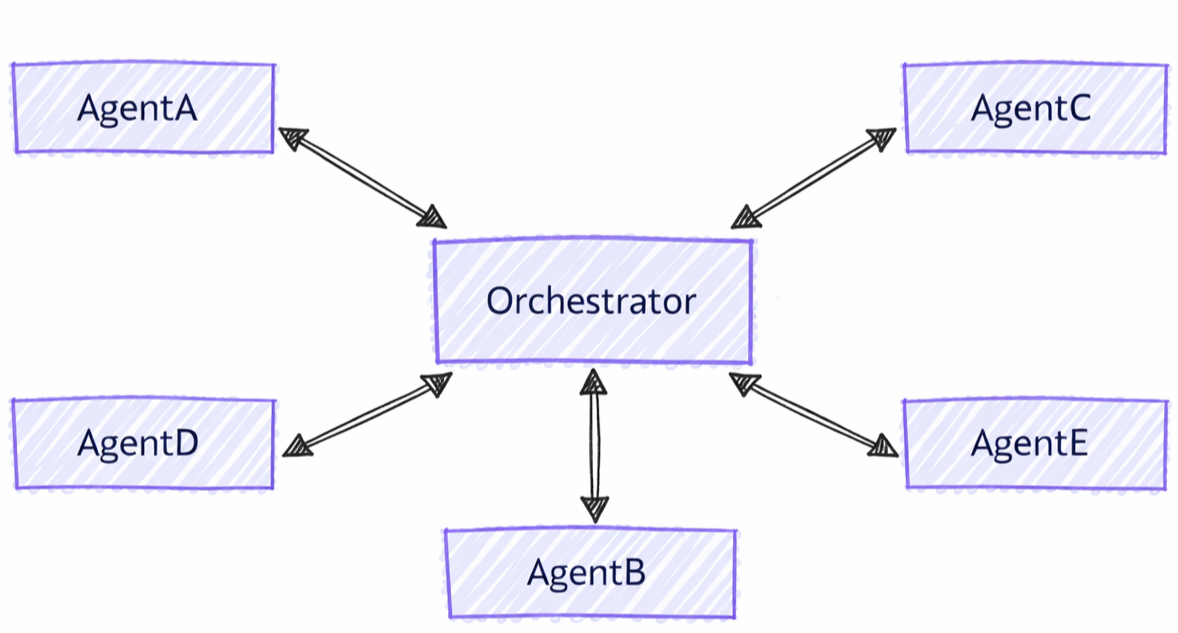
그룹 채팅과 기타 패턴의 차이점
그룹 채팅 오케스트레이션에는 다른 다중 에이전트 패턴에 비해 고유한 특성이 있습니다.
- 중앙 집중식 조정: 에이전트가 직접 제어를 전송하는 핸드오프 패턴과 달리 그룹 채팅은 오케스트레이터를 사용하여 다음에 말하는 사람을 조정합니다.
- 반복 구체화: 에이전트는 여러 번의 라운드에 걸쳐 서로의 응답을 검토하고 발전시킬 수 있습니다.
- 유연한 발표자 선택: 오케스트레이터는 다양한 전략(라운드 로빈, 프롬프트 기반 사용자 지정 논리)을 사용하여 스피커를 선택할 수 있습니다.
- 공유 컨텍스트: 모든 에이전트가 전체 대화 기록을 확인하여 공동 작업을 구체화할 수 있습니다.
학습 내용
- 그룹 공동 작업을 위한 특수 에이전트를 만드는 방법
- 화자 선택 전략을 구성하는 방법
- 반복 에이전트 구체화를 사용하여 워크플로를 빌드하는 방법
- 사용자 지정 오케스트레이터를 사용하여 대화 흐름을 사용자 지정하는 방법
Azure OpenAI 클라이언트 설정
using System;
using System.Collections.Generic;
using System.Threading.Tasks;
using Azure.AI.Projects;
using Azure.Identity;
using Microsoft.Agents.AI.Workflows;
using Microsoft.Extensions.AI;
using Microsoft.Agents.AI;

// Set up the Azure OpenAI client
var endpoint = Environment.GetEnvironmentVariable("AZURE_OPENAI_ENDPOINT") ??
    throw new InvalidOperationException("AZURE_OPENAI_ENDPOINT is not set.");
var deploymentName = Environment.GetEnvironmentVariable("AZURE_OPENAI_DEPLOYMENT_NAME") ?? "gpt-4o-mini";
var client = new AIProjectClient(new Uri(endpoint), new DefaultAzureCredential())
    .GetProjectOpenAIClient()
    .GetProjectResponsesClient()
    .AsIChatClient(deploymentName);
Warning
DefaultAzureCredential 은 개발에 편리하지만 프로덕션 환경에서 신중하게 고려해야 합니다. 프로덕션 환경에서는 특정 자격 증명(예: ManagedIdentityCredential)을 사용하여 대기 시간 문제, 의도하지 않은 자격 증명 검색 및 대체 메커니즘의 잠재적인 보안 위험을 방지하는 것이 좋습니다.
에이전트 설정
그룹 대화에서 다양한 역할에 대한 특수 에이전트를 만듭니다.
// Create a copywriter agent
ChatClientAgent writer = new(client,
    "You are a creative copywriter. Generate catchy slogans and marketing copy. Be concise and impactful.",
    "CopyWriter",
    "A creative copywriter agent");

// Create a reviewer agent
ChatClientAgent reviewer = new(client,
    "You are a marketing reviewer. Evaluate slogans for clarity, impact, and brand alignment. " +
    "Provide constructive feedback or approval.",
    "Reviewer",
    "A marketing review agent");
Round-Robin Orchestrator를 사용하여 그룹 채팅 구성
다음을 사용하여 그룹 채팅 워크플로를 구축합니다: AgentWorkflowBuilder.
// Build group chat with round-robin speaker selection
// The manager factory receives the list of agents and returns a configured manager
var workflow = AgentWorkflowBuilder
    .CreateGroupChatBuilderWith(agents =>
        new RoundRobinGroupChatManager(agents)
        {
            MaximumIterationCount = 5  // Maximum number of turns
        })
    .AddParticipants(writer, reviewer)
    .Build();
그룹 채팅 워크플로 실행
워크플로를 실행하고 반복 대화를 관찰합니다.
// Start the group chat
var messages = new List<ChatMessage> {
    new(ChatRole.User, "Create a slogan for an eco-friendly electric vehicle.")
};

await using StreamingRun run = await InProcessExecution.RunStreamingAsync(workflow, messages);
await run.TrySendMessageAsync(new TurnToken(emitEvents: true));

await foreach (WorkflowEvent evt in run.WatchStreamAsync().ConfigureAwait(false))
{
    if (evt is AgentResponseUpdateEvent update)
    {
        // Process streaming agent responses
        AgentResponse response = update.AsResponse();
        foreach (ChatMessage message in response.Messages)
        {
            Console.WriteLine($"[{update.ExecutorId}]: {message.Text}");
        }
    }
    else if (evt is WorkflowOutputEvent output)
    {
        // Workflow completed
        var conversationHistory = output.As<List<ChatMessage>>();
        Console.WriteLine("\n=== Final Conversation ===");
        foreach (var message in conversationHistory)
        {
            Console.WriteLine($"{message.AuthorName}: {message.Text}");
        }
        break;
    }
}
샘플 상호 작용
[CopyWriter]: "Green Dreams, Zero Emissions" - Drive the future with style and sustainability.

[Reviewer]: The slogan is good, but "Green Dreams" might be a bit abstract. Consider something
more direct like "Pure Power, Zero Impact" to emphasize both performance and environmental benefit.

[CopyWriter]: "Pure Power, Zero Impact" - Experience electric excellence without compromise.

[Reviewer]: Excellent! This slogan is clear, impactful, and directly communicates the key benefits.
The tagline reinforces the message perfectly. Approved for use.

[CopyWriter]: Thank you! The final slogan is: "Pure Power, Zero Impact" - Experience electric
excellence without compromise.
채팅 클라이언트 설정
import os

from agent_framework.foundry import FoundryChatClient
from azure.identity import AzureCliCredential

# Initialize the Azure OpenAI client
client = FoundryChatClient(
    project_endpoint=os.environ["FOUNDRY_PROJECT_ENDPOINT"],
    model=os.environ["FOUNDRY_MODEL"],
    credential=AzureCliCredential(),
)
에이전트 설정
고유한 역할을 사용하여 특수 에이전트를 만듭니다.
from agent_framework import Agent

# Create a researcher agent
researcher = Agent(
    client=client,
    name="Researcher",
    description="Collects relevant background information.",
    instructions="Gather concise facts that help answer the question. Be brief and factual.",
)

# Create a writer agent
writer = Agent(
    client=client,
    name="Writer",
    description="Synthesizes polished answers using gathered information.",
    instructions="Compose clear, structured answers using any notes provided. Be comprehensive.",
)
단순 선택기를 사용하여 그룹 채팅 구성
사용자 지정 화자 선택 논리를 사용하여 그룹 채팅을 빌드합니다.
from agent_framework.orchestrations import GroupChatBuilder, GroupChatState

def round_robin_selector(state: GroupChatState) -> str:
    """A round-robin selector function that picks the next speaker based on the current round index."""

    participant_names = list(state.participants.keys())
    return participant_names[state.current_round % len(participant_names)]


# Build the group chat workflow
workflow = GroupChatBuilder(
    participants=[researcher, writer],
    termination_condition=lambda conversation: len(conversation) >= 4,
    intermediate_output_from=[researcher, writer],
    selection_func=round_robin_selector,
).build()
Agent-Based Orchestrator를 사용하여 그룹 채팅 구성
또는 지능형 스피커 선택에 에이전트 기반 오케스트레이터를 사용합니다. 오케스트레이터는 도구, 컨텍스트 및 관측 가능성에 대한 전체 액세스 권한을 가진 Agent 입니다.
# Create orchestrator agent for speaker selection
orchestrator_agent = Agent(
    name="Orchestrator",
    description="Coordinates multi-agent collaboration by selecting speakers",
    instructions="""
You coordinate a team conversation to solve the user's task.

Guidelines:
- Start with Researcher to gather information
- Then have Writer synthesize the final answer
- Only finish after both have contributed meaningfully
""",
    client=client,
)

# Build group chat with agent-based orchestrator
workflow = GroupChatBuilder(
    participants=[researcher, writer],
    # Set a hard termination condition: stop after 4 assistant messages
    # The agent orchestrator will intelligently decide when to end before this limit but just in case
    termination_condition=lambda messages: sum(1 for msg in messages if msg.role == "assistant") >= 4,
    orchestrator_agent=orchestrator_agent,
    intermediate_output_from=[researcher, writer],
).build()
그룹 채팅 워크플로 실행
워크플로를 실행하고 스트리밍 참가자 업데이트를 처리합니다. 비스트리밍 터미널 출력은 AgentResponse입니다. 스트리밍 터미널 출력은 AgentResponseUpdate 청크로 출력됩니다.
from agent_framework import AgentResponseUpdate, Message

task = "What are the key benefits of async/await in Python?"

print(f"Task: {task}\n")
print("=" * 80)

last_author: str | None = None
# Run the workflow with streaming enabled
stream = workflow.run(task, stream=True)
async for event in stream:
    if event.type in ("intermediate", "output") and isinstance(event.data, AgentResponseUpdate):
        # Print streaming agent updates
        author = event.data.author_name
        if author != last_author:
            if last_author is not None:
                print()
            print(f"[{author}]:", end=" ", flush=True)
            last_author = author
        print(event.data.text, end="", flush=True)
result = await stream.get_final_response()
if outputs := result.get_outputs():
    print("\n\n" + "=" * 80)
    print("Final Response:")
    print(outputs[-1])

print("\nWorkflow completed.")
샘플 상호 작용
Task: What are the key benefits of async/await in Python?

================================================================================

[Researcher]: Async/await in Python provides non-blocking I/O operations, enabling
concurrent execution without threading overhead. Key benefits include improved
performance for I/O-bound tasks, better resource utilization, and simplified
concurrent code structure using native coroutines.

[Writer]: The key benefits of async/await in Python are:

1. **Non-blocking Operations**: Allows I/O operations to run concurrently without
   blocking the main thread, significantly improving performance for network
   requests, file I/O, and database queries.

2. **Resource Efficiency**: Avoids the overhead of thread creation and context
   switching, making it more memory-efficient than traditional threading.

3. **Simplified Concurrency**: Provides a clean, synchronous-looking syntax for
   asynchronous code, making concurrent programs easier to write and maintain.

4. **Scalability**: Enables handling thousands of concurrent connections with
   minimal resource consumption, ideal for high-performance web servers and APIs.

--------------------------------------------------------------------------------

Workflow completed.
Foundry 구성 설정
endpoint := os.Getenv("FOUNDRY_PROJECT_ENDPOINT")
model := cmp.Or(os.Getenv("FOUNDRY_MODEL"), "gpt-4o-mini")

token, err := azidentity.NewDefaultAzureCredential(nil)
if err != nil {
    return err
}
Warning
azidentity.NewDefaultAzureCredential 은 개발에 편리하지만 프로덕션 환경에서 신중하게 고려해야 합니다. 프로덕션 환경에서는 대기 시간 문제, 의도하지 않은 자격 증명 검색 및 대체 메커니즘의 잠재적인 보안 위험을 방지하기 위해 특정 자격 증명(예: azidentity.NewManagedIdentityCredential)을 사용하는 것이 좋습니다.
에이전트 설정
대화에서 고유한 역할을 가진 특수 에이전트를 만듭니다.
copywriter := foundryprovider.NewAgent(
    endpoint,
    token,
    foundryprovider.ModelDeployment(model),
    foundryprovider.AgentConfig{
        Instructions: "You are a creative copywriter. Generate catchy slogans and marketing copy. Be concise and impactful.",
        Config:      agent.Config{Name: "CopyWriter"},
    },
)

reviewer := foundryprovider.NewAgent(
    endpoint,
    token,
    foundryprovider.ModelDeployment(model),
    foundryprovider.AgentConfig{
        Instructions: "You are a marketing reviewer. Evaluate slogans for clarity, impact, and brand alignment. Provide constructive feedback or approval.",
        Config:      agent.Config{Name: "Reviewer"},
    },
)
Round-Robin Manager를 사용하여 그룹 채팅 구성
를 사용하여 그룹 채팅 워크플로를 빌드합니다 agentworkflow.NewGroupChatWorkflowBuilder. 빌더는 관리자 팩터리와 참여 에이전트를 사용합니다.
NewRoundRobinGroupChatManager 는 각 에이전트를 차례로 선택하고 구성된 최대 참가자 턴 수 후에 중지합니다.
managerFactory := func(agents []*agent.Agent) *agentworkflow.GroupChatManager {
    return agentworkflow.NewRoundRobinGroupChatManager(
        agents,
        agentworkflow.RoundRobinGroupChatOptions{MaximumIterationCount: 5},
    )
}

wf, err := agentworkflow.NewGroupChatWorkflowBuilder(managerFactory, copywriter, reviewer).
    WithName("Marketing Review Group Chat").
    WithDescription("A copywriter and reviewer collaborate on marketing copy.").
    Build()
if err != nil {
    return err
}
그룹 채팅 워크플로 실행
사용자 메시지 및 턴 토큰을 사용하여 워크플로를 실행합니다. 이벤트 배출을 사용하도록 설정하면 참가자 업데이트가 중간 출력 이벤트로 도착하고 최종 성적표가 터미널 출력 이벤트로 도착합니다.
run, err := inproc.Default.RunStreaming(ctx, wf, []*message.Message{
    message.NewText("Create a slogan for an eco-friendly electric vehicle."),
})
if err != nil {
    return err
}
defer run.Close(ctx)

emitEvents := true
if err := run.SendMessage(ctx, workflow.TurnToken{EmitEvents: &emitEvents}); err != nil {
    return err
}

lastExecutorID := ""
for evt, err := range run.WatchStream(ctx) {
    if err != nil {
        return err
    }

    switch e := evt.(type) {
    case workflow.OutputEvent:
        switch value := e.Output.(type) {
        case *agent.ResponseUpdate:
            if e.ExecutorID != lastExecutorID {
                lastExecutorID = e.ExecutorID
                fmt.Printf("\n[%s]: ", e.ExecutorID)
            }
            fmt.Print(value.String())
        case []*message.Message:
            fmt.Println("\n\n=== Final Conversation ===")
            for _, msg := range value {
                author := msg.AuthorName
                if author == "" {
                    author = string(msg.Role)
                }
                fmt.Printf("%s: %s\n", author, msg.String())
            }
        }
    case workflow.ErrorEvent:
        return e.Error
    case workflow.ExecutorFailedEvent:
        return fmt.Errorf("executor %q failed: %w", e.ExecutorID, e.Error)
    }
}
샘플 상호 작용
[CopyWriter]: "Pure Power, Zero Impact" - Experience electric performance without compromise.

[Reviewer]: This is clear and memorable. It communicates performance and sustainability directly.
Approved.

[CopyWriter]: The final slogan is: "Pure Power, Zero Impact" - Experience electric performance
without compromise.

=== Final Conversation ===
user: Create a slogan for an eco-friendly electric vehicle.
CopyWriter: "Pure Power, Zero Impact" - Experience electric performance without compromise.
Reviewer: This is clear and memorable. It communicates performance and sustainability directly. Approved.
CopyWriter: The final slogan is: "Pure Power, Zero Impact" - Experience electric performance without compromise.
주요 개념
- 중앙 집중식 관리자: 그룹 채팅은 관리자를 사용하여 화자 선택 및 흐름을 조정합니다.
- AgentWorkflowBuilder.CreateGroupChatBuilderWith(): 관리자 팩터리 함수를 사용하여 워크플로를 만듭니다.
- RoundRobinGroupChatManager: 라운드 로빈 방식으로 스피커를 대체하는 기본 제공 관리자
- MaximumIterationCount: 종료 전 에이전트 턴의 최대 수를 제어합니다.
-
사용자 지정 관리자: 사용자 지정 논리 확장
RoundRobinGroupChatManager또는 구현 - 반복적 구체화: 에이전트는 서로의 기여도를 검토하고 개선합니다.
- 공유 컨텍스트: 모든 참가자가 전체 대화 기록을 볼 수 있습니다.
-
유연한 오케스트레이터 전략: 생성자 매개 변수(
selection_funcorchestrator_agent또는)를 통해 간단한 선택기, 에이전트 기반 오케스트레이터 또는orchestrator사용자 지정 논리 중에서 선택합니다. - GroupChatBuilder: 구성 가능한 화자 선택을 사용하여 워크플로 만들기
- GroupChatState: 선택 결정에 대한 대화 상태를 제공합니다.
- 반복적인 공동 작업: 에이전트는 서로의 기여를 기반으로 합니다.
-
AgentResponse 출력: 터미널 출력은 오케스트레이터의 완료 메시지를 포함하는 출력입니다
AgentResponse. -
이벤트 스트리밍:
AgentResponseUpdateworkflow.run(task, stream=True)을 통해 이벤트를 실시간으로 처리하기 -
중간 출력:
intermediate_output_from=[participant, ...]를 전달하면 오케스트레이터의 최종"intermediate"이벤트에 더해 나열된 각 참여자의 출력을"output"이벤트로 노출합니다.
- GroupChatWorkflowBuilder: 센터에서 그룹 채팅 호스트와 호스트된 에이전트를 참가자로 사용하여 별 토폴로지 워크플로를 만듭니다.
- GroupChatManager: 다음 참가자를 선택하고 브로드캐스트 기록을 업데이트할 수 있으며 대화를 종료할 수 있습니다.
- NewRoundRobinGroupChatManager: 라운드 로빈 순서로 참가자를 대체하는 기본 제공 관리자
- RoundRobinGroupChatOptions: 최대 참가자 턴 수 및 선택적 종료 함수를 구성합니다.
- 출력 이벤트: 기본적으로 참가자 출력은 중간 이벤트이며 그룹 채팅 호스트는 터미널 대본을 생성합니다.
-
사용자 지정 관리자: 사용자 지정 발화자 선택 또는 체크포인트된 상태를 위해
SelectNextAgent와 선택적인 수명 주기 콜백을 구현합니다
고급: 사용자 지정 스피커 선택
사용자 지정 그룹 채팅 관리자를 만들어 사용자 지정 관리자 논리를 구현할 수 있습니다.
public class ApprovalBasedManager : RoundRobinGroupChatManager
{
    private readonly string _approverName;

    public ApprovalBasedManager(IReadOnlyList<AIAgent> agents, string approverName)
        : base(agents)
    {
        _approverName = approverName;
    }

    // Override to add custom termination logic
    protected override ValueTask<bool> ShouldTerminateAsync(
        IReadOnlyList<ChatMessage> history,
        CancellationToken cancellationToken = default)
    {
        var last = history.LastOrDefault();
        bool shouldTerminate = last?.AuthorName == _approverName &&
            last.Text?.Contains("approve", StringComparison.OrdinalIgnoreCase) == true;

        return ValueTask.FromResult(shouldTerminate);
    }
}

// Use custom manager in workflow
var workflow = AgentWorkflowBuilder
    .CreateGroupChatBuilderWith(agents =>
        new ApprovalBasedManager(agents, "Reviewer")
        {
            MaximumIterationCount = 10
        })
    .AddParticipants(writer, reviewer)
    .Build();
대화 상태에 따라 정교한 선택 논리를 구현할 수 있습니다.
def smart_selector(state: GroupChatState) -> str:
    """Select speakers based on conversation content and context."""
    conversation = state.conversation

    last_message = conversation[-1] if conversation else None

    # If no messages yet, start with Researcher
    if not last_message:
        return "Researcher"

    # Check last message content
    last_text = last_message.text.lower()

    # If researcher finished gathering info, switch to writer
    if "i have finished" in last_text and last_message.author_name == "Researcher":
        return "Writer"

    # Else continue with researcher until it indicates completion
    return "Researcher"

workflow = GroupChatBuilder(
    participants=[researcher, writer],
    selection_func=smart_selector,
).build()
중요합니다
고급 시나리오에 대한 사용자 지정 구현 BaseGroupChatOrchestrator 을 사용하는 경우 , participant_registry및 max_rounds를 비롯한 termination_condition모든 속성을 설정해야 합니다.
max_rounds 및 termination_condition 빌더에서 설정한 내용은 무시됩니다.
중간 출력
기본적으로 오케스트레이터의 최종 출력 표면만 워크플로 "output" (터미널) 이벤트로 표시됩니다. 중간 소스로 지정하려는 참가자와 함께 intermediate_output_from를 전달하면 각 참가자의 개별 출력도 "intermediate" 이벤트로 노출할 수 있습니다.
workflow = GroupChatBuilder(
    participants=[researcher, writer],
    termination_condition=lambda conversation: len(conversation) >= 4,
    selection_func=round_robin_selector,
    intermediate_output_from=[researcher, writer],
).build()
빌더의 관리자 팩터리에서 GroupChatManager를 반환하여 사용자 지정 스피커 선택을 구현합니다.
type approvalManager struct {
    agents []*agent.Agent
}

func newApprovalManager(agents []*agent.Agent) *agentworkflow.GroupChatManager {
    manager := &approvalManager{agents: agents}
    return &agentworkflow.GroupChatManager{
        SelectNextAgent: manager.selectNextAgent,
        ShouldTerminate: manager.shouldTerminate,
    }
}

func (m *approvalManager) selectNextAgent(_ context.Context, history []*message.Message) (*agent.Agent, error) {
    last := lastAssistantMessage(history)
    if last == nil || last.AuthorName == "Reviewer" {
        return m.agentByName("CopyWriter")
    }
    return m.agentByName("Reviewer")
}

func (m *approvalManager) shouldTerminate(_ context.Context, history []*message.Message, iterationCount int) (bool, error) {
    if iterationCount >= 10 {
        return true, nil
    }
    last := lastAssistantMessage(history)
    return last != nil &&
        last.AuthorName == "Reviewer" &&
        strings.Contains(strings.ToLower(last.String()), "approve"), nil
}

func (m *approvalManager) agentByName(name string) (*agent.Agent, error) {
    for _, currentAgent := range m.agents {
        if currentAgent.Name() == name {
            return currentAgent, nil
        }
    }
    return nil, fmt.Errorf("agent %q is not part of the group chat", name)
}

func lastAssistantMessage(history []*message.Message) *message.Message {
    for i := len(history) - 1; i >= 0; i-- {
        if history[i].Role == message.RoleAssistant {
            return history[i]
        }
    }
    return nil
}

wf, err := agentworkflow.NewGroupChatWorkflowBuilder(newApprovalManager, copywriter, reviewer).
    WithName("Approval Group Chat").
    Build()
GroupChatManager에서는 브로드캐스트 UpdateHistoryResetOnCheckpointOnCheckpointRestored 메시지를 필터링하거나 관리자 소유 상태를 유지하는 고급 관리자에 대한 콜백도 지원합니다.
중간 출력
기본적으로 GroupChatWorkflowBuilder 참가자 출력을 중간 워크플로 출력으로 내보내고 누적된 대화 기록을 터미널 출력으로 내보낸다.
OutputEvent.IsIntermediate()를 사용해 참가자 업데이트를 최종 기록과 구분하세요:
if output, ok := evt.(workflow.OutputEvent); ok {
    if output.IsIntermediate() {
        fmt.Printf("intermediate from %s: %v\n", output.ExecutorID, output.Output)
        return nil
    }

    fmt.Printf("terminal output: %v\n", output.Output)
}
그룹 채팅 빌더에서 WithOutputFrom 또는 WithIntermediateOutputFrom을 호출하면 명시적 출력 지정 방식으로 전환됩니다. 기본 최종 성적표와 모든 참가자 중간 출력 대신 선택한 참가자 출력을 원하는 경우 이러한 메서드를 사용합니다.
컨텍스트 동기화
이 가이드의 시작 부분에서 설명한 것처럼 그룹 채팅의 모든 에이전트는 동기화된 대화 기록을 봅니다.
에이전트 프레임워크의 에이전트는 컨텍스트를 관리하기 위해 에이전트 세션(AgentSession)을 사용합니다. 그룹 채팅 오케스트레이션에서 에이전트는 동일한 세션 인스턴스를 공유 하지 않지만 오케스트레이터는 각 턴 전에 각 에이전트의 세션을 대화 기록과 동기화합니다. 오케스트레이터는 각 에이전트가 전환된 후 다른 모든 에이전트에 응답을 브로드캐스트하여 모든 참가자가 다음 턴에 대한 최신 컨텍스트를 갖도록 합니다.
Python 사용자 텍스트, 인라인 데이터, URI, 호스트된 파일 및 호스트된 벡터 저장소를 동기화된 그룹 채팅 기록에 유지합니다. 사용자가 아닌 메시지는 텍스트만 유지하며 함수 호출, 함수 결과, 승인 페이로드 및 기타 도구 제어 콘텐츠는 브로드캐스트 전에 필터링됩니다.
Tip
공유 기록에 들어가거나 다른 참가자에게 도달하기 전에 참가자 텍스트를 가림 처리하거나 보류하려면 사용자 지정 GroupChatOrchestrator 참가자 응답 처리기에서 필터링합니다. 원래 응답이 이미 저장되고 브로드캐스트되어 있으므로 workflow.run()에서 반환된 이벤트를 필터링하는 것은 너무 늦습니다.
그룹 채팅 응답 필터링 샘플을 참조하세요.
이 샘플은 공유 히스토리 및 브로드캐스트 경계를 보호합니다. 전송 에이전트의 세션, 도구, 모델 공급자, 원격 분석 또는 이전 워크플로 수명 주기 이벤트에서 원래 콘텐츠를 제거하지 않습니다.
Tip
에이전트 유형에 따라 추상화 구현이 다를 수 있으므로 에이전트 는 동일한 세션 인스턴스를 AgentSession 공유하지 않습니다. 동일한 세션 인스턴스를 공유하면 각 에이전트가 컨텍스트를 처리하고 유지 관리하는 방식이 불일치할 수 있습니다.
응답을 브로드캐스트한 후 오케스트레이터는 다음 화자를 결정하고 선택한 에이전트에 요청을 보내며, 이제 응답 생성을 위해 업데이트된 대화 기록이 있습니다.
그룹 채팅을 사용하는 경우
그룹 채팅 오케스트레이션은 다음 작업에 적합합니다.
- 반복적 구체화: 여러 차례의 검토 및 개선
- 공동 작업 문제 해결: 상호 보완적인 전문 지식을 갖춘 에이전트가 함께 작동합니다.
- 콘텐츠 만들기: 문서 생성을 위한 작성자-검토자 워크플로
- 다중 관점 분석: 동일한 입력에 대한 다양한 뷰포인트 가져오기
- 품질 보증: 자동화된 검토 및 승인 프로세스
다음과 같은 경우 대안을 고려합니다.
- 엄격한 순차적 처리가 필요합니다(순차 오케스트레이션 사용)
- 에이전트는 완전히 독립적으로 작동해야 합니다(동시 오케스트레이션 사용)
- 직접 에이전트 간 핸드오프 필요(핸드오프 오케스트레이션 사용)
- 복잡한 동적 계획이 필요합니다(Magentic 오케스트레이션 사용)