visualSVN Server에서 visualsvn.req 파일을 생성한후
Sign a certificate
In order to sign a certificate using the Active Directory Certificate Services it's recommended to use the standard
Certreq.exe command-line tool:
- Open an elevated command prompt with domain administrative permissions.
- Execute the following command line
certreq -submit -attrib "CertificateTemplate: WebServer" visualsvn.req visualsvn.cer
3. Choose the appropriate Certification Authority in the dialog box and press the OK button.
4. If you have domain administrator access permissions, the issued certificate will be saved in a file named
visualsvn.cer.
Please contact your system administrators if you do not have domain administrator access permissions.
아래를 실행하면
certreq -submit -attrib "CertificateTemplate: WebServer" visualsvn.req visualsvn.cer
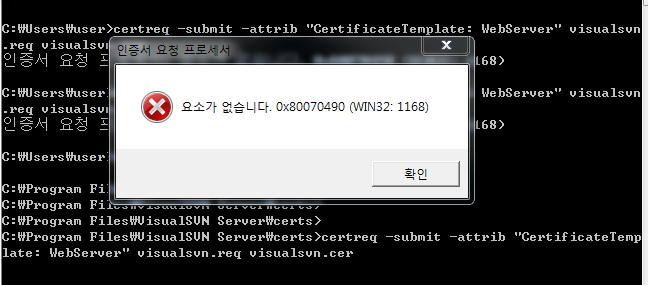
위와 같은 에러가 발생합니다.
ㅜㅜㅜㅜㅜ 뭐가 잘못된건가요?
visualsvn.req 파일 첨부할려고 했더니.... 파일 첨부가 안돼네요?
' cx='32' cy='32' r='32' /%3E%3Ctext x='50%25' y='55%25' dominant-baseline='middle' text-anchor='middle' fill='%23FFF' %3EA%3C/text%3E%3C/svg%3E)
