안녕하세요.
윈도우10으로 업그레이드 하고 나서 .NET Framework 3.5 설치 오류에 관하여 문의드립니다.
- 최초 설치시 0x800f091f의 오류가 발생하여 windows 기능 켜기 / 끄기 및 서비스 windows update 수동설정 시작
하여도 전혀 설정이 적용되지 않음.
- 윈도우 설치 USB를 삽입 후 dism 명령어 사용 했으나 진행되지 않음.
Dism.exe /online
/enable-feature /featurename:NetFX3 /source:해당드라이브:\ /LimitAccess
- 윈도우 사이트에서 ISO제작 후 가상드라이브를 삽입 후 dism 명령어 사용 했으나 일부 진행 후 오류코드 50 발생.
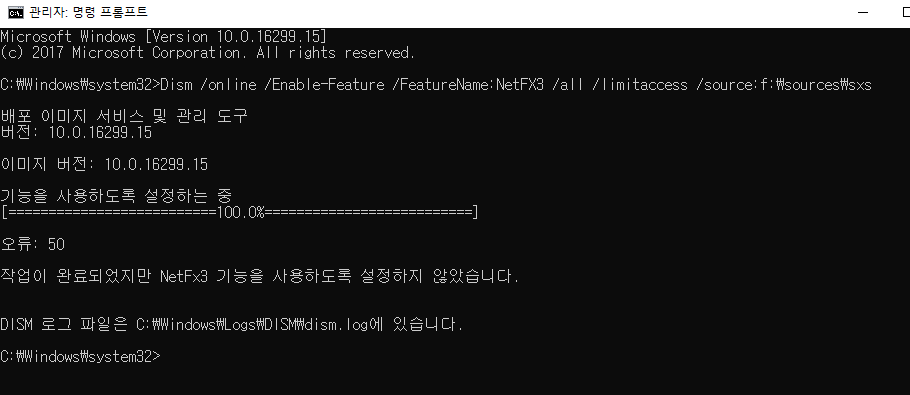
하단에 dism.log 파일 내용 첨부 합니다.
2017-12-21 13:54:08, Info DISM API: PID=9400 TID=1736 DismApi.dll: - DismInitializeInternal
2017-12-21 13:54:08, Info DISM API: PID=9400 TID=1736 DismApi.dll: <----- Starting DismApi.dll session -----> - DismInitializeInternal
2017-12-21 13:54:08, Info DISM API: PID=9400 TID=1736 DismApi.dll: - DismInitializeInternal
2017-12-21 13:54:08, Info DISM API: PID=9400 TID=1736 DismApi.dll: Version 10.0.16299.15 - DismInitializeInternal
2017-12-21 13:54:08, Info DISM API: PID=9400 TID=1736 DismApi.dll: Parent process command line: C:\Windows\system32\CompatTelRunner.exe -m:appraiser.dll -f:DoScheduledTelemetryRun -cv:i9Q2zmIzPkG230Wl.1 - DismInitializeInternal
2017-12-21 13:54:08, Info DISM API: PID=9400 TID=1736 Enter DismInitializeInternal - DismInitializeInternal
2017-12-21 13:54:08, Info DISM API: PID=9400 TID=1736 Input parameters: LogLevel: 2, LogFilePath: (null), ScratchDirectory: (null) - DismInitializeInternal
2017-12-21 13:54:08, Info DISM Initialized Panther logging at C:\Windows\Logs\DISM\dism.log
2017-12-21 13:54:08, Info DISM API: PID=9400 TID=1736 Initialized GlobalConfig - DismInitializeInternal
2017-12-21 13:54:08, Info DISM API: PID=9400 TID=1736 Initialized SessionTable - DismInitializeInternal
2017-12-21 13:54:08, Info DISM API: PID=9400 TID=1736 Lookup in table by path failed for: DummyPath-2BA51B78-C7F7-4910-B99D-BB7345357CDC - CTransactionalImageTable::LookupImagePath
2017-12-21 13:54:08, Info DISM API: PID=9400 TID=1736 Waiting for m_pInternalThread to start - CCommandThread::Start
2017-12-21 13:54:08, Info DISM API: PID=9400 TID=1012 Enter CCommandThread::CommandThreadProcedureStub - CCommandThread::CommandThreadProcedureStub
2017-12-21 13:54:08, Info DISM API: PID=9400 TID=1012 Enter CCommandThread::ExecuteLoop - CCommandThread::ExecuteLoop
2017-12-21 13:54:08, Info DISM API: PID=9400 TID=1736 CommandThread StartupEvent signaled - CCommandThread::WaitForStartup
2017-12-21 13:54:08, Info DISM API: PID=9400 TID=1736 m_pInternalThread started - CCommandThread::Start
2017-12-21 13:54:08, Info DISM API: PID=9400 TID=1736 Created g_internalDismSession - DismInitializeInternal
2017-12-21 13:54:08, Info DISM API: PID=9400 TID=1736 Leave DismInitializeInternal - DismInitializeInternal
2017-12-21 13:54:08, Info DISM API: PID=9400 TID=1736 Enter DismOpenSessionInternal - DismOpenSessionInternal
2017-12-21 13:54:08, Info DISM API: PID=9400 TID=1736 Input parameters: ImagePath: DISM_{53BFAE52-B167-4E2F-A258-0A37B57FF845}, WindowsDirectory: (null), SystemDrive: (null) - DismOpenSessionInternal
2017-12-21 13:54:08, Info DISM API: PID=9400 TID=1736 Lookup in table by path failed for: DRIVE_C -
중략
2017-12-21 13:54:08, Warning DISM DISM Provider Store: PID=9400 TID=8564 Failed to load the provider: C:\Windows\System32\Dism\MetaDeployProvider.dll. - CDISMProviderStore::Internal_GetProvider(hr:0x8007007e)
2017-12-21 13:54:08, Info DISM DISM FFU Provider: PID=9400 TID=8564 [C:] is not recognized by the DISM FFU provider. - CFfuImage::Initialize
[9400] [0x8007007b] FIOReadFileIntoBuffer:(1259): 파일 이름, 디렉터리 이름 또는 볼륨 레이블 구문이 잘못되었습니다.
[9400] [0xc142011c] UnmarshallImageHandleFromDirectory:(640)
[9400] [0xc142011c] WIMGetMountedImageHandle:(2896)
중략
2017-12-21 13:54:08, Info DISM DISM Imaging Provider: PID=9400 TID=8564 The provider VHDManager does not support CreateDismImage on C:\ - CGenericImagingManager::CreateDismImage
[9400] [0x8007007b] FIOReadFileIntoBuffer:(1259): 파일 이름, 디렉터리 이름 또는 볼륨 레이블 구문이 잘못되었습니다.
[9400] [0xc142011c] UnmarshallImageHandleFromDirectory:(640)
[9400] [0xc142011c] WIMGetMountedImageHandle:(2896)
중략
CFfuImage::Initialize
[676] [0x8007007b] FIOReadFileIntoBuffer:(1259): 파일 이름, 디렉터리 이름 또는 볼륨 레이블 구문이 잘못되었습니다.
[676] [0xc142011c] UnmarshallImageHandleFromDirectory:(640)
[676] [0xc142011c] WIMGetMountedImageHandle:(2896)
중략
2017-12-21 14:27:45, Info DISM DISM Imaging Provider: PID=676 TID=2684 The provider VHDManager does not support CreateDismImage on C:\ - CGenericImagingManager::CreateDismImage
[676] [0x8007007b] FIOReadFileIntoBuffer:(1259): 파일 이름, 디렉터리 이름 또는 볼륨 레이블 구문이 잘못되었습니다.
[676] [0xc142011c] UnmarshallImageHandleFromDirectory:(640)
[676] [0xc142011c] WIMGetMountedImageHandle:(2896)
중략
2017-12-21 14:27:46, Info DISM DISM FFU Provider: PID=676 TID=2684 [C:] is not recognized by the DISM FFU provider. - CFfuImage::Initialize
[676] [0x8007007b] FIOReadFileIntoBuffer:(1259): 파일 이름, 디렉터리 이름 또는 볼륨 레이블 구문이 잘못되었습니다.
[676] [0xc142011c] UnmarshallImageHandleFromDirectory:(640)
[676] [0xc142011c] WIMGetMountedImageHandle:(2896)
중략
2017-12-21 19:34:12, Info DISM DISM Provider Store: PID=6092 TID=3172 Disconnecting Provider: FolderManager - CDISMProviderStore::Internal_DisconnectProvider
2017-12-21 19:34:12, Info DISM DISM Provider Store: PID=6092 TID=3172 Releasing the local reference to DISMLogger. Stop logging. - CDISMProviderStore::Internal_DisconnectProvider
해당 로그 파일의 양이 많아 중략 처리 하였습니다.
필요하시면 해당 로그파일 전송하도록 하겠습니다.
이상 해결 할 수 있는 방안 제시 부탁드립니다.
' cx='32' cy='32' r='32' /%3E%3Ctext x='50%25' y='55%25' dominant-baseline='middle' text-anchor='middle' fill='%23FFF' %3EA%3C/text%3E%3C/svg%3E)
