다음을 통해 공유

사용자계정 관리자계정

익명
2022-10-15T22:58:19+00:00

안녕하세요. windows10 설치 후 사용자 계정 설정에서 의문이 있어 질문드립니다.

각종 계정(Administrator 계정, 관리자계정, User 계정, 로컬계정, 표준계정 (표준사용자 계정), .....) 용어간의 의미 차이가 잘 이해되지 않아서 질문드립니다.

[상황설명]

(1) windows10 를 처음 설치할때 'microsoft 계정을 만들기 위해 이메일 주소를 입력하라'고 해서 ******@gmail.com 를 넣었는데 그것이 그대로 windows 사용자계정이름으로 설정되어버려서 사용자폴더 theti 가 생성되었습니다.

(2) 사용자폴더 이름을 제 이름으로 변경하고 싶어서 Kim 이라는 사용자계정을 하나 추가하고, 계정유형을 "표준사용자"와 "관리자" 중에서, "관리자"로 저장했습니다.

그랬더니,

(i) 현재 윈도우 탐색기에 보면 아래 그림처럼:

"C:\Users\Kim" 와 "C:\Users\theti" 이렇게 두개의 폴더가 생성되어 있습니다.

  [![](https://learn-attachment.microsoft.com/api/attachments/0b559199-02ea-4287-9b1d-bd3cdae98aa2?platform=QnA"https://learn-attachment.microsoft.com/api/attachments/5a58ca39-d44b-4e45-aed3-1ba5276ff6cc?platform=QnA" rel="ugc nofollow">

(iii) 실행> netplwiz 명령어로 '사용자계정' 창을 열었더니

  두 사용자 이름이 나오고, 각각의 그룹에 "Users, Administrators" 두개씩 함께 적혀있습니다. 

  (따로 하나씩 적힌 것이 아니라.)
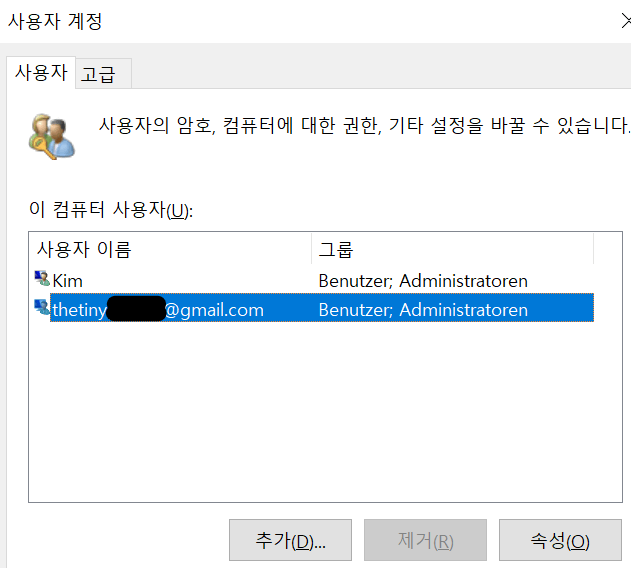
ㄴ Benutzer는 독일어로 User 입니다. (처음에 독일어로 깔고 언어를 한국어로 변경해서....)

제 질문은 다음과 같습니다.

  1. 로컬계정의 반대말은 무엇인가요? Microsoft 계정인가요?
  2. 로컬계정과 User 계정은 어떤 관계/ 어떤 차이가 있나요?
  3. 'Administrator 계정'과 '관리자계정'은 다른 것인가요? (여기서 '관리자계정'은 'User 관리자계정' 과 같은 의미인가요? 이것은 '(표준사용자 권한이 아닌) 관리자권한을 가진 User 계정' 과 같은 의미 인가요?)
  4. (ii)에서 처럼, 두 개의 사용자계정(theti계정과 Kim 계정)이 동시에 Administrator 일 수 있나요? 그렇다면 두 계정 모두 시스템파일 삭제 등의 administrator 권한을 가지는 것인가요?
  5. 인터넷에 찾아보면 (iii)의 '사용자계정' 창에, 보통 하나의 사용자이름 뒤에 하나의 그룹만 나오던데 (User만 있든지, Administrator만 있든지) 왜 저는 User와 Administrator 둘 다 적혀있을까요? 하나만 적힌 것과, 둘 모두 적혀있는 것이 의미하는 차이는 무엇인가요?
  6. theti 계정을 삭제하고 Kim 만 남기는 것이 가능한가요? (Windows 10 설치 후 아직 다른 프로그램들을 깔지 않은 상태입니다. ) 만약 안된다면, 왜 theti 계정은 제거가 되지 않나요? Kim 계정 하나만 남기고 싶을때는 어떻게 해야 하나요?

상세한 답변 부탁드립니다.

미리 감사드려요.

가정용 Windows | Windows 10 | 보안 및 개인 정보

잠긴 질문. 이 질문은 Microsoft 지원 커뮤니티에서 마이그레이션되었습니다. 질문이 도움이 되었는지 여부에 대해 응답할 수는 있지만, 메모나 회신을 추가하거나 질문을 따를 수는 없습니다.

댓글 0개 설명 없음

질문 작성자가 수락한 답변

Van S 23,885 평판 포인트 독립 자문가
2022-10-16T18:31:53+00:00

Hi theti,

  1. In the "lusrmgr" all accounts listed in the Users folder are all User accounts.
  2. A user account that has admin rights is part of the Administrators group. If it does not have admin rights, this user belongs to the Users group.
  3. The only difference between the two accounts is "theti" is created and saved in the clouds or Microsoft servers while "Kim" is created and saved inside Windows.
  4. I wouldn't advise renaming the User's folder because it might bring issues to the system.
  5. You cannot change the Microsoft account to a local account. However, you can switch accounts to a local account. This option will replace the Microsoft account with a local account retaining the existing User folder.

Best regards,

Van

이 대답이 도움이 되었나요?

1명이 이 답변이 도움이 된다고 생각했습니다.
댓글 0개 설명 없음

질문 작성자가 수락한 답변

Van S 23,885 평판 포인트 독립 자문가
2022-10-16T00:38:13+00:00

Hi theti,

This is the English translation of my previous reply

  1. Yes, you can have multiple accounts that have administrator privilege on the Windows system.
  2. The Administrator in image (ii) is referring to the account type. This means that both accounts are part of the Administrator group. The thetiny account is a Microsoft account.
  3. A standard user is an account type that belongs to the standard user group. A local account is a user account created in which information is saved in the operating system. The "User" refers to the group in the system.
  4. This means that the user account is part of the User and Administrator group.
  5. Yes, you can remove the "thetiny". Login on the Pc using the Kim account then go to the User account window (netplwiz). Highlight "thetiny" then click Remove.

With regard to your last question. Yes, there is a built-in Administrator account which is disabled by default.

If you are using Windows 10 Pro, you can check the list of users and groups in the Local Users and Groups manager or (lusrmgr). In the User Account window (netplwiz), click the Advanced tab then click Advanced under Advanced user management.

Best regards,

Van

이 대답이 도움이 되었나요?

1명이 이 답변이 도움이 된다고 생각했습니다.
댓글 0개 설명 없음

3 추가 답변

정렬 기준: 가장 유용함
  1. 익명
    2022-10-16T18:11:28+00:00

    Thank you so much for your answer, Van S.!

    It helped me a lot to understand some confused terms..

    I want to check, if I understood correctly.

    Are these statements correct? (I'm using 'Windows 10 Pro')

    1.1) User accounts are classified into 'local account' and 'Microsoft account' according to position where informations will be saved (maybe local in OS and MS in cloud?).

    1.2) And User accounts are ALSO classified into 'built-in Administrator account', 'User account with administrator privilege' and 'User account without administator privilege, which called 'Standard user account', according to degree of privilege.

    1.3) And what we can see in Windows control panel are usually just later two account types, i.e., 'User account with administrator privilege (seen as 'Administrator')' and 'User account without administator privilege (seen as 'Standard user')'.

    1. If an user account is 'User account with administrator privilege (seen as 'Administrator')', then this account is belong to User group and Administrator group,

    and if an user account is 'User account without administator privilege (seen as 'Standard user')', then this account is belong to User group only.

    Last question:

    As I said, I installed Windows 10 Pro first with my Microsoft account (thetiny..) first and then created new account with local account (Kim) - started from 'Hallo!' to all set-ups. And I didn't installed any other program yet.

    What I want is to have only one local account.

    1. Is there no any difference between two account 'theti' and 'Kim' (except account type(Microsoft vs. local account)), even if 'theti' was the first account with administrator previlege? I mean if I remove one of them, there should be same, and no problem, even if I remove my first account ("thetiny..", microsoft account), right?
    2. Can I change just the user folder name (for example from "C:\Users\theti" to "C:\Users\theHuge") without removing this first user account?
    3. Can I this microsoft account change to local account without remove/add a new user accout?

    Thank you in advance for your support!

    Best regards

    ..............

    이 대답이 도움이 되었나요?

    댓글 0개 설명 없음
  2. 익명
    2022-10-16T00:26:37+00:00

    Thank you so much for your answer!

    You might have answered, while I was editing the questions.

    Could you answer again with new version and question numbers, please?

    (I cannot see my old questions more..)

    You can answer in English or in German also, if it is your mother language is.

    Thank you in advance!

    ps. I think Question 3 is the key which I m confused..

    Are there two different types of 'administrator'? (for example, Administrator Account vs. User Account with Administrative permission? Because in Korean we use the same words for them.) Is there any 'hidden' administrator account that I cannot see?

    이 대답이 도움이 되었나요?

    댓글 0개 설명 없음
  3. Van S 23,885 평판 포인트 독립 자문가
    2022-10-15T23:55:09+00:00

    저희는 사용자를 위하여 번역된 내용을 제공하고 있습니다. 문법적 오류가 있더라도 양해바랍니다.

    안녕하세요, 저는 밴입니다. 오늘 당신을 도와 드리겠습니다.

    1. 예, Windows 시스템에 대한 관리자 권한이있는 여러 계정을 가질 수 있습니다.
    2. 이미지 (ii)의 관리자는 계정 유형을 참조하고 있습니다. 즉, 두 계정 모두 관리자 그룹의 일부입니다. 작은 계정은 Microsoft 계정입니다.
    3. 표준 사용자는 표준 사용자 그룹에 속하는 계정 유형입니다. 로컬 계정은 운영 체제에 정보가 저장되는 사용자 계정입니다. "사용자"는 시스템의 그룹을 나타냅니다.
    4. 이는 사용자 계정이 사용자 및 관리자 그룹의 일부임을 의미합니다.
    5. 예, "thetiny"를 제거 할 수 있습니다. Kim 계정을 사용하여 PC에 로그인 한 다음 사용자 계정 창 (netplwiz)으로 이동하십시오. "thetiny"를 강조 표시 한 다음 제거를 클릭하십시오.

    감사합니다

    이 대답이 도움이 되었나요?

    댓글 0개 설명 없음
