Microsoft Teams | 비즈니스용 Microsoft Teams | 채팅 | 그룹 채팅
Conversations involving multiple participants, allowing collaboration and information sharing in Teams

' cx='32' cy='32' r='32' /%3E%3Ctext x='50%25' y='55%25' dominant-baseline='middle' text-anchor='middle' fill='%23FFF' %3EA%3C/text%3E%3C/svg%3E)
안녕하세요.
Microsoft Teams에서 이미 테넌트에 등록된 게스트에게 채팅을 보내려고 할 때,
상대방에게 승인 과정 없이 소통할 수 있게 설정하고 싶습니다.
가능한가요? 가능하다면 어떤 설정을 구성해야 하나요?
시도한 내용:
예를 들어 다음과 같은 환경이 구성되어 있을 때,
테넌트 A - 사용자 a
테넌트 B - 사용자 b
(이 때, 사용자 b에게 수락과정을 생략하기 위해 테넌트 간 액세스 설정에서 각 테넌트를 추가하고 인/아웃바운드 액세스 에서 신뢰설정>초대 자동 상환을 허용합니다.)
(이 때, 사용자 a가 사용자 b를 검색할 수 있지만, 사용자 b가 오프라인 상태로 보입니다.)
3. 사용자 b의 메일함에 사용자 a가 사용자 b에게 Teams 메세지 발송 알림 메일이 수신됩니다.
(이러한 수락 과정을 생략하고 사용자 a가 사용자 b에게 메세지를 보냈을 때, 바로 채팅이 가능할 수 있도록 하고 싶습니다.)
* 테넌트 간 액세스 설정
: 테넌트 A와 B 모두 테넌트 간 액세스 설정에서 B2B collaboration과 B2B direct connection, 신뢰설정 인/아웃바운드 액세스 허용하였습니다.
Conversations involving multiple participants, allowing collaboration and information sharing in Teams
잠긴 질문. 이 질문은 Microsoft 지원 커뮤니티에서 마이그레이션되었습니다. 질문이 도움이 되었는지 여부에 대해 응답할 수는 있지만, 메모나 회신을 추가하거나 질문을 따를 수는 없습니다.
Hello jisoo1,
Greetings! Thanks for posting in the Microsoft Community!
Based on your description, I understand that you're trying to streamline the guest invitation process in Microsoft Teams so that guests can join conversations without needing approval. Unfortunately, Microsoft Teams doesn't currently support bypassing the guest acceptance process entirely. However, there are some settings you can adjust to make the process smoother:
You can use the following steps to enable guest access.
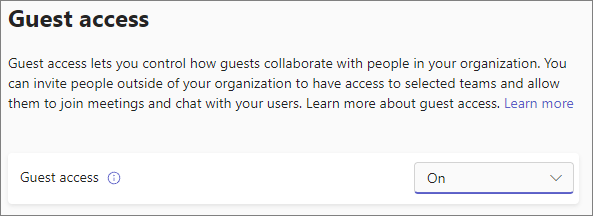
If a user in tenant A search for an emails address of User B in tenant B, user B will be shown as external user
If user A send a Teams chat message to User B, the user B will receive the message however user B need to accept the chat message are there will be a prompt to prevent spam and phishing messages in teams.
As this is how this feature is designed, I would suggest you share your feedback on how you would like it to function by going into Microsoft teams' application select three dots button(...)>>feedback>>suggest a feature or by posting on Ideas · Community (microsoft.com).
This allowsusers to describe features in detail and submit them directly to Microsoft product development team for review. The product development team uses these suggestions from users to create new features and improve the existing features.
You can check the above information, if you need further assistance or require more clarification, please feel free to reply here.
감사합니다. 도움이 되었습니다.
테넌트 간 동기화와 관련하여 한 가지 더 질문해도 될까요?
A 테넌트에 B 테넌트를 단방향 동기화 구성을 완료하고
B 테넌트에서 다음과 같이 설정하였습니다.
테넌트 간 동기화 > 구성 > 프로비저닝 > 매핑 설정에서
userType을 Guest로 설정하여 동기화 진행하려고 합니다.
이 때, A 테넌트에서 B 테넌트가
userType이 Guest가 아닌 Member로 변경을 못하도록 제어할 수 있나요?
또는
B 테넌트가 userType을 Member로 변경하여 동기화 시도할 때,
A 테넌트에서 동기화 거부 혹은 해당 user를 거부할 수 있나요?
A 테넌트에서 B 테넌트의 user들을 userType이 Member가 아닌 Guest로만 받고 싶습니다.
내가 A 테넌트 관리자 일 때, B 테넌트의 동기화 매핑 구성을 제어할 수 있는지 궁금합니다.
감사합니다.
이 응답은 자동으로 번역되었습니다. 따라서 문법 오류 또는 이상한 표현이 있을 수 있습니다.
제가 도울 수 있어서 기쁩니다! 다음은 "내부 회원", "외부 회원" 및 "게스트"를 구별하는 방법입니다.
내부 구성원: 이러한 사용자는 일반적으로 조직의 직원입니다. Microsoft Entra ID(이전의 Azure AD)를 통해 내부적으로 인증합니다. 그리고 그들은 다른 직원과 마찬가지로 조직 내의 리소스에 대한 전체 액세스 권한을 갖습니다. 여기에는 SharePoint 사이트, OneDrive, Teams, Outlook 및 기타 내부 리소스에 대한 제한이 없는 액세스가 포함됩니다.
외부 회원: 이러한 사용자는 외부 Microsoft Entra 조직 또는 외부 ID 공급자에 계정이 있지만 조직의 리소스에 대한 멤버 수준 액세스 권한이 부여됩니다. 이는 사용자가 서로 다른 테넌트 간의 리소스에 액세스해야 하는 것과 같은 다중 테넌트 조직에서 일반적입니다.
외부 구성원은 내부 구성원과 유사한 액세스 권한을 가지므로 내부 구성원인 것처럼 SharePoint, OneDrive, Teams 및 Outlook에 액세스할 수 있습니다. 그러나 해당 인증은 외부에서 관리됩니다
손님: 이러한 사용자는 일반적으로 파트너, 공급업체 또는 고객과 같은 외부 공동 작업자입니다. 게스트 수준 권한이 있으며 일반적으로 특정 리소스에 대해 공동 작업하도록 초대됩니다. 게스트는 회원에 비해 액세스가 더 제한됩니다. 특정 SharePoint 사이트 또는 Teams 채널과 같이 초대된 특정 리소스에 액세스할 수 있지만 구성원과 동일한 수준의 액세스 권한은 없습니다
채널 대화, 파일 공동 작업 및 공유 앱을 통한 외부 공동 작업 계획 | 마이크로소프트 런
시나리오에 따라 테넌트 A의 OneDrive를 조직 내 사용자와만 공유할 수 있고 문서 보안 레이블을 설정한 경우 테넌트 B의 외부 구성원은 테넌트가 사용자를 동기화하도록 구성된 다중 테넌트 조직의 구성원이기 때문에 계속 액세스할 수 있으며 테넌트 B 사용자는 액세스 권한 측면에서 내부 구성원과 유사하게 처리됩니다. 그러나 게스트 사용자는 명시적으로 부여되지 않는 한 이 수준의 액세스 권한을 갖지 않습니다.
외부 구성원은 내부 구성원과 거의 동일한 액세스 권한을 갖습니다. 게스트 사용자에게 적용되는 제한 없이 대부분의 리소스에 액세스할 수 있습니다
예를 들면 다음과 같습니다.
이것이 당신을 위해 차이점을 명확히하기를 바랍니다! 더 궁금한 점이 있거나 도움이 필요하시면 여기로 언제든지 답변해 주십시오.
감사합니다.
해당 내용이 많이 도움 되었습니다.
한 가지 더 궁금한 것이 있습니다.
현재, 테넌트 A에 테넌트 B 동기화 구조를 구성하였는데
동기화 시, userType의 default 값이 (External) Member임을 확인하였습니다.
"Internal Member"와 "External Member", 그리고 "Guest"의 차이에 대해 설명해줄 수 있나요?
B2B guest user properties - Microsoft Entra External ID | Microsoft Learn
↑ 해당 링크 설명에 따르면, 리소스에 대한 액세스 권한이 Member와 "유사하게" 적용된다고 하는데, 유사하다는 단어의 의미가 모호하여 정확히 알 수 없습니다.
특히, OneDrive에서의 접근을 테스트 해보았을 때,
테넌트 A의 OneDrive에서 조직 내 사용자만 공유 가능하게 설정하고 문서 보안 레이블도 설정하였을 때, 테넌트 B의 user에게 공유하면 테넌트 B의 user도 열람이 가능합니다.
그렇다면 동기화된 테넌트 B의 user는 테넌트 A의 내부 조직 member로 인정이 되는 건가요?
"internal member"와 "external member"의 차이점을 명확하게 알 수 없습니다. 리소스 액세스 권한에 대한 예를 들어 설명해 줄 수 있나요? (ex. SharePoint, Onedrive, Teams, Outlook, etc..)