Introduction
How to convert the DateTime field Schema element to String format.
Tried all the possible scenario using scripting functoid. But nothing worked and finally resolved with a new solution.
This post will tell you how to convert the DateTime format schema element to string format("yyyyMMdd").
Step 1: Functoid Required :
1. Scripting
2. String Size
3. String Extract
https://images-blogger-opensocial.googleusercontent.com/gadgets/proxy?url=http%3A%2F%2F4.bp.blogspot.com%2F-mRQhMrdtPKM%2FU7Rw5qQnXGI%2FAAAAAAAADd0%2FD2QN92ye1ck%2Fs1600%2FFunctoid.jpg&container=blogger&gadget=a&rewriteMime=image%2F*


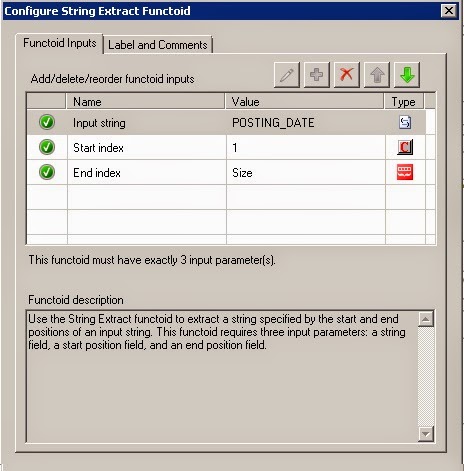
Step 2: Drag and drop the DateTime field to String Size and String Extract.
String Extract requires three inputs (Element, Start Index, End Index).
Element - DateTime field, Start Index will be 1, End Index will be the Size of the String (Drag and Drop the Size functoid)
https://images-blogger-opensocial.googleusercontent.com/gadgets/proxy?url=http%3A%2F%2F1.bp.blogspot.com%2F-D3Wk9qZ0qMk%2FU7Rw61_0JuI%2FAAAAAAAADd8%2FwRT7zEFbWEw%2Fs1600%2FStringExtract.jpg&container=blogger&gadget=a&rewriteMime=image%2F*

**Step 3: **Now drag and drop the output of the String Extract functoid to Scripting functoid input.
Select Inline C# function:
Copy and Paste this code:
public string ConvertDateTime(string strdate)
{
  DateTime dt = DateTime.ParseExact(strdate, "dd-MMM-yy", System.Globalization.CultureInfo.InvariantCulture);
            return dt.ToString("yyyyMMdd");
}
If the above code is not working then try with the below code:
**
public string ConvertDateTime(string inputDate)
 {
     System.DateTime strDate;
     if (System.DateTime.TryParseExact(inputDate, "yyMMdd", System.Globalization.CultureInfo.InvariantCulture, System.Globalization.DateTimeStyles.None, out strDate))
     {
         return strDate.ToString("dd/MM/yyyy");
     }
     return "INVALID DATE";
 }
Note: Depends on the Inputdate the tryparse parameter will change "dd-MMM-yy". If your input in this format "01/04/2017 09:40:00" then you need to parseextract with is format "dd/MM/yyyy hh:mm:ss"
Note: If the input is 12 hrs format then use the format as "dd/MM/yyyy hh:mm:ss" and if the input is 24 hrs format then use as "dd/MM/yyyy HH:mm:ss"
Now connect the scripting functoid output to the Destination field. It will work as expected.
Eg: My Source Field is 2-Jun-2014 and the Output is 20140602
https://images-blogger-opensocial.googleusercontent.com/gadgets/proxy?url=http%3A%2F%2F2.bp.blogspot.com%2F-wgje9lhTI1g%2FU7Rw3zgDD8I%2FAAAAAAAADds%2FNOXghbER26A%2Fs1600%2FScriptingFunctoid.jpg&container=blogger&gadget=a&rewriteMime=image%2F*


See Also
Another important place to find a huge amount of BizTalk related articles is the TechNet Wiki itself. The best entry point is BizTalk Server Resources on the TechNet Wiki.