라이브러리 관리자(LibMan)는 가벼운 클라이언트 쪽 라이브러리 획득 도구입니다. LibMan은 파일 시스템에서 또는 CDN(콘텐츠 전송 네트워크)에서 인기 있는 라이브러리 및 프레임워크를 다운로드합니다. 지원되는 CDN은 CDNJS, jsDelivr 및 unpkg입니다. 선택한 라이브러리 파일은 ASP.NET Core 프로젝트 내부의 적절한 위치에 페치 및 배치됩니다.
Prerequisites
Installation
다음 명령은 LibMan을 설치합니다.
dotnet tool install -g Microsoft.Web.LibraryManager.Cli
Note
기본적으로 설치할 .NET 이진 파일의 아키텍처는 현재 실행 중인 운영 체제 아키텍처를 나타냅니다.
다른 아키텍처를 지정하려면 dotnet tool install과 함께 명령을 사용하는 방법을 검토합니다.
자세한 내용은 GitHub dotnet/aspnetcore.docs 이슈 #29262 - Apple Silicon에서 '-a arm64' 추가를 참조하세요.
.NET 전역 도구는 Microsoft.Web.LibraryManager.Cli NuGet 패키지에서 설치한 것입니다.
Usage
libman
설치된 LibMan 버전을 보려면 다음을 수행합니다.
libman --version
사용 가능한 CLI 명령을 보려면 다음을 수행합니다.
libman --help
위의 명령은 다음과 유사한 출력을 표시합니다.
 1.0.163+g45474d37ed

Usage: libman [options] [command]

Options:
  --help|-h  Show help information
  --version  Show version information

Commands:
  cache      List or clean libman cache contents
  clean      Deletes all library files defined in libman.json from the project
  init       Create a new libman.json
  install    Add a library definition to the libman.json file, and download the
             library to the specified location
  restore    Downloads all files from provider and saves them to specified
             destination
  uninstall  Deletes all files for the specified library from their specified
             destination, then removes the specified library definition from
             libman.json
  update     Updates the specified library

Use "libman [command] --help" for more information about a command.
다음 섹션에서는 사용 가능한 CLI 명령에 대해 간략하게 설명합니다.
프로젝트에서 LibMan 초기화
libman init 명령은 libman.json 파일이 없는 경우 새로 만듭니다. 이 파일은 기본 항목 템플릿 콘텐츠를 사용하여 만들어집니다.
Synopsis
libman init [-d|--default-destination] [-p|--default-provider] [--verbosity]
libman init [-h|--help]
Options
다음 옵션은 libman init 명령에 사용할 수 있습니다.
-d|--default-destination <PATH>현재 폴더에 상대적인 경로입니다.
destination의 라이브러리에 대해libman.json속성이 정의되지 않으면 라이브러리 파일이 이 위치에 설치됩니다.<PATH>값이defaultDestination의libman.json속성에 기록됩니다.-p|--default-provider <PROVIDER>지정된 라이브러리에 대해 공급자를 지정하지 않은 경우 사용할 공급자입니다.
<PROVIDER>값이defaultProvider의libman.json속성에 기록됩니다.<PROVIDER>을 다음 값 중 하나로 바꿉니다.cdnjsfilesystemjsdelivrunpkg
-h|--help도움말 정보를 표시합니다.
--verbosity <LEVEL>출력의 자세한 정도를 설정합니다.
<LEVEL>을 다음 값 중 하나로 바꿉니다.quietnormaldetailed
Examples
ASP.NET Core 프로젝트에서 libman.json 파일을 만들려면 다음을 수행합니다.
프로젝트 루트로 이동합니다.
다음 명령을 실행합니다.
libman init기본 공급자의 이름을 입력하거나
Enter키를 눌러 기본 CDNJS 공급자를 사용합니다. 유효한 값은 다음과 같습니다.cdnjsfilesystemjsdelivrunpkg
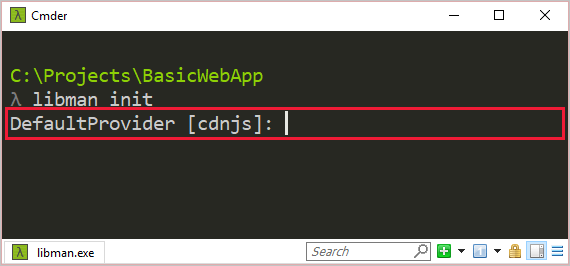
libman.json 다음 내용이 포함된 파일이 프로젝트 루트에 추가됩니다.
{
  "version": "1.0",
  "defaultProvider": "cdnjs",
  "libraries": []
}
라이브러리 파일 추가
libman install 명령은 라이브러리 파일을 다운로드하여 프로젝트에 설치합니다.
libman.json 파일이 없으면 추가됩니다. 파일은 libman.json 라이브러리 파일에 대한 구성 세부 정보를 저장하도록 수정됩니다.
Synopsis
libman install <LIBRARY> [-d|--destination] [--files] [-p|--provider] [--verbosity]
libman install [-h|--help]
Arguments
LIBRARY
설치할 라이브러리의 이름입니다. 이 이름에는 버전 번호 표기법(예: @1.2.0)이 포함될 수 있습니다.
Options
다음 옵션은 libman install 명령에 사용할 수 있습니다.
-d|--destination <PATH>라이브러리를 설치할 위치입니다. 이 값을 지정하지 않으면 기본 위치가 사용됩니다.
defaultDestination에libman.json속성이 지정되지 않은 경우 이 옵션이 필요합니다.참고: 대상 경로에는 제한이 있습니다. 예를 들어 패키지 원본에 배포 폴더뿐만 아니라 전체 프로젝트 구조가 있는 경우 폴더 이동을 지정할 수 없습니다. 자세한 내용은 문제 #407 및 문제 #702를 참조하세요.
--files <FILE>라이브러리에서 설치할 파일의 이름을 지정합니다. 지정하지 않으면 라이브러리의 모든 파일이 설치됩니다. 설치할 파일마다 하나의
--files옵션을 제공합니다. 상대 경로도 지원됩니다. 예:--files dist/browser/signalr.js-p|--provider <PROVIDER>라이브러리 획득에 사용할 공급자의 이름입니다.
<PROVIDER>을 다음 값 중 하나로 바꿉니다.cdnjsfilesystemjsdelivrunpkg
지정하지 않은 경우
defaultProvider의libman.json속성이 사용됩니다.defaultProvider에libman.json속성이 지정되지 않은 경우 이 옵션이 필요합니다.
-h|--help도움말 정보를 표시합니다.
--verbosity <LEVEL>출력의 자세한 정도를 설정합니다.
<LEVEL>을 다음 값 중 하나로 바꿉니다.quietnormaldetailed
Examples
다음 libman.json 파일을 살펴보세요.
{
  "version": "1.0",
  "defaultProvider": "cdnjs",
  "libraries": []
}
CDNJS 공급자를 사용하여 jQuery 버전 3.2.1 jquery.min.js 파일을 wwwroot/scripts/jquery 폴더에 설치하려면 다음을 수행합니다.
libman install jquery@3.2.1 --provider cdnjs --destination wwwroot/scripts/jquery --files jquery.min.js
libman.json 파일은 다음과 유사합니다.
{
  "version": "1.0",
  "defaultProvider": "cdnjs",
  "libraries": [
    {
      "library": "jquery@3.2.1",
      "destination": "wwwroot/scripts/jquery",
      "files": [
        "jquery.min.js"
      ]
    }
  ]
}
파일 시스템 공급자를 사용하여 calendar.js에서 calendar.css 및 파일을 설치하려면:
libman install C:\temp\contosoCalendar\ --provider filesystem --files calendar.js --files calendar.css
다음과 같은 두 가지 이유로 다음 프롬프트가 표시됩니다.
-
libman.json파일에는defaultDestination속성이 포함되어 있지 않습니다. -
libman install명령에는-d|--destination옵션이 포함되어 있지 않습니다.
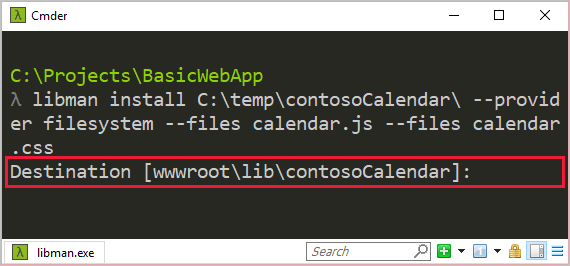
기본 대상을 수락한 후 파일은 libman.json 다음과 유사합니다.
{
  "version": "1.0",
  "defaultProvider": "cdnjs",
  "libraries": [
    {
      "library": "jquery@3.2.1",
      "destination": "wwwroot/scripts/jquery",
      "files": [
        "jquery.min.js"
      ]
    },
    {
      "library": "C:\\temp\\contosoCalendar\\",
      "provider": "filesystem",
      "destination": "wwwroot/lib/contosoCalendar",
      "files": [
        "calendar.js",
        "calendar.css"
      ]
    }
  ]
}
라이브러리 파일 복원
libman restore 명령은 libman.json에 정의된 라이브러리 파일을 설치합니다. 다음 규칙이 적용됩니다.
- 프로젝트 루트에 파일이 없
libman.json으면 오류가 반환됩니다. - 라이브러리가 공급자를 지정하는 경우
defaultProvider의libman.json속성이 무시됩니다. - 라이브러리가 대상을 지정하는 경우
defaultDestination의libman.json속성이 무시됩니다.
Synopsis
libman restore [--verbosity]
libman restore [-h|--help]
Options
다음 옵션은 libman restore 명령에 사용할 수 있습니다.
-h|--help도움말 정보를 표시합니다.
--verbosity <LEVEL>출력의 자세한 정도를 설정합니다.
<LEVEL>을 다음 값 중 하나로 바꿉니다.quietnormaldetailed
Examples
에 정의된 libman.json라이브러리 파일을 복원하려면:
libman restore
라이브러리 파일 삭제
libman clean 명령은 LibMan을 통해 이전에 복원한 라이브러리 파일을 삭제합니다. 이 작업 후 삭제된 후에 비어 있게 되는 폴더입니다.
libraries의 libman.json 속성에 있는 라이브러리 파일의 연결된 구성은 제거되지 않습니다.
Synopsis
libman clean [--verbosity]
libman clean [-h|--help]
Options
다음 옵션은 libman clean 명령에 사용할 수 있습니다.
-h|--help도움말 정보를 표시합니다.
--verbosity <LEVEL>출력의 자세한 정도를 설정합니다.
<LEVEL>을 다음 값 중 하나로 바꿉니다.quietnormaldetailed
Examples
LibMan을 통해 설치된 라이브러리 파일을 삭제하려면 다음을 수행합니다.
libman clean
라이브러리 파일 제거
libman uninstall 명령은 다음을 수행합니다.
- 지정된 라이브러리와 연결된 모든 파일을 대상
libman.json에서 삭제합니다. -
libman.json에서 연결된 라이브러리 구성을 제거합니다.
다음 경우에 오류가 발생합니다.
- 프로젝트 루트에 파일이 없습니다
libman.json. - 지정된 라이브러리가 없습니다.
이름이 같은 라이브러리가 2개 이상 설치되어 있으면 하나를 선택하라는 메시지가 표시됩니다.
Synopsis
libman uninstall <LIBRARY> [--verbosity]
libman uninstall [-h|--help]
Arguments
LIBRARY
제거할 라이브러리의 이름입니다. 이 이름에는 버전 번호 표기법(예: @1.2.0)이 포함될 수 있습니다.
Options
다음 옵션은 libman uninstall 명령에 사용할 수 있습니다.
-h|--help도움말 정보를 표시합니다.
--verbosity <LEVEL>출력의 자세한 정도를 설정합니다.
<LEVEL>을 다음 값 중 하나로 바꿉니다.quietnormaldetailed
Examples
다음 libman.json 파일을 살펴보세요.
{
  "version": "1.0",
  "defaultProvider": "cdnjs",
  "libraries": [
    {
      "library": "jquery@3.7.1",
      "files": [
        "jquery.min.js",
        "jquery.js",
        "jquery.min.map"
      ],
      "destination": "wwwroot/lib/jquery/"
    },
    {
      "provider": "unpkg",
      "library": "bootstrap@5.3.6",
      "destination": "wwwroot/lib/bootstrap/"
    }
  ]
}
jQuery를 제거하려면 다음 명령 중 하나를 수행합니다.
libman uninstall jquerylibman uninstall jquery@3.3.1filesystem공급자를 통해 설치된 Lodash 파일을 제거하려면 다음을 수행합니다.libman uninstall C:\temp\lodash\
라이브러리 버전 업데이트
libman update 명령은 LibMan을 통해 설치된 라이브러리를 지정된 버전으로 업데이트합니다.
다음 경우에 오류가 발생합니다.
- 프로젝트 루트에 파일이 없습니다
libman.json. - 지정된 라이브러리가 없습니다.
이름이 같은 라이브러리가 2개 이상 설치되어 있으면 하나를 선택하라는 메시지가 표시됩니다.
Synopsis
libman update <LIBRARY> [-pre] [--to] [--verbosity]
libman update [-h|--help]
Arguments
LIBRARY
업데이트할 라이브러리의 이름입니다.
Options
다음 옵션은 libman update 명령에 사용할 수 있습니다.
-pre라이브러리의 최신 시험판 버전을 가져옵니다.
--to <VERSION>라이브러리의 특정 버전을 가져옵니다.
-h|--help도움말 정보를 표시합니다.
--verbosity <LEVEL>출력의 자세한 정도를 설정합니다.
<LEVEL>을 다음 값 중 하나로 바꿉니다.quietnormaldetailed
Examples
jQuery를 최신 버전으로 업데이트하려면 다음을 수행합니다.
libman update jqueryjQuery를 버전 3.3.1로 업데이트하려면 다음을 수행합니다.
libman update jquery --to 3.3.1jQuery를 최신 시험판 버전으로 업데이트하려면 다음을 수행합니다.
libman update jquery -pre
라이브러리 캐시 관리
libman cache 명령은 LibMan 라이브러리 캐시를 관리합니다.
filesystem 공급자는 라이브러리 캐시를 사용하지 않습니다.
Synopsis
libman cache clean [<PROVIDER>] [--verbosity]
libman cache list [--files] [--libraries] [--verbosity]
libman cache [-h|--help]
Arguments
PROVIDER
clean 명령에서만 사용됩니다. 정리할 공급자 캐시를 지정합니다. 유효한 값은 다음과 같습니다.
cdnjsfilesystemjsdelivrunpkg
Options
다음 옵션은 libman cache 명령에 사용할 수 있습니다.
--files캐시된 파일의 이름을 나열합니다.
--libraries캐시된 라이브러리의 이름을 나열합니다.
-h|--help도움말 정보를 표시합니다.
--verbosity <LEVEL>출력의 자세한 정도를 설정합니다.
<LEVEL>을 다음 값 중 하나로 바꿉니다.quietnormaldetailed
Examples
공급자당 캐시된 라이브러리의 이름을 보려면 다음 명령 중 하나를 사용합니다.
libman cache listlibman cache list --libraries다음과 비슷한 출력이 표시됩니다.
Cache contents:
---------------
unpkg:
    knockout
    react
    vue
cdnjs:
    font-awesome
    jquery
    knockout
    lodash.js
    react
공급자당 캐시된 라이브러리 파일의 이름을 보려면 다음을 수행합니다.
libman cache list --files다음과 비슷한 출력이 표시됩니다.
Cache contents:
---------------
unpkg:
    knockout:
        <list omitted for brevity>
    react:
        <list omitted for brevity>
    vue:
        <list omitted for brevity>
cdnjs:
    font-awesome
        metadata.json
    jquery
        metadata.json
        3.2.1\core.js
        3.2.1\jquery.js
        3.2.1\jquery.min.js
        3.2.1\jquery.min.map
        3.2.1\jquery.slim.js
        3.2.1\jquery.slim.min.js
        3.2.1\jquery.slim.min.map
        3.3.1\core.js
        3.3.1\jquery.js
        3.3.1\jquery.min.js
        3.3.1\jquery.min.map
        3.3.1\jquery.slim.js
        3.3.1\jquery.slim.min.js
        3.3.1\jquery.slim.min.map
    knockout
        metadata.json
        3.4.2\knockout-debug.js
        3.4.2\knockout-min.js
    lodash.js
        metadata.json
        4.17.10\lodash.js
        4.17.10\lodash.min.js
    react
        metadata.json
위의 출력은 jQuery 버전 3.2.1 및 3.3.1이 CDNJS 공급자 아래에 캐시됨을 보여 줍니다.
CDNJS 공급자에 대한 라이브러리 캐시를 비우려면 다음을 수행합니다.
libman cache clean cdnjsCDNJS 공급자 캐시를 비우면
libman cache list명령은 다음을 표시합니다.Cache contents: --------------- unpkg: knockout react vue cdnjs: (empty)지원되는 모든 공급자에 대한 캐시를 비우려면 다음을 수행합니다.
libman cache clean모든 공급자 캐시를 비우면
libman cache list명령은 다음을 표시합니다.Cache contents: --------------- unpkg: (empty) cdnjs: (empty)
관련 콘텐츠
GitHub에서 Microsoft와 공동 작업
이 콘텐츠의 원본은 GitHub에서 찾을 수 있으며, 여기서 문제와 끌어오기 요청을 만들고 검토할 수도 있습니다. 자세한 내용은 참여자 가이드를 참조하세요.

ASP.NET Core