이 문서에서는 사용자 지정 음성 모델에 대한 엔드포인트를 배포하는 방법을 알아봅니다. 일괄 처리 전사를 제외하고 사용자 지정 음성 모델을 사용하려면 사용자 지정 엔드포인트를 배포해야 합니다.
팁
호스트된 배포 엔드포인트의 경우 사용자 지정 음성을 일괄 대화 내용 기록 API와 함께 사용할 필요가 없습니다. 사용자 지정 음성 모델이 일괄 대화 내용 기록에만 사용되는 경우 리소스를 보존할 수 있습니다. 자세한 내용은 Speech Service 가격 책정을 참조하세요.
기본 또는 사용자 지정 모델에 대한 엔드포인트를 배포한 다음, 나중에 더 나은 학습된 모델을 사용하도록 엔드포인트를 업데이트할 수 있습니다.
참고 항목
F0 음성 리소스에서 사용하는 엔드포인트는 7일 후에 삭제됩니다.
배포 엔드포인트 추가
팁
Speech Studio에서 Microsoft Foundry 포털로 사용자 지정 음성 모델을 가져옵니다. Microsoft Foundry 포털에서 기존 Speech 리소스에 연결하여 중단한 지점에서 다시 시작할 수 있습니다. 기존 Speech 리소스에 연결하는 방법에 대한 자세한 내용은 기존 Speech 리소스에 연결을 참조 하세요.
Microsoft Foundry 포털에 로그인합니다.
왼쪽 창에서 미세 조정을 선택한 다음 , AI Service 미세 조정을 선택합니다.
사용자 지정 음성 미세 조정 문서를 시작하는 방법에 설명된 대로 시작한 사용자 지정 음성 미세 조정 작업(모델 이름 기준)을 선택합니다.
모델 배포>+ 모델 배포를 선택합니다.

새 모델 배포 마법사에서 배포할 모델을 선택합니다.

배포의 이름과 설명을 입력합니다. 사용 약관에 동의할 상자를 선택합니다. 그런 다음 배포를 선택합니다.
배포 상태가 성공하면 배포 세부 정보를 볼 수 있습니다. 배포를 선택하여 엔드포인트 ID와 같은 세부 정보를 봅니다.


사용자 지정 엔드포인트를 만들려면 다음 단계를 수행합니다.
Speech Studio에 로그인합니다.
사용자 지정 음성> 내 프로젝트 이름 >모델 배포를 선택합니다.
첫 번째 엔드포인트인 경우에는 표에 나열된 엔드포인트가 없다는 것을 알 수 있습니다. 엔드포인트를 만든 후 이 페이지를 사용하여 배포된 각 엔드포인트를 추적할 수 있습니다.
모델 배포를 선택하여 새 엔드포인트 마법사를 시작합니다.
새 엔드포인트 페이지에서 사용자 지정 엔드포인트에 대한 이름 및 설명을 입력합니다.
엔드포인트와 연결하려는 사용자 지정 모델을 선택합니다.
필요에 따라 확인란을 선택하여 엔드포인트 트래픽의 오디오 및 진단 로깅을 사용하도록 설정할 수 있습니다.
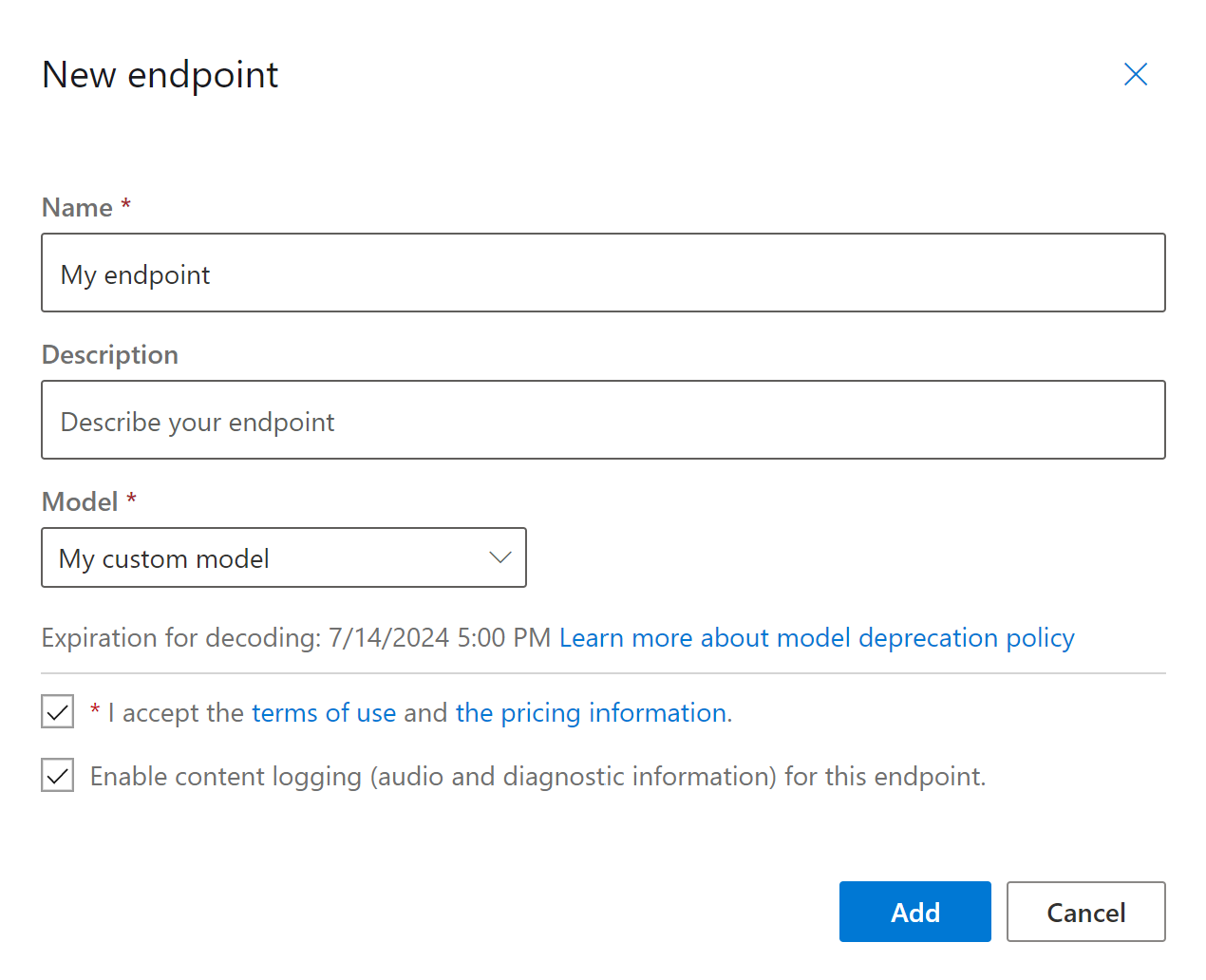
추가를 선택하여 엔드포인트를 저장하고 배포합니다.
기본 모델 배포 페이지에서 이름, 설명, 상태 및 만료 날짜와 같은 새 엔드포인트에 대한 세부 정보가 테이블에 표시됩니다. 사용자 지정 모델을 사용하는 새 엔드포인트를 인스턴스화하는 데 최대 30분이 걸릴 수 있습니다. 배포 상태가 성공이면 엔드포인트를 사용할 준비가 완료된 것입니다.
중요합니다
모델 만료 날짜를 적어 두세요. 음성 인식을 위해 사용자 지정 모델을 사용할 수 있는 마지막 날짜입니다. 자세한 내용은 모델 및 엔드포인트 수명 주기를 참조하세요.
엔드포인트 키, 엔드포인트 URL 및 샘플 코드와 같은 특정 정보를 표시하려면 엔드포인트 링크를 선택합니다.
계속하기 전에 Speech CLI 를 설치하고 구성했는지 확인합니다.
엔드포인트를 만들고 모델을 배포하려면 spx csr endpoint create 명령을 사용합니다. 다음 지침에 따라 요청 매개 변수를 생성합니다.
-
project속성을 기존 프로젝트의 ID로 설정합니다.project이 속성은 Microsoft Foundry 포털에서 사용자 지정 음성에 대한 미세 조정을 관리할 수도 있도록 하는 것이 좋습니다. 프로젝트 ID를 가져오려면 REST API 설명서의 프로젝트 ID 가져오기를 참조하세요. - 필요한
model속성을 엔드포인트에 배포하려는 모델의 ID로 설정합니다. - 필수
language속성을 설정합니다. 엔드포인트 로캘은 모델의 로캘과 일치해야 합니다. 로캘은 나중에 변경할 수 없습니다. Speech CLIlanguage속성은localeJSON 요청 및 응답의 속성에 해당합니다. - 필수
name속성을 설정합니다. Microsoft Foundry 포털에 표시되는 이름입니다. Speech CLIname속성은displayNameJSON 요청 및 응답의 속성에 해당합니다. - 필요에 따라
logging속성을 설정할 수 있습니다. 엔드포인트 트래픽의 오디오 및 진단enabled을 사용하도록 설정하려면 이 매개 변수를 로 설정합니다. 기본값은false입니다.
엔드포인트를 만들고 모델을 배포하는 Speech CLI 명령 예제는 다음과 같습니다.
spx csr endpoint create --api-version v3.2 --project YourProjectId --model YourModelId --name "My Endpoint" --description "My Endpoint Description" --language "en-US"
중요합니다
--api-version v3.2를 설정해야 합니다. Speech CLI는 REST API를 사용하지만 이후 버전을 v3.2지원하지 않습니다.
응답 본문은 다음 형식으로 표시되어야 합니다.
{
  "self": "https://eastus.api.cognitive.microsoft.com/speechtotext/v3.2/endpoints/aaaabbbb-0000-cccc-1111-dddd2222eeee",
  "model": {
    "self": "https://eastus.api.cognitive.microsoft.com/speechtotext/v3.2/models/bbbbcccc-1111-dddd-2222-eeee3333ffff"
  },
  "links": {
    "logs": "https://eastus.api.cognitive.microsoft.com/speechtotext/v3.2/endpoints/a07164e8-22d1-4eb7-aa31-bf6bb1097f37/files/logs",
    "restInteractive": "https://eastus.stt.speech.microsoft.com/speech/recognition/interactive/cognitiveservices/v1?cid=aaaabbbb-0000-cccc-1111-dddd2222eeee",
    "restConversation": "https://eastus.stt.speech.microsoft.com/speech/recognition/conversation/cognitiveservices/v1?cid=aaaabbbb-0000-cccc-1111-dddd2222eeee",
    "restDictation": "https://eastus.stt.speech.microsoft.com/speech/recognition/dictation/cognitiveservices/v1?cid=aaaabbbb-0000-cccc-1111-dddd2222eeee",
    "webSocketInteractive": "wss://eastus.stt.speech.microsoft.com/speech/recognition/interactive/cognitiveservices/v1?cid=aaaabbbb-0000-cccc-1111-dddd2222eeee",
    "webSocketConversation": "wss://eastus.stt.speech.microsoft.com/speech/recognition/conversation/cognitiveservices/v1?cid=aaaabbbb-0000-cccc-1111-dddd2222eeee",
    "webSocketDictation": "wss://eastus.stt.speech.microsoft.com/speech/recognition/dictation/cognitiveservices/v1?cid=aaaabbbb-0000-cccc-1111-dddd2222eeee"
  },
  "project": {
    "self": "https://eastus.api.cognitive.microsoft.com/speechtotext/v3.2/projects/ccccdddd-2222-eeee-3333-ffff4444aaaa"
  },
  "properties": {
    "loggingEnabled": true
  },
  "lastActionDateTime": "2024-07-15T16:29:36Z",
  "status": "NotStarted",
  "createdDateTime": "2024-07-15T16:29:36Z",
  "locale": "en-US",
  "displayName": "My Endpoint",
  "description": "My Endpoint Description"
}
응답 본문의 최상위 self 속성은 엔드포인트의 URI입니다. 이 URI를 사용하여 엔드포인트의 프로젝트, 모델 및 로그에 대한 세부 정보를 가져옵니다. 또한 이 URI를 사용하여 엔드포인트를 업데이트합니다.
엔드포인트와 관련된 Speech CLI 도움말을 보려면 다음 명령을 실행합니다.
spx help csr endpoint
엔드포인트를 만들고 모델을 배포하려면 음성 텍스트 변환 REST API의 Endpoints_Create 작업을 사용합니다. 다음 지침에 따라 요청 본문을 생성합니다.
-
project속성을 기존 프로젝트의 URI로 설정합니다. 이 속성은 Microsoft Foundry 포털에서 엔드포인트를 보고 관리할 수도 있도록 하는 것이 좋습니다. 프로젝트 ID를 가져오려면 REST API 설명서의 프로젝트 ID 가져오기를 참조하세요. - 필수
model속성을 엔드포인트에 배포하려는 모델의 URI로 설정합니다. - 필수
locale속성을 설정합니다. 엔드포인트 로캘은 모델의 로캘과 일치해야 합니다. 로캘은 나중에 변경할 수 없습니다. - 필수
displayName속성을 설정합니다. Microsoft Foundry 포털에 표시되는 이름입니다. - 필요에 따라
loggingEnabled내에서properties속성을 설정할 수 있습니다. 엔드포인트 트래픽의 오디오 및 진단true을 사용하도록 설정하려면 이 매개 변수를 로 설정합니다. 기본값은false입니다.
다음 Endpoints_Create 예제와 같이 URI를 사용하여 HTTP POST 요청을 수행합니다.
YourSpeechResoureKey를 Speech 리소스 키로 바꾸고, YourServiceRegion을 Speech 리소스 영역으로 바꾸고, 앞에서 설명한 대로 요청 본문 속성을 설정합니다.
curl -v -X POST -H "Ocp-Apim-Subscription-Key: YourSpeechResoureKey" -H "Content-Type: application/json" -d '{
  "project": {
    "self": "https://eastus.api.cognitive.microsoft.com/speechtotext/v3.2/projects/ccccdddd-2222-eeee-3333-ffff4444aaaa"
  },
  "properties": {
    "loggingEnabled": true
  },
  "displayName": "My Endpoint",
  "description": "My Endpoint Description",
  "model": {
    "self": "https://eastus.api.cognitive.microsoft.com/speechtotext/v3.2/models/base/ddddeeee-3333-ffff-4444-aaaa5555bbbb"
  },
  "locale": "en-US",
}'  "https://YourServiceRegion.api.cognitive.microsoft.com/speechtotext/v3.2/endpoints"
응답 본문은 다음 형식으로 표시되어야 합니다.
{
  "self": "https://eastus.api.cognitive.microsoft.com/speechtotext/v3.2/endpoints/aaaabbbb-0000-cccc-1111-dddd2222eeee",
  "model": {
    "self": "https://eastus.api.cognitive.microsoft.com/speechtotext/v3.2/models/bbbbcccc-1111-dddd-2222-eeee3333ffff"
  },
  "links": {
    "logs": "https://eastus.api.cognitive.microsoft.com/speechtotext/v3.2/endpoints/a07164e8-22d1-4eb7-aa31-bf6bb1097f37/files/logs",
    "restInteractive": "https://eastus.stt.speech.microsoft.com/speech/recognition/interactive/cognitiveservices/v1?cid=aaaabbbb-0000-cccc-1111-dddd2222eeee",
    "restConversation": "https://eastus.stt.speech.microsoft.com/speech/recognition/conversation/cognitiveservices/v1?cid=aaaabbbb-0000-cccc-1111-dddd2222eeee",
    "restDictation": "https://eastus.stt.speech.microsoft.com/speech/recognition/dictation/cognitiveservices/v1?cid=aaaabbbb-0000-cccc-1111-dddd2222eeee",
    "webSocketInteractive": "wss://eastus.stt.speech.microsoft.com/speech/recognition/interactive/cognitiveservices/v1?cid=aaaabbbb-0000-cccc-1111-dddd2222eeee",
    "webSocketConversation": "wss://eastus.stt.speech.microsoft.com/speech/recognition/conversation/cognitiveservices/v1?cid=aaaabbbb-0000-cccc-1111-dddd2222eeee",
    "webSocketDictation": "wss://eastus.stt.speech.microsoft.com/speech/recognition/dictation/cognitiveservices/v1?cid=aaaabbbb-0000-cccc-1111-dddd2222eeee"
  },
  "project": {
    "self": "https://eastus.api.cognitive.microsoft.com/speechtotext/v3.2/projects/ccccdddd-2222-eeee-3333-ffff4444aaaa"
  },
  "properties": {
    "loggingEnabled": true
  },
  "lastActionDateTime": "2024-07-15T16:29:36Z",
  "status": "NotStarted",
  "createdDateTime": "2024-07-15T16:29:36Z",
  "locale": "en-US",
  "displayName": "My Endpoint",
  "description": "My Endpoint Description"
}
응답 본문의 최상위 self 속성은 엔드포인트의 URI입니다. 이 URI를 사용하여 엔드포인트의 프로젝트, 모델 및 로그에 대한 세부 정보를 가져옵니다. 또한 이 URI를 사용하여 엔드포인트를 업데이트하거나 삭제합니다.
모델 변경 및 엔드포인트 재배포
동일한 음성 리소스에서 만든 다른 모델을 사용하도록 엔드포인트를 업데이트할 수 있습니다. 앞에서 설명한 것처럼 모델이 만료되기 전에 엔드포인트의 모델을 업데이트해야 합니다.
새 모델을 사용하고 사용자 지정 엔드포인트를 다시 배포하려면 다음을 수행합니다.
- Speech Studio에 로그인합니다.
- 사용자 지정 음성> 내 프로젝트 이름 >모델 배포를 선택합니다.
- 이름으로 엔드포인트에 대한 링크를 선택한 다음, 모델 변경을 선택합니다.
- 엔드포인트에서 사용할 새 모델을 선택합니다.
- 완료를 선택하여 엔드포인트를 저장하고 다시 배포합니다.
계속하기 전에 Speech CLI 를 설치하고 구성했는지 확인합니다.
새 모델을 사용하여 사용자 지정 엔드포인트를 다시 배포하려면 spx csr model update 명령을 사용합니다. 다음 지침에 따라 요청 매개 변수를 생성합니다.
- 필수
endpoint속성을 배포하려는 엔드포인트의 ID로 설정합니다. - 필요한
model속성을 엔드포인트에 배포하려는 모델의 ID로 설정합니다.
새 모델을 사용하여 사용자 지정 엔드포인트를 다시 배포하는 Speech CLI 명령 예제는 다음과 같습니다.
spx csr endpoint update --api-version v3.2 --endpoint YourEndpointId --model YourModelId
중요합니다
--api-version v3.2를 설정해야 합니다. Speech CLI는 REST API를 사용하지만 이후 버전을 v3.2지원하지 않습니다.
응답 본문은 다음 형식으로 표시되어야 합니다.
{
  "self": "https://eastus.api.cognitive.microsoft.com/speechtotext/v3.2/endpoints/aaaabbbb-0000-cccc-1111-dddd2222eeee",
  "model": {
    "self": "https://eastus.api.cognitive.microsoft.com/speechtotext/v3.2/models/bbbbcccc-1111-dddd-2222-eeee3333ffff"
  },
  "links": {
    "logs": "https://eastus.api.cognitive.microsoft.com/speechtotext/v3.2/endpoints/a07164e8-22d1-4eb7-aa31-bf6bb1097f37/files/logs",
    "restInteractive": "https://eastus.stt.speech.microsoft.com/speech/recognition/interactive/cognitiveservices/v1?cid=aaaabbbb-0000-cccc-1111-dddd2222eeee",
    "restConversation": "https://eastus.stt.speech.microsoft.com/speech/recognition/conversation/cognitiveservices/v1?cid=aaaabbbb-0000-cccc-1111-dddd2222eeee",
    "restDictation": "https://eastus.stt.speech.microsoft.com/speech/recognition/dictation/cognitiveservices/v1?cid=aaaabbbb-0000-cccc-1111-dddd2222eeee",
    "webSocketInteractive": "wss://eastus.stt.speech.microsoft.com/speech/recognition/interactive/cognitiveservices/v1?cid=aaaabbbb-0000-cccc-1111-dddd2222eeee",
    "webSocketConversation": "wss://eastus.stt.speech.microsoft.com/speech/recognition/conversation/cognitiveservices/v1?cid=aaaabbbb-0000-cccc-1111-dddd2222eeee",
    "webSocketDictation": "wss://eastus.stt.speech.microsoft.com/speech/recognition/dictation/cognitiveservices/v1?cid=aaaabbbb-0000-cccc-1111-dddd2222eeee"
  },
  "project": {
    "self": "https://eastus.api.cognitive.microsoft.com/speechtotext/v3.2/projects/ccccdddd-2222-eeee-3333-ffff4444aaaa"
  },
  "properties": {
    "loggingEnabled": true
  },
  "lastActionDateTime": "2024-07-15T16:30:12Z",
  "status": "Succeeded",
  "createdDateTime": "2024-07-15T16:29:36Z",
  "locale": "en-US",
  "displayName": "My Endpoint",
  "description": "My Endpoint Description"
}
엔드포인트와 관련된 Speech CLI 도움말을 보려면 다음 명령을 실행합니다.
spx help csr endpoint
새 모델을 사용하여 사용자 지정 엔드포인트를 다시 배포하려면 음성 텍스트 변환 REST API의 Endpoints_Update 작업을 사용합니다. 다음 지침에 따라 요청 본문을 생성합니다.
-
model속성을 엔드포인트에 배포하려는 모델의 URI로 설정합니다.
다음 예제와 같이 URI를 사용하여 HTTP PATCH 요청을 만듭니다.
YourSpeechResoureKey를 Speech 리소스 키로 바꾸고, YourServiceRegion을 Speech 리소스 지역으로 바꾸고, YourEndpointId를 엔드포인트 ID로 바꾸고, 앞에서 설명한 대로 요청 본문 속성을 설정합니다.
curl -v -X PATCH -H "Ocp-Apim-Subscription-Key: YourSpeechResoureKey" -H "Content-Type: application/json" -d '{
  "model": {
    "self": "https://eastus.api.cognitive.microsoft.com/speechtotext/v3.2/models/bbbbcccc-1111-dddd-2222-eeee3333ffff"
  },
}'  "https://YourServiceRegion.api.cognitive.microsoft.com/speechtotext/v3.2/endpoints/YourEndpointId"
응답 본문은 다음 형식으로 표시되어야 합니다.
{
  "self": "https://eastus.api.cognitive.microsoft.com/speechtotext/v3.2/endpoints/aaaabbbb-0000-cccc-1111-dddd2222eeee",
  "model": {
    "self": "https://eastus.api.cognitive.microsoft.com/speechtotext/v3.2/models/bbbbcccc-1111-dddd-2222-eeee3333ffff"
  },
  "links": {
    "logs": "https://eastus.api.cognitive.microsoft.com/speechtotext/v3.2/endpoints/a07164e8-22d1-4eb7-aa31-bf6bb1097f37/files/logs",
    "restInteractive": "https://eastus.stt.speech.microsoft.com/speech/recognition/interactive/cognitiveservices/v1?cid=aaaabbbb-0000-cccc-1111-dddd2222eeee",
    "restConversation": "https://eastus.stt.speech.microsoft.com/speech/recognition/conversation/cognitiveservices/v1?cid=aaaabbbb-0000-cccc-1111-dddd2222eeee",
    "restDictation": "https://eastus.stt.speech.microsoft.com/speech/recognition/dictation/cognitiveservices/v1?cid=aaaabbbb-0000-cccc-1111-dddd2222eeee",
    "webSocketInteractive": "wss://eastus.stt.speech.microsoft.com/speech/recognition/interactive/cognitiveservices/v1?cid=aaaabbbb-0000-cccc-1111-dddd2222eeee",
    "webSocketConversation": "wss://eastus.stt.speech.microsoft.com/speech/recognition/conversation/cognitiveservices/v1?cid=aaaabbbb-0000-cccc-1111-dddd2222eeee",
    "webSocketDictation": "wss://eastus.stt.speech.microsoft.com/speech/recognition/dictation/cognitiveservices/v1?cid=aaaabbbb-0000-cccc-1111-dddd2222eeee"
  },
  "project": {
    "self": "https://eastus.api.cognitive.microsoft.com/speechtotext/v3.2/projects/ccccdddd-2222-eeee-3333-ffff4444aaaa"
  },
  "properties": {
    "loggingEnabled": true
  },
  "lastActionDateTime": "2024-07-15T16:30:12Z",
  "status": "Succeeded",
  "createdDateTime": "2024-07-15T16:29:36Z",
  "locale": "en-US",
  "displayName": "My Endpoint",
  "description": "My Endpoint Description"
}
재배포를 완료하려면 몇 분이 걸립니다. 그 동안 엔드포인트는 서비스를 중단하지 않고 이전 모델을 사용합니다.
로깅 데이터 보기
로깅 데이터는 엔드포인트를 만드는 동안 구성한 경우 내보낼 수 있습니다.
엔드포인트 로그를 다운로드하려면 다음을 수행합니다.
- Speech Studio에 로그인합니다.
- 사용자 지정 음성> 내 프로젝트 이름 >모델 배포를 선택합니다.
- 엔드포인트 이름으로 링크를 선택합니다.
- 콘텐츠 로깅에서 로그 다운로드를 선택합니다.
계속하기 전에 Speech CLI 를 설치하고 구성했는지 확인합니다.
엔드포인트에 대한 로그를 가져오려면 spx csr endpoint list 명령을 사용합니다. 다음 지침에 따라 요청 매개 변수를 생성합니다.
- 필요한
endpoint속성을 로그를 가져오려는 엔드포인트의 ID로 설정합니다.
엔드포인트에 대한 로그를 가져오는 Speech CLI 명령 예제는 다음과 같습니다.
spx csr endpoint list --api-version v3.2 --endpoint YourEndpointId
중요합니다
--api-version v3.2를 설정해야 합니다. Speech CLI는 REST API를 사용하지만 이후 버전을 v3.2지원하지 않습니다.
자세한 내용이 포함된 각 로그 파일의 위치가 응답 본문에 반환됩니다.
엔드포인트에 대한 로그를 가져오려면 먼저 음성 텍스트 변환 REST API의 Endpoints_Get 작업을 사용하여 시작합니다.
다음 예제와 같이 URI를 사용하여 HTTP GET 요청을 만듭니다.
YourEndpointId를 엔드포인트 ID로 바꾸고, YourSpeechResoureKey를 음성 리소스 키로 바꾸고, YourServiceRegion을 음성 리소스 지역으로 바꿉니다.
curl -v -X GET "https://YourServiceRegion.api.cognitive.microsoft.com/speechtotext/v3.2/endpoints/YourEndpointId" -H "Ocp-Apim-Subscription-Key: YourSpeechResoureKey"
응답 본문은 다음 형식으로 표시되어야 합니다.
{
  "self": "https://eastus.api.cognitive.microsoft.com/speechtotext/v3.2/endpoints/aaaabbbb-0000-cccc-1111-dddd2222eeee",
  "model": {
    "self": "https://eastus.api.cognitive.microsoft.com/speechtotext/v3.2/models/bbbbcccc-1111-dddd-2222-eeee3333ffff"
  },
  "links": {
    "logs": "https://eastus.api.cognitive.microsoft.com/speechtotext/v3.2/endpoints/a07164e8-22d1-4eb7-aa31-bf6bb1097f37/files/logs",
    "restInteractive": "https://eastus.stt.speech.microsoft.com/speech/recognition/interactive/cognitiveservices/v1?cid=aaaabbbb-0000-cccc-1111-dddd2222eeee",
    "restConversation": "https://eastus.stt.speech.microsoft.com/speech/recognition/conversation/cognitiveservices/v1?cid=aaaabbbb-0000-cccc-1111-dddd2222eeee",
    "restDictation": "https://eastus.stt.speech.microsoft.com/speech/recognition/dictation/cognitiveservices/v1?cid=aaaabbbb-0000-cccc-1111-dddd2222eeee",
    "webSocketInteractive": "wss://eastus.stt.speech.microsoft.com/speech/recognition/interactive/cognitiveservices/v1?cid=aaaabbbb-0000-cccc-1111-dddd2222eeee",
    "webSocketConversation": "wss://eastus.stt.speech.microsoft.com/speech/recognition/conversation/cognitiveservices/v1?cid=aaaabbbb-0000-cccc-1111-dddd2222eeee",
    "webSocketDictation": "wss://eastus.stt.speech.microsoft.com/speech/recognition/dictation/cognitiveservices/v1?cid=aaaabbbb-0000-cccc-1111-dddd2222eeee"
  },
  "project": {
    "self": "https://eastus.api.cognitive.microsoft.com/speechtotext/v3.2/projects/ccccdddd-2222-eeee-3333-ffff4444aaaa"
  },
  "properties": {
    "loggingEnabled": true
  },
  "lastActionDateTime": "2024-07-15T16:30:12Z",
  "status": "Succeeded",
  "createdDateTime": "2024-07-15T16:29:36Z",
  "locale": "en-US",
  "displayName": "My Endpoint",
  "description": "My Endpoint Description"
}
이전 응답 본문의 "logs" URI를 사용하여 HTTP GET 요청을 수행합니다.
YourEndpointId를 엔드포인트 ID로 바꾸고, YourSpeechResoureKey를 음성 리소스 키로 바꾸고, YourServiceRegion을 음성 리소스 지역으로 바꿉니다.
curl -v -X GET "https://YourServiceRegion.api.cognitive.microsoft.com/speechtotext/v3.2/endpoints/YourEndpointId/files/logs" -H "Ocp-Apim-Subscription-Key: YourSpeechResoureKey"
자세한 내용이 포함된 각 로그 파일의 위치가 응답 본문에 반환됩니다.
로깅 데이터는 Microsoft 소유 스토리지에서 30일 동안 사용할 수 있으며, 그 후에 제거됩니다. 사용자 고유의 스토리지 계정이 Foundry Tools 구독에 연결된 경우 로깅 데이터는 자동으로 삭제되지 않습니다.