이 자습서에서는 변형 기능 플래그를 사용하여 예제 애플리케이션인 오늘의 견적에서 다양한 사용자 세그먼트에 대한 환경을 관리합니다. 변형 기능 플래그를 변형 기능 플래그 사용에서 활용합니다. 계속하기 전에 App Configuration 저장소에서 Greeting 이라는 변형 기능 플래그를 만들어야 합니다.
필수 조건
- 활성 구독이 있는 Azure 계정. 체험 계정 만들기
- App Configuration 저장소는 스토어를 만들기 위한 자습서에 표시됩니다.
- 1.21 버전 이상 이용 가능. Go 설치에 대한 자세한 내용은 Go 다운로드 페이지를 참조하세요.
- Azure App Configuration Go 공급자 v1.1.0 이상.
- 기능 관리 Go 라이브러리 v1.1.0 이상.
- 변형 기능 플래그 사용 자습서에 따라 Greeting이라는 변형 기능 플래그를 만듭니다.
Go Gin 웹 애플리케이션 설정
Go 프로젝트에 대한 새 디렉터리를 만들고 다음으로 이동합니다.
mkdir quote-of-the-day
cd quote-of-the-day
새 Go 모듈을 초기화합니다.
go mod init quote-of-the-day필요한 Go 패키지를 설치합니다.
go get github.com/gin-gonic/gin
go get github.com/gin-contrib/sessions
go get github.com/gin-contrib/sessions/cookie
go get github.com/microsoft/Featuremanagement-Go/featuremanagement
go get github.com/microsoft/Featuremanagement-Go/featuremanagement/providers/azappconfig
HTML 템플릿에 대한 템플릿 디렉터리를 만들고 필요한 HTML 파일을 추가합니다.
mkdir templatesGitHub 리포지토리에서 다음 HTML 템플릿 파일을 추가하고 디렉터리에 배치합니다
templates.-
index.html- 홈페이지 템플릿 -
login.html- 로그인 페이지 템플릿
-
다음 내용으로 명명된
appconfig.go파일을 만듭니다. Microsoft Entra ID(권장) 또는 연결 문자열을 사용하여 App Configuration 저장소에 연결할 수 있습니다.package main import ( "context" "log" "os" "github.com/Azure/AppConfiguration-GoProvider/azureappconfiguration" "github.com/Azure/azure-sdk-for-go/sdk/azidentity" ) func loadAzureAppConfiguration(ctx context.Context) (*azureappconfiguration.AzureAppConfiguration, error) { // Get the endpoint from environment variable endpoint := os.Getenv("AZURE_APPCONFIG_ENDPOINT") if endpoint == "" { log.Fatal("AZURE_APPCONFIG_ENDPOINT environment variable is not set") } // Create a credential using DefaultAzureCredential credential, err := azidentity.NewDefaultAzureCredential(nil) if err != nil { log.Fatalf("Failed to create credential: %v", err) } // Set up authentication options with endpoint and credential authOptions := azureappconfiguration.AuthenticationOptions{ Endpoint: endpoint, Credential: credential, } // Set up options to enable feature flags options := &azureappconfiguration.Options{ FeatureFlagOptions: azureappconfiguration.FeatureFlagOptions{ Enabled: true, RefreshOptions: azureappconfiguration.RefreshOptions{ Enabled: true, }, }, } // Load configuration from Azure App Configuration appConfig, err := azureappconfiguration.Load(ctx, authOptions, options) if err != nil { log.Fatalf("Failed to load configuration: %v", err) } return appConfig, nil }
변형 기능 플래그 사용
다음 내용으로 명명된
main.go파일을 만듭니다.package main import ( "context" "fmt" "log" "net/http" "strings" "github.com/Azure/AppConfiguration-GoProvider/azureappconfiguration" "github.com/gin-contrib/sessions" "github.com/gin-contrib/sessions/cookie" "github.com/gin-gonic/gin" "github.com/microsoft/Featuremanagement-Go/featuremanagement" "github.com/microsoft/Featuremanagement-Go/featuremanagement/providers/azappconfig" ) type Quote struct { Message string `json:"message"` Author string `json:"author"` } type WebApp struct { featureManager *featuremanagement.FeatureManager appConfig *azureappconfiguration.AzureAppConfiguration quotes []Quote } func main() { // Load Azure App Configuration appConfig, err := loadAzureAppConfiguration(context.Background()) if err != nil { log.Fatalf("Error loading Azure App Configuration: %v", err) } // Create feature flag provider featureFlagProvider, err := azappconfig.NewFeatureFlagProvider(appConfig) if err != nil { log.Fatalf("Error creating feature flag provider: %v", err) } // Create feature manager featureManager, err := featuremanagement.NewFeatureManager(featureFlagProvider, nil) if err != nil { log.Fatalf("Error creating feature manager: %v", err) } // Initialize quotes quotes := []Quote{ { Message: "You cannot change what you are, only what you do.", Author: "Philip Pullman", }, } // Create web app app := &WebApp{ featureManager: featureManager, appConfig: appConfig, quotes: quotes, } // Setup Gin with default middleware (Logger and Recovery) r := gin.Default() // Start server if err := r.Run(":8080"); err != nil { log.Fatalf("Failed to start server: %v", err) } fmt.Println("Starting Quote of the Day server on http://localhost:8080") fmt.Println("Open http://localhost:8080 in your browser") fmt.Println() }미들웨어를 사용하여 Azure App Configuration에서 구성 및 기능 플래그 새로 고침을 사용하도록 설정합니다.
// Existing code
// ... ...

func (app *WebApp) refreshMiddleware() gin.HandlerFunc {
    return func(c *gin.Context) {
        go func() {
            if err := app.appConfig.Refresh(context.Background()); err != nil {
                log.Printf("Error refreshing configuration: %v", err)
            }
        }()
        c.Next()
    }
}
// The rest of existing code
//... ...
다음 콘텐츠를 사용하여 경로를 설정합니다.
// Existing code // ... ... func (app *WebApp) setupRoutes(r *gin.Engine) { // Setup sessions store := cookie.NewStore([]byte("secret-key-change-in-production")) store.Options(sessions.Options{ MaxAge: 3600, // 1 hour HttpOnly: true, Secure: false, // Set to true in production with HTTPS }) r.Use(sessions.Sessions("session", store)) r.Use(app.refreshMiddleware()) // Load HTML templates r.LoadHTMLGlob("templates/*.html") // Routes r.GET("/", app.homeHandler) r.GET("/login", app.loginPageHandler) r.POST("/login", app.loginHandler) r.GET("/logout", app.logoutHandler) } // Home page handler func (app *WebApp) homeHandler(c *gin.Context) { session := sessions.Default(c) username := session.Get("username") quote := app.quotes[0] var greetingMessage string var targetingContext featuremanagement.TargetingContext if username != nil { // Create targeting context for the user targetingContext = createTargetingContext(username.(string)) // Get the Greeting variant for the current user if variant, err := app.featureManager.GetVariant("Greeting", targetingContext); err != nil { log.Printf("Error getting Greeting variant: %v", err) } else if variant != nil && variant.ConfigurationValue != nil { // Extract the greeting message from the variant configuration if configValue, ok := variant.ConfigurationValue.(string); ok { greetingMessage = configValue } } } c.HTML(http.StatusOK, "index.html", gin.H{ "title": "Quote of the Day", "user": username, "greetingMessage": greetingMessage, "quote": quote, }) } func (app *WebApp) loginPageHandler(c *gin.Context) { c.HTML(http.StatusOK, "login.html", gin.H{ "title": "Login - Quote of the Day", }) } func (app *WebApp) loginHandler(c *gin.Context) { email := strings.TrimSpace(c.PostForm("email")) // Basic validation if email == "" { c.HTML(http.StatusOK, "login.html", gin.H{ "title": "Login - Quote of the Day", "error": "Email cannot be empty", }) return } if !strings.Contains(email, "@") { c.HTML(http.StatusOK, "login.html", gin.H{ "title": "Login - Quote of the Day", "error": "Please enter a valid email address", }) return } // Store email in session session := sessions.Default(c) session.Set("username", email) if err := session.Save(); err != nil { log.Printf("Error saving session: %v", err) } c.Redirect(http.StatusFound, "/") } func (app *WebApp) logoutHandler(c *gin.Context) { session := sessions.Default(c) session.Clear() if err := session.Save(); err != nil { log.Printf("Error saving session: %v", err) } c.Redirect(http.StatusFound, "/") } // Helper function to create TargetingContext func createTargetingContext(userID string) featuremanagement.TargetingContext { targetingContext := featuremanagement.TargetingContext{ UserID: userID, Groups: []string{}, } if strings.Contains(userID, "@") { parts := strings.Split(userID, "@") if len(parts) == 2 { domain := parts[1] targetingContext.Groups = append(targetingContext.Groups, domain) // Add domain as group } } return targetingContext } // The rest of existing code //... ...main.go를 다음 콘텐츠로 업데이트하십시오.// Existing code // ... ... r := gin.Default() // Setup routes app.setupRoutes(r) // Start server if err := r.Run(":8080"); err != nil { log.Fatalf("Failed to start server: %v", err) } // The rest of existing code // ... ...
앱 빌드 및 실행
인증에 대한 환경 변수를 설정하고 애플리케이션을 실행합니다.
go mod tidy
go run .
브라우저를 열고
http://localhost:8080으로 이동합니다. 오른쪽 위에서 로그인을 선택하여 usera@contoso.com으로 로그인합니다.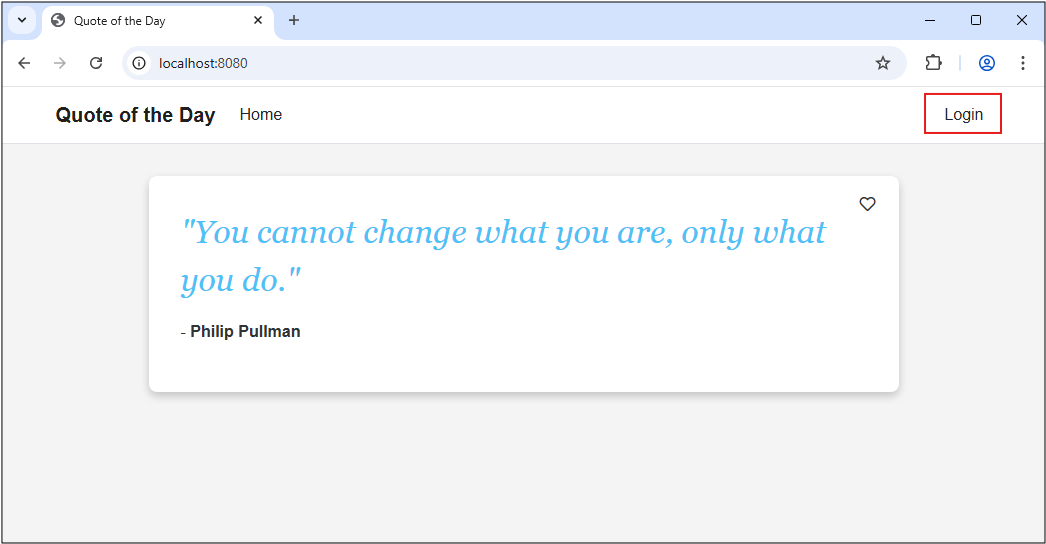
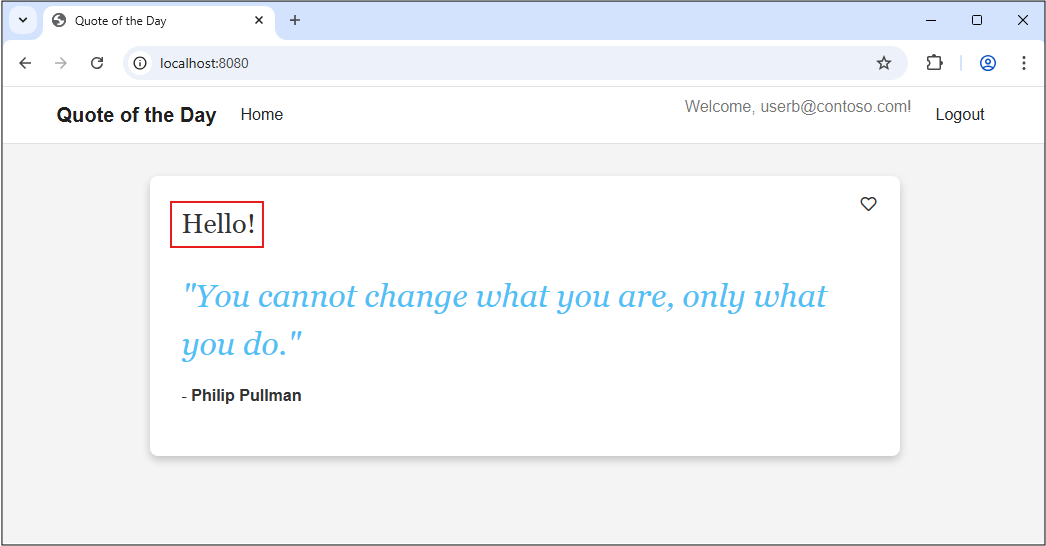
로그인하면 usera@contoso.com에 대한 긴 인사말 메시지가 표시됩니다.

로그아웃을 클릭하고 로그인하면 userb@contoso.com간단한 인사말 메시지가 표시됩니다.
비고
이 자습서에서는 이러한 이름을 정확하게 사용하는 것이 중요합니다. 예상대로 기능이 구성되어 있다면, 두 사용자는 서로 다른 버전을 볼 수 있어야 합니다.
다음 단계
Go의 기능 관리에 대해 자세히 알아보려면 다음 문서를 계속 진행하세요.