클라이언트는 표준 WebSocket 프로토콜을 사용하여 Azure Web PubSub 서비스에 연결합니다. WebSocket 클라이언트가 지원되는 언어를 사용하여 서비스 클라이언트를 작성할 수 있습니다. 이 문서에서는 다양한 언어의 WebSocket 클라이언트 샘플을 여럿 볼 수 있습니다.
Authorization
Web PubSub은 JWT(JSON 웹 토큰)를 사용하여 클라이언트의 유효성을 검사하고 권한을 부여합니다. 클라이언트는 토큰을 access_token 쿼리 매개 변수에 넣거나, 서비스에 연결할 때 Authorization 헤더에 넣을 수 있습니다.
일반적인으로 클라이언트는 먼저 앱 서버와 통신하여 서비스 및 토큰의 URL을 가져옵니다. 그런 다음 클라이언트에서 수신한 URL과 토큰을 사용하여 서비스에 대한 WebSocket 연결을 엽니다.
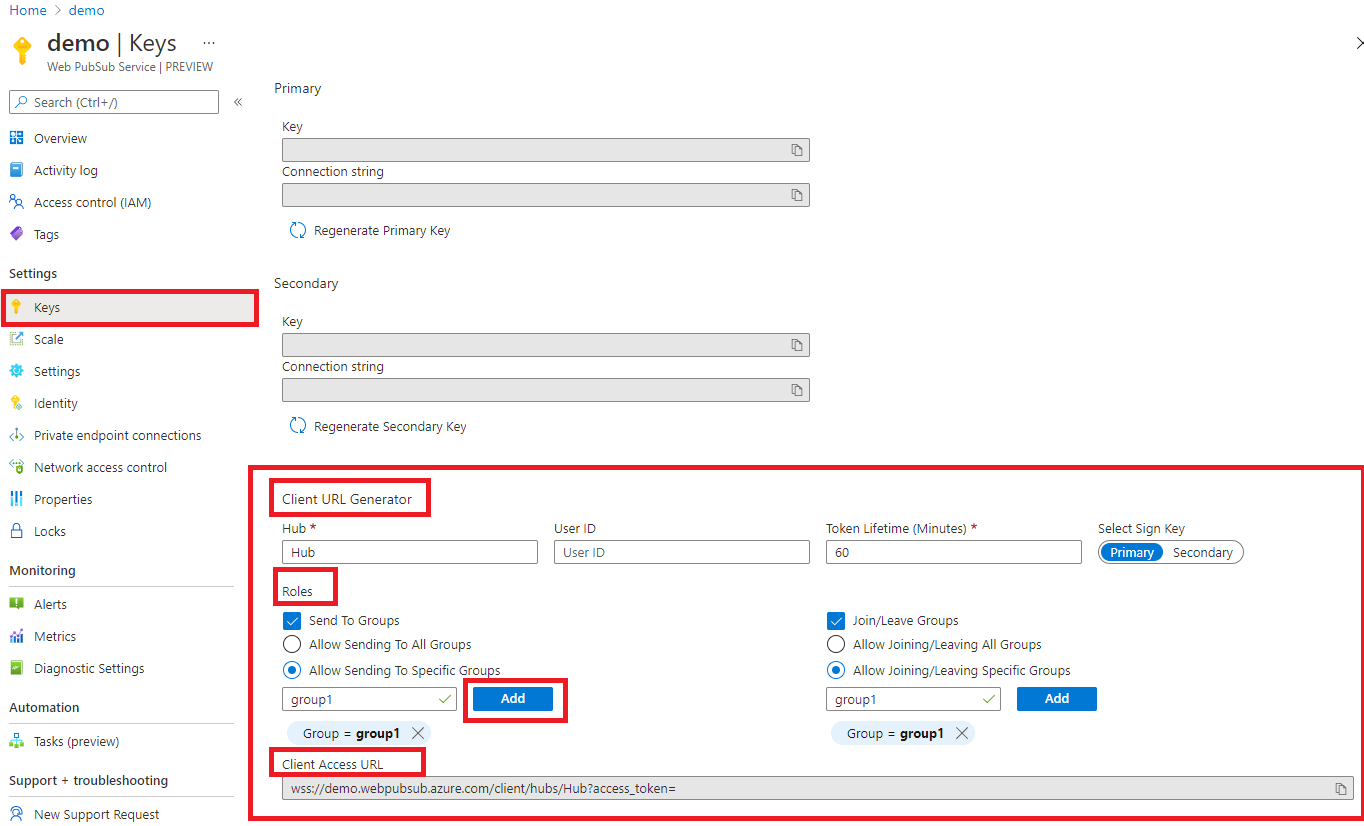
또한 포털은 토큰을 사용하여 클라이언트 URL을 동적으로 생성하는 도구를 제공합니다. 이 도구는 빠른 테스트를 수행하는 데 유용할 수 있습니다.
참고 항목
토큰을 생성할 때 필요한 역할만 포함해야 합니다.
다음 섹션에서는 샘플 워크플로를 간소화하기 위해 클라이언트가 연결할 포털에서 일시적으로 생성된 URL을 사용합니다. <Client_URL_From_Portal>을 사용하여 값을 나타냅니다. 생성된 토큰은 기본적으로 60분 후에 만료되므로, 토큰이 만료되면 다시 생성하는 것을 잊지 마세요.
이 서비스는 두 가지 유형의 WebSocket 클라이언트를 지원합니다. 하나는 단순 WebSocket 클라이언트이고 다른 하나는 PubSub WebSocket 클라이언트입니다. 여기에서는 이 두 종류의 클라이언트가 서비스에 연결하는 방법을 보여 줍니다. 이러한 클라이언트에 대한 자세한 내용은 Azure Web PubSub용 WebSocket 클라이언트 프로토콜을 참조하세요.
Dependency
대부분의 최신 브라우저에서는 WebSocket API가 기본적으로 지원됩니다.
단순 WebSocket 클라이언트
HTML 페이지의 script 블록 내부:
<script>
    // Don't forget to replace this <Client_URL_From_Portal> with the value fetched from the portal
    let ws = new WebSocket("<Client_URL_From_Portal>");
    ws.onopen = () => {
        // Do things when the WebSocket connection is established
    };

    ws.onmessage = event => {
        // Do things when messages are received.
    };
</script>
const WebSocket = require('ws');
// Don't forget to replace this <Client_URL_From_Portal> with the value fetched from the portal
const client = new WebSocket("<Client_URL_From_Portal>");
client.on('open', () => {
     // Do things when the WebSocket connection is established
});
client.on('message', msg => {
     // Do things when messages are received.
});
import asyncio
import websockets

async def hello():
    # Don't forget to replace this <Client_URL_From_Portal> with the value fetched from the portal
    uri = '<Client_URL_From_Portal>'
    async with websockets.connect(uri) as ws:
        while True:
            await ws.send('hello')
            greeting = await ws.recv()
            print(greeting)

asyncio.get_event_loop().run_until_complete(hello())
using System;
using System.IO;
using System.Text;
using System.Threading.Tasks;
using Websocket.Client;

namespace subscriber
{
    class Program
    {
        static async Task Main(string[] args)
        {
            // Don't forget to replace this <Client_URL_From_Portal> with the value fetched from the portal
            using (var client = new WebsocketClient(new Uri("<Client_URL_From_Portal>")))
            {
                // Disable the auto disconnect and reconnect because the sample would like the client to stay online even if no data comes in
                client.ReconnectTimeout = null;
                client.MessageReceived.Subscribe(msg => Console.WriteLine($"Message received: {msg}"));
                await client.Start();
                Console.WriteLine("Connected.");
                Console.Read();
            }
        }
    }
}
package client;

import java.net.URI;
import java.net.http.HttpClient;
import java.net.http.WebSocket;
import java.util.concurrent.CompletionStage;

/**
 * A simple WebSocket Client.
 *
 */
public final class SimpleClient {
    private SimpleClient() {
    }

    /**
     * Starts a simple WebSocket connection.
     * @param args The arguments of the program.
     */
    public static void main(String[] args) throws Exception {
        // Don't forget to replace this <Client_URL_From_Portal> with the value fetched from the portal
        WebSocket ws = HttpClient.newHttpClient().newWebSocketBuilder()
                .buildAsync(URI.create("<Client_URL_From_Portal>"), new WebSocketClient()).join();
        System.in.read();
    }

    private static final class WebSocketClient implements WebSocket.Listener {
        private WebSocketClient() {
        }

        @Override
        public void onOpen(WebSocket webSocket) {
            System.out.println("onOpen using subprotocol " + webSocket.getSubprotocol());
            WebSocket.Listener.super.onOpen(webSocket);
        }

        @Override
        public CompletionStage<?> onText(WebSocket webSocket, CharSequence data, boolean last) {
            System.out.println("onText received " + data);
            return WebSocket.Listener.super.onText(webSocket, data, last);
        }

        @Override
        public void onError(WebSocket webSocket, Throwable error) {
            System.out.println("Bad day! " + webSocket.toString());
            WebSocket.Listener.super.onError(webSocket, error);
        }
    }
}
PubSub WebSocket 클라이언트
HTML 페이지의 script 블록 내부:
<script>
    // Don't forget to replace this <Client_URL_From_Portal> with the value fetched from the portal
    let ws = new WebSocket("<Client_URL_From_Portal>", 'json.webpubsub.azure.v1');
    ws.onopen = () => {
        // Do things when the WebSocket connection is established
    };

    ws.onmessage = event => {
        // Do things when messages are received.
    };
</script>
const WebSocket = require('ws');
// Don't forget to replace this <Client_URL_From_Portal> with the value fetched from the portal
const client = new WebSocket("<Client_URL_From_Portal>", "json.webpubsub.azure.v1");
client.on('open', () => {
     // Do things when the WebSocket connection is established
});
client.on('message', msg => {
     // Do things when messages are received.
});
import asyncio
import websockets

async def join_group():
    # Don't forget to replace this <Client_URL_From_Portal> with the value fetched from the portal
    uri = '<Client_URL_From_Portal>'
    async with websockets.connect(uri, subprotocols=['json.webpubsub.azure.v1']) as ws:
        await ws.send('{"type":"joinGroup","ackId":1,"group":"group1"}')
        return await ws.recv()

print(asyncio.get_event_loop().run_until_complete(join_group()))
using System;
using System.IO;
using System.Net.WebSockets;
using System.Text;
using System.Threading.Tasks;
namespace subscriber
{
    class Program
    {
        static async Task Main(string[] args)
        {
            // Don't forget to replace this <Client_URL_From_Portal> with the value fetched from the portal
            using (var client = new WebsocketClient(new Uri("<Client_URL_From_Portal>"), () =>
            {
                var inner = new ClientWebSocket();
                inner.Options.AddSubProtocol("json.webpubsub.azure.v1");
                return inner;
            }))
            {
                // Disable the auto disconnect and reconnect because the sample would like the client to stay online even if no data comes in
                client.ReconnectTimeout = null;
                client.MessageReceived.Subscribe(msg => Console.WriteLine($"Message received: {msg}"));
                await client.Start();
                Console.WriteLine("Connected.");
                Console.Read();
            }
        }
    }
}
package client;

import java.net.URI;
import java.net.http.HttpClient;
import java.net.http.WebSocket;
import java.util.concurrent.CompletionStage;

/**
 * A PubSub WebSocket Client.
 *
 */
public final class SubprotocolClient {
    private SubprotocolClient() {
    }

    /**
     * Starts a PubSub WebSocket connection.
     * @param args The arguments of the program.
     */
    public static void main(String[] args) throws Exception {
        // Don't forget to replace this <Client_URL_From_Portal> with the value fetched from the portal
        WebSocket ws = HttpClient.newHttpClient().newWebSocketBuilder().subprotocols("json.webpubsub.azure.v1")
                .buildAsync(URI.create("<Client_URL_From_Portal>"), new WebSocketClient()).join();

        ws.sendText("{\"type\":\"joinGroup\",\"ackId\":1,\"group\":\"group1\"}", true);
        System.in.read();
    }

    private static final class WebSocketClient implements WebSocket.Listener {
        private WebSocketClient() {
        }

        @Override
        public void onOpen(WebSocket webSocket) {
            System.out.println("onOpen using subprotocol " + webSocket.getSubprotocol());
            WebSocket.Listener.super.onOpen(webSocket);
        }

        @Override
        public CompletionStage<?> onText(WebSocket webSocket, CharSequence data, boolean last) {
            System.out.println("onText received " + data);
            return WebSocket.Listener.super.onText(webSocket, data, last);
        }

        @Override
        public void onError(WebSocket webSocket, Throwable error) {
            System.out.println("Bad day! " + webSocket.toString());
            WebSocket.Listener.super.onError(webSocket, error);
        }
    }
}
다음 단계
이 문서에서는 포털에서 생성된 URL을 사용하여 서비스에 연결하는 방법을 알아보았습니다. 클라이언트가 앱 서버와 통신하여 실제 애플리케이션에서 URL을 가져오는 방법을 살펴보려면 다음 자습서를 읽고 샘플을 확인하세요.