비고
여기에 사용된 용어에 대한 자세한 내용은 주요 개념 문서에 설명되어 있습니다.
클라이언트 쪽 SDK는 개발자의 워크플로 속도를 높이는 것을 목표로 합니다. 보다 구체적으로 말하면 다음과 같습니다.
- 클라이언트 연결 관리를 간소화합니다.
- 클라이언트 간에 메시지 보내기 간소화
- 의도하지 않은 클라이언트 연결 삭제 후 자동으로 다시 시도
- 연결 끊기에서 복구한 후 수와 순서대로 메시지를 안정적으로 전달합니다.
다이어그램에 표시된 것처럼 클라이언트는 Web PubSub 리소스와 WebSocket 연결을 설정합니다.

시작하기
필수 조건
- Python 3.8+
- Azure 구독
- Web PubSub 리소스
1. azure-messaging-webpubsubclient 패키지 설치
pip install azure-messaging-webpubsubclient
2. Web PubSub 리소스로 연결
클라이언트는 다음 Client Access URL 의 패턴을 wss://<service_name>.webpubsub.azure.com/client/hubs/<hub_name>?access_token=<token>따르는 서비스에 연결하고 인증하는 데 사용합니다. 클라이언트는 몇 가지 방법으로 .를 Client Access URL가져올 수 있습니다. 이 빠른 시작을 위해 표시된 Azure Portal에서 복사하여 붙여넣을 수 있습니다.
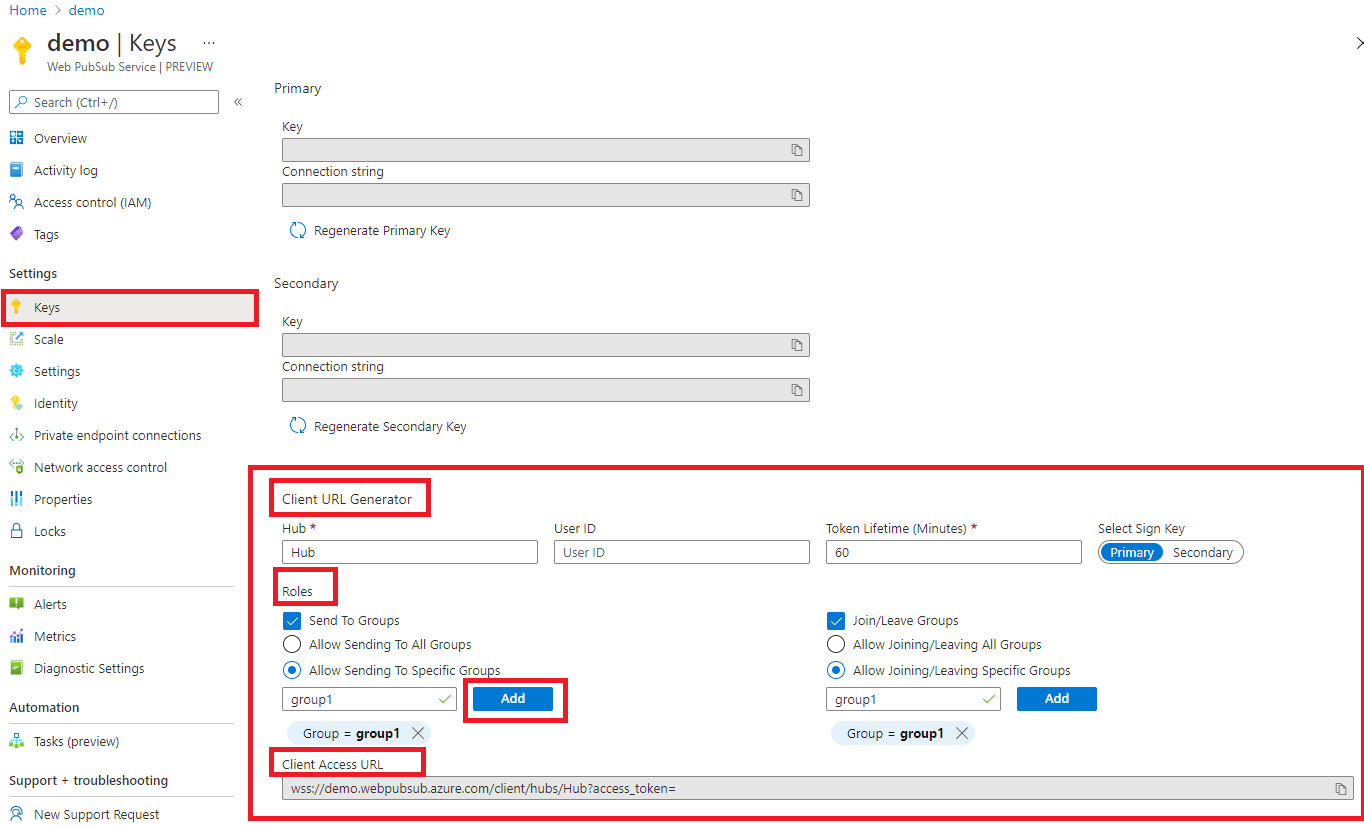
다이어그램에 표시된 것처럼 클라이언트에는 group1이라는 특정 그룹에 메시지를 보내고 조인할 수 있는 권한이 있습니다.
from azure.messaging.webpubsubclient import WebPubSubClient

client = WebPubSubClient("<client-access-url>")
with client:
    # The client can join/leave groups, send/receive messages to and from those groups all in real-time
    ...
3. 그룹 가입
클라이언트는 조인된 그룹에서만 메시지를 받을 수 있으며, 메시지를 받을 때 논리를 지정하는 콜백을 추가해야 합니다.
from azure.messaging.webpubsubclient.models import CallbackType

# ...continues the code snippet from above

# Registers a listener for the event 'group-message' early before joining a group to not miss messages
group_name = "group1";
client.subscribe(CallbackType.GROUP_MESSAGE, lambda e: print(f"Received message: {e.data}"));

# A client needs to join the group it wishes to receive messages from
client.join_group(groupName);
4. 그룹에 메시지 보내기
# ...continues the code snippet from above

# Send a message to a joined group
client.send_to_group(group_name, "hello world", "text");

# In the Console tab of your developer tools found in your browser, you should see the message printed there.
예시
및 stopped 이벤트에 대한 connecteddisconnected 콜백 추가
클라이언트가 Web PubSub 리소스에 성공적으로 연결되면
connected이벤트가 트리거됩니다.from azure.messaging.webpubsubclient.models import CallbackType client.subscribe(CallbackType.CONNECTED, lambda e: print(f"Connection {e.connection_id} is connected"))클라이언트의 연결이 끊어지고 연결을 복구하지 못하면
disconnected이벤트가 트리거됩니다.from azure.messaging.webpubsubclient.models import CallbackType client.subscribe(CallbackType.DISCONNECTED, lambda e: print(f"Connection disconnected: {e.message}"))클라이언트의 연결이
stopped클라이언트가 다시 연결 시도를 중지하면 이벤트가 트리거됩니다. 이는 일반적으로client.stop()호출되거나auto_reconnect비활성화되거나 다시 연결하려고 하는 지정된 제한에 도달한 후에 발생합니다. 클라이언트를 다시 시작하려면 중지된 이벤트에서client.start()호출할 수 있습니다.from azure.messaging.webpubsubclient.models import CallbackType client.subscribe(CallbackType.STOPPED, lambda : print("Client has stopped"))
클라이언트가 애플리케이션 서버 또는 조인된 그룹의 메시지를 사용합니다.
클라이언트는 콜백을 추가하여 애플리케이션 서버 또는 그룹의 메시지를 사용할 수 있습니다. 이벤트의 경우 group-message 클라이언트는 조인된 그룹 메시지 만 받을 수 있습니다.
from azure.messaging.webpubsubclient.models import CallbackType

# Registers a listener for the "server-message". The callback is invoked when your application server sends message to the connectionID, to or broadcast to all connections.
client.subscribe(CallbackType.CONNECTED, lambda e: print(f"Received message {e.data}"))

# Registers a listener for the "group-message". The callback is invoked when the client receives a message from the groups it has joined.
client.subscribe(CallbackType.GROUP_MESSAGE, lambda e: print(f"Received message from {e.group}: {e.data}"))
재가입 실패 처리
클라이언트의 연결이 끊어지고 복구에 실패하면 모든 그룹 컨텍스트가 Web PubSub 리소스에서 정리됩니다. 즉, 클라이언트가 다시 연결할 때 그룹에 다시 가입해야 합니다. 기본적으로 클라이언트에는 auto_rejoin_groups 옵션이 활성화되어 있습니다.
그러나 auto_rejoin_groups제한 사항을 알고 있어야 합니다.
- 클라이언트는 원래 서버 쪽 코드가 아닌 클라이언트 코드에 의해 조인된 그룹만 다시 조인할 수 있습니다.
- "그룹 다시 가입" 작업은 여러 가지 이유로 인해 실패할 수 있습니다. 예를 들어 클라이언트에는 그룹에 조인할 수 있는 권한이 없습니다. 이러한 경우 이 오류를 처리하기 위해 콜백을 추가해야 합니다.
from azure.messaging.webpubsubclient.models import CallbackType

# By default auto_rejoin_groups=True. You can disable it by setting to False.
client = WebPubSubClient("<client-access-url>", auto_rejoin_groups=True);

# Registers a listener to handle "rejoin-group-failed" event
client.subscribe(CallbackType.REJOIN_GROUP_FAILED, lambda e: print(f"Rejoin group {e.group} failed: {e.error}"))
작업 및 다시 시도
기본적으로 client.join_group(), client.leave_group(), client.send_to_group(), client.send_event() 등의 작업에는 세 번의 재시도가 있습니다. 키 단어 인수를 통해 구성할 수 있습니다. 모든 다시 시도가 실패하면 오류가 throw됩니다. Web PubSub 서비스가 작업을 중복 제거할 수 있도록 이전 재시도와 동일한 ack_id 전달하여 재시도를 계속할 수 있습니다.
try:
    client.join_group(group_name)
except SendMessageError as e:
    client.join_group(group_name, ack_id=e.ack_id)
문제 해결
로그 사용
다음 환경 변수를 설정하여 이 라이브러리를 사용할 때 디버그 로그를 가져올 수 있습니다.
export AZURE_LOG_LEVEL=verbose
로그를 사용하도록 설정하는 방법에 대한 자세한 지침은 @azure/로거 패키지 문서확인할 수 있습니다.
라이브 추적
Azure Portal의 라이브 추적 도구를 사용하여 Web PubSub 리소스를 통해 라이브 메시지 트래픽을 검사합니다.