이 빠른 시작에서는 Azure 에이전트 모드에 GitHub Copilot 사용하여 Azure Cosmos DB 리소스를 만들고 Python 사용하여 샘플 데이터를 가져옵니다. 에이전트 모드는 파일 만들기, 터미널에서 명령 실행 등 Visual Studio Code 작업을 수행합니다.
Azure 에이전트 모드에 대한 GitHub Copilot 없으면 Cosmos DB를 설정하고 데이터를 가져오려면 코드로서의 인프라, Python 스크립트를 작성하고 종속성을 수동으로 관리해야 합니다. Azure 에이전트 모드용 GitHub Copilot을 사용하면 원하는 결과를 설명하기만 하면 나머지는 Copilot이 처리합니다
사전 요구 사항
- Azure 구독입니다. 아직 없는 경우 무료 계정을 만들 수 있습니다.
- Azure 리소스 그룹입니다. 다음 절차에서 이 리소스 그룹을 사용합니다.
- GitHub Copilot for Azure 확장이 설치된 Visual Studio Code
- Python 3.9 이상.
-
Azure CLI. 시작하기 전에 로그인합니다. 사용하려는 구독을 실행하고
az login선택합니다. - 에이전트 모드에 액세스할 수 있는 GitHub Copilot 구독입니다.
- Azure용 GitHub Copilot 시작하기에 대한 이해.
환경 설정
- 로컬 컴퓨터에 새 디렉터리를 만듭니다.
- 해당 로컬 디렉터리(작업 영역)에서 Visual Studio Code 엽니다.
- 제품 데이터를 다운로드하고 새 로컬 디렉터리(작업 영역)에 저장합니다.
CosmicWorks 제품 데이터를 다운로드하고 작업 영역 폴더에 저장 products.json 합니다.
Azure Cosmos DB 가져오기 솔루션 빌드
Visual Studio Code에서 GitHub Copilot 채팅 창을 엽니다.
기본 승인에서 Autopilot(미리 보기)으로 전환합니다.
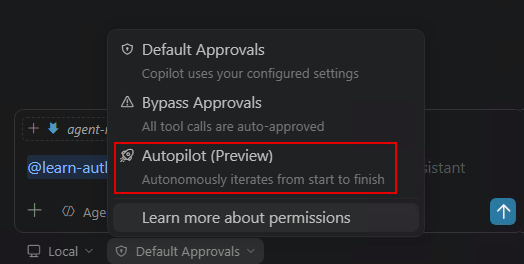
에이전트 모드로 전환하고 원하는 모델을 선택합니다. 다음 프롬프트를 입력합니다.
Using the products.json file in my workspace, create a Python virtual environment, then set up an Azure Cosmos DB for NoSQL environment in West US (resource group named "<resource-group-name>", account, database, and container with partition key "/categoryId"). Write and run a Python script to import all records into the container. Verify the import by querying the first 5 items. If there are errors, fix them and retry.
Using the products.json file in my workspace, create a Python virtual environment, then set up an Azure Cosmos DB for NoSQL environment in West US (resource group named "<resource-group-name>", account, database, and container with partition key "/categoryId"). Write and run a Python script to import all records into the container. Verify the import by querying the first 5 items. If there are errors, fix them and retry.
<resource-group-name>를 고유한 값으로 바꾸세요.
에이전트 모드는 가상 환경 만들기, 각 Azure 리소스 프로비전, Python 가져오기 스크립트 생성, 종속성 설치, 가져오기 실행 및 결과 확인과 같은 전체 워크플로를 처리합니다. 실행을 허용하기 전에 생성된 코드를 검토합니다.
자원을 정리하세요
완료되면 지속적인 요금이 발생하지 않도록 리소스 그룹을 삭제합니다.
Use the Azure CLI to delete the resource group `<resource-group-name>` and all its resources.
또는 터미널에서 직접 명령을 실행합니다.
az group delete --name <resource-group-name> --yes --no-wait