이 빠른 시작에서는 TypeSpec을 사용하여 RESTful API 애플리케이션을 디자인, 생성 및 구현하는 방법을 알아봅니다. TypeSpec은 클라우드 서비스 API를 설명하기 위한 오픈 소스 언어이며 여러 플랫폼에 대한 클라이언트 및 서버 코드를 생성합니다. 이 빠른 시작에 따라 API 계약을 한 번 정의하고 일관된 구현을 생성하여 유지 관리가 가능하고 잘 문서화된 API 서비스를 빌드하는 방법을 알아봅니다.
TypeSpec의 코드 생성기를 사용하여 라우팅 및 Swagger UI를 사용하여 ASP.NET Core 서버를 스캐폴드하고, 지속성을 위해 Azure Cosmos DB에 연결하고, Azure Container Apps에 배포합니다.
API 개발에서 TypeSpec의 역할에 대한 컨텍스트는 TypeSpec 개요를 참조하세요.
완료 시간: 20~25분
이 빠른 시작에서 당신은 다음을 수행합니다.
- TypeSpec을 사용하여 API 정의
- API 서버 애플리케이션 만들기
- 영구 스토리지에 Azure Cosmos DB 통합
- 로컬에서 API 실행 및 테스트
- Azure Container Apps에 배포
Prerequisites
- 활성 Azure 계정입니다. 계정이 없는 경우 무료로 계정을 만듭니다.
- .NET 9 SDK
- Node.js LTS - TypeSpec CLI 및 패키지 관리자에 필요합니다.
- 다음 확장을 가지고 있는 Visual Studio Code.
- TypeSpec 확장
- 선택 사항: Azure Developer CLI를 사용하여 배포
TypeSpec을 사용하여 개발
TypeSpec은 언어에 구애받지 않은 방식으로 API를 정의하고 여러 플랫폼에 대한 API 서버 및 클라이언트 라이브러리를 생성합니다. 이 기능을 통해 다음을 수행할 수 있습니다.
- API 계약을 한 번 정의
- 일관된 서버 및 클라이언트 코드 생성
- API 인프라가 아닌 비즈니스 논리 구현에 집중
TypeSpec은 API 서비스 관리를 제공합니다.
- API 정의 언어
- API용 서버 쪽 라우팅 미들웨어
- API를 사용하는 클라이언트 라이브러리
클라이언트 요청 및 서버 통합을 제공합니다.
- 데이터베이스, 스토리지 및 메시징에 대한 Azure 서비스와 같은 미들웨어에서 비즈니스 논리 구현
- API용 호스팅 서버(로컬 또는 Azure)
- 반복 가능한 프로비전 및 배포를 위한 배포 스크립트
새 TypeSpec 애플리케이션 만들기
API 서버 및 TypeSpec 파일을 저장할 새 폴더를 만듭니다.
mkdir my_typespec_quickstart
cd my_typespec_quickstart
TypeSpec 컴파일러를 전역적으로 설치합니다.
npm install -g @typespec/compilerTypeSpec이 올바르게 설치되었는지 확인합니다.
tsp --versionTypeSpec 프로젝트를 초기화합니다.
tsp init제공된 답변으로 다음 프롬프트에 응답합니다.
- 여기에서 새 프로젝트를 초기화하시겠습니까? Y
- 프로젝트 템플릿을 선택하시겠습니까? 일반 REST API
- 프로젝트 이름 입력: 위젯
- 어떤 내보내기를 사용하시겠습니까?
- OpenAPI 3.1 문서
- C# 서버 스텁 코드
TypeSpec 발생기는 다양한 TypeSpec 컴파일러 API를 활용하여 TypeSpec 컴파일 프로세스를 고찰하고 아티팩트를 생성하는 라이브러리입니다.
계속하기 전에 초기화가 완료되기를 기다립니다.
Run tsp compile . to build the project.

Please review the following messages from emitters:
  @typespec/http-server-csharp:

        Generated ASP.Net services require dotnet 9:
        https://dotnet.microsoft.com/download

        Create an ASP.Net service project for your TypeSpec:
        > npx hscs-scaffold . --use-swaggerui --overwrite

        More information on getting started:
        https://aka.ms/tsp/hscs/start
프로젝트를 컴파일합니다.
tsp compile .팁 (조언)
반복 개발의 경우 변경 감시 모드를 사용하여 파일 변경 시
tsp compile . --watch자동으로 다시 컴파일합니다. 이렇게 하면 수정main.tsp할 때 생성된 서버와 스키마가 최신 상태로 유지됩니다.TypeSpec은 두 개의 개별 폴더를 만드는 기본
./tsp-output프로젝트를 생성합니다.- schema
- server
./tsp-output/schema/openapi.yaml파일을 엽니다../main.tsp의 몇 줄이 여러분을 위해 200줄이 넘는 OpenApi 사양을 생성한 것을 주목하세요../tsp-output/server/aspnet폴더를 엽니다. 스캐폴드된 .NET 파일에는 다음이 포함됩니다.-
./generated/operations/IWidgets.cs은 위젯 메서드에 대한 인터페이스를 정의합니다. -
./generated/controllers/WidgetsController.cs는 Widgets 메서드에 통합을 구현합니다. 여기서 비즈니스 논리를 배치합니다. -
./generated/models은 위젯 API에 대한 모델을 정의합니다.
-
TypeSpec 방출기 구성
TypeSpec 파일을 사용하여 API 서버 생성을 구성합니다.
기존 구성을
tspconfig.yaml열고 다음 YAML로 바꿉다.emit: - "@typespec/openapi3" - "@typespec/http-server-csharp" options: "@typespec/openapi3": emitter-output-dir: "{cwd}/server/wwwroot" openapi-versions: - 3.1.0 "@typespec/http-server-csharp": emitter-output-dir: "{cwd}/server/" use-swaggerui: true overwrite: true emit-mocks: "mocks-and-project-files"이 구성은 완전히 생성된 .NET API 서버에 필요한 몇 가지 변경 사항을 투영합니다.
-
emit-mocks: 서버에 필요한 모든 프로젝트 파일을 만듭니다. -
use-swaggerui: 브라우저에 친숙한 방식으로 API를 사용할 수 있도록 Swagger UI를 통합합니다. -
emitter-output-dir: 서버 생성 및 OpenApi 사양 생성 모두에 대한 출력 디렉터리를 설정합니다. - 모든 항목을
./server에 생성합니다.
-
프로젝트를 다시 컴파일합니다.
tsp compile .새
/server디렉터리로 변경합니다.cd server아직 없는 경우 기본 개발자 인증서를 만듭니다.
dotnet dev-certs https프로젝트를 실행합니다.
dotnet run브라우저에서 알림이 열릴 때까지 기다립니다.
브라우저를 열고 Swagger UI 경로를
/swagger추가합니다.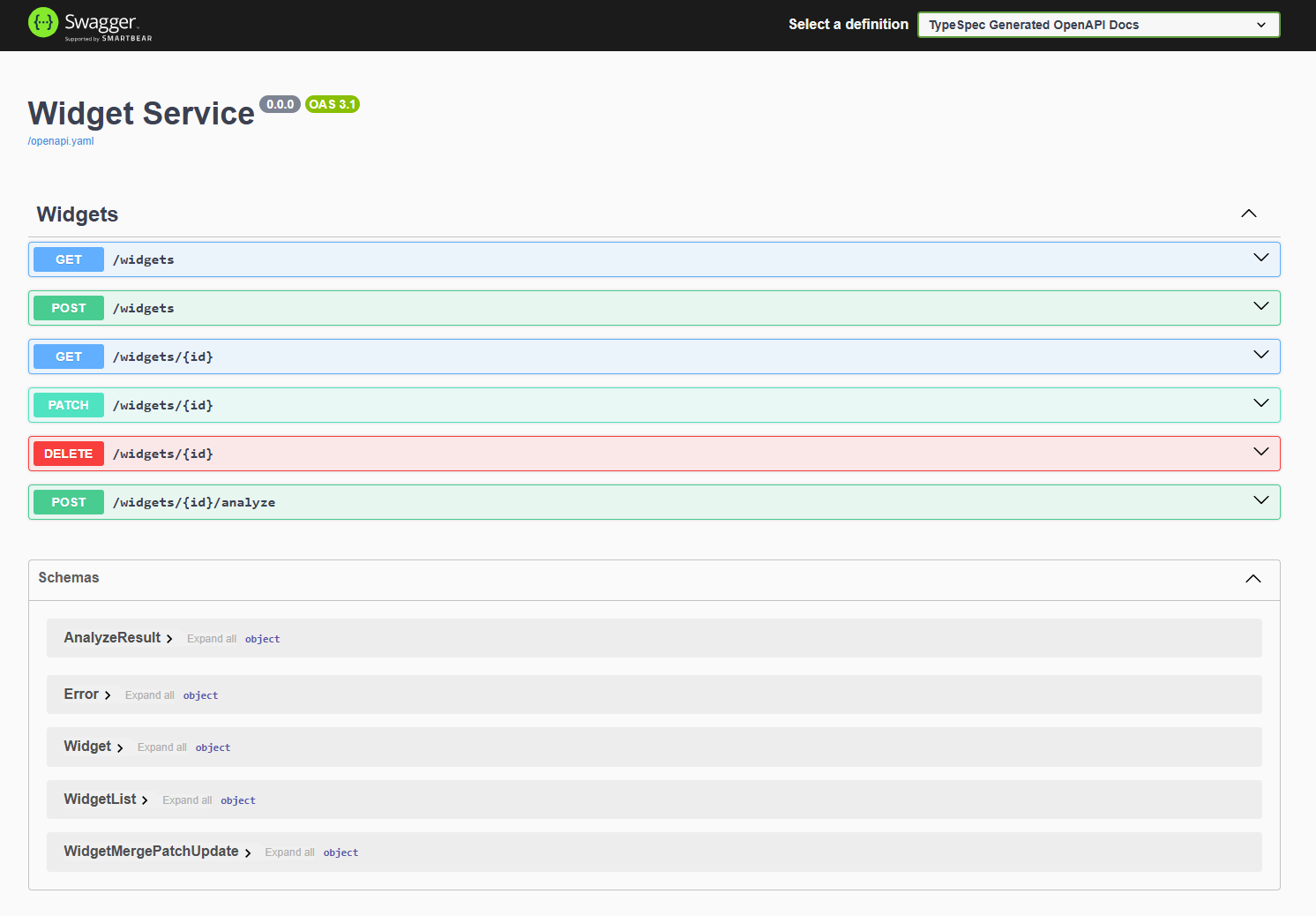
기본 TypeSpec API와 서버가 모두 작동합니다.
애플리케이션 파일 구조 이해
생성된 서버의 프로젝트 구조에는 .NET 컨트롤러 기반 API 서버, 프로젝트를 빌드하기 위한 .NET 파일 및 Azure 통합을 위한 미들웨어가 포함됩니다.
├── appsettings.Development.json
├── appsettings.json
├── docs
├── generated
├── mocks
├── Program.cs
├── Properties
├── README.md
├── ServiceProject.csproj
└── wwwroot
-
비즈니스 논리를 추가합니다. 이 예제에서는 파일로 시작합니다
./server/mocks/Widget.cs. 생성된Widget.cs는 기본 메서드를 제공합니다. -
서버 업데이트: 특정 서버 구성을 추가합니다
./program.cs. -
OpenApi 사양을 사용합니다. TypeSpec은 OpenApi3.json 파일을
./server/wwwroot파일로 생성하여 개발 중에 Swagger UI에서 사용할 수 있도록 했습니다. 사양에 대한 UI를 제공합니다. REST 클라이언트 또는 웹 프런트 엔드와 같은 요청 메커니즘을 제공하지 않고도 API와 상호 작용할 수 있습니다.
Azure Cosmos DB no-sql로 지속성 변경
이제 기본 위젯 API 서버가 작동하므로 영구 데이터 저장소에 대한 Azure Cosmos DB 와 함께 작동하도록 서버를 업데이트합니다.
./server디렉터리에서 프로젝트에 Azure Cosmos DB를 추가합니다.dotnet add package Microsoft.Azure.CosmosAzure ID 라이브러리를 추가하여 Azure에 인증합니다.
dotnet add package Azure.IdentityCosmos DB 통합 설정의
./server/ServiceProject.csproj을(를) 업데이트하세요.<Project Sdk="Microsoft.NET.Sdk.Web"> <PropertyGroup> ... existing settings ... <EnableSdkContainerSupport>true</EnableSdkContainerSupport> </PropertyGroup> <ItemGroup> ... existing settings ... <PackageReference Include="Newtonsoft.Json" Version="13.0.3" /> </ItemGroup> </Project>- EnableSdkContainerSupport를 사용하면 Dockerfile을 작성하지 않고 .NET SDK의 기본 제공 컨테이너 빌드 지원(dotnet publish ––container)을 사용할 수 있습니다.
- Newtonsoft.Json은 Cosmos DB SDK가 .NET 개체를 JSON으로 변환하는 데 사용하는 Json .NET 직렬 변환기를 추가합니다.
Cosmos DB 등록을 관리하기 위해 새 등록 파일을
./azure/CosmosDbRegistration만듭니다.using Microsoft.Azure.Cosmos; using Microsoft.Extensions.Configuration; using System; using System.Threading.Tasks; using Azure.Identity; using DemoService; namespace WidgetService.Service { /// <summary> /// Registration class for Azure Cosmos DB services and implementations /// </summary> public static class CosmosDbRegistration { /// <summary> /// Registers the Cosmos DB client and related services for dependency injection /// </summary> /// <param name="builder">The web application builder</param> public static void RegisterCosmosServices(this WebApplicationBuilder builder) { // Register the HttpContextAccessor for accessing the HTTP context builder.Services.AddHttpContextAccessor(); // Get configuration settings var cosmosEndpoint = builder.Configuration["Configuration:AzureCosmosDb:Endpoint"]; // Validate configuration ValidateCosmosDbConfiguration(cosmosEndpoint); // Configure Cosmos DB client options var cosmosClientOptions = new CosmosClientOptions { SerializerOptions = new CosmosSerializationOptions { PropertyNamingPolicy = CosmosPropertyNamingPolicy.CamelCase }, ConnectionMode = ConnectionMode.Direct }; builder.Services.AddSingleton(serviceProvider => { var credential = new DefaultAzureCredential(); // Create Cosmos client with token credential authentication return new CosmosClient(cosmosEndpoint, credential, cosmosClientOptions); }); // Initialize Cosmos DB if needed builder.Services.AddHostedService<CosmosDbInitializer>(); // Register WidgetsCosmos implementation of IWidgets builder.Services.AddScoped<IWidgets, WidgetsCosmos>(); } /// <summary> /// Validates the Cosmos DB configuration settings /// </summary> /// <param name="cosmosEndpoint">The Cosmos DB endpoint</param> /// <exception cref="ArgumentException">Thrown when configuration is invalid</exception> private static void ValidateCosmosDbConfiguration(string cosmosEndpoint) { if (string.IsNullOrEmpty(cosmosEndpoint)) { throw new ArgumentException("Cosmos DB Endpoint must be specified in configuration"); } } } }엔드포인트에 대한 환경 변수를 확인합니다.
var cosmosEndpoint = builder.Configuration["Configuration:AzureCosmosDb:Endpoint"];영구 저장소에 대한 Azure Cosmos DB와 통합하는 비즈니스 논리를 제공하기 위해 새 위젯 클래스
./azure/WidgetsCosmos.cs를 만듭니다.using System; using System.Net; using System.Threading.Tasks; using Microsoft.Azure.Cosmos; using Microsoft.Extensions.Logging; using System.Collections.Generic; using System.Linq; // Use generated models and operations using DemoService; namespace WidgetService.Service { /// <summary> /// Implementation of the IWidgets interface that uses Azure Cosmos DB for persistence /// </summary> public class WidgetsCosmos : IWidgets { private readonly CosmosClient _cosmosClient; private readonly ILogger<WidgetsCosmos> _logger; private readonly IHttpContextAccessor _httpContextAccessor; private readonly string _databaseName = "WidgetDb"; private readonly string _containerName = "Widgets"; /// <summary> /// Initializes a new instance of the WidgetsCosmos class. /// </summary> /// <param name="cosmosClient">The Cosmos DB client instance</param> /// <param name="logger">Logger for diagnostic information</param> /// <param name="httpContextAccessor">Accessor for the HTTP context</param> public WidgetsCosmos( CosmosClient cosmosClient, ILogger<WidgetsCosmos> logger, IHttpContextAccessor httpContextAccessor) { _cosmosClient = cosmosClient; _logger = logger; _httpContextAccessor = httpContextAccessor; } /// <summary> /// Gets a reference to the Cosmos DB container for widgets /// </summary> private Container WidgetsContainer => _cosmosClient.GetContainer(_databaseName, _containerName); /// <summary> /// Lists all widgets in the database /// </summary> /// <returns>Array of Widget objects</returns> public async Task<WidgetList> ListAsync() { try { var queryDefinition = new QueryDefinition("SELECT * FROM c"); var widgets = new List<Widget>(); using var iterator = WidgetsContainer.GetItemQueryIterator<Widget>(queryDefinition); while (iterator.HasMoreResults) { var response = await iterator.ReadNextAsync(); widgets.AddRange(response.ToList()); } // Create and return a WidgetList instead of Widget[] return new WidgetList { Items = widgets.ToArray() }; } catch (Exception ex) { _logger.LogError(ex, "Error listing widgets from Cosmos DB"); throw new Error(500, "Failed to retrieve widgets from database"); } } /// <summary> /// Retrieves a specific widget by ID /// </summary> /// <param name="id">The ID of the widget to retrieve</param> /// <returns>The retrieved Widget</returns> public async Task<Widget> ReadAsync(string id) { try { var response = await WidgetsContainer.ReadItemAsync<Widget>( id, new PartitionKey(id)); return response.Resource; } catch (CosmosException ex) when (ex.StatusCode == HttpStatusCode.NotFound) { _logger.LogWarning("Widget with ID {WidgetId} not found", id); throw new Error(404, $"Widget with ID '{id}' not found"); } catch (Exception ex) { _logger.LogError(ex, "Error reading widget {WidgetId} from Cosmos DB", id); throw new Error(500, "Failed to retrieve widget from database"); } } /// <summary> /// Creates a new widget from the provided Widget object /// </summary> /// <param name="body">The Widget object to store in the database</param> /// <returns>The created Widget</returns> public async Task<Widget> CreateAsync(Widget body) { try { // Validate the Widget if (body == null) { throw new Error(400, "Widget data cannot be null"); } if (string.IsNullOrEmpty(body.Id)) { throw new Error(400, "Widget must have an Id"); } if (body.Color != "red" && body.Color != "blue") { throw new Error(400, "Color must be 'red' or 'blue'"); } // Save the widget to Cosmos DB var response = await WidgetsContainer.CreateItemAsync( body, new PartitionKey(body.Id)); _logger.LogInformation("Created widget with ID {WidgetId}", body.Id); return response.Resource; } catch (CosmosException ex) when (ex.StatusCode == HttpStatusCode.Conflict) { _logger.LogError(ex, "Widget with ID {WidgetId} already exists", body.Id); throw new Error(409, $"Widget with ID '{body.Id}' already exists"); } catch (Exception ex) when (!(ex is Error)) { _logger.LogError(ex, "Error creating widget in Cosmos DB"); throw new Error(500, "Failed to create widget in database"); } } /// <summary> /// Updates an existing widget with properties specified in the patch document /// </summary> /// <param name="id">The ID of the widget to update</param> /// <param name="body">The WidgetMergePatchUpdate object containing properties to update</param> /// <returns>The updated Widget</returns> public async Task<Widget> UpdateAsync(string id, TypeSpec.Http.WidgetMergePatchUpdate body) { try { // Validate input parameters if (body == null) { throw new Error(400, "Update data cannot be null"); } if (body.Color != null && body.Color != "red" && body.Color != "blue") { throw new Error(400, "Color must be 'red' or 'blue'"); } // First check if the item exists Widget existingWidget; try { var response = await WidgetsContainer.ReadItemAsync<Widget>( id, new PartitionKey(id)); existingWidget = response.Resource; } catch (CosmosException ex) when (ex.StatusCode == HttpStatusCode.NotFound) { _logger.LogWarning("Widget with ID {WidgetId} not found for update", id); throw new Error(404, $"Widget with ID '{id}' not found"); } // Apply the patch updates only where properties are provided bool hasChanges = false; if (body.Weight.HasValue) { existingWidget.Weight = body.Weight.Value; hasChanges = true; } if (body.Color != null) { existingWidget.Color = body.Color; hasChanges = true; } // Only perform the update if changes were made if (hasChanges) { // Use ReplaceItemAsync for the update var updateResponse = await WidgetsContainer.ReplaceItemAsync( existingWidget, id, new PartitionKey(id)); _logger.LogInformation("Updated widget with ID {WidgetId}", id); return updateResponse.Resource; } // If no changes, return the existing widget _logger.LogInformation("No changes to apply for widget with ID {WidgetId}", id); return existingWidget; } catch (Error) { // Rethrow Error exceptions throw; } catch (Exception ex) { _logger.LogError(ex, "Error updating widget {WidgetId} in Cosmos DB", id); throw new Error(500, "Failed to update widget in database"); } } /// <summary> /// Deletes a widget by its ID /// </summary> /// <param name="id">The ID of the widget to delete</param> public async Task DeleteAsync(string id) { try { await WidgetsContainer.DeleteItemAsync<Widget>(id, new PartitionKey(id)); _logger.LogInformation("Deleted widget with ID {WidgetId}", id); } catch (CosmosException ex) when (ex.StatusCode == HttpStatusCode.NotFound) { _logger.LogWarning("Widget with ID {WidgetId} not found for deletion", id); throw new Error(404, $"Widget with ID '{id}' not found"); } catch (Exception ex) { _logger.LogError(ex, "Error deleting widget {WidgetId} from Cosmos DB", id); throw new Error(500, "Failed to delete widget from database"); } } /// <summary> /// Analyzes a widget by ID and returns a simplified analysis result /// </summary> /// <param name="id">The ID of the widget to analyze</param> /// <returns>An AnalyzeResult containing the analysis of the widget</returns> public async Task<AnalyzeResult> AnalyzeAsync(string id) { try { // First retrieve the widget from the database Widget widget; try { var response = await WidgetsContainer.ReadItemAsync<Widget>( id, new PartitionKey(id)); widget = response.Resource; } catch (CosmosException ex) when (ex.StatusCode == HttpStatusCode.NotFound) { _logger.LogWarning("Widget with ID {WidgetId} not found for analysis", id); throw new Error(404, $"Widget with ID '{id}' not found"); } // Create the analysis result var result = new AnalyzeResult { Id = widget.Id, Analysis = $"Weight: {widget.Weight}, Color: {widget.Color}" }; _logger.LogInformation("Analyzed widget with ID {WidgetId}", id); return result; } catch (Error) { // Rethrow Error exceptions throw; } catch (Exception ex) { _logger.LogError(ex, "Error analyzing widget {WidgetId} from Cosmos DB", id); throw new Error(500, "Failed to analyze widget from database"); } } } }Azure에
./server/services/CosmosDbInitializer.cs인증할 파일을 만듭니다.using System; using System.Threading; using System.Threading.Tasks; using Microsoft.Azure.Cosmos; using Microsoft.Extensions.Configuration; using Microsoft.Extensions.Hosting; using Microsoft.Extensions.Logging; namespace WidgetService.Service { /// <summary> /// Hosted service that initializes Cosmos DB resources on application startup /// </summary> public class CosmosDbInitializer : IHostedService { private readonly CosmosClient _cosmosClient; private readonly ILogger<CosmosDbInitializer> _logger; private readonly IConfiguration _configuration; private readonly string _databaseName; private readonly string _containerName = "Widgets"; public CosmosDbInitializer(CosmosClient cosmosClient, ILogger<CosmosDbInitializer> logger, IConfiguration configuration) { _cosmosClient = cosmosClient; _logger = logger; _configuration = configuration; _databaseName = _configuration["CosmosDb:DatabaseName"] ?? "WidgetDb"; } public async Task StartAsync(CancellationToken cancellationToken) { _logger.LogInformation("Ensuring Cosmos DB database and container exist..."); try { // Create database if it doesn't exist var databaseResponse = await _cosmosClient.CreateDatabaseIfNotExistsAsync( _databaseName, cancellationToken: cancellationToken); _logger.LogInformation("Database {DatabaseName} status: {Status}", _databaseName, databaseResponse.StatusCode == System.Net.HttpStatusCode.Created ? "Created" : "Already exists"); // Create container if it doesn't exist (using id as partition key) var containerResponse = await databaseResponse.Database.CreateContainerIfNotExistsAsync( new ContainerProperties { Id = _containerName, PartitionKeyPath = "/id" }, throughput: 400, // Minimum RU/s cancellationToken: cancellationToken); _logger.LogInformation("Container {ContainerName} status: {Status}", _containerName, containerResponse.StatusCode == System.Net.HttpStatusCode.Created ? "Created" : "Already exists"); } catch (Exception ex) { _logger.LogError(ex, "Error initializing Cosmos DB"); throw; } } public Task StopAsync(CancellationToken cancellationToken) { return Task.CompletedTask; } } }./server/program.csCosmos DB를 사용하도록 업데이트하고 Swagger UI를 프로덕션 배포에 사용할 수 있도록 합니다. 전체 파일에서 복사:// Generated by @typespec/http-server-csharp // <auto-generated /> #nullable enable using TypeSpec.Helpers; using WidgetService.Service; var builder = WebApplication.CreateBuilder(args); // Add services to the container. builder.Services.AddControllersWithViews(options => { options.Filters.Add<HttpServiceExceptionFilter>(); }); builder.Services.AddEndpointsApiExplorer(); builder.Services.AddSwaggerGen(); // Replace original registration with the Cosmos DB one CosmosDbRegistration.RegisterCosmosServices(builder); var app = builder.Build(); // Configure the HTTP request pipeline. if (!app.Environment.IsDevelopment()) { app.UseExceptionHandler("/Home/Error"); // The default HSTS value is 30 days. You may want to change this for production scenarios, see https://aka.ms/aspnetcore-hsts. app.UseHsts(); } // Swagger UI is always available app.UseSwagger(); app.UseSwaggerUI(c => { c.DocumentTitle = "TypeSpec Generated OpenAPI Viewer"; c.SwaggerEndpoint("/openapi.yaml", "TypeSpec Generated OpenAPI Docs"); c.RoutePrefix = "swagger"; }); app.UseHttpsRedirection(); app.UseStaticFiles(); app.Use(async (context, next) => { context.Request.EnableBuffering(); await next(); }); app.MapGet("/openapi.yaml", async (HttpContext context) => { var externalFilePath = "wwwroot/openapi.yaml"; if (!File.Exists(externalFilePath)) { context.Response.StatusCode = StatusCodes.Status404NotFound; await context.Response.WriteAsync("OpenAPI spec not found."); return; } context.Response.ContentType = "application/json"; await context.Response.SendFileAsync(externalFilePath); }); app.UseRouting(); app.UseAuthorization(); app.MapControllerRoute( name: "default", pattern: "{controller=Home}/{action=Index}/{id?}"); app.Run();프로젝트를 빌드합니다.
dotnet build이제 프로젝트는 Cosmos DB 통합을 사용하여 빌드됩니다. Azure 리소스를 만들고 프로젝트를 배포하는 배포 스크립트를 만들어 보겠습니다.
배포 인프라 만들기
Azure Developer CLI 및 Bicep 템플릿을 사용하여 반복 가능한 배포에 필요한 파일을 만듭니다.
TypeSpec 프로젝트의 루트에서 배포 정의 파일을 만들고
azure.yaml다음 원본에 붙여넣습니다.# yaml-language-server: $schema=https://raw.githubusercontent.com/Azure/azure-dev/main/schemas/v1.0/azure.yaml.json name: azure-typespec-scaffold-dotnet metadata: template: azd-init@1.14.0 services: api: project: ./server host: containerapp language: dotnet pipeline: provider: github이 구성은 생성된 프로젝트 위치(
./server)를 참조합니다. 에./tspconfig.yaml지정된 위치와 일치하는지 확인합니다./azure.yaml.TypeSpec 프로젝트의 루트에서
./infra디렉터리를 만듭니다../infra/main.bicepparam파일을 만들고 다음을 복사하여 배포에 필요한 매개 변수를 정의합니다.using './main.bicep' param environmentName = readEnvironmentVariable('AZURE_ENV_NAME', 'dev') param location = readEnvironmentVariable('AZURE_LOCATION', 'eastus2') param deploymentUserPrincipalId = readEnvironmentVariable('AZURE_PRINCIPAL_ID', '')이 매개 변수 목록은 이 배포에 필요한 최소 매개 변수를 제공합니다.
./infra/main.bicep파일을 만들고 다음을 복사하여 프로비저닝 및 배포를 위한 Azure 리소스를 정의합니다.metadata description = 'Bicep template for deploying a GitHub App using Azure Container Apps and Azure Container Registry.' targetScope = 'resourceGroup' param serviceName string = 'api' var databaseName = 'WidgetDb' var containerName = 'Widgets' @minLength(1) @maxLength(64) @description('Name of the environment that can be used as part of naming resource convention') param environmentName string @minLength(1) @description('Primary location for all resources') param location string @description('Id of the principal to assign database and application roles.') param deploymentUserPrincipalId string = '' var resourceToken = toLower(uniqueString(resourceGroup().id, environmentName, location)) var tags = { 'azd-env-name': environmentName repo: 'https://github.com/typespec' } module managedIdentity 'br/public:avm/res/managed-identity/user-assigned-identity:0.4.1' = { name: 'user-assigned-identity' params: { name: 'identity-${resourceToken}' location: location tags: tags } } module cosmosDb 'br/public:avm/res/document-db/database-account:0.8.1' = { name: 'cosmos-db-account' params: { name: 'cosmos-db-nosql-${resourceToken}' location: location locations: [ { failoverPriority: 0 locationName: location isZoneRedundant: false } ] tags: tags disableKeyBasedMetadataWriteAccess: true disableLocalAuth: true networkRestrictions: { publicNetworkAccess: 'Enabled' ipRules: [] virtualNetworkRules: [] } capabilitiesToAdd: [ 'EnableServerless' ] sqlRoleDefinitions: [ { name: 'nosql-data-plane-contributor' dataAction: [ 'Microsoft.DocumentDB/databaseAccounts/readMetadata' 'Microsoft.DocumentDB/databaseAccounts/sqlDatabases/containers/items/*' 'Microsoft.DocumentDB/databaseAccounts/sqlDatabases/containers/*' ] } ] sqlRoleAssignmentsPrincipalIds: union( [ managedIdentity.outputs.principalId ], !empty(deploymentUserPrincipalId) ? [deploymentUserPrincipalId] : [] ) sqlDatabases: [ { name: databaseName containers: [ { name: containerName paths: [ '/id' ] } ] } ] } } module containerRegistry 'br/public:avm/res/container-registry/registry:0.5.1' = { name: 'container-registry' params: { name: 'containerreg${resourceToken}' location: location tags: tags acrAdminUserEnabled: false anonymousPullEnabled: true publicNetworkAccess: 'Enabled' acrSku: 'Standard' } } var containerRegistryRole = subscriptionResourceId( 'Microsoft.Authorization/roleDefinitions', '8311e382-0749-4cb8-b61a-304f252e45ec' ) module registryUserAssignment 'br/public:avm/ptn/authorization/resource-role-assignment:0.1.1' = if (!empty(deploymentUserPrincipalId)) { name: 'container-registry-role-assignment-push-user' params: { principalId: deploymentUserPrincipalId resourceId: containerRegistry.outputs.resourceId roleDefinitionId: containerRegistryRole } } module logAnalyticsWorkspace 'br/public:avm/res/operational-insights/workspace:0.7.0' = { name: 'log-analytics-workspace' params: { name: 'log-analytics-${resourceToken}' location: location tags: tags } } module containerAppsEnvironment 'br/public:avm/res/app/managed-environment:0.8.0' = { name: 'container-apps-env' params: { name: 'container-env-${resourceToken}' location: location tags: tags logAnalyticsWorkspaceResourceId: logAnalyticsWorkspace.outputs.resourceId zoneRedundant: false } } module containerAppsApp 'br/public:avm/res/app/container-app:0.9.0' = { name: 'container-apps-app' params: { name: 'container-app-${resourceToken}' environmentResourceId: containerAppsEnvironment.outputs.resourceId location: location tags: union(tags, { 'azd-service-name': serviceName }) ingressTargetPort: 8080 ingressExternal: true ingressTransport: 'auto' stickySessionsAffinity: 'sticky' scaleMaxReplicas: 1 scaleMinReplicas: 1 corsPolicy: { allowCredentials: true allowedOrigins: [ '*' ] } managedIdentities: { systemAssigned: false userAssignedResourceIds: [ managedIdentity.outputs.resourceId ] } secrets: { secureList: [ { name: 'azure-cosmos-db-nosql-endpoint' value: cosmosDb.outputs.endpoint } { name: 'user-assigned-managed-identity-client-id' value: managedIdentity.outputs.clientId } ] } containers: [ { image: 'mcr.microsoft.com/dotnet/samples:aspnetapp-9.0' name: serviceName resources: { cpu: '0.25' memory: '.5Gi' } env: [ { name: 'CONFIGURATION__AZURECOSMOSDB__ENDPOINT' secretRef: 'azure-cosmos-db-nosql-endpoint' } { name: 'AZURE_CLIENT_ID' secretRef: 'user-assigned-managed-identity-client-id' } ] } ] } } output CONFIGURATION__AZURECOSMOSDB__ENDPOINT string = cosmosDb.outputs.endpoint output CONFIGURATION__AZURECOSMOSDB__DATABASENAME string = databaseName output CONFIGURATION__AZURECOSMOSDB__CONTAINERNAME string = containerName output AZURE_CONTAINER_REGISTRY_ENDPOINT string = containerRegistry.outputs.loginServer출력 변수를 사용하면 로컬 개발에서 프로비전된 클라우드 리소스를 사용할 수 있습니다.
containerAppsApp 태그는 serviceName 변수(파일 맨 위에
api로 설정됨) 및api에 지정된./azure.yaml변수를 사용합니다. 이 연결은 Azure Developer CLI에 .NET 프로젝트를 Azure Container Apps 호스팅 리소스에 배포할 위치를 알려줍니다....bicep... module containerAppsApp 'br/public:avm/res/app/container-app:0.9.0' = { name: 'container-apps-app' params: { name: 'container-app-${resourceToken}' environmentResourceId: containerAppsEnvironment.outputs.resourceId location: location tags: union(tags, { 'azd-service-name': serviceName }) <--------- `API` ...bicep..
프로젝트 구조
최종 프로젝트 구조에는 TypeSpec API 파일, Express.js 서버 및 Azure 배포 파일이 포함됩니다.
├── infra
├── tsp-output
├── .gitignore
├── .azure.yaml
├── Dockerfile
├── main.tsp
├── package-lock.json
├── package.json
├── tspconfig.yaml
| Area | 파일/디렉터리 |
|---|---|
| TypeSpec |
main.tsp, tspconfig.yaml |
| Express.js 서버 |
./tsp-output/server/(생성된 파일(예: controllers/, models/ServiceProject.csproj)을 포함합니다. |
| Azure 개발자 CLI 배포 |
./azure.yaml, ./infra/ |
Azure에 애플리케이션 배포
Azure Container Apps를 사용하여 Azure에 이 애플리케이션을 배포할 수 있습니다.
Azure 개발자 CLI에 인증:
azd auth loginAzure 개발자 CLI를 사용하여 Azure Container Apps에 배포:
azd up
브라우저에서 애플리케이션 사용
배포되면 다음을 수행할 수 있습니다.
- Swagger UI에 액세스하여
/swagger에서 API를 테스트합니다. - 이제 각 API에서 Try it 기능을 사용하여 API를 통해 위젯을 만들고, 읽고, 업데이트하고, 삭제합니다.
애플리케이션 확장
이제 전체 엔드-엔드 프로세스가 작동했으므로 API를 계속 빌드합니다.
- 에 API 및 API 계층 기능을 더 추가하려면 TypeSpec 언어 에 대해 자세히 알아봅니다
./main.tsp. - 추가 발생기를 추가하고 해당 매개변수를
./tspconfig.yaml에서 구성합니다. - TypeSpec 파일에 추가 기능을 추가하면 서버 프로젝트의 소스 코드를 사용하여 이러한 변경 내용을 지원합니다.
- Azure ID에서 암호 없는 인증 을 계속 사용합니다.
자원을 정리하세요
이 빠른 시작을 완료하면 Azure 리소스를 제거할 수 있습니다.
azd down
또는 Azure Portal에서 직접 리소스 그룹을 삭제합니다.
Troubleshooting
.NET 9 요구 사항이 충족되지 않음
오류:Build error: This project requires .NET 9. You have <version> installed.
Solution:
- .NET 버전을
dotnet --version확인합니다. . - dot.net .NET 9를 설치합니다.
HTTPS 인증서 오류
오류:System.IO.IOException: The certificate generation failed 실행 중일 때 dotnet dev-certs https
Solution:
- 기존 인증서를 신뢰합니다
dotnet dev-certs https --trust. - 실패하면 정리하고 다시 만듭니다.
dotnet dev-certs https --cleandotnet dev-certs https - Windows에서 터미널을 관리자 권한으로 실행해야 합니다.
@typespec/http-server-csharp 방출기 충돌
오류:Emitter error: Dependency conflict 실행 중일 때 tsp compile .
Solution:
tspconfig.yaml아래에 두 방출기가 모두 포함되어 있는지emit:확인하십시오.emit: - "@typespec/openapi3" - "@typespec/http-server-csharp"캐시 지우기:
npm cache clean --force다음을 다시 시도합니다tsp compile ..
Cosmos DB 인증 실패
오류:Azure.Identity.AuthenticationFailedException 또는 Connection string/key not set
Solution:
- 환경 변수(macOS/Linux) 또는
echo $AZURE_COSMOS_ENDPOINT(Windows)가 설정되어echo %AZURE_COSMOS_ENDPOINT%있는지 확인합니다. - 로컬 개발의 경우
Program.cs또는.env파일에 값을 설정합니다. - 프로덕션의 경우 컨테이너 앱 비밀이 구성되었는지 확인합니다("배포 인프라 만들기" 섹션 참조).
Swagger UI는 404를 표시합니다.
오류: 브라우저에 404 Not Found이(가) /swagger에 표시됨
Solution:
Swagger 엔드포인트 구성을
Program.cs에서 확인하십시오.c.SwaggerEndpoint("/openapi.yaml", "TypeSpec Generated OpenAPI Docs"); c.RoutePrefix = "swagger";openapi.yaml가wwwroot/디렉터리에 있는지 확인합니다.다시 빌드 및 다시 시작:
dotnet clean && dotnet build && dotnet run.
다음 단계
- TypeSpec 설명서
- Azure Cosmos DB 설명서
- Azure에 Node.js 앱 배포
- Azure Container Apps 설명서