.NET MongoDB 드라이버와 함께 Azure DocumentDB에서 벡터 검색을 사용하여 벡터 데이터를 효율적으로 저장하고 쿼리하는 방법을 알아봅니다.
이 빠른 시작에서는 GitHub에서 .NET 샘플 앱을 사용하여 주요 벡터 검색 기술을 안내합니다.
앱은 모델에서 미리 계산된 벡터가 있는 JSON 파일의 text-embedding-3-small 샘플 호텔 데이터 세트를 사용하지만 직접 벡터를 생성할 수도 있습니다. 호텔 데이터에는 호텔 이름, 위치, 설명 및 벡터 포함이 포함됩니다.
필수 조건
Azure 구독
- Azure 구독이 없는 경우 체험 계정 만들기
기존 Azure DocumentDB 클러스터
클러스터가 없는 경우 새 클러스터를 만듭니다.
-
구성된 사용자 지정 도메인
text-embedding-3-small배포된 모델
Bash 환경을 Azure Cloud Shell에서 사용합니다. 자세한 내용은 Azure Cloud Shell을 시작하는 방법을 참조하세요.

CLI 참조 명령을 로컬에서 실행하려면 Azure CLI를 설치하십시오. Windows 또는 macOS에서 실행 중인 경우 Docker 컨테이너에서 Azure CLI를 실행하는 것이 좋습니다. 자세한 내용은 Docker 컨테이너에서 Azure CLI를 실행하는 방법을 참조하세요.
로컬 설치를 사용하는 경우 az login 명령을 사용하여 Azure CLI에 로그인합니다. 인증 프로세스를 완료하려면 터미널에 표시되는 단계를 수행합니다. 다른 로그인 옵션은 Azure CLI를 사용하여 Azure에 인증을 참조하세요.
메시지가 표시되면 처음 사용할 때 Azure CLI 확장을 설치합니다. 확장에 대한 자세한 내용은 Azure CLI로 확장 사용 및 관리를 참조하세요.
az version을 실행하여 설치된 버전과 관련 종속 라이브러리를 확인합니다. 최신 버전으로 업그레이드하려면 az upgrade를 실행합니다.
앱 종속성
앱은 다음 NuGet 패키지를 사용합니다.
-
Azure.Identity: Microsoft Entra ID를 사용한 암호 없는 인증을 위한 Azure ID 라이브러리 -
Azure.AI.OpenAI: Azure OpenAI 클라이언트 라이브러리를 사용하여 AI 모델과 통신하고 벡터 임베딩을 생성합니다. -
Microsoft.Extensions.Configuration: 앱 설정에 대한 구성 관리 -
MongoDB.Driver: 데이터베이스 연결 및 작업에 대한 공식 MongoDB .NET 드라이버 -
Newtonsoft.Json: 인기 있는 JSON 직렬화 및 역직렬화 라이브러리
앱 구성 및 실행
다음 단계를 완료하여 고유한 값으로 앱을 구성하고 Azure DocumentDB 클러스터에 대한 검색을 실행합니다.
앱 구성
appsettings.json 자리 표시자 값을 사용자 고유의 값으로 업데이트합니다.
{
  "AzureOpenAI": {
    "TenantId": "<your-tenant-id>",
    "EmbeddingModel": "text-embedding-3-small",
    "ApiVersion": "2023-05-15",
    "Endpoint": "https://<your-openai-service-name>.openai.azure.com/"
  },
  "DataFiles": {
    "WithoutVectors": "data/Hotels.json",
    "WithVectors": "data/Hotels_Vector.json"
  },
  "Embedding": {
    "FieldToEmbed": "Description",
    "EmbeddedField": "DescriptionVector",
    "Dimensions": 1536,
    "BatchSize": 16
  },
  "MongoDB": {
    "TenantId": "<your-tenant-id>",
    "ClusterName": "<your-cluster-name>",
    "LoadBatchSize": 100
  },
  "VectorSearch": {
    "Query": "quintessential lodging near running trails, eateries, retail",
    "DatabaseName": "Hotels",
    "TopK": 5
  }
}
Azure에 인증하기
샘플 앱은 DefaultAzureCredential 및 Microsoft Entra ID 통해 암호 없는 인증을 사용합니다. Azure 리소스에 안전하게 액세스할 수 있도록 애플리케이션을 실행하기 전에 Azure CLI 또는 Azure PowerShell과 같은 지원되는 도구를 사용하여 Azure에 로그인합니다.
비고
로그인한 ID에 Azure DocumentDB 계정과 Azure OpenAI 리소스 모두에서 필요한 데이터 평면 역할이 있는지 확인합니다.
프로젝트 빌드 및 실행
샘플 앱은 MongoDB 컬렉션에서 벡터화된 샘플 데이터를 채우고 다양한 유형의 검색 쿼리를 실행할 수 있습니다.
명령을
dotnet run사용하여 앱을 시작합니다.dotnet run앱은 데이터베이스 및 검색 옵션을 선택할 수 있는 메뉴를 인쇄합니다.
=== DocumentDB Vector Samples Menu === Please enter your choice (0-5): 1. Create embeddings for data 2. Show all database indexes 3. Run IVF vector search 4. Run HNSW vector search 5. Run DiskANN vector search 0. Exit5을 입력하고 Enter 키를 누르세요.앱이 데이터베이스를 채우고 검색을 실행하면 선택한 벡터 검색 쿼리 및 해당 유사성 점수와 일치하는 상위 5개 호텔이 표시됩니다.
앱 로깅 및 출력은 다음을 보여줍니다.
- 컬렉션 만들기 및 데이터 삽입 상태
- 벡터 인덱스 만들기 확인
- 호텔 이름, 위치 및 유사성 점수가 있는 검색 결과
예제 출력(간결성을 위해 단축됨):
MongoDB client initialized with passwordless authentication
Starting DiskANN vector search workflow
Collection is empty, loading data from file
Successfully loaded 50 documents into collection
Creating vector index 'vectorIndex_diskann'
Vector index 'vectorIndex_diskann' is ready for DiskANN search
Executing DiskANN vector search for top 5 results

Search Results (5 found using DiskANN):
1. Royal Cottage Resort (Similarity: 0.4991)
2. Country Comfort Inn (Similarity: 0.4786)
3. Nordick's Valley Motel (Similarity: 0.4635)
4. Economy Universe Motel (Similarity: 0.4461)
5. Roach Motel (Similarity: 0.4388)
앱 코드 탐색
다음 섹션에서는 샘플 앱에서 가장 중요한 서비스 및 코드에 대한 세부 정보를 제공합니다. GitHub 리포지토리를 방문하여 전체 앱 코드를 탐색합니다.
검색 서비스 탐색
Azure OpenAI 임베딩을 사용하여 IVF, HNSW, 그리고 DiskANN 검색 기술을 통해 엔드투엔드 벡터 유사성 검색을 관리합니다.
using Azure.AI.OpenAI;
using Azure.Identity;
using DocumentDBVectorSamples.Models;
using Microsoft.Extensions.Logging;
using MongoDB.Bson;
using MongoDB.Driver;
using Newtonsoft.Json;
using Newtonsoft.Json.Linq;
using System.Reflection;

namespace DocumentDBVectorSamples.Services.VectorSearch;

/// <summary>
/// Service for performing vector similarity searches using different algorithms (IVF, HNSW, DiskANN).
/// Handles data loading, vector index creation, query embedding generation, and search execution.
/// </summary>
public class VectorSearchService
{
    private readonly ILogger<VectorSearchService> _logger;
    private readonly AzureOpenAIClient _openAIClient;
    private readonly MongoDbService _mongoService;
    private readonly AppConfiguration _config;

    public VectorSearchService(ILogger<VectorSearchService> logger, MongoDbService mongoService, AppConfiguration config)
    {
        _logger = logger;
        _mongoService = mongoService;
        _config = config;

        // Initialize Azure OpenAI client with passwordless authentication
        var credentialOptions = new DefaultAzureCredentialOptions();
        if (!string.IsNullOrEmpty(_config.AzureOpenAI.TenantId))
        {
            credentialOptions.TenantId = _config.AzureOpenAI.TenantId;
        }
        var credential = new DefaultAzureCredential(credentialOptions);
        _openAIClient = new AzureOpenAIClient(new Uri(_config.AzureOpenAI.Endpoint), credential);
    }

    /// <summary>
    /// Executes a complete vector search workflow: data setup, index creation, query embedding, and search
    /// </summary>
    /// <param name="indexType">The vector search algorithm to use (IVF, HNSW, or DiskANN)</param>
    public async Task RunSearchAsync(VectorIndexType indexType)
    {
        try
        {
            _logger.LogInformation($"Starting {indexType} vector search workflow");

            // Setup collection
            var collectionSuffix = indexType switch
            {
                VectorIndexType.IVF => "ivf",
                VectorIndexType.HNSW => "hnsw",
                VectorIndexType.DiskANN => "diskann",
                _ => throw new ArgumentException($"Unknown index type: {indexType}")
            };
            var collectionName = $"hotels_{collectionSuffix}";
            var indexName = $"vectorIndex_{collectionSuffix}";

            var collection = _mongoService.GetCollection<HotelData>(_config.VectorSearch.DatabaseName, collectionName);

            // Load data from file if collection is empty
            var assemblyLocation = Path.GetDirectoryName(Assembly.GetExecutingAssembly().Location) ?? string.Empty;
            var dataFilePath = Path.Combine(assemblyLocation, _config.DataFiles.WithVectors);
            await _mongoService.LoadDataIfNeededAsync(collection, dataFilePath);

            // Create the vector index with algorithm-specific search options
            var searchOptions = indexType switch
            {
                VectorIndexType.IVF => CreateIVFSearchOptions(_config.Embedding.Dimensions),
                VectorIndexType.HNSW => CreateHNSWSearchOptions(_config.Embedding.Dimensions),
                VectorIndexType.DiskANN => CreateDiskANNSearchOptions(_config.Embedding.Dimensions),
                _ => throw new ArgumentException($"Unknown index type: {indexType}")
            };

            await _mongoService.CreateVectorIndexAsync(
                _config.VectorSearch.DatabaseName, collectionName, indexName,
                _config.Embedding.EmbeddedField, searchOptions);

            _logger.LogInformation($"Vector index '{indexName}' is ready for {indexType} search");
            await Task.Delay(5000); // Allow index to be fully initialized

            // Create embedding for the query
            var embeddingClient = _openAIClient.GetEmbeddingClient(_config.AzureOpenAI.EmbeddingModel);
            var queryEmbedding = (await embeddingClient.GenerateEmbeddingAsync(_config.VectorSearch.Query)).Value.ToFloats().ToArray();
            _logger.LogInformation($"Generated query embedding with {queryEmbedding.Length} dimensions");

            // Build MongoDB aggregation pipeline for vector search
            var searchPipeline = new BsonDocument[]
            {
                // Vector similarity search using cosmosSearch
                new BsonDocument("$search", new BsonDocument
                {
                    ["cosmosSearch"] = new BsonDocument
                    {
                        ["vector"] = new BsonArray(queryEmbedding.Select(f => new BsonDouble(f))),
                        ["path"] = _config.Embedding.EmbeddedField,  // Field containing embeddings
                        ["k"] = _config.VectorSearch.TopK           // Number of results to return
                    }
                }),
                // Project results with similarity scores
                new BsonDocument("$project", new BsonDocument
                {
                    ["score"] = new BsonDocument("$meta", "searchScore"),
                    ["document"] = "$$ROOT"
                })
            };

            // Execute and process the search
            _logger.LogInformation($"Executing {indexType} vector search for top {_config.VectorSearch.TopK} results");
            var searchResults = (await collection.AggregateAsync<BsonDocument>(searchPipeline)).ToList()
                .Select(result => new SearchResult
                {
                    Document = MongoDB.Bson.Serialization.BsonSerializer.Deserialize<HotelData>(result["document"].AsBsonDocument),
                    Score = result["score"].AsDouble
                }).ToList();

            // Print the results
            if (searchResults?.Count == 0)
            {
                _logger.LogInformation("❌ No search results found. Check query terms and data availability.");
            }
            else
            {
                _logger.LogInformation($"\n✅ Search Results ({searchResults!.Count} found using {indexType}):");
                for (int i = 0; i < searchResults.Count; i++)
                {
                    var result = searchResults[i];
                    var hotelName = result.Document?.HotelName ?? "Unknown Hotel";
                    _logger.LogInformation($"  {i + 1}. {hotelName} (Similarity: {result.Score:F4})");
                }
            }
        }
        catch (Exception ex)
        {
            _logger.LogError(ex, $"{indexType} vector search failed");
            throw;
        }
    }

    /// <summary>
    /// Creates IVF (Inverted File) search options - good for large datasets with fast approximate search
    /// </summary>
    private BsonDocument CreateIVFSearchOptions(int dimensions) => new BsonDocument
    {
        ["kind"] = "vector-ivf",
        ["similarity"] = "COS",
        ["dimensions"] = dimensions,
        ["numLists"] = 1
    };

    /// <summary>
    /// Creates HNSW (Hierarchical Navigable Small World) search options - best accuracy/speed balance
    /// </summary>
    private BsonDocument CreateHNSWSearchOptions(int dimensions) => new BsonDocument
    {
        ["kind"] = "vector-hnsw",
        ["similarity"] = "COS",
        ["dimensions"] = dimensions,
        ["m"] = 16,
        ["efConstruction"] = 64
    };

    /// <summary>
    /// Creates DiskANN search options - optimized for very large datasets stored on disk
    /// </summary>
    private BsonDocument CreateDiskANNSearchOptions(int dimensions) => new BsonDocument
    {
        ["kind"] = "vector-diskann",
        ["similarity"] = "COS",
        ["dimensions"] = dimensions
    };
}
앞의 코드 VectorSearchService 에서 다음 작업을 수행합니다.
- 요청된 알고리즘에 따라 컬렉션 및 인덱스 이름을 결정합니다.
- MongoDB 컬렉션을 만들거나 가져오고 비어 있는 경우 JSON 데이터를 로드합니다.
- 알고리즘별 인덱스 옵션(IVF/HNSW/DiskANN)을 빌드하고 벡터 인덱스가 있는지 확인합니다.
- Azure OpenAI를 통해 구성된 쿼리에 대한 포함을 생성합니다.
- 집계 검색 파이프라인을 생성하고 실행합니다.
- 결과를 역직렬화하고 인쇄합니다.
Azure DocumentDB 서비스 살펴보기
Azure MongoDbService DocumentDB와의 상호 작용을 관리하여 데이터 로드, 벡터 인덱스 만들기, 인덱스 목록 및 호텔 벡터 검색을 위한 대량 삽입과 같은 작업을 처리합니다.
using Azure.Identity;
using DocumentDBVectorSamples.Models;
using Microsoft.Extensions.Configuration;
using Microsoft.Extensions.Logging;
using MongoDB.Bson;
using MongoDB.Driver;
using Newtonsoft.Json;

namespace DocumentDBVectorSamples.Services;

/// <summary>
/// Service for MongoDB operations including data insertion, index management, and vector index creation.
/// Supports Azure DocumentDB with passwordless authentication.
/// </summary>
public class MongoDbService
{
    private readonly ILogger<MongoDbService> _logger;
    private readonly AppConfiguration _config;
    private readonly MongoClient _client;

    public MongoDbService(ILogger<MongoDbService> logger, IConfiguration configuration)
    {
        _logger = logger;
        _config = new AppConfiguration();
        configuration.Bind(_config);

        // Validate configuration
        if (string.IsNullOrEmpty(_config.MongoDB.ClusterName))
            throw new InvalidOperationException("MongoDB connection not configured. Please provide ConnectionString or ClusterName.");

        // Configure MongoDB connection for Azure DocumentDB with OIDC authentication
        var connectionString = $"mongodb+srv://{_config.MongoDB.ClusterName}.global.mongocluster.cosmos.azure.com/?tls=true&authMechanism=MONGODB-OIDC&retrywrites=false&maxIdleTimeMS=120000";
        var settings = MongoClientSettings.FromUrl(MongoUrl.Create(connectionString));
        settings.UseTls = true;
        settings.RetryWrites = false;
        settings.MaxConnectionIdleTime = TimeSpan.FromMinutes(2);
        settings.Credential = MongoCredential.CreateOidcCredential(new AzureIdentityTokenHandler(new DefaultAzureCredential(), _config.MongoDB.TenantId));
        settings.Freeze();

        _client = new MongoClient(settings);
        _logger.LogInformation("MongoDB client initialized with passwordless authentication");
    }

    /// <summary>Gets a database instance by name</summary>
    public IMongoDatabase GetDatabase(string databaseName) => _client.GetDatabase(databaseName);

    /// <summary>Gets a collection instance from the specified database</summary>
    public IMongoCollection<T> GetCollection<T>(string databaseName, string collectionName) =>
        _client.GetDatabase(databaseName).GetCollection<T>(collectionName);

    /// <summary>Drops a collection from the specified database</summary>
    public async Task DropCollectionAsync(string databaseName, string collectionName)
    {
        _logger.LogInformation($"Dropping collection '{collectionName}' from database '{databaseName}'");
        await _client.GetDatabase(databaseName).DropCollectionAsync(collectionName);
        _logger.LogInformation($"Collection '{collectionName}' dropped successfully");
    }

    /// <summary>
    /// Creates a vector search index for DocumentDB, with support for IVF, HNSW, and DiskANN algorithms
    /// </summary>
    public async Task<BsonDocument> CreateVectorIndexAsync(string databaseName, string collectionName, string indexName, string embeddedField, BsonDocument cosmosSearchOptions)
    {
        var database = _client.GetDatabase(databaseName);
        var collection = database.GetCollection<BsonDocument>(collectionName);

        // Check if index already exists to avoid duplication
        var indexList = await (await collection.Indexes.ListAsync()).ToListAsync();
        if (indexList.Any(index => index.TryGetValue("name", out var nameValue) && nameValue.AsString == indexName))
        {
            _logger.LogInformation($"Vector index '{indexName}' already exists, skipping creation");
            return new BsonDocument { ["ok"] = 1 };
        }

        // Create the specified vector index type
        _logger.LogInformation($"Creating vector index '{indexName}' on field '{embeddedField}'");
        return await database.RunCommandAsync<BsonDocument>(new BsonDocument
        {
            ["createIndexes"] = collectionName,
            ["indexes"] = new BsonArray
            {
                new BsonDocument
                {
                    ["name"] = indexName,
                    ["key"] = new BsonDocument { [embeddedField] = "cosmosSearch" },
                    ["cosmosSearchOptions"] = cosmosSearchOptions
                }
            }
        });
    }

    /// <summary>
    /// Displays all indexes across all user databases, excluding system databases
    /// </summary>
    public async Task ShowAllIndexesAsync()
    {
        try
        {
            // Get user databases (exclude system databases)
            var databases = (await (await _client.ListDatabaseNamesAsync()).ToListAsync())
                .Where(name => !new[] { "admin", "config", "local" }.Contains(name)).ToList();

            if (!databases.Any())
            {
                _logger.LogInformation("No user databases found or access denied");
                return;
            }

            foreach (var dbName in databases)
            {
                var database = _client.GetDatabase(dbName);
                var collections = await (await database.ListCollectionNamesAsync()).ToListAsync();

                if (!collections.Any())
                {
                    _logger.LogInformation($"Database '{dbName}': No collections found");
                    continue;
                }

                _logger.LogInformation($"\n📂 DATABASE: {dbName} ({collections.Count} collections)");

                // Display indexes for each collection
                foreach (var collName in collections)
                {
                    try
                    {
                        var indexList = await (await database.GetCollection<BsonDocument>(collName).Indexes.ListAsync()).ToListAsync();
                        _logger.LogInformation($"\n  🗃️ COLLECTION: {collName} ({indexList.Count} indexes)");
                        indexList.ForEach(index => _logger.LogInformation($"    Index: {index.ToJson()}"));
                    }
                    catch (Exception ex)
                    {
                        _logger.LogError(ex, $"Failed to list indexes for collection '{collName}'");
                    }
                }
            }
        }
        catch (Exception ex)
        {
            _logger.LogError(ex, "Failed to retrieve database indexes");
            throw;
        }
    }

    /// <summary>
    /// Loads data from file into collection if the collection is empty
    /// </summary>
    /// <param name="collection">Target collection to load data into</param>
    /// <param name="dataFilePath">Path to the JSON data file containing vector embeddings</param>
    /// <returns>Number of documents loaded, or 0 if collection already had data</returns>
    public async Task<int> LoadDataIfNeededAsync<T>(IMongoCollection<T> collection, string dataFilePath) where T : class
    {
        var existingDocCount = await collection.CountDocumentsAsync(Builders<T>.Filter.Empty);

        // Skip loading if collection already has data
        if (existingDocCount > 0)
        {
            _logger.LogInformation("Collection already contains data, skipping load operation");
            return 0;
        }

        // Load and validate data file
        _logger.LogInformation("Collection is empty, loading data from file");
        if (!File.Exists(dataFilePath))
            throw new FileNotFoundException($"Vector data file not found: {dataFilePath}");

        var jsonContent = await File.ReadAllTextAsync(dataFilePath);
        var data = JsonConvert.DeserializeObject<List<T>>(jsonContent) ?? new List<T>();

        if (data.Count == 0)
            throw new InvalidOperationException("No data found in the vector data file");

        // Insert data using existing method
        var summary = await InsertDataAsync(collection, data);
        _logger.LogInformation($"Successfully loaded {summary.Inserted} documents into collection");

        return summary.Inserted;
    }

    /// <summary>
    /// Inserts data into MongoDB collection, converts JSON embeddings to float arrays, and creates standard indexes
    /// </summary>
    public async Task<InsertSummary> InsertDataAsync<T>(IMongoCollection<T> collection, IEnumerable<T> data)
    {
        var dataList = data.ToList();
        _logger.LogInformation($"Processing {dataList.Count} items for insertion");

        // Convert JSON array embeddings to float arrays for vector search compatibility
        foreach (var hotel in dataList.OfType<HotelData>().Where(h => h.ExtraElements != null))
            foreach (var kvp in hotel.ExtraElements.ToList().Where(k => k.Value is Newtonsoft.Json.Linq.JArray))
                hotel.ExtraElements[kvp.Key] = ((Newtonsoft.Json.Linq.JArray)kvp.Value).Select(token => (float)token).ToArray();

        int inserted = 0, failed = 0;
        try
        {
            // Use unordered insert for better performance
            await collection.InsertManyAsync(dataList, new InsertManyOptions { IsOrdered = false });
            inserted = dataList.Count;
            _logger.LogInformation($"Successfully inserted {inserted} items");
        }
        catch (Exception ex)
        {
            failed = dataList.Count;
            _logger.LogError(ex, $"Batch insert failed for {dataList.Count} items");
        }

        // Create standard indexes for common query fields
        var indexFields = new[] { "HotelId", "Category", "Description", "Description_fr" };
        foreach (var field in indexFields)
            await collection.Indexes.CreateOneAsync(new CreateIndexModel<T>(Builders<T>.IndexKeys.Ascending(field)));

        return new InsertSummary { Total = dataList.Count, Inserted = inserted, Failed = failed };
    }

    /// <summary>Disposes the MongoDB client and its resources</summary>
    public void Dispose() => _client?.Cluster?.Dispose();
}
앞의 코드 MongoDbService 에서 다음 작업을 수행합니다.
- 구성을 읽고 Azure 자격 증명을 사용하여 암호 없는 클라이언트를 빌드합니다.
- 요청 시 데이터베이스 또는 컬렉션 참조 제공
- 벡터 검색 인덱스가 아직 없는 경우에만 만듭니다.
- 모든 비 시스템 데이터베이스, 해당 컬렉션 및 각 컬렉션의 인덱스를 나열합니다.
- 컬렉션이 비어 있는 경우 샘플 데이터를 삽입하고 지원 인덱스를 추가합니다.
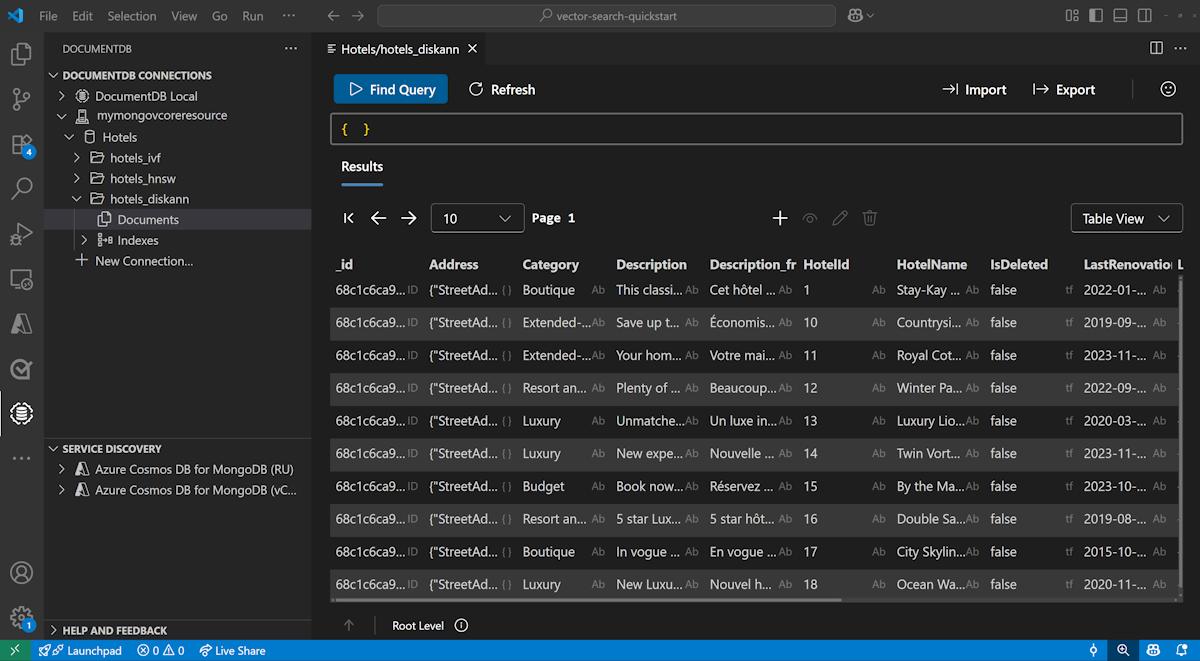
Visual Studio Code에서 데이터 보기 및 관리
Visual Studio Code에서 DocumentDB 확장 및 C# 확장을 설치합니다.
DocumentDB 확장을 사용하여 Azure DocumentDB 계정에 연결합니다.
Hotels 데이터베이스에서 데이터 및 인덱스를 봅니다.
자원을 정리하세요
불필요한 비용을 방지하기 위해 더 이상 필요하지 않은 경우 리소스 그룹, Azure DocumentDB 클러스터 및 Azure OpenAI 리소스를 삭제합니다.