Python 클라이언트 라이브러리와 함께 Azure DocumentDB에서 벡터 검색을 사용합니다. 벡터 데이터를 효율적으로 저장하고 쿼리합니다.
이 빠른 시작에서는 모델의 미리 계산된 벡터가 있는 JSON 파일의 text-embedding-3-small 샘플 호텔 데이터 세트를 사용합니다. 데이터 세트에는 호텔 이름, 위치, 설명 및 벡터 포함이 포함됩니다.
GitHub에서 샘플 코드를 찾습니다.
필수 조건
Azure 구독
- Azure 구독이 없는 경우 체험 계정 만들기
기존 Azure DocumentDB 클러스터
클러스터가 없는 경우 새 클러스터를 만듭니다.
-
구성된 사용자 지정 도메인
text-embedding-3-small배포된 모델
Bash 환경을 Azure Cloud Shell에서 사용합니다. 자세한 내용은 Azure Cloud Shell을 시작하는 방법을 참조하세요.

CLI 참조 명령을 로컬에서 실행하려면 Azure CLI를 설치하십시오. Windows 또는 macOS에서 실행 중인 경우 Docker 컨테이너에서 Azure CLI를 실행하는 것이 좋습니다. 자세한 내용은 Docker 컨테이너에서 Azure CLI를 실행하는 방법을 참조하세요.
로컬 설치를 사용하는 경우 az login 명령을 사용하여 Azure CLI에 로그인합니다. 인증 프로세스를 완료하려면 터미널에 표시되는 단계를 수행합니다. 다른 로그인 옵션은 Azure CLI를 사용하여 Azure에 인증을 참조하세요.
메시지가 표시되면 처음 사용할 때 Azure CLI 확장을 설치합니다. 확장에 대한 자세한 내용은 Azure CLI로 확장 사용 및 관리를 참조하세요.
az version을 실행하여 설치된 버전과 관련 종속 라이브러리를 확인합니다. 최신 버전으로 업그레이드하려면 az upgrade를 실행합니다.
- Python 3.9 이상
벡터를 사용하여 데이터 파일 만들기
호텔 데이터 파일에 대한 새 데이터 디렉터리를 만듭니다.
mkdir data벡터를 사용하여
Hotels_Vector.json원시 데이터 파일을 디렉터리에 복사합니다data.
Python 프로젝트 만들기
프로젝트에 대한 새 디렉터리를 만들고 Visual Studio Code에서 엽니다.
mkdir vector-search-quickstart
code vector-search-quickstart
터미널에서 가상 환경을 만들고 활성화합니다.
Windows의 경우:
python -m venv venv
venv\\Scripts\\activate
macOS/Linux의 경우:
python -m venv venv
source venv/bin/activate
필요한 패키지를 설치합니다.
pip install pymongo azure-identity openai python-dotenv-
pymongo: Python용 MongoDB 드라이버 -
azure-identity: 암호 없는 인증을 위한 Azure ID 라이브러리 -
openai: 벡터를 만드는 OpenAI 클라이언트 라이브러리 -
python-dotenv: .env 파일에서 환경 변수 관리
-
.env에 환경 변수를 위한vector-search-quickstart파일을 만듭니다.# Identity for local developer authentication with Azure CLI AZURE_TOKEN_CREDENTIALS=AzureCliCredential # Azure OpenAI configuration AZURE_OPENAI_EMBEDDING_ENDPOINT= AZURE_OPENAI_EMBEDDING_MODEL=text-embedding-3-small AZURE_OPENAI_EMBEDDING_API_VERSION=2023-05-15 # Azure DocumentDB configuration MONGO_CLUSTER_NAME= # Data Configuration (defaults should work) DATA_FILE_WITH_VECTORS=../data/Hotels_Vector.json EMBEDDED_FIELD=DescriptionVector EMBEDDING_DIMENSIONS=1536 EMBEDDING_SIZE_BATCH=16 LOAD_SIZE_BATCH=50이 문서에 사용된 암호 없는 인증의 경우 파일의 자리 표시자 값을 사용자 고유의
.env정보로 바꿉다.-
AZURE_OPENAI_EMBEDDING_ENDPOINT: Azure OpenAI 리소스 엔드포인트 URL 주소 -
MONGO_CLUSTER_NAME: Azure DocumentDB 리소스 이름
항상 암호 없는 인증을 선호해야 하지만 추가 설정이 필요합니다. 관리 ID 및 인증 옵션의 전체 범위를 설정하는 방법에 대한 자세한 내용은 Python용 Azure SDK를 사용하여 Azure 서비스에 Python 앱 인증을 참조하세요.
-
벡터 검색을 위한 코드 파일 만들기
벡터 검색을 위한 코드 파일을 만들어 프로젝트를 계속합니다. 완료되면 프로젝트 구조는 다음과 같이 표시됩니다.
├── data/
│   ├── Hotels.json              # Source hotel data (without vectors)
│   └── Hotels_Vector.json       # Hotel data with vector embeddings
└── vector-search-quickstart/
    ├── src/
    │   ├── diskann.py           # DiskANN vector search implementation
    │   ├── hnsw.py              # HNSW vector search implementation
    │   ├── ivf.py               # IVF vector search implementation
    │   └── utils.py              # Shared utility functions
    ├── requirements.txt         # Python dependencies
    ├── .env                     # Environment variables template
Python 파일에 대한 src 디렉터리를 만듭니다. DiskANN 인덱스 구현에 대해 다음 두 개의 파일을 diskann.pyutils.py 추가합니다.
mkdir src
touch src/diskann.py
touch src/utils.py
벡터 검색을 위한 코드 만들기
다음 코드를 파일에 붙여넣습니다 diskann.py .
import os
from typing import List, Dict, Any
from utils import get_clients, get_clients_passwordless, read_file_return_json, insert_data, print_search_results, drop_vector_indexes
from dotenv import load_dotenv

# Load environment variables
load_dotenv()


def create_diskann_vector_index(collection, vector_field: str, dimensions: int) -> None:

    print(f"Creating DiskANN vector index on field '{vector_field}'...")

    # Drop any existing vector indexes on this field first
    drop_vector_indexes(collection, vector_field)

    # Use the native MongoDB command for DocumentDB vector indexes
    index_command = {
        "createIndexes": collection.name,
        "indexes": [
            {
                "name": f"diskann_index_{vector_field}",
                "key": {
                    vector_field: "cosmosSearch"  # DocumentDB vector search index type
                },
                "cosmosSearchOptions": {
                    # DiskANN algorithm configuration
                    "kind": "vector-diskann",

                    # Vector dimensions must match the embedding model
                    "dimensions": dimensions,

                    # Vector similarity metric - cosine is good for text embeddings
                    "similarity": "COS",

                    # Maximum degree: number of edges per node in the graph
                    # Higher values improve accuracy but increase memory usage
                    "maxDegree": 20,

                    # Build parameter: candidates evaluated during index construction
                    # Higher values improve index quality but increase build time
                    "lBuild": 10
                }
            }
        ]
    }

    try:
        # Execute the createIndexes command directly
        result = collection.database.command(index_command)
        print("DiskANN vector index created successfully")

    except Exception as e:
        print(f"Error creating DiskANN vector index: {e}")

        # Check if it's a tier limitation and suggest alternatives
        if "not enabled for this cluster tier" in str(e):
            print("\nDiskANN indexes require a higher cluster tier.")
            print("Try one of these alternatives:")
            print("  • Upgrade your DocumentDB cluster to a higher tier")
            print("  • Use HNSW instead: python src/hnsw.py")
            print("  • Use IVF instead: python src/ivf.py")
        raise


def perform_diskann_vector_search(collection,
                                 azure_openai_client,
                                 query_text: str,
                                 vector_field: str,
                                 model_name: str,
                                 top_k: int = 5) -> List[Dict[str, Any]]:

    print(f"Performing DiskANN vector search for: '{query_text}'")

    try:
        # Generate embedding for the query text
        embedding_response = azure_openai_client.embeddings.create(
            input=[query_text],
            model=model_name
        )

        query_embedding = embedding_response.data[0].embedding

        # Construct the aggregation pipeline for vector search
        # DocumentDB uses $search with cosmosSearch
        pipeline = [
            {
                "$search": {
                    # Use cosmosSearch for vector operations in DocumentDB
                    "cosmosSearch": {
                        # The query vector to search for
                        "vector": query_embedding,

                        # Field containing the document vectors to compare against
                        "path": vector_field,

                        # Number of final results to return
                        "k": top_k
                    }
                }
            },
            {
                # Add similarity score to the results
                "$project": {
                    "document": "$$ROOT",
                    # Add search score from metadata
                    "score": {"$meta": "searchScore"}
                }
            }
        ]

        # Execute the aggregation pipeline
        results = list(collection.aggregate(pipeline))

        return results

    except Exception as e:
        print(f"Error performing DiskANN vector search: {e}")
        raise


def main():

    # Load configuration from environment variables
    config = {
        'cluster_name': os.getenv('MONGO_CLUSTER_NAME'),
        'database_name': 'Hotels',
        'collection_name': 'hotels_diskann',
        'data_file': os.getenv('DATA_FILE_WITH_VECTORS', '../data/Hotels_Vector.json'),
        'vector_field': os.getenv('EMBEDDED_FIELD', 'DescriptionVector'),
        'model_name': os.getenv('AZURE_OPENAI_EMBEDDING_MODEL', 'text-embedding-3-small'),
        'dimensions': int(os.getenv('EMBEDDING_DIMENSIONS', '1536')),
        'batch_size': int(os.getenv('LOAD_SIZE_BATCH', '100'))
    }

    try:
        # Initialize clients
        print("\nInitializing MongoDB and Azure OpenAI clients...")
        mongo_client, azure_openai_client = get_clients_passwordless()

        # Get database and collection
        database = mongo_client[config['database_name']]
        collection = database[config['collection_name']]

        # Load data with embeddings
        print(f"\nLoading data from {config['data_file']}...")
        data = read_file_return_json(config['data_file'])
        print(f"Loaded {len(data)} documents")

        # Verify embeddings are present
        documents_with_embeddings = [doc for doc in data if config['vector_field'] in doc]
        if not documents_with_embeddings:
            raise ValueError(f"No documents found with embeddings in field '{config['vector_field']}'. "
                           "Please run create_embeddings.py first.")

        # Insert data into collection
        print(f"\nInserting data into collection '{config['collection_name']}'...")

        # Insert the hotel data
        stats = insert_data(
            collection,
            documents_with_embeddings,
            batch_size=config['batch_size']
        )

        if stats['inserted'] == 0 and not stats.get('skipped'):
            raise ValueError("No documents were inserted successfully")

        # Create DiskANN vector index (skip if data was already present)
        if not stats.get('skipped'):
            create_diskann_vector_index(
                collection,
                config['vector_field'],
                config['dimensions']
            )

            # Wait briefly for index to be ready
            import time
            print("Waiting for index to be ready...")
            time.sleep(2)

        # Perform sample vector search
        query = "quintessential lodging near running trails, eateries, retail"

        results = perform_diskann_vector_search(
            collection,
            azure_openai_client,
            query,
            config['vector_field'],
            config['model_name'],
            top_k=5
        )

        # Display results
        print_search_results(results, max_results=5, show_score=True)


    except Exception as e:
        print(f"\nError during DiskANN demonstration: {e}")
        raise

    finally:
        # Close the MongoDB client
        if 'mongo_client' in locals():
            mongo_client.close()


if __name__ == "__main__":
    main()
이 주 모듈은 다음과 같은 기능을 제공합니다.
유틸리티 함수 포함
환경 변수에 대한 구성 개체를 만듭니다.
Azure OpenAI 및 Azure DocumentDB에 대한 클라이언트를 만듭니다.
MongoDB에 연결하고, 데이터베이스 및 컬렉션을 만들고, 데이터를 삽입하고, 표준 인덱스를 만듭니다.
IVF, HNSW 또는 DiskANN을 사용하여 벡터 인덱스를 만듭니다.
OpenAI 클라이언트를 사용하여 샘플 쿼리 텍스트에 대한 포함을 만듭니다. 파일 맨 위에 있는 쿼리를 변경할 수 있습니다.
포함을 사용하여 벡터 검색을 실행하고 결과를 출력합니다.
유틸리티 함수 만들기
다음 코드를 utils.py에 붙여넣으세요.
import json
import os
import time
import warnings
from typing import Dict, List, Any, Optional, Tuple

# Suppress the PyMongo CosmosDB cluster detection warning
# Must be set before importing pymongo
warnings.filterwarnings(
    "ignore",
    message="You appear to be connected to a CosmosDB cluster.*",
)

from pymongo import MongoClient, InsertOne
from pymongo.collection import Collection
from pymongo.errors import BulkWriteError
from azure.identity import DefaultAzureCredential
from pymongo.auth_oidc import OIDCCallback, OIDCCallbackContext, OIDCCallbackResult
from openai import AzureOpenAI
from dotenv import load_dotenv

# Load environment variables from .env file
load_dotenv()

class AzureIdentityTokenCallback(OIDCCallback):
    def __init__(self, credential):
        self.credential = credential

    def fetch(self, context: OIDCCallbackContext) -> OIDCCallbackResult:
        token = self.credential.get_token(
            "https://ossrdbms-aad.database.windows.net/.default").token
        return OIDCCallbackResult(access_token=token)

def get_clients() -> Tuple[MongoClient, AzureOpenAI]:

    # Get MongoDB connection string - required for DocumentDB access
    mongo_connection_string = os.getenv("MONGO_CONNECTION_STRING")
    if not mongo_connection_string:
        raise ValueError("MONGO_CONNECTION_STRING environment variable is required")

    # Create MongoDB client with optimized settings for DocumentDB
    mongo_client = MongoClient(
        mongo_connection_string,
        maxPoolSize=50,  # Allow up to 50 connections for better performance
        minPoolSize=5,   # Keep minimum 5 connections open
        maxIdleTimeMS=30000,  # Close idle connections after 30 seconds
        serverSelectionTimeoutMS=5000,  # 5 second timeout for server selection
        socketTimeoutMS=20000  # 20 second socket timeout
    )

    # Get Azure OpenAI configuration
    azure_openai_endpoint = os.getenv("AZURE_OPENAI_EMBEDDING_ENDPOINT")
    azure_openai_key = os.getenv("AZURE_OPENAI_EMBEDDING_KEY")

    if not azure_openai_endpoint or not azure_openai_key:
        raise ValueError("Azure OpenAI endpoint and key are required")

    # Create Azure OpenAI client for generating embeddings
    azure_openai_client = AzureOpenAI(
        azure_endpoint=azure_openai_endpoint,
        api_key=azure_openai_key,
        api_version=os.getenv("AZURE_OPENAI_EMBEDDING_API_VERSION", "2023-05-15")
    )

    return mongo_client, azure_openai_client


def get_clients_passwordless() -> Tuple[MongoClient, AzureOpenAI]:

    # Get MongoDB cluster name for passwordless authentication
    cluster_name = os.getenv("MONGO_CLUSTER_NAME")
    if not cluster_name:
        raise ValueError("MONGO_CLUSTER_NAME environment variable is required")

    # Create credential object for Azure authentication
    credential = DefaultAzureCredential()

    authProperties = {"OIDC_CALLBACK": AzureIdentityTokenCallback(credential)}

    # Create MongoDB client with Azure AD token callback
    mongo_client = MongoClient(
        f"mongodb+srv://{cluster_name}.global.mongocluster.cosmos.azure.com/",
        connectTimeoutMS=120000,
        tls=True,
        retryWrites=True,
        authMechanism="MONGODB-OIDC",
        authMechanismProperties=authProperties
    )

    # Get Azure OpenAI endpoint
    azure_openai_endpoint = os.getenv("AZURE_OPENAI_EMBEDDING_ENDPOINT")
    if not azure_openai_endpoint:
        raise ValueError("AZURE_OPENAI_EMBEDDING_ENDPOINT environment variable is required")

    # Create Azure OpenAI client with credential-based authentication
    azure_openai_client = AzureOpenAI(
        azure_endpoint=azure_openai_endpoint,
        azure_ad_token_provider=lambda: credential.get_token("https://cognitiveservices.azure.com/.default").token,
        api_version=os.getenv("AZURE_OPENAI_EMBEDDING_API_VERSION", "2023-05-15")
    )

    return mongo_client, azure_openai_client


def azure_identity_token_callback(credential: DefaultAzureCredential) -> str:

    # DocumentDB requires this specific scope
    token_scope = "https://cosmos.azure.com/.default"

    # Get token from Azure AD
    token = credential.get_token(token_scope)

    return token.token


def read_file_return_json(file_path: str) -> List[Dict[str, Any]]:

    try:
        with open(file_path, 'r', encoding='utf-8') as file:
            return json.load(file)
    except FileNotFoundError:
        print(f"Error: File '{file_path}' not found")
        raise
    except json.JSONDecodeError as e:
        print(f"Error: Invalid JSON in file '{file_path}': {e}")
        raise


def write_file_json(data: List[Dict[str, Any]], file_path: str) -> None:

    try:
        with open(file_path, 'w', encoding='utf-8') as file:
            json.dump(data, file, indent=2, ensure_ascii=False)
        print(f"Data successfully written to '{file_path}'")
    except IOError as e:
        print(f"Error writing to file '{file_path}': {e}")
        raise


def insert_data(collection: Collection, data: List[Dict[str, Any]],
                batch_size: int = 100, index_fields: Optional[List[str]] = None) -> Dict[str, int]:

    total_documents = len(data)

    # Check if data already exists in the collection
    existing_count = collection.count_documents({})
    if existing_count >= total_documents:
        print(f"Collection already has {existing_count} documents, skipping insert and index creation")
        return {'total': total_documents, 'inserted': 0, 'failed': 0, 'skipped': True}

    # Clear existing data if counts don't match to ensure clean state
    if existing_count > 0:
        print(f"Collection has {existing_count} documents but expected {total_documents}, clearing and re-inserting...")
        collection.delete_many({})

    inserted_count = 0
    failed_count = 0

    print(f"Starting batch insertion of {total_documents} documents...")

    # Create indexes if specified
    if index_fields:
        for field in index_fields:
            try:
                collection.create_index(field)
                print(f"Created index on field: {field}")
            except Exception as e:
                print(f"Warning: Could not create index on {field}: {e}")

    # Process data in batches to manage memory and error recovery
    for i in range(0, total_documents, batch_size):
        batch = data[i:i + batch_size]
        batch_num = (i // batch_size) + 1
        total_batches = (total_documents + batch_size - 1) // batch_size

        try:
            # Prepare bulk insert operations
            operations = [InsertOne(document) for document in batch]

            # Execute bulk insert
            result = collection.bulk_write(operations, ordered=False)
            inserted_count += result.inserted_count

            print(f"Batch {batch_num} completed: {result.inserted_count} documents inserted")

        except BulkWriteError as e:
            # Handle partial failures in bulk operations
            inserted_count += e.details.get('nInserted', 0)
            failed_count += len(batch) - e.details.get('nInserted', 0)

            print(f"Batch {batch_num} had errors: {e.details.get('nInserted', 0)} inserted, "
                  f"{failed_count} failed")

            # Print specific error details for debugging
            for error in e.details.get('writeErrors', []):
                print(f"  Error: {error.get('errmsg', 'Unknown error')}")

        except Exception as e:
            # Handle unexpected errors
            failed_count += len(batch)
            print(f"Batch {batch_num} failed completely: {e}")

        # Small delay between batches to avoid overwhelming the database
        time.sleep(0.1)

    # Return summary statistics
    stats = {
        'total': total_documents,
        'inserted': inserted_count,
        'failed': failed_count
    }

    return stats


def drop_vector_indexes(collection, vector_field: str) -> None:

    try:
        # Get all indexes for the collection
        indexes = list(collection.list_indexes())

        # Find vector indexes on the specified field
        vector_indexes = []
        for index in indexes:
            if 'key' in index and vector_field in index['key']:
                if index['key'][vector_field] == 'cosmosSearch':
                    vector_indexes.append(index['name'])

        # Drop each vector index found
        for index_name in vector_indexes:
            print(f"Dropping existing vector index: {index_name}")
            collection.drop_index(index_name)

        if vector_indexes:
            print(f"Dropped {len(vector_indexes)} existing vector index(es)")
        else:
            print("No existing vector indexes found to drop")

    except Exception as e:
        print(f"Warning: Could not drop existing vector indexes: {e}")
        # Continue anyway - the error might be that no indexes exist


def print_search_resultsx(results: List[Dict[str, Any]],
                        max_results: int = 5,
                        show_score: bool = True) -> None:

    if not results:
        print("No search results found.")
        return

    print(f"\nSearch Results (showing top {min(len(results), max_results)}):")
    print("=" * 80)

    for i, result in enumerate(results[:max_results], 1):

        # Display hotel name and ID
        print(f"HotelName: {result['HotelName']}, Score: {result['score']:.4f}")

def print_search_results(results: List[Dict[str, Any]],
                        max_results: int = 5,
                        show_score: bool = True) -> None:

    if not results:
        print("No search results found.")
        return

    print(f"\nSearch Results (showing top {min(len(results), max_results)}):")
    print("=" * 80)

    for i, result in enumerate(results[:max_results], 1):

        # Check if results are nested under 'document' (when using $$ROOT)
        if 'document' in result:
            doc = result['document']
        else:
            doc = result

        # Display hotel name and ID
        print(f"HotelName: {doc['HotelName']}, Score: {result['score']:.4f}")


    if len(results) > max_results:
        print(f"\n... and {len(results) - max_results} more results")
이 유틸리티 모듈은 다음과 같은 기능을 제공합니다.
-
get_clients: Azure OpenAI 및 Azure DocumentDB에 대한 클라이언트를 만들고 반환합니다. -
get_clients_passwordless: 암호 없는 인증을 사용하여 Azure OpenAI 및 Azure DocumentDB에 대한 클라이언트를 만들고 반환합니다. -
azure_identity_token_callback: MongoDB OIDC 인증에서 사용하는 Azure AD 토큰을 가져옵니다. -
read_file_return_json: JSON 파일을 읽고 해당 내용을 개체 배열로 반환합니다. -
write_file_json: JSON 파일에 개체 배열을 씁니다. -
insert_data: MongoDB 컬렉션에 데이터를 일괄 처리로 삽입하고 지정된 필드에 표준 인덱스를 만듭니다. -
drop_vector_indexes: 대상 벡터 필드에 기존 벡터 인덱스를 삭제합니다. -
print_search_results: 점수 및 호텔 이름을 포함하여 벡터 검색 결과를 인쇄합니다.
Azure CLI를 사용하여 인증
Azure 리소스에 안전하게 액세스할 수 있도록 애플리케이션을 실행하기 전에 Azure CLI에 로그인합니다.
az login
이 코드는 로컬 개발자 인증을 사용하여 Azure DocumentDB 및 Azure OpenAI에 액세스합니다. 설정할 AZURE_TOKEN_CREDENTIALS=AzureCliCredential때 이 설정은 함수에 인증을 위해 Azure CLI 자격 증명을 결정적으로 사용하도록 지시합니다. 인증은 Azure ID의 DefaultAzureCredential을 사용하여 환경에서 Azure 자격 증명을 찾습니다.
Azure ID 라이브러리를 사용하여 Azure 서비스에 Python 앱을 인증하는 방법에 대해 자세히 알아봅니다.
애플리케이션 실행
Python 스크립트를 실행하려면 다음을 수행합니다.
벡터 검색 쿼리 및 해당 유사성 점수와 일치하는 상위 5개 호텔이 표시됩니다.
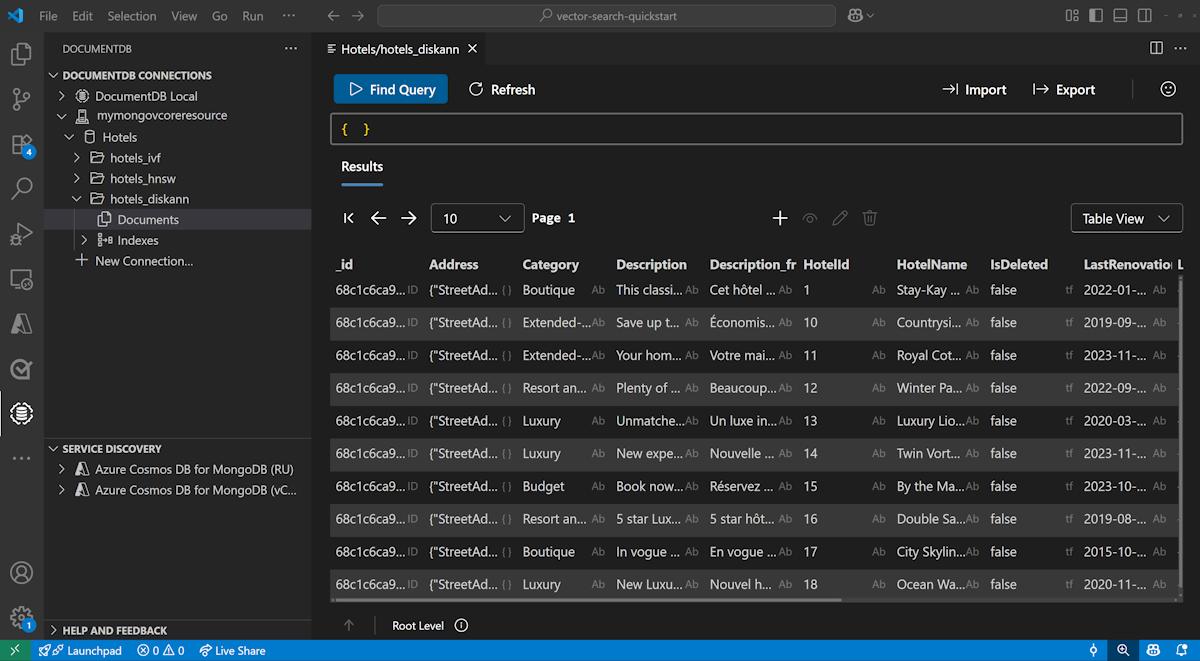
Visual Studio Code에서 데이터 보기 및 관리
Visual Studio Code에서 DocumentDB 확장을 선택하여 Azure DocumentDB 계정에 연결합니다.
Hotels 데이터베이스에서 데이터 및 인덱스를 봅니다.
자원을 정리하세요
추가 비용을 방지할 필요가 없는 경우 리소스 그룹, Azure DocumentDB 계정 및 Azure OpenAI 리소스를 삭제합니다.