Calendar.BlackoutDates 속성
정의
중요
일부 정보는 릴리스되기 전에 상당 부분 수정될 수 있는 시험판 제품과 관련이 있습니다. Microsoft는 여기에 제공된 정보에 대해 어떠한 명시적이거나 묵시적인 보증도 하지 않습니다.
선택할 수 없는 것으로 표시된 날짜의 컬렉션을 가져옵니다.
public:
 property System::Windows::Controls::CalendarBlackoutDatesCollection ^ BlackoutDates { System::Windows::Controls::CalendarBlackoutDatesCollection ^ get(); };
public System.Windows.Controls.CalendarBlackoutDatesCollection BlackoutDates { get; }member this.BlackoutDates : System.Windows.Controls.CalendarBlackoutDatesCollectionPublic ReadOnly Property BlackoutDates As CalendarBlackoutDatesCollection속성 값
선택할 수 없는 날짜의 컬렉션입니다. 기본값은 빈 컬렉션입니다.
예제
다음 예에서는 선택할 수 없는 날짜가 있는 날짜를 만듭니다 Calendar .
  // Create a Calendar that displays dates through
  // Januarary 31, 2009 and has dates that are not selectable.
  Calendar calendarWithBlackoutDates = new Calendar();
  calendarWithBlackoutDates.IsTodayHighlighted = false;
  calendarWithBlackoutDates.DisplayDate = new DateTime(2009, 1, 1);
  calendarWithBlackoutDates.DisplayDateEnd = new DateTime(2009, 1, 31);
  calendarWithBlackoutDates.SelectionMode = CalendarSelectionMode.MultipleRange;

  // Add the dates that are not selectable.
  calendarWithBlackoutDates.BlackoutDates.Add(
      new CalendarDateRange(new DateTime(2009, 1, 2), new DateTime(2009, 1, 4)));
  calendarWithBlackoutDates.BlackoutDates.Add(
      new CalendarDateRange(new DateTime(2009, 1, 9)));
  calendarWithBlackoutDates.BlackoutDates.Add(
      new CalendarDateRange(new DateTime(2009, 1, 16)));
  calendarWithBlackoutDates.BlackoutDates.Add(
      new CalendarDateRange(new DateTime(2009, 1, 23), new DateTime(2009, 1, 25)));
  calendarWithBlackoutDates.BlackoutDates.Add(
      new CalendarDateRange(new DateTime(2009, 1, 30)));

  // Add the selected dates.
  calendarWithBlackoutDates.SelectedDates.Add(
      new DateTime(2009, 1, 5));
  calendarWithBlackoutDates.SelectedDates.AddRange(
      new DateTime(2009, 1, 12), new DateTime(2009, 1, 15));
  calendarWithBlackoutDates.SelectedDates.Add(
      new DateTime(2009, 1, 27));

  // root is a Panel that is defined elswhere.
  root.Children.Add(calendarWithBlackoutDates);
' Create a Calendar that displays dates through
' Januarary 31, 2009 and has dates that are not selectable.
Dim calendarWithBlackoutDates As New Calendar()
calendarWithBlackoutDates.IsTodayHighlighted = False
calendarWithBlackoutDates.DisplayDate = New DateTime(2009, 1, 1)
calendarWithBlackoutDates.DisplayDateEnd = New DateTime(2009, 1, 31)
calendarWithBlackoutDates.SelectionMode = CalendarSelectionMode.MultipleRange

' Add the dates that are not selectable.
calendarWithBlackoutDates.BlackoutDates.Add(New CalendarDateRange(New DateTime(2009, 1, 2), New DateTime(2009, 1, 4)))
calendarWithBlackoutDates.BlackoutDates.Add(New CalendarDateRange(New DateTime(2009, 1, 9)))
calendarWithBlackoutDates.BlackoutDates.Add(New CalendarDateRange(New DateTime(2009, 1, 16)))
calendarWithBlackoutDates.BlackoutDates.Add(New CalendarDateRange(New DateTime(2009, 1, 23), New DateTime(2009, 1, 25)))
calendarWithBlackoutDates.BlackoutDates.Add(New CalendarDateRange(New DateTime(2009, 1, 30)))

' Add the selected dates.
calendarWithBlackoutDates.SelectedDates.Add(New DateTime(2009, 1, 5))
calendarWithBlackoutDates.SelectedDates.AddRange(New DateTime(2009, 1, 12), New DateTime(2009, 1, 15))
calendarWithBlackoutDates.SelectedDates.Add(New DateTime(2009, 1, 27))

' root is a Panel that is defined elswhere.
root.Children.Add(calendarWithBlackoutDates)
<!-- Create a Calendar that displays dates through
     Januarary 31, 2009 and has dates that are not selectable. -->
<Calendar Margin="20" SelectionMode="MultipleRange"
          IsTodayHighlighted="false"
          DisplayDate="1/1/2009"
          DisplayDateEnd="1/31/2009"
          xmlns:sys="clr-namespace:System;assembly=mscorlib">

  <Calendar.BlackoutDates>
    <CalendarDateRange Start="1/2/2009" End="1/4/2009"/>
    <CalendarDateRange Start="1/9/2009" End="1/9/2009"/>
    <CalendarDateRange Start="1/16/2009" End="1/16/2009"/>
    <CalendarDateRange Start="1/23/2009" End="1/25/2009"/>
    <CalendarDateRange Start="1/30/2009" End="1/30/2009"/>
  </Calendar.BlackoutDates>

  <Calendar.SelectedDates>
    <sys:DateTime>1/5/2009</sys:DateTime>
    <sys:DateTime>1/12/2009</sys:DateTime>
    <sys:DateTime>1/14/2009</sys:DateTime>
    <sys:DateTime>1/13/2009</sys:DateTime>
    <sys:DateTime>1/15/2009</sys:DateTime>
    <sys:DateTime>1/27/2009</sys:DateTime>
    <sys:DateTime>4/2/2009</sys:DateTime>
  </Calendar.SelectedDates>
</Calendar>
앞의 예제에서는 다음 그림과 유사한 출력을 생성합니다.
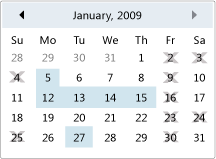 선택할 수 없는 날짜가 있는 일정
설명
이 컬렉션의 날짜는 회색으로 표시되고 달력에 교차됩니다.
이전 날짜를 모두 선택할 수 없도록 하려면 이 속성에서 AddDatesInPast 반환된 컬렉션에서 제공하는 메서드를 사용할 수 있습니다.
XAML 속성 요소 사용
<object>
  <object.BlackoutDates>
    oneOrMoreCalendarDateRanges
  </object.BlackoutDates>
</object>
XAML 값
oneOrMoreCalendarDateRanges 형식 CalendarDateRange의 하나 이상의 개체 요소입니다.
