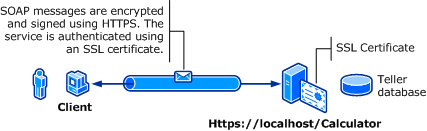
다음 그림에서는 WCF(Windows Communication Foundation) 서비스 및 클라이언트를 보여 줍니다. 서버에는 SSL(Secure Sockets Layer)에 사용할 수 있는 유효한 X.509 인증서가 필요하며 클라이언트는 서버의 인증서를 신뢰해야 합니다. 또한 웹 서비스에는 사용할 수 있는 SSL 구현이 이미 있습니다. IIS(인터넷 정보 서비스)에서 기본 인증을 사용하도록 설정하는 방법에 대한 자세한 내용은 기본 인증을 참조하세요.
| 특성 | 설명 |
|---|---|
| 보안 모드 | 운송 |
| 상호 운용성 | 기존 웹 서비스 클라이언트 및 서비스 사용 |
| 인증(서버) 인증(클라이언트) |
예(HTTPS 사용) 예(사용자 이름/암호를 통해) |
| 무결성 | 예 |
| 기밀성 | 예 |
| 운송 | HTTPS |
| 묶기 | WSHttpBinding |
서비스
다음 코드와 구성은 독립적으로 실행하기 위한 것입니다. 다음 중 하나를 수행합니다.
구성 없이 코드를 사용하여 독립 실행형 서비스를 만듭니다.
제공된 구성을 사용하여 서비스를 만들지만 엔드포인트는 정의하지 않습니다.
코드
다음 코드에서는 전송 보안을 위해 Windows 도메인 사용자 이름 및 암호를 사용하는 서비스 엔드포인트를 만드는 방법을 보여 줍니다. 클라이언트에 인증하려면 서비스에 X.509 인증서가 필요합니다. 자세한 내용은 인증서 작업 및 방법: SSL 인증서를 사용하여 포트 구성을 참조하세요.
// Create the binding.
WSHttpBinding binding = new WSHttpBinding();
binding.Security.Mode = SecurityMode.Transport;
binding.Security.Transport.ClientCredentialType =
    HttpClientCredentialType.Basic;

// Create the URI for the endpoint.
Uri httpUri = new Uri("https://localhost/Calculator");

// Create the service host and add an endpoint.
ServiceHost myServiceHost = new ServiceHost(
    typeof(ServiceModel.Calculator), httpUri);
myServiceHost.AddServiceEndpoint(
    typeof(ServiceModel.ICalculator), binding, "");

// Open the service.
myServiceHost.Open();
Console.WriteLine("Listening...");
Console.WriteLine("Press Enter to exit.");
Console.ReadLine();

// Close the service.
myServiceHost.Close();
' Create the binding.
Dim binding As New WSHttpBinding()
binding.Security.Mode = SecurityMode.Transport
binding.Security.Transport.ClientCredentialType = HttpClientCredentialType.Basic

' Create the URI for the endpoint.
Dim httpUri As New Uri("https://localhost/Calculator")

' Create the service host and add an endpoint.
Dim myServiceHost As New ServiceHost(GetType(ServiceModel.Calculator), httpUri)
myServiceHost.AddServiceEndpoint(GetType(ServiceModel.ICalculator), binding, "")

' Open the service.
myServiceHost.Open()
Console.WriteLine("Listening...")
Console.WriteLine("Press Enter to exit.")
Console.ReadLine()

' Close the service.
myServiceHost.Close()
구성 / 설정
다음은 전송 수준 보안과 함께 기본 인증을 사용하도록 서비스를 구성합니다.
<?xml version="1.0" encoding="utf-8"?>
<configuration>
    <system.serviceModel>
        <bindings>
            <wsHttpBinding>
                <binding name="UsernameWithTransport">
                    <security mode="Transport">
                        <transport clientCredentialType="Basic" />
                    </security>
                </binding>
            </wsHttpBinding>
        </bindings>
        <services>
            <service name="BasicAuthentication.Calculator">
                <endpoint address="https://localhost/Calculator"
                          binding="wsHttpBinding"
                          bindingConfiguration="UsernameWithTransport"
                          name="BasicEndpoint"
                          contract="BasicAuthentication.ICalculator" />
            </service>
        </services>
    </system.serviceModel>
</configuration>
클라이언트
코드
다음 코드는 사용자 이름 및 암호를 포함하는 클라이언트 코드를 보여줍니다. 사용자는 유효한 Windows 사용자 이름 및 암호를 제공해야 합니다. 사용자 이름과 암호를 반환하는 코드는 여기에 표시되지 않습니다. 대화 상자 또는 다른 인터페이스를 사용하여 사용자에게 정보를 쿼리합니다.
비고
사용자 이름 및 암호는 코드를 사용하여 설정할 수 있습니다.
// Create the binding.
WSHttpBinding myBinding = new WSHttpBinding();
myBinding.Security.Mode = SecurityMode.Transport;
myBinding.Security.Transport.ClientCredentialType =
    HttpClientCredentialType.Basic;

// Create the endpoint address. Note that the machine name
// must match the subject or DNS field of the X.509 certificate
// used to authenticate the service.
EndpointAddress ea = new
    EndpointAddress("https://machineName/Calculator");

// Create the client. The code for the calculator
// client is not shown here. See the sample applications
// for examples of the calculator code.
CalculatorClient cc =
    new CalculatorClient(myBinding, ea);
// The client must provide a user name and password. The code
// to return the user name and password is not shown here. Use
// a database to store the user name and passwords, or use the
// ASP.NET Membership provider database.
cc.ClientCredentials.UserName.UserName = ReturnUsername();
cc.ClientCredentials.UserName.Password = ReturnPassword();
try
{
    // Begin using the client.
    cc.Open();
    Console.WriteLine(cc.Add(100, 11));
    Console.ReadLine();

    // Close the client.
    cc.Close();
}
' Create the binding.
Dim myBinding As New WSHttpBinding()
myBinding.Security.Mode = SecurityMode.Transport
myBinding.Security.Transport.ClientCredentialType = HttpClientCredentialType.Basic

' Create the endpoint address. Note that the machine name
' must match the subject or DNS field of the X.509 certificate
' used to authenticate the service.
Dim ea As New EndpointAddress("https://machineName/Calculator")

' Create the client. The code for the calculator
' client is not shown here. See the sample applications
' for examples of the calculator code.
Dim cc As New CalculatorClient(myBinding, ea)

' The client must provide a user name and password. The code
' to return the user name and password is not shown here. Use
' a database to store the user name and passwords, or use the
' ASP.NET Membership provider database.
cc.ClientCredentials.UserName.UserName = ReturnUsername()
cc.ClientCredentials.UserName.Password = ReturnPassword()

' Begin using the client.
Try
    cc.Open()

    Console.WriteLine(cc.Add(100, 11))
    Console.ReadLine()

    ' Close the client.
    cc.Close()
Catch tex As TimeoutException
    Console.WriteLine(tex.Message)
    cc.Abort()
Catch cex As CommunicationException
    Console.WriteLine(cex.Message)
    cc.Abort()
Finally
    Console.WriteLine("Closed the client")
    Console.ReadLine()
End Try
구성 / 설정
다음 코드는 클라이언트 구성을 보여줍니다.
비고
구성을 사용하여 사용자 이름과 암호를 설정할 수 없습니다. 여기에 표시된 구성은 사용자 이름 및 암호를 설정하는 코드를 사용하여 보강되어야 합니다.
<?xml version="1.0" encoding="utf-8"?>
<configuration>
  <system.serviceModel>
    <bindings>
      <wsHttpBinding>
        <binding name="WSHttpBinding_ICalculator" >
          <security mode="Transport">
            <transport clientCredentialType="Basic" />
          </security>
        </binding>
      </wsHttpBinding>
    </bindings>
    <client>
      <endpoint address="https://machineName/Calculator"
                binding="wsHttpBinding"
                bindingConfiguration="WSHttpBinding_ICalculator"
                contract="ICalculator"
                name="WSHttpBinding_ICalculator" />
    </client>
  </system.serviceModel>
</configuration>
참고하십시오
- ClientCredentials
- UserNamePasswordClientCredential
- 인증서 작업
- 방법: SSL 인증서를 사용하여 포트 구성
- 보안 개요
- <clientCredentials>
- Windows Server App Fabric의 보안 모델