중요합니다
Power Virtual Agents 기능 및 특징은 생성 AI에 대한 막대한 투자와 Microsoft Copilot 전반의 향상된 통합에 따라 이제 Microsoft Copilot Studio의 일부가 되었습니다.
문서 및 교육 콘텐츠를 업데이트하는 동안 일부 문서와 스크린샷에서는 Power Virtual Agents을 참조할 수 있습니다.
컨텍스트 변수의 데이터 타입은 두 가지 속성을 가진 JSON 객체입니다: isDisplayable 과 Value.
JSON 객체는 다음과 같은 스키마를 가집니다:
{
            "type": "object",
             "properties": {
                    "isDisplayable": {
                        " description": " Context variable should display in agent UI or not",
                        "type": "boolean"
                    },
                    "Value": {
                         " description": " Context variable value pass through bot , this can be string Boolean or number",
                        "type": "string or Boolean or Number"
                    }
                },
                "required": [ "isDisplayable", "Value" ]
        }
isDisplayable의 입력 값은 다음과 같습니다:
- 불린 (true 또는 false, 참 또는 거짓)
Value의 입력 값은 다음과 같을 수 있습니다:
- Boolean
- String
- 숫자
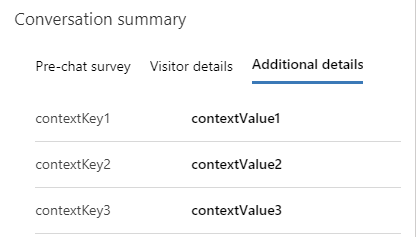
Copilot Studio 및 Azure 봇에 대한 대화의 대화 요약 컨트롤에 컨텍스트 변수를 표시하려면 isDisplayable 메서드 본문의 속성을 사용합니다.
예: {\"isDisplayable\":\"true\"," +"\"Value\":\"context variable value as string\"}
isDisplayable의 입력 값은 불리언 값(참 또는 거짓)입니다. Value의 입력 값은 문자열, 불리언 값, 또는 숫자일 수 있습니다.
.. /use/oc-customer-summary.md#view-conversation-summary Microsoft Copilot Studio 또는 Azure 봇을 사용하는 대화를 위해 참조/methods/setContextProvider.md 메서드 본문에 속성을 isDisplayable 포함하세요.
다음 예시는 문자열 컨텍스트 변수를 보여줍니다:
{ "isDisplayable": true, "Value": "Context 변수 값" }
isDisplayable이 true로 설정되어 있으면, 컨텍스트 변수가 대화 요약 컨트롤의 세 번째 탭에 나타납니다. Value 속성은 사용자의 응답이나 기타 정보를 문자열, 불리언 또는 숫자 형식으로 포함합니다.