중요
MCP 및 API 플러그인은 선언적 에이전트 내에서 작업을 제공합니다. 독립형 설치 가능한 플러그인 패키지가 아닙니다. 포함된 에이전트만 해당 기능과 도구에 액세스할 수 있습니다. 패키지와 작업 매니페스트 관계에 대한 자세한 내용은 플러그 인 및 선언적 에이전트 작업을 참조하세요.
팁
권장: 지원되는 프로 코드 선언적 에이전트 및 플러그인 시나리오에 대한 Work IQ Dev 도구 로 시작하십시오. WIQD 빠른 시작을 참조하세요. 도구 키트 기반 지침은 이를 필요로 하는 기존 프로젝트 및 워크플로에 계속 사용할 수 있습니다. 도구를 선택하기 전에 기능 및 대상 환경 지원을 확인하세요. WIQD는 사용자 지정 엔진 에이전트를 대상으로 하지 않습니다.
API 플러그 인은 OpenAPI 사양이 있는 REST API를 Microsoft 365 Copilot에 연결하는 선언적 에이전트에 대한 사용자 지정 작업입니다. 이 가이드에서는 TypeSpec 및 Microsoft 365 에이전트 도구 키트를 사용하여 선언적 에이전트에 API 플러그 인을 추가하는 방법을 보여 줍니다.
필수 구성 요소
- Copilot 확장성 옵션 요구 사항에 지정된 요구 사항
- 기존 REST API(이 연습에서는 JSON 자리 표시자 API 사용)
- Visual Studio Code
- Microsoft 365 에이전트 도구 키트
- Microsoft 365 에이전트 도구 키트 및 Microsoft 365 Copilot용 TypeSpec을 사용하여 만든 에이전트
팁
최상의 결과를 얻으려면 생성 중인 API가 Copilot을 확장하는 데 OpenAPI 문서를 효과적으로 만드는 방법에 자세히 설명된 지침을 따르는지 확인합니다.
VS Code에서 API 플러그 인 프로젝트 설정
이 문서에서는 Microsoft 365 에이전트 도구 키트 및 TypeSpec을 사용하여 만든 선언적 에이전트 프로젝트가 이미 있다고 가정합니다. TypeSpec에서 REST API 작업을 정의한 다음 에이전트를 프로비저닝하여 해당 프로젝트에 API 플러그인을 추가합니다. 다음 섹션에서는 각 작업을 안내합니다.
- 에이전트 프로젝트가 아직 없는 경우 선언적 에이전트 만들기에 따라 만듭니다. 메시지가 표시되면 Microsoft 365 Copilot용 TypeSpec으로 시작을 선택합니다.
- Visual Studio Code에서 에이전트 프로젝트를 열고 프로젝트 루트에서 파일을 엽니다
main.tsp. - 다음 섹션에 표시된 대로 작업을 추가하여 API 플러그인을 정의합니다.
main.tsp완료되면 사용자 지정 작업 프로비전 및 테스트에 설명된 대로 에이전트를 프로비전합니다.
작업 추가 GET
시작하려면 모든 게시물 항목을 나열하는 작업을 추가합니다 GET . 파일을 열고 main.tsp 다음 콘텐츠를 사용하여 네임스페이스에 MyAgent 새 네임스페이스 PostsAPI 를 추가합니다.
// Omitted for brevity
namespace MyAgent {
  // Omitted for brevity
  @service
  @server("https://jsonplaceholder.typicode.com")
  @actions(#{
    nameForHuman: "Posts APIs",
    descriptionForHuman: "Manage blog post items with the JSON Placeholder API.",
    descriptionForModel: "Read, create, update and delete blog post items with the JSON Placeholder API."
  })
  namespace PostsAPI {

    /**
     * List all blog post items.
     */
    @route("/posts")
    @get op listPosts(): PostItem[];

    /**
     * Structure of a blog post item.
     */
    model PostItem {
      /**
       * The ID of the user who created the post.
       */
      userId: integer;

      /**
       * The ID of the post.
       */
      @visibility(Lifecycle.Read)
      id: integer;

      /**
       * The title of the post.
       */
      title: string;

      /**
       * The body of the post.
       */
      body: string;
    }
  }
  // Omitted for brevity
}
이 코드는 모델과 PostItem REST API GET /posts를 정의합니다.
쿼리 매개 변수를 사용하여 작업 추가 GET
이전 예제의 GET 작업은 매개 변수를 사용하지 않습니다. 사용자 ID로 필터링을 활성화하려면 선택적 쿼리 매개 변수로 작업을 업데이트 GET 하여 사용자 ID로 결과를 필터링합니다.
파일을 열고 main.tsp 기존 listPosts 작업을 다음 내용으로 바꿉니다.
/**
 * List all blog post items.
  * @param userId The ID of the user who created the post. If not provided, all posts will be returned.
  */
@route("/posts")
@get op listPosts(@query userId?: integer): PostItem[];
REST API를 업데이트하기 위해 listPosts 추가된 매개 변수입니다@query userId?.GET /posts?userId={userId}
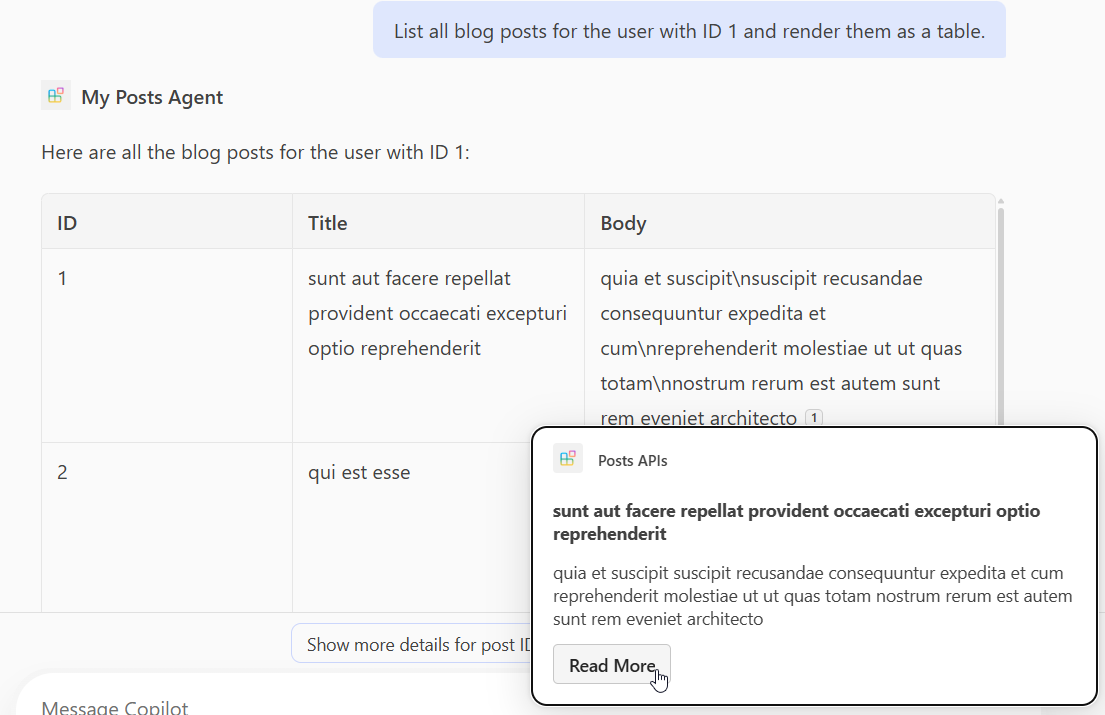
작업에 적응형 카드 GET 추가
작업에 적응형 카드를listPosts 추가하면 생성된 응답의 인용이 렌더링되는 방식이 변경됩니다.
appPackage 디렉터리에 post-카드.json라는 새 파일을 만들고 다음 콘텐츠를 추가합니다.
{
  "type": "AdaptiveCard",
  "$schema": "http://adaptivecards.io/schemas/adaptive-card.json",
  "version": "1.5",
  "body": [
    {
      "type": "Container",
      "$data": "${$root}",
      "items": [
        {
          "type": "TextBlock",
          "text": "**${if(title, title, 'N/A')}**",
          "wrap": true
        },
        {
          "type": "TextBlock",
          "text": "${if(body, body, 'N/A')}",
          "wrap": true
        }
      ]
    }
  ],
  "actions": [
    {
      "type": "Action.OpenUrl",
      "title": "Read More",
      "url": "https://www.bing.com/search?q=https://jsonplaceholder.typicode.com/posts/${id}"
    }
  ]
}
다음 코드 조각과 같이 파일을 열고 main.tsp 작업에 데코레이터 listPosts 를 추가합니다@card.
/**
 * List all blog post items.
  * @param userId The ID of the user who created the post. If not provided, all posts will be returned.
  */
@route("/posts")
@card(#{ dataPath: "$", file: "post-card.json", properties: #{ title: "$.title" } })
@get op listPosts(@query userId?: integer): PostItem[];
작업 추가 POST
파일을 열고 main.tsp 네임스페이스 내에 PostsAPI 다음 콘텐츠를 추가합니다.
/**
 * Create a new blog post item.
 * @param post The post item to create.
 */
@route("/posts")
@post op createPost(@body post: PostItem): PostItem;
이 코드는 새 블로그 게시물을 만드는 REST API POST /posts를 정의합니다.
작업 추가 PATCH
파일을 열고 main.tsp 네임스페이스 내에 PostsAPI 다음 콘텐츠를 추가합니다.
/**
 * Updates a blog post item.
 * @param id The ID of the post to update.
 * @param post The updated post item.
 */
@route("/posts/{id}")
@patch op updatePost(@path id: integer, @body post: PostItem): PostItem;
이 코드는 REST API PATCH /posts/{id}를 정의하며, 이 기능은 기존 블로그 게시물을 업데이트합니다.
작업 추가 DELETE
파일을 열고 main.tsp 네임스페이스 내에 PostsAPI 다음 콘텐츠를 추가합니다.
/**
 * Deletes a blog post item.
 * @param id The ID of the post to delete.
 */
@route("/posts/{id}")
@delete op deletePost(@path id: integer): void;
이 코드는 REST API DELETE /posts/{id}를 정의하며, 이는 기존 블로그 게시물을 삭제합니다.
사용자 지정 작업 프로비전 및 테스트
Microsoft 365 에이전트 도구 키트의 수명 주기 창을 사용하여 에이전트 및 해당 API 플러그 인을 프로비전한 다음 Microsoft 365 Copilot에서 사용자 지정 작업을 테스트합니다.
- 왼쪽 활동 모음에서 Microsoft 365 에이전트 도구 키트 아이콘을 선택합니다.
- 수명 주기 창에서 프로비전을 선택합니다.
- 프로비전이 완료될 때까지 기다린 다음, 브라우저에서 엽니다 https://m365.cloud.microsoft/ .
- 에이전트 목록에서 에이전트를 선택합니다.
- 다음 프롬프트를 사용하여 에이전트를 테스트하거나 직접 시도해 보세요.
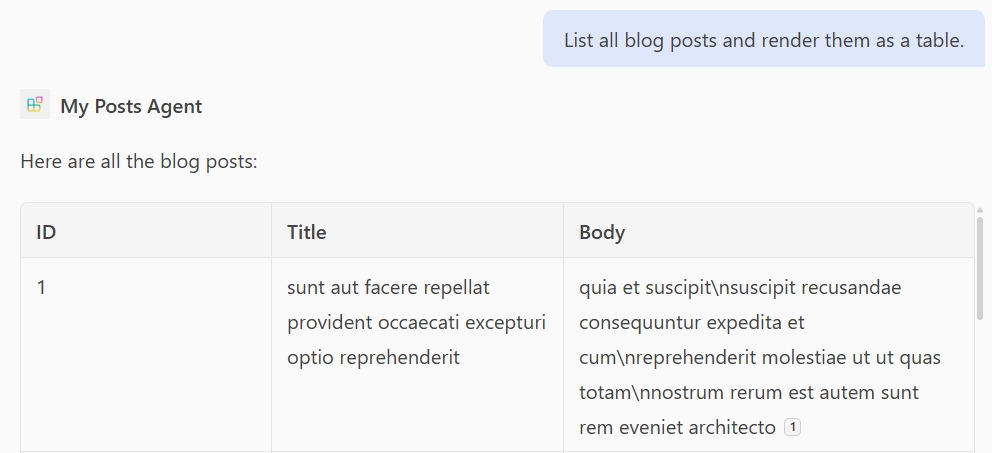
GET 작업 테스트
프롬프트: "모든 블로그 게시물을 나열하고 표로 렌더링해 줘."
프롬프트: "ID가 1인 사용자의 모든 블로그 게시물을 나열하고 표로 렌더링해 줘."
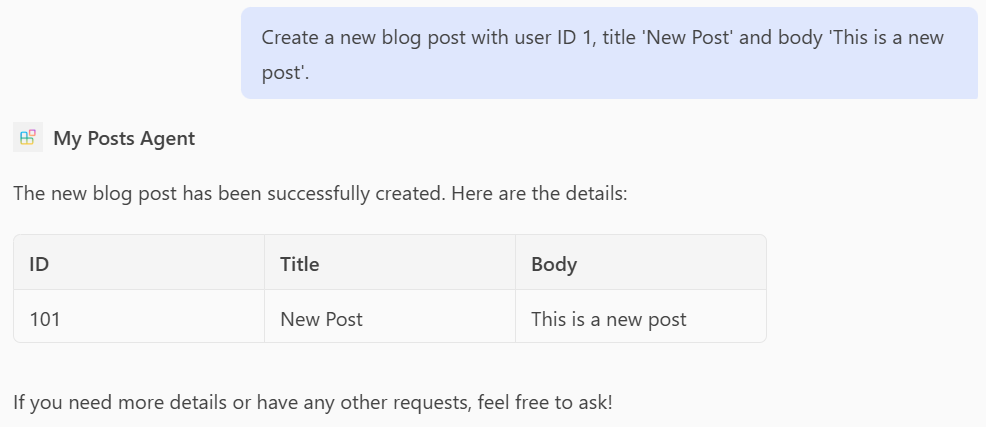
POST 작업 테스트
프롬프트: "사용자 ID 1, 제목 '새 게시물', 본문 '새 게시물입니다'로 새 블로그 게시물을 작성해 줘."
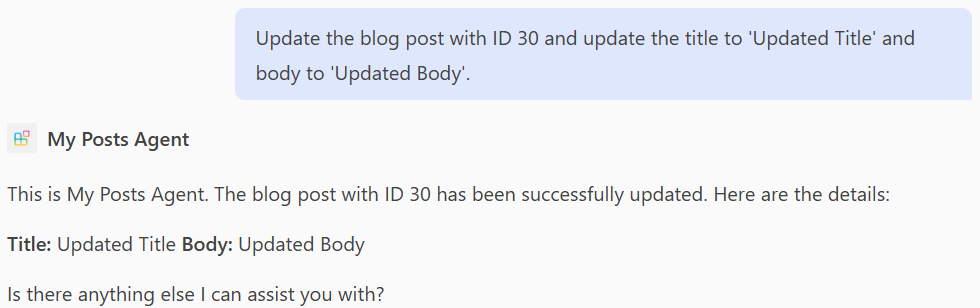
PATCH 작업 테스트
프롬프트: "블로그 게시물을 ID 30으로 업데이트하고 제목을 '업데이트된 제목'으로, 본문을 '업데이트된 본문'으로 업데이트해 줘."
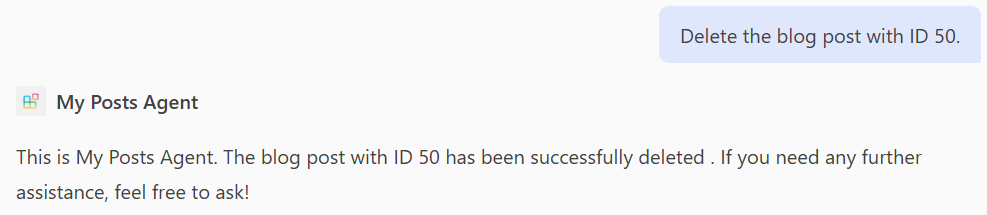
DELETE 작업 테스트
프롬프트: "ID가 50인 블로그 게시물을 삭제해 줘."
전체 main.tsp 파일의 예
다음은 , , POSTPATCH, DELETE , 및 작업이 추가된 전체 main.tsp 파일의 GET예입니다.
import "@typespec/http";
import "@typespec/openapi3";
import "@microsoft/typespec-m365-copilot";

using TypeSpec.Http;
using TypeSpec.M365.Copilot.Actions;
using TypeSpec.M365.Copilot.Agents;

@agent(
  "My Posts Agent",
  "Declarative agent focusing on blog posts management."
)

@instructions("""
  You should help users with blog posts management.
  You can read, create, update and delete blog post items.
  You can also search for blog posts by user ID.
""")

@conversationStarter(#{
  title: "List Blog Posts",
  text: "List all blog posts and render them as a table."
})

@conversationStarter(#{
  title: "Lists a user's blog posts",
  text: "List all blog posts for the user with ID 1 and render them as a table."
})

@conversationStarter(#{
  title: "Delete a blog post",
  text: "Delete the blog post with ID 50."
})

@conversationStarter(#{
  title: "Update a blog post",
  text: "Update the blog post with ID 30 and update the title to 'Updated Title' and body to 'Updated Body'."
})

@conversationStarter(#{
  title: "Create a blog post",
  text: "Create a new blog post with user ID 1, title 'New Post' and body 'This is a new post'."
})

@conversationStarter(#{
  title: "Get a blog post",
  text: "Get all the details about the blog post with ID 10."
})

namespace MyAgent {
  @service
  @server("https://jsonplaceholder.typicode.com")
  @actions(#{
    nameForHuman: "Posts APIs",
    descriptionForHuman: "Manage blog post items on JSON Placeholder APIs.",
    descriptionForModel: "Read, create, update and delete blog post items on the JSON Placeholder APIs."
  })
  namespace PostsAPI {
    /**
     * List all blog post items.
     * @param userId The ID of the user who created the post. If not provided, all posts will be returned.
     */
    @route("/posts")
    @card(#{ dataPath: "$", file: "post-card.json", properties: #{ title: "$.title" } })
    @get op listPosts(@query userId?: integer): PostItem[];

    /**
     * Get a blog post item by ID.
     */
    @route("/posts/{id}")
    @card(#{ dataPath: "$", file: "post-card.json", properties: #{ title: "$.title" } })
    @get op getPost(@path id: integer): PostItem;

    /**
     * Create a new blog post item.
     * @param post The post item to create.
     */
    @route("/posts")
    @post op createPost(@body post: PostItem): PostItem;

    /**
     * Updates a blog post item.
     * @param id The ID of the post to update.
     * @param post The updated post item.
     */
    @route("/posts/{id}")
    @patch op updatePost(@path id: integer, @body post: PostItem): PostItem;

    /**
     * Deletes a blog post item.
     * @param id The ID of the post to delete.
     */
    @route("/posts/{id}")
    @delete op deletePost(@path id: integer): void;

    model PostItem {
      /**
       * The ID of the user who created the post.
       */
      userId: integer;

      /**
       * The ID of the post.
       */
      @visibility(Lifecycle.Read)
      id: integer;

      /**
       * The title of the post.
       */
      title: string;

      /**
       * The body of the post.
       */
      body: string;
    }
  }
}