Power Platform API는 Microsoft Dataverse 데이터베이스가 있거나 없는 Microsoft Power Platform 환경에서 다양한 세부 정보와 메타데이터를 추출하는 데 사용할 수 있습니다. API는 PowerShell과 같이 현재 사용 가능한 다양한 클라이언트에서 내부적으로 사용됩니다.
이 자습서에서는 다음 작업을 수행하는 방법을 알아봅니다.
- Power Automate 또는 Logic Apps 워크플로(Azure) 또는 Power Platform API로 인증하는 PowerShell 스크립트를 만듭니다.
- List Environments 엔드포인트를 호출하여 Microsoft Power Platform 환경 세부 정보를 검색합니다.
- 용량 개체를 통해 반복하여 실제 소비량을 검색합니다.
- 소비 데이터를 표시할 테이블에 저장합니다.
이 시나리오의 예로서 고객은 부서별 총 테넌트 생산 능력 할당을 더 잘 이해할 수 있도록 생산 능력 소비량을 처리할 방법을 찾고 있습니다. 이를 통해 고객은 내부 비용 회계 기능을 수행하고 각 부서에서 전체 사용 가능 용량을 얼마나 사용하는지에 따라 요금을 청구할 수 있습니다. 이 고객은 Environment Description을 사용하여 각 환경을 담당하는 부서를 호출합니다.
연결 및 변수 설정
다음 세부 정보를 사용하여 Power Platform 프로그래밍 방식으로 연결하세요. Azure 환경이나 PowerShell 스크립트 중에서 선택할 수 있습니다.
워크플로를 만들고 변수를 설정합니다.
이 튜토리얼에서는 시작하기 위해 Logic Apps 워크플로를 사용합니다. Power Automate 흐름도 허용되며 회사에서 자동화에 사용하기를 선호하는 다른 모든 오케스트레이션 엔진도 사용할 수 있습니다. 데이터를 검색하는 모든 호출은 RESTful API를 사용하므로 REST를 지원하는 모든 툴이 이 튜토리얼과 호환됩니다.
Azure Portal을 방문한 다음 새 논리 앱을 만들고 이름을 지정합니다.
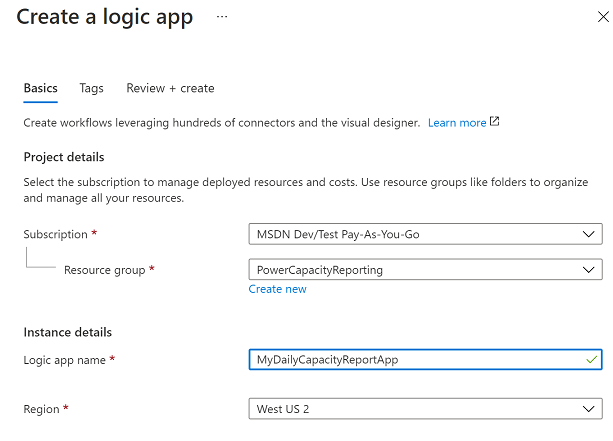
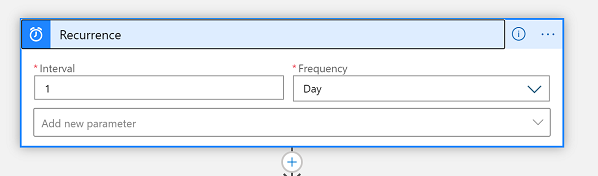
프로비저닝이 완료되면 Designer를 사용하여 워크플로를 편집하고 매일 실행되도록 반복 트리거를 설정합니다.
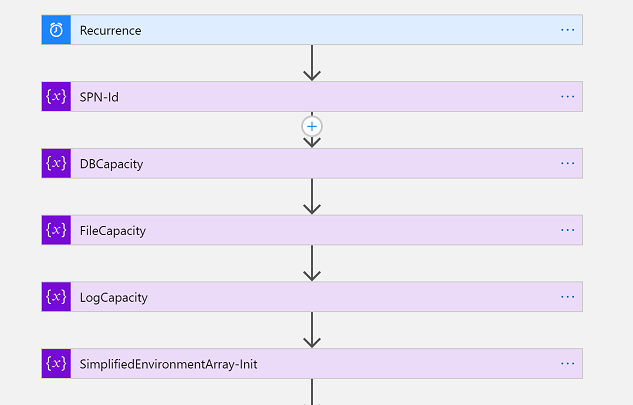
다음으로, 5개의 변수를 초기화해야 합니다.
- SPN-Id – 서비스 주체 ClientID입니다. 이는 나중에 서비스 주체 컨텍스트에서 인증을 수행하는 데 사용됩니다. 사용자 이름/암호 컨텍스트를 사용하는 경우 이 변수를 건너뛸 수 있습니다.
- DBCapacity – 이것은 소비된 데이터베이스 용량을 메가바이트 단위로 나타내는 Float 변수입니다.
- FileCapacity – 이것은 소비된 파일 용량을 메가바이트 단위로 나타내는 Float 변수입니다.
- LogCapacity – 이것은 소비된 로그 용량을 메가바이트 단위로 나타내는 Float 변수입니다.
- SimplifiedEnvironmentArray-Init – 이것은 몇 가지 환경 속성으로 채워지는 배열 변수입니다. 이는 최종 HTML 테이블 보고서 결과물을 대폭 단순화합니다.
다음으로, Microsoft Entra API를 호출하기 위한 토큰을 인증하고 검색합니다. Power Platform Microsoft Entra 설정을 완료하지 않은 경우 인증 - 레거시를 참조하세요.
이 자습서에서는 키 자격 증명 모음을 사용하여 서비스 주체 비밀 값을 저장합니다. 이러한 방식으로 IT 관리자는 이 값을 워크플로에 안전하게 사용할 수 있습니다. 그런 다음 이 내용은 Microsoft Entra 토큰을 검색하기 위한 POST 호출에 채워집니다.
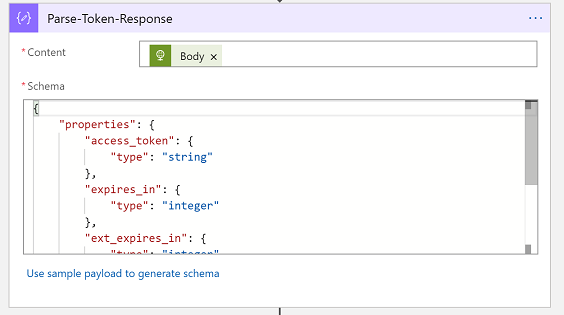
그런 다음 'Parse JSON' 작업에서 이 JSON 스키마를 사용하여 유형이 지정된 개체로 Microsoft Entra 토큰 응답을 구문 분석합니다.
{
    "properties": {
        "access_token": {
            "type": "string"
        },
        "expires_in": {
            "type": "integer"
        },
        "ext_expires_in": {
            "type": "integer"
        },
        "token_type": {
            "type": "string"
        }
    },
    "type": "object"
}
환경 가져오기
이 섹션에서는 귀하가 관리하는 환경 목록을 가져옵니다. 이는 API와 PowerShell을 통해 수행할 수 있습니다.
List Environments 엔드포인트 호출
이제 Power Platform API를 호출해도 됩니다. 끝점 환경 목록을 사용하여 모든 환경과 해당 메타데이터를 검색합니다. 특히 용량에 대한 $expand 매개변수를 사용합니다. 또한 Microsoft Entra ID의 이전 섹션에서 받은 전달자 토큰과 함께 Authorization 헤더를 사용합니다. 사용자 이름/암호 컨텍스트를 사용했다면 이 단계에서도 해당 전달자 토큰을 입력하면 됩니다.
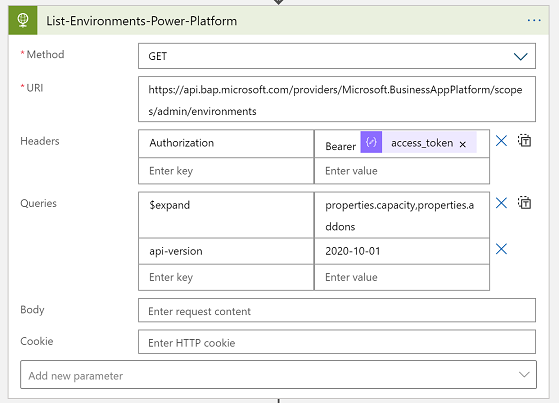
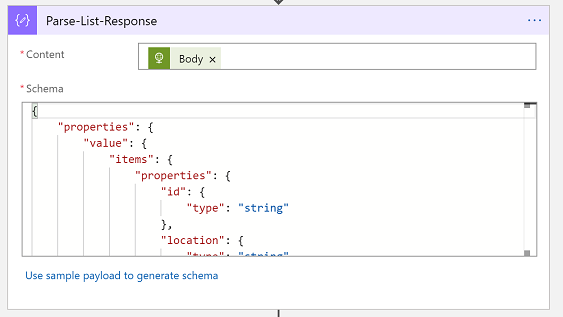
그런 다음 이 JSON 스키마와 'JSON 구문 분석' 작업을 사용하여 Power Platform API 응답를 형식화된 객체로 구문 분석합니다.
{
"properties": {
"value": {
"items": {
"properties": {
"description": {
"type": "string"
},
"id": {
"type": "string"
},
"location": {
"type": "string"
},
"name": {
"type": "string"
},
"properties": {
"properties": {
"addons": {
"type": "array"
},
"azureRegion": {
"type": "string"
},
"capacity": {
"items": {
"properties": {
"actualConsumption": {
"type": "number"
},
"capacityType": {
"type": "string"
},
"capacityUnit": {
"type": "string"
},
"ratedConsumption": {
"type": "number"
},
"updatedOn": {
"type": "string"
}
},
"required": [
"capacityType",
"actualConsumption",
"ratedConsumption",
"capacityUnit",
"updatedOn"
],
"type": "object"
},
"type": "array"
},
"clientUris": {
"properties": {
"admin": {
"type": "string"
},
"maker": {
"type": "string"
}
},
"type": "object"
},
"cluster": {
"properties": {
"category": {
"type": "string"
},
"number": {
"type": "string"
}
},
"type": "object"
},
"connectedGroups": {
"type": "array"
},
"createdBy": {
"properties": {
"displayName": {
"type": "string"
},
"id": {
"type": "string"
},
"type": {
"type": "string"
}
},
"type": "object"
},
"createdTime": {
"type": "string"
},
"creationType": {
"type": "string"
},
"databaseType": {
"type": "string"
},
"displayName": {
"type": "string"
},
"environmentSku": {
"type": "string"
},
"isDefault": {
"type": "boolean"
},
"linkedEnvironmentMetadata": {
"properties": {
"backgroundOperationsState": {
"type": "string"
},
"baseLanguage": {
"type": "number"
},
"createdTime": {
"type": "string"
},
"domainName": {
"type": "string"
},
"friendlyName": {
"type": "string"
},
"instanceApiUrl": {
"type": "string"
},
"instanceState": {
"type": "string"
},
"instanceUrl": {
"type": "string"
},
"platformSku": {
"type": "string"
},
"resourceId": {
"type": "string"
},
"scaleGroup": {
"type": "string"
},
"uniqueName": {
"type": "string"
},
"version": {
"type": "string"
}
},
"type": "object"
},
"protectionStatus": {
"properties": {
"keyManagedBy": {
"type": "string"
}
},
"type": "object"
},
"provisioningState": {
"type": "string"
},
"retentionDetails": {
"properties": {
"backupsAvailableFromDateTime": {
"type": "string"
},
"retentionPeriod": {
"type": "string"
}
},
"type": "object"
},
"retentionPeriod": {
"type": "string"
},
"runtimeEndpoints": {
"properties": {
"microsoft.ApiManagement": {
"type": "string"
},
"microsoft.BusinessAppPlatform": {
"type": "string"
},
"microsoft.CommonDataModel": {
"type": "string"
},
"microsoft.Flow": {
"type": "string"
},
"microsoft.PowerApps": {
"type": "string"
},
"microsoft.PowerAppsAdvisor": {
"type": "string"
}
},
"type": "object"
},
"states": {
"properties": {
"management": {
"properties": {
"id": {
"type": "string"
}
},
"type": "object"
},
"runtime": {
"properties": {
"id": {
"type": "string"
}
},
"type": "object"
}
},
"type": "object"
},
"updateCadence": {
"properties": {
"id": {
"type": "string"
}
},
"type": "object"
}
},
"type": "object"
},
"type": {
"type": "string"
}
},
"required": [
"id",
"type",
"location",
"name",
"properties"
],
"type": "object"
},
"type": "array"
}
},
"type": "object"
}
용량 개체를 통해 반복합니다.
이것은 자습서에서 가장 복잡한 부분입니다. 여기서는 루프 내부의 루프를 사용하여 목록 환경 응답,에 있는 각 환경를 반복하고 각 환경에는 반복되는 용량 세부 정보 배열이 있습니다. 이를 통해 용량 보고서 표의 각 환경 행에 대한 필요한 정보를 수집할 수 있습니다.
For-each 및 구문 분석
이를 단계별로 진행하겠습니다. 먼저 Parse-List-Response 출력의 '값'을 사용하여 For Each 컨트롤을 사용합니다.
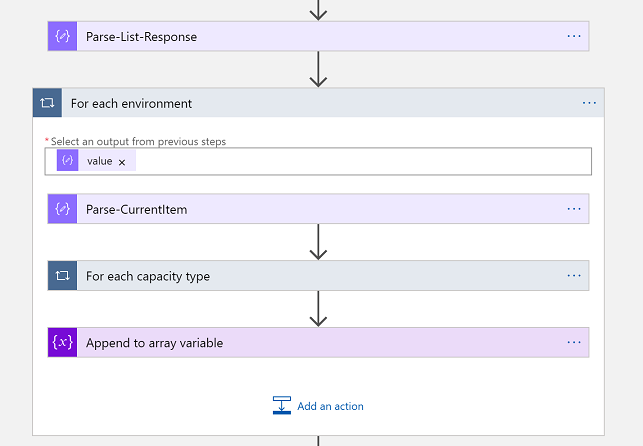
그런 다음 이 JSON 스키마를 사용하여 단일 환경를 형식화된 객체로 구문 분석합니다.
{
    "properties": {
        "description": {
            "type": "string"
        },
        "id": {
            "type": "string"
        },
        "location": {
            "type": "string"
        },
        "name": {
            "type": "string"
        },
        "properties": {
            "properties": {
                "addons": {
                    "type": "array"
                },
                "azureRegion": {
                    "type": "string"
                },
                "capacity": {
                    "items": {
                        "properties": {
                            "actualConsumption": {
                                "type": "number"
                            },
                            "capacityType": {
                                "type": "string"
                            },
                            "capacityUnit": {
                                "type": "string"
                            },
                            "ratedConsumption": {
                                "type": "number"
                            },
                            "updatedOn": {
                                "type": "string"
                            }
                        },
                        "required": [
                            "capacityType",
                            "actualConsumption",
                            "ratedConsumption",
                            "capacityUnit",
                            "updatedOn"
                        ],
                        "type": "object"
                    },
                    "type": "array"
                },
                "clientUris": {
                    "properties": {
                        "admin": {
                            "type": "string"
                        },
                        "maker": {
                            "type": "string"
                        }
                    },
                    "type": "object"
                },
                "cluster": {
                    "properties": {
                        "number": {
                            "type": "string"
                        }
                    },
                    "type": "object"
                },
                "connectedGroups": {
                    "type": "array"
                },
                "createdBy": {
                    "properties": {
                        "displayName": {
                            "type": "string"
                        },
                        "id": {
                            "type": "string"
                        },
                        "type": {
                            "type": "string"
                        }
                    },
                    "type": "object"
                },
                "createdTime": {
                    "type": "string"
                },
                "creationType": {
                    "type": "string"
                },
                "databaseType": {
                    "type": "string"
                },
                "displayName": {
                    "type": "string"
                },
                "environmentSku": {
                    "type": "string"
                },
                "isDefault": {
                    "type": "boolean"
                },
                "linkedEnvironmentMetadata": {
                    "properties": {
                        "backgroundOperationsState": {
                            "type": "string"
                        },
                        "baseLanguage": {
                            "type": "integer"
                        },
                        "createdTime": {
                            "type": "string"
                        },
                        "domainName": {
                            "type": "string"
                        },
                        "friendlyName": {
                            "type": "string"
                        },
                        "instanceApiUrl": {
                            "type": "string"
                        },
                        "instanceState": {
                            "type": "string"
                        },
                        "instanceUrl": {
                            "type": "string"
                        },
                        "resourceId": {
                            "type": "string"
                        },
                        "scaleGroup": {
                            "type": "string"
                        },
                        "uniqueName": {
                            "type": "string"
                        },
                        "version": {
                            "type": "string"
                        }
                    },
                    "type": "object"
                },
                "protectionStatus": {
                    "properties": {
                        "keyManagedBy": {
                            "type": "string"
                        }
                    },
                    "type": "object"
                },
                "provisioningState": {
                    "type": "string"
                },
                "retentionDetails": {
                    "properties": {
                        "backupsAvailableFromDateTime": {
                            "type": "string"
                        },
                        "retentionPeriod": {
                            "type": "string"
                        }
                    },
                    "type": "object"
                },
                "retentionPeriod": {
                    "type": "string"
                },
                "runtimeEndpoints": {
                    "properties": {
                        "microsoft.ApiManagement": {
                            "type": "string"
                        },
                        "microsoft.BusinessAppPlatform": {
                            "type": "string"
                        },
                        "microsoft.CommonDataModel": {
                            "type": "string"
                        },
                        "microsoft.Flow": {
                            "type": "string"
                        },
                        "microsoft.PowerApps": {
                            "type": "string"
                        },
                        "microsoft.PowerAppsAdvisor": {
                            "type": "string"
                        }
                    },
                    "type": "object"
                },
                "states": {
                    "properties": {
                        "management": {
                            "properties": {
                                "id": {
                                    "type": "string"
                                }
                            },
                            "type": "object"
                        },
                        "runtime": {
                            "properties": {
                                "id": {
                                    "type": "string"
                                }
                            },
                            "type": "object"
                        }
                    },
                    "type": "object"
                },
                "updateCadence": {
                    "properties": {
                        "id": {
                            "type": "string"
                        }
                    },
                    "type": "object"
                }
            },
            "type": "object"
        },
        "type": {
            "type": "string"
        }
    },
    "type": "object"
}
다음으로, Parse-CurrentItem 출력의 '용량'을 사용하는 또 다른 For Each 컨트롤을 사용합니다. 그런 다음 이 JSON 스키마를 사용하여 이를 형식화된 객체로 구문 분석합니다.
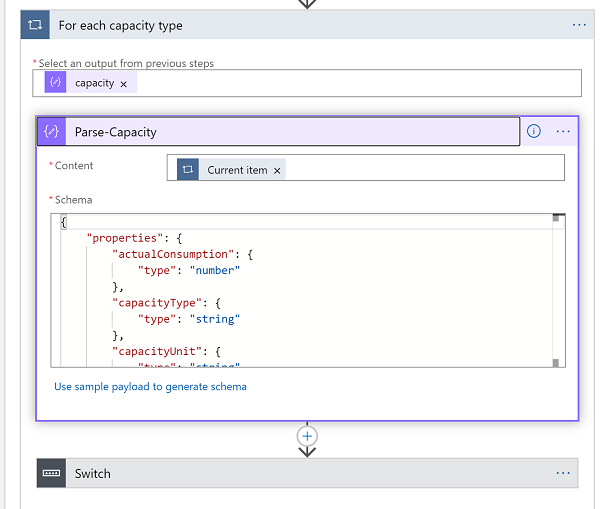
이제 Parse-Capacity 출력에서 CapacityType 속성에 대한 스위치 컨트롤을 사용할 수 있습니다. 이는 '데이터베이스', '파일' 또는 '로그' 값입니다. 각 스위치 케이스에서 관련 'actualConsumption' 속성을 관련 변수에 캡처합니다. 다음 사례에서는 데이터베이스 용량을 캡처하고 있는 것을 볼 수 있습니다.
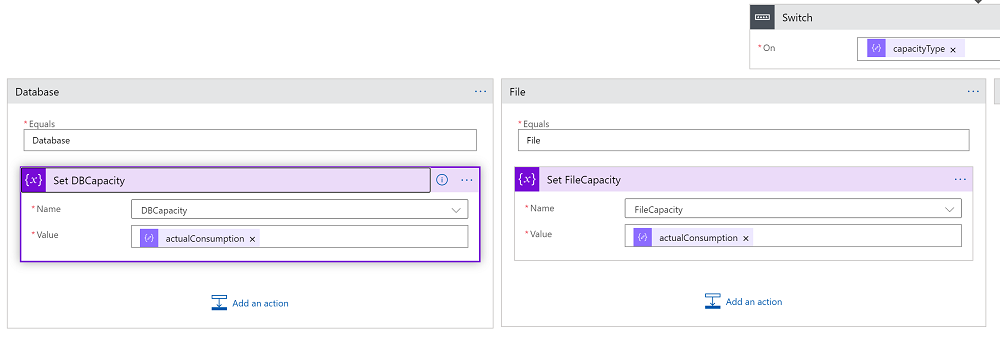
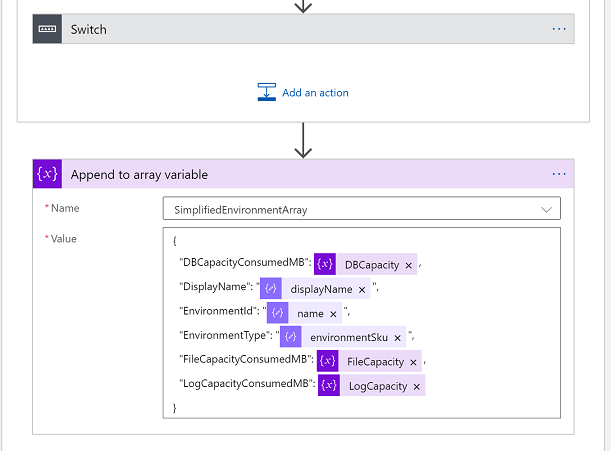
'For each 환경' 루프의 마지막 단계로 이제 보고서에서 이 행에 대한 환경 세부 정보를 캡처하면 됩니다. 배열 변수에 추가 컨트롤을 사용하여 다음 JSON 스키마를 사용하십시오.
{
    "properties": {
        "actualConsumption": {
            "type": "number"
        },
        "capacityType": {
            "type": "string"
        },
        "capacityUnit": {
            "type": "string"
        },
        "ratedConsumption": {
            "type": "number"
        },
        "updatedOn": {
            "type": "string"
        }
    },
    "type": "object"
}
보고서 테이블 작성
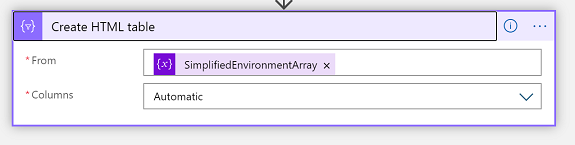
축하합니다. 이제 쉬운 부분에 도달했습니다! 이제 완전히 채워지고 단순화된 환경 용량 배열이 있으므로 표 형식으로 표시할 수 있습니다.
HTML 테이블 커넥터 사용
논리 앱을 실행하면 이제 HTML 테이블 보고서의 결과물을 볼 수 있습니다.
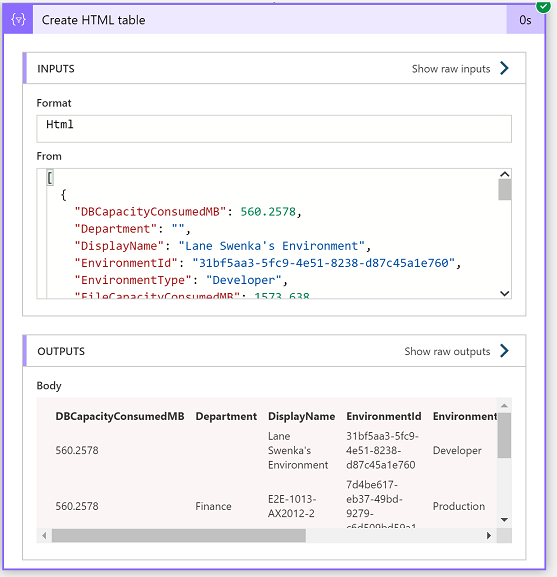
이 예에서는 원가 계산 목적으로 보고서를 이해 관계자에게 선택적으로 이메일로 보내거나 추가 분석 및 기록 추세를 위해 데이터를 데이터베이스에 저장할 수 있습니다.