이 문서는 GitHub Actions 및 Power Automate 클라우드 흐름을 사용하여 Power Platform에서 파이프라인을 확장하는 방법을 보여줍니다. 파이프라인 배포가 제출되면 클라우드 흐름이 GitHub 워크플로를 트리거하여 아티팩트의 소스 코드를 다운로드하고 압축을 풀고 GitHub 분기에 커밋합니다.
워크플로 세부 정보
워크플로는 workflow_dispatch 이벤트를 통해 트리거됩니다. 워크플로는 ubuntu-latest에서 실행되며 GitHub 리포지토리 분기에 대한 변경 사항을 커밋할 수 있는 contents: write 권한을 포함합니다.
워크플로는 다음 단계로 구성됩니다.
-
actions/checkout@v3: 리포지토리를 체크아웃합니다. -
create new branch if specified: 입력에target_branch가 지정된 경우 새 분기를 생성합니다. -
download solution from artifact: 파이프라인에서 생성된 아티팩트에서 솔루션을 다운로드합니다. -
unpack solution: 솔루션의 압축을 풉니다. -
commit changes: 기존 또는 새 브랜치에 대한 변경 사항을 커밋합니다. -
push to branch: 커밋된 변경 사항을 소스 분기로 푸시합니다.
워크플로 입력
다음 워크플로 입력은 필수 또는 선택 사항입니다.
-
artifact_url(필수): 파이프라인에서 생성된 아티팩트에 대한 Microsoft Dataverse 행(레코드) ID의 URL입니다. -
solution_name(필수): Dataverse 환경의 솔루션 이름입니다. -
source_branch(필수) : 솔루션 커밋을 위한 분기입니다. -
target_branch(선택 사항): 솔루션 커밋을 위해 생성할 분기입니다. 지정하지 않으면source_branch가 사용됩니다. -
commit_message(필수): 커밋을 위해 제공할 메시지입니다.
워크플로 암호
Dataverse 및 Microsoft Entra ID(AD)에 구성된 애플리케이션 사용자를 사용하여 Dataverse에 연결하려면 다음 암호가 필요합니다. GitHub 리포지토리 설정에서 이러한 암호를 구성합니다.
-
CLIENT_ID: 등록된 Microsoft Entra 애플리케이션의 클라이언트 ID입니다. -
TENANT_ID: Microsoft Entra 애플리케이션과 연결된 Microsoft Entra 디렉터리의 테넌트 ID입니다. -
CLIENT_SECRET: 등록된 Microsoft Entra 애플리케이션의 클라이언트 암호입니다.
자세한 내용은 암호화된 비밀 만들기 및 사용하기와 애플리케이션 사용자 만들기를 참고하세요.
워크플로 코드
아래 목록은 GitHub Actions 워크플로 코드입니다.
name: Download, unpack and commit the solution to git
run-name: Getting ${{ github.event.inputs.solution_name }} from pipelines host environment and committing
on:
  workflow_dispatch:
    inputs:
      artifact_url:
        description: "The url of the Dataverse record ID for the artifact created by the pipelines (Example: https://[your-env].crm.dynamics.com/api/data/v9.0/deploymentartifacts([your-artifact-id])/artifactfile/$value)."
        required: true
      solution_name:
        description: "Name of the Solution in Dataverse environment"
        required: true
      user_name:
        description: "User name for the commit"
        required: true
      source_branch:
        description: "Branch for the solution commit"
        required: true
      target_branch:
        description: "Branch to create for the solution commit"
        required: false
      commit_message:
        description: "Message to provide for the commit"
        required: true
permissions:
  contents: write
jobs:
  export-unpack-commit:
    runs-on: ubuntu-latest

    steps:
      - uses: actions/checkout@v3
        with:
            ref: ${{ github.event.inputs.source_branch }}

      # Commit changes to the existing or new branch
      - name: create new branch if specified
        shell: pwsh
        run: |
            if('${{ github.event.inputs.target_branch }}' -ne '') {
                git checkout -b ${{ github.event.inputs.target_branch }} ${{ github.event.inputs.source_branch }}
            }

      # Export the solution from the artifact created by pipelines
      - name: download solution from artifact
        env:
            CLIENT_ID: ${{secrets.CLIENT_ID}}
            TENANT_ID: ${{secrets.TENANT_ID}}
            CLIENT_SECRET: ${{secrets.CLIENT_SECRET}}
        shell: pwsh
        run: |
            $aadHost = "login.microsoftonline.com"
            $url = "${{ github.event.inputs.artifact_url }}"
            $options = [System.StringSplitOptions]::RemoveEmptyEntries
            $dataverseHost = $url.Split("://", $options)[1].Split("/")[0]

            $body = @{client_id = $env:CLIENT_ID; client_secret = $env:CLIENT_SECRET; grant_type = "client_credentials"; scope = "https://$dataverseHost/.default"; }
            $OAuthReq = Invoke-RestMethod -Method Post -Uri "https://$aadHost/$env:TENANT_ID/oauth2/v2.0/token" -Body $body
            $spnToken = $OAuthReq.access_token
            $headers = New-Object "System.Collections.Generic.Dictionary[[String],[String]]"
            $headers.Add("Authorization", "Bearer $spnToken")
            $headers.Add("Content-Type", "application/json")

            # Download the managed solution
            $response = Invoke-RestMethod "${{ github.event.inputs.artifact_url }}" -Method 'GET' -Headers $headers
            $bytes = [Convert]::FromBase64String($response.value)
            [IO.File]::WriteAllBytes("${{ github.event.inputs.solution_name }}_managed.zip", $bytes)

            # Download the unmanaged solution (for now we will need to use string manipulation to get the unmanaged solution URL, until the API provides this value)
            $unmanaged_artifact_url = "${{ github.event.inputs.artifact_url }}".Replace("artifactfile", "artifactfileunmanaged")
            $response = Invoke-RestMethod "$unmanaged_artifact_url" -Method 'GET' -Headers $headers
            $bytes = [Convert]::FromBase64String($response.value)
            [IO.File]::WriteAllBytes("${{ github.event.inputs.solution_name }}.zip", $bytes)

      # Unpack the solution
      - name: unpack solution
        uses: microsoft/powerplatform-actions/unpack-solution@v0
        with:
          solution-file: "${{ github.event.inputs.solution_name }}.zip"
          solution-folder: "${{ github.event.repository.name }}"
          solution-type: 'Both'
          process-canvas-apps: false
          overwrite-files: true

      # Commit changes to the existing or new branch
      - name: commit changes
        shell: pwsh
        run: |
          rm -rf ${{ github.event.inputs.solution_name }}.zip
          rm -rf ${{ github.event.inputs.solution_name }}_managed.zip
          git config user.name ${{ github.event.inputs.user_name }}
          git pull
          git add --all
          git commit -am "${{ github.event.inputs.commit_message }}" --allow-empty

      # Push the committed changes to the source branch
      - name: push to branch
        shell: pwsh
        run: |
          if('${{ github.event.inputs.target_branch }}' -ne '') {
              git push origin ${{ github.event.inputs.target_branch }}
          } else {
              git push origin ${{ github.event.inputs.source_branch }}
          }
참고
솔루션 아티팩트를 다운로드하는 데 사용되는 Dataverse 웹 API의 최대 파일 크기 제한은 16MB입니다.
Power Automate 흐름 예
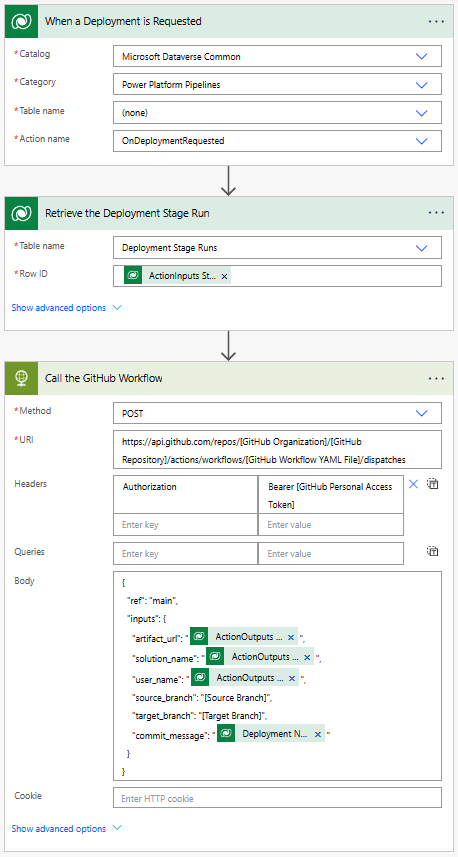
GitHub 워크플로를 호출하기 위해 Dataverse에서 배포 요청이 있을 때 트리거되는 Power Automate 흐름을 만들 수 있습니다. 필요한 입력을 GitHub 워크플로에 전달하도록 흐름을 구성할 수 있습니다. Power Automate 흐름을 만드는 방법에 대한 자세한 내용은 흐름 만들기를 참고하세요.
흐름 세부 정보
OnDeploymentRequested 작업이 Dataverse에서 실행될 때 흐름이 트리거됩니다. 흐름은 HTTP 커넥터를 호출하여 GitHub 워크플로를 트리거합니다. 흐름은 필요한 입력을 GitHub 워크플로에 전달합니다. 요청 본문에 다음 입력을 포함합니다.
-
artifact_url: 파이프라인에서 생성된 Dataverse 솔루션 아티팩트의 URL입니다. -
solution_name: Dataverse 환경의 솔루션 이름입니다. -
user_name: 커밋을 위한 사용자 이름입니다. -
source_branch: 솔루션 커밋을 위한 소스 분기입니다. -
target_branch: 솔루션 커밋을 위해 생성할 분기입니다. -
commit_message: 커밋을 위해 제공할 메시지입니다.
artifact_url, solution_name 및 user_name에 전달된 값은 파이프라인을 트리거한 작업의 출력에서 가져옵니다.
commit_message는 Dataverse의 배포 단계 실행 행에서 가져옵니다.
-
artifact_url:@{triggerOutputs()?['body/OutputParameters/ArtifactFileDownloadLink']} -
solution_name:@{triggerOutputs()?['body/OutputParameters/ArtifactName']} -
user_name:@{triggerOutputs()?['body/OutputParameters/DeployAsUser']} -
commit_message:@{outputs('Retrieve_the_Deployment_Stage_Run')?['body/deploymentnotes']}
흐름은 또한 개인용 액세스 토큰(PAT)를 사용하여 GitHub에 인증합니다. GitHub 개인 액세스 토큰을 만드는 방법에 대한 자세한 내용은 개인용 액세스 토큰 만들기를 참조하세요. PAT는 HTTP 요청의 Authorization 헤더로 전달됩니다.
흐름에서 다음 값을 업데이트합니다.
-
[GitHub Personal Access Token]- GitHub 개인용 액세스 토큰으로 바꿉니다. -
[GitHub Organization]- GitHub 조직 이름으로 바꿉니다. -
[GitHub Repository]- GitHub 리포지토리 이름으로 바꿉니다. -
[GitHub Workflow YAML File]- GitHub 워크플로 YAML 파일 이름으로 바꿉니다. -
[Source Branch]- Git 분기로 교체하여 솔루션을 커밋합니다. -
[Target Branch]- 솔루션 커밋을 위해 만들 Git 분기로 바꿉니다.Target Branch는 선택 사항입니다. 대상 분기를 지정하지 않으면 솔루션이Source Branch에 커밋됩니다.