Important
이 게시물의 일부 정보는 상용으로 출시되기 전에 실질적으로 수정될 수 있는 사전 릴리스된 제품과 관련이 있습니다. Microsoft는 여기에서 제공되는 정보와 관련하여 명시적이거나 묵시적인 어떠한 보증도 하지 않습니다. Project Perception은 현재 제한된 공개 프리뷰 상태입니다. 제한된 공개 미리 보기 프로그램은 광범위한 공개 가용성 전에 정의된 미리 보기 창에 대한 초대 전용 소규모 고객이 Perception을 사용할 수 있다는 것을 의미합니다.
Project Perception의 정찰 에이전트는 보안 팀과 레드 팀 운영자에게 Azure 환경에 대한 공격자 관점 보기를 제공합니다. 리소스를 변경하지 않고 실제 공격 경로, 구성 문제 및 노출 위험을 식별하기 위해 자산, ID, 권한 및 네트워크 노출의 상관 관계를 지정합니다.
이 문서를 사용하여 정찰 에이전트의 기능을 이해하고, 필수 구성 요소 및 권한을 검토하고, 설정하고, 세션을 시작하고, 보고서를 해석할 수 있습니다.
주요 기능
정찰 에이전트는 Azure 환경에서 AI가 조율하는 다단계 정찰 활동을 수행합니다.
- 읽기 전용 평가: 리소스를 변경하지 않고 증거 지원 위험 평가를 제공합니다.
- 다른 에이전트에 대한 입력: 조사 에이전트를 포함하여 다른 에이전트에 결과를 제공합니다.
- 환경 기반 분석: Azure 환경의 데이터만 분석합니다.
메모
Recon Agent는 읽기 전용 평가를 만듭니다. 취약점을 악용하거나 페이로드를 실행하거나 리소스를 수정하거나 탐지를 배포하거나 공격 그래프를 저장하거나 조직 외부에서는 작동하지 않습니다. 에이전트는 읽기 전용 API 호출을 통해 환경을 분석합니다. 결과는 지정 시간 스냅샷이며 연속 모니터링 시스템을 대체하지 않습니다.
정찰 에이전트를 사용하는 이유는 무엇인가요?
Microsoft Security 노출 관리는 인터넷에 노출된 자산, 중요한 리소스 및 중요한 ID에서 발생하는 공격 경로를 지속적으로 식별합니다. 표시된 자산 및 ID를 모니터링하지만 이러한 조건을 충족하지 않는 임의의 시작 지점에서 공격 경로를 생성하지는 않습니다.
Recon Agent는 침해 가정 분석을 통해 Exposure Management를 보완합니다. 분석가는 Azure 구독 내의 어떤 자산이나 ID에서든 시작할 수 있습니다. 자산을 중요 또는 인터넷 노출로 지정할 필요가 없으며 ID를 중요한 것으로 표시할 필요가 없습니다. 분석은 "공격자가 이미 이 자산 또는 ID를 제어한 경우 다음에 어디로 갈 수 있습니까?" 질문에 대답합니다.
예를 들어 피싱 공격은 Defender 중요한 ID로 표시되지 않은 사용자를 손상시킬 수 있습니다. 노출 관리는 일반적으로 경로에 표시된 다른 자산이 포함되어 있지 않으면 해당 사용자로부터 공격 경로를 생성하지 않습니다. Recon Agent는 사용자를 출발점으로 삼아 공격자가 이동할 수 있는 잠재적 경로를 드러낼 수 있습니다. 그런 다음 팀은 이러한 경로가 중요한 리소스 또는 중요한 ID와 관련된 인시던트로 이어지기 전에 효과적인 초크 지점을 식별할 수 있습니다.
이 보다 광범위한 시작 지점 범위를 통해 팀은 Azure 환경에서 공격 경로를 식별하고 중요한 경로의 우선 순위를 지정하여 SOC(보안 운영 센터) 인시던트 볼륨을 줄일 수 있습니다.
| 사용 사례 | Recon 에이전트 |
|---|---|
| 표시되지 않은 자산 및 ID의 공격 경로 | 중요 자산이나 인터넷 노출 자산으로 지정되지 않은 자산과 민감한 것으로 표시되지 않은 ID를 포함하여, Azure 구독의 모든 자산 또는 ID에서 침해 가정 공격 경로를 생성합니다. |
| 자세 및 노출 가시성 | 컨텍스트에서 이러한 신호를 해석하고 ID, 권한, 자산 및 네트워크 노출의 조합이 현실적인 공격 경로를 만드는지 설명합니다. |
| 경고 조사 | 경고 또는 발견이 더 광범위한 공격자 경로의 일부인지 여부와 도달할 수 있는 다운스트림 자산에 대해 설명합니다. |
| 공격 경로 분석 | 구독, 리소스 그룹 또는 중요 자산 범위로 한정된 표적화된 세션 기반 정찰을 수행하며, 누락된 데이터, 실패한 단계 및 추론된 경로에 대해서도 추론할 수 있습니다. |
| 탐지 범위 | 공격 경로 단계를 기존 Defender 경고 및 헌팅 범위에 매핑한 다음 SOC에 가시성이 부족할 수 있는 위치를 강조 표시합니다. |
| 우선순위 지정 | 경로의 우선 순위를 지정하고 선택한 환경에 대한 악용 가능성, 폭발 반경 및 비즈니스 영향을 줄일 가능성이 가장 높은 수정 사항을 수정합니다. |
| 수정 계획 | 가장 많은 수의 공격 경로를 중단하는 가장 작은 영향을 주는 변경 집합을 식별하고 각 수정에서 제거할 경로를 표시합니다. |
| 분석가의 유용성 | 분석가, 빨간색 팀 및 이해 관계자가 보다 쉽게 검토할 수 있는 일반 언어 설명, 증거 기반 추론 및 공격 경로 다이어그램을 생성합니다. |
요컨대, Microsoft Defender 제품은 노출을 감지, 보호 및 관리하는 데 도움이 됩니다. 정찰 에이전트는 공격자가 특정 Azure 환경에서 해당 노출을 사용하는 방법과 위험을 가장 효과적으로 줄일 수 있는 작업을 설명합니다.
시작하기 전 주의 사항:
Recon Agent를 설정하기 전에 다음 제품 및 권한 요구 사항을 검토합니다.
사전 요구 사항
Recon Agent를 사용하려면 다음이 필요합니다.
- Microsoft Entra ID P2(마이크로소프트 엔트라 아이디 P2)
- Microsoft Defender XDR
- Azure 구독
필요한 권한
| 권한 수준 | 수행 가능한 작업 |
|---|---|
| 보안 관리자 | 에이전트 설치 및 구성: 에이전트 ID 및 사용 권한을 설정하고 에이전트를 제거합니다. 조직에서 한 명 이상의 사용자에게 이 역할이 있어야 합니다. |
| 보안 뷰어 | 에이전트 사용: 에이전트 세션 보기 및 상호 작용, 세션 시작 및 세션 세부 정보 보기 |
팁 (조언)
에이전트 설정을 다른 사용자에게 위임하려면 보안 관리자 역할을 할당합니다. 역할 할당이 필요한 경우 Microsoft Entra 관리자에게 문의하세요.
추가 권한이 필요합니다.
정찰을 수행하려면 정찰 에이전트에 두 개의 권한 집합이 더 필요합니다. 각 권한 집합을 부여하는 사용자에게는 다음 표의 해당 역할이 필요합니다.
| 사용 권한을 부여하는 데 필요한 역할 | 정찰 에이전트에 부여할 수 있는 권한 |
|---|---|
| 권한 있는 역할 관리자(Microsoft Entra 역할) |
Microsoft Graph API 권한: - User.Read.All- Organization.Read.All- GroupMember.Read.All- Application.Read.All- DelegatedPermissionGrant.Read.All- Policy.Read.All- RoleManagement.Read.Directory- AuditLog.Read.All |
| Recon Agent의 대상 환경인 구독에 대한 역할 기반 액세스 제어 관리자 |
Azure 역할 기반 액세스 제어(RBAC) 역할(구독 범위에서 할당): - 읽기 권한자 - Key Vault 읽기 도구 - Log Analytics 읽기 권한 - 보안 읽기 권한 |
Recon Agent 설정하기
이 에이전트를 설정하려면 에이전트 설정의 단계를 수행합니다.
메모
Recon Agent는 에이전트 사용자 ID가 아닌 에이전트 ID를 사용합니다. 현재 기술적 제한 사항으로 인해 에이전트 사용자 ID는 Recon Agent의 읽기 전용 작업을 지원하지 않습니다.
Recon Agent의 에이전트 ID를 만든 후 다음 스크립트를 사용하여 필요한 추가 권한에 나열된 권한을 할당합니다. 스크립트 매개 변수는 아래에 나열되어 있습니다.
Microsoft Graph API 및 AZURE RBAC 권한을 부여합니다.
이 스크립트를 실행하여 Recon Agent에 필요한 Microsoft Graph 애플리케이션 권한과 Azure RBAC 권한을 부여하세요. 매개 변수를 통해 그래프, Azure 또는 두 권한을 모두 부여할 수 있습니다.
<#
.SYNOPSIS
    Assigns the Graph API permissions and Azure RBAC roles required by Recon.

.DESCRIPTION
    Assigns the following Graph API application permissions:
      - User.Read.All
      - Organization.Read.All
      - GroupMember.Read.All
      - Application.Read.All
      - DelegatedPermissionGrant.Read.All
      - Policy.Read.All
      - RoleManagement.Read.Directory
      - AuditLog.Read.All

        Assigns the following Azure RBAC roles at subscription scope:
            - Reader
            - Key Vault Reader
            - Log Analytics Reader
            - Security Reader

.PARAMETER TenantId
    The Tenant Id.

.PARAMETER AgentId
    The Entra ID Object ID (principal ID) of the Agent Identity to assign roles to. To get this value,
    1. Go to the Microsoft Defender portal at https://security.microsoft.com/ -> Perception -> Agents
    2. Search for the Recon Agent and click on it to open the agent details page
    3. Copy the value under the "Identity" section

.PARAMETER Permissions
    Permission sets to assign: All, Azure, or Graph. Defaults to All.

.PARAMETER SubscriptionId
    One or more Azure subscriptions to receive the Recon RBAC assignments.
    Values can be comma-delimited, space-delimited, or supplied as an array.
    Required when Permissions is All or Azure.

Example: .\ReconAgent-Permissions.ps1 -TenantId <TenandId> -AgentId <AgentId> -Permissions All -SubscriptionId <SubscriptionId>
Example: .\ReconAgent-Permissions.ps1 -TenantId <TenandId> -AgentId <AgentId> -Permissions Azure -SubscriptionId <SubscriptionId1>, <SubscriptionId2>

#>

[CmdletBinding()]
param(
    [Parameter(Mandatory = $true)]
    [ValidatePattern('^[0-9a-fA-F]{8}-([0-9a-fA-F]{4}-){3}[0-9a-fA-F]{12}$')]
    [string]$TenantId,

    [Parameter(Mandatory = $true)]
    [ValidatePattern('^[0-9a-fA-F]{8}-([0-9a-fA-F]{4}-){3}[0-9a-fA-F]{12}$')]
    [string]$AgentId,

    [ValidateSet('All', 'Azure', 'Graph')]
    [string]$Permissions = 'All',

    [string[]]$SubscriptionId,

    [Parameter(ValueFromRemainingArguments = $true, DontShow = $true)]
    [string[]]$AdditionalSubscriptionId
)

$ErrorActionPreference = 'Stop'

$subscriptionIds = @(@($SubscriptionId) + @($AdditionalSubscriptionId) |
    ForEach-Object { $_ -split '[,\s]+' } |
    Where-Object { -not [string]::IsNullOrWhiteSpace($_) } |
    ForEach-Object { $_.Trim() } |
    Sort-Object -Unique)

if ($Permissions -in @('All', 'Azure') -and $subscriptionIds.Count -eq 0) {
    throw '-SubscriptionId requires at least one subscription GUID when -Permissions is All or Azure.'
}

foreach ($id in $subscriptionIds) {
    if ($id -notmatch '^[0-9a-fA-F]{8}-([0-9a-fA-F]{4}-){3}[0-9a-fA-F]{12}$') {
        throw "Invalid subscription ID '$id'. Supply one or more GUIDs separated by commas or spaces."
    }
}

function Invoke-AzJson {
    param(
        [Parameter(Mandatory)]
        [string[]]$Arguments
    )

    $output = & az @Arguments 2>&1
    if ($LASTEXITCODE -ne 0) {
        throw "az $($Arguments -join ' ') failed: $($output -join [Environment]::NewLine)"
    }

    if (-not $output) {
        return $null
    }

    return ($output -join [Environment]::NewLine) | ConvertFrom-Json | Write-Output
}

function Test-AzureActionAllowed {
    param(
        [Parameter(Mandatory)]
        [string]$Scope,

        [Parameter(Mandatory)]
        [string]$Action
    )

    $permissionsResponse = Invoke-AzJson -Arguments @(
        'rest', '--method', 'GET',
        '--url', "https://management.azure.com$Scope/providers/Microsoft.Authorization/permissions?api-version=2022-04-01",
        '--output', 'json'
    )

    foreach ($permission in @($permissionsResponse.value)) {
        $isAllowed = @($permission.actions | Where-Object {
            $Action -like [string]$_
        }).Count -gt 0
        $isExcluded = @($permission.notActions | Where-Object {
            $Action -like [string]$_
        }).Count -gt 0

        if ($isAllowed -and -not $isExcluded) {
            return $true
        }
    }

    return $false
}

function Write-Section {
    param([string]$Title)

    Write-Host ''
    Write-Host $Title -ForegroundColor Cyan
    Write-Host ('-' * $Title.Length) -ForegroundColor DarkGray
}

function Write-Step {
    param(
        [string]$Message,
        [ValidateSet('Info', 'OK', 'Warn', 'Err', 'Step')]
        [string]$Level = 'Info'
    )

    $color = switch ($Level) {
        'OK' { 'Green' }
        'Warn' { 'Yellow' }
        'Err' { 'Red' }
        'Step' { 'Cyan' }
        default { 'Gray' }
    }
    $prefix = switch ($Level) {
        'OK' { '[ OK ]' }
        'Warn' { '[WARN]' }
        'Err' { '[FAIL]' }
        'Step' { '[STEP]' }
        default { '[ -- ]' }
    }

    if ($Level -eq 'Step') {
        Write-Host ''
    }

    Write-Host (
        '{0} {1} {2}' -f
        (Get-Date -Format 'HH:mm:ss'), $prefix, $Message
    ) -ForegroundColor $color
}

function Write-ConsoleResults {
    param([object[]]$Results)

    Write-Section 'Granular Recon permission assignment'
    Write-Step `
        -Message "Agent: Recon, EntraObjectId: $AgentId" `
        -Level Step

    foreach ($result in @($Results |
        Sort-Object PermissionSet, SubscriptionId, Role)) {
        $category = if ($result.PermissionSet -eq 'Graph') {
            'Microsoft Graph permission'
        }
        else {
            'Azure RBAC'
        }
        $value = if ($result.PermissionSet -eq 'Azure') {
            "{0} ({1})" -f $result.Role, $result.Scope
        }
        else {
            "Graph $($result.Role)"
        }
        $assignmentResult = switch ($result.Status) {
            'Already assigned' { 'Already existed' }
            'Assigned' { 'Added' }
            default { $result.Status }
        }
        $level = if ($result.Status -eq 'Failed') { 'Err' } else { 'OK' }

        Write-Step `
            -Message "$category`: $value - $assignmentResult" `
            -Level $level
        if ($result.Status -eq 'Failed' -and
            -not [string]::IsNullOrWhiteSpace([string]$result.Details)) {
            Write-Host ("       Details:  {0}" -f $result.Details) `
                -ForegroundColor DarkGray
        }
    }
}

if (-not (Get-Command az -ErrorAction SilentlyContinue)) {
    throw 'Azure CLI is required but the az command was not found.'
}

Write-Host ''
Write-Host 'Recon Agent Permission Assignment' -ForegroundColor Cyan
Write-Host 'Assigns required Microsoft Graph and Azure RBAC permissions' `
    -ForegroundColor DarkGray
Write-Host "Permission set: $Permissions"
Write-Host "Tenant: $TenantId"

# Ensure Azure CLI is signed in to the requested tenant.
$account = $null
try {
    $account = Invoke-AzJson -Arguments @('account', 'show', '--output', 'json')
}
catch {
    # No usable cached Azure CLI session.
}

if (-not $account -or [string]$account.tenantId -ne $TenantId) {
    & az login --tenant $TenantId --allow-no-subscriptions | Out-Null
    if ($LASTEXITCODE -ne 0) {
        throw "Azure CLI sign-in to tenant $TenantId failed."
    }
}

$agentServicePrincipal = Invoke-AzJson -Arguments @(
    'rest', '--method', 'GET',
    '--url', "https://graph.microsoft.com/v1.0/servicePrincipals/$AgentId",
    '--output', 'json'
)
if ([string]$agentServicePrincipal.id -ne $AgentId) {
    throw "Agent service principal $AgentId could not be resolved in tenant $TenantId."
}

$results = @()

if ($Permissions -in @('All', 'Graph')) {
    $graphToken = & az account get-access-token `
        --tenant $TenantId `
        --resource-type ms-graph `
        --query accessToken `
        --output tsv 2>&1
    if ($LASTEXITCODE -ne 0 -or [string]::IsNullOrWhiteSpace([string]$graphToken)) {
        throw "Unable to acquire a Microsoft Graph token: $($graphToken -join [Environment]::NewLine)"
    }
    $graphHeaders = @{
        Authorization = "Bearer $([string]$graphToken)"
        Accept = 'application/json'
    }

    # Graph API roles (AppRoleId -> Role Name)
    $graphRoleIds = @{
        'df021288-bdef-4463-88db-98f22de89214' = 'User.Read.All'
        '498476ce-e0fe-48b0-b801-37ba7e2685c6' = 'Organization.Read.All'
        '98830695-27a2-44f7-8c18-0c3ebc9698f6' = 'GroupMember.Read.All'
        '9a5d68dd-52b0-4cc2-bd40-abcf44ac3a30' = 'Application.Read.All'
        '81b4724a-58aa-41c1-8a55-84ef97466587' = 'DelegatedPermissionGrant.Read.All'
        '246dd0d5-5bd0-4def-940b-0421030a5b68' = 'Policy.Read.All'
        '483bed4a-2ad3-4361-a73b-c83ccdbdc53c' = 'RoleManagement.Read.Directory'
        'b0afded3-3588-46d8-8b3d-9842eff778da' = 'AuditLog.Read.All'
    }

    $graphServicePrincipal = Invoke-AzJson -Arguments @(
        'ad', 'sp', 'show',
        '--id', '00000003-0000-0000-c000-000000000000',
        '--output', 'json'
    )
    $GraphObjectId = [string]$graphServicePrincipal.id
    if ([string]::IsNullOrWhiteSpace($GraphObjectId)) {
        throw "Microsoft Graph service principal could not be resolved in tenant $TenantId."
    }

    $existingAssignmentsResponse = Invoke-AzJson -Arguments @(
        'rest', '--method', 'GET',
        '--url', "https://graph.microsoft.com/v1.0/servicePrincipals/$AgentId/appRoleAssignments",
        '--output', 'json'
    )
    $existingAssignments = @($existingAssignmentsResponse.value)

    foreach ($rid in $graphRoleIds.Keys) {
        $roleName = $graphRoleIds[$rid]
        $existingAssignment = $existingAssignments |
            Where-Object {
                [string]$_.resourceId -eq $GraphObjectId -and
                [string]$_.appRoleId -eq $rid
            } |
            Select-Object -First 1

        if ($existingAssignment) {
            $results += [pscustomobject]@{
                PermissionSet = 'Graph'
                Role = $roleName
                Status = 'Already assigned'
                Details = ''
            }
            continue
        }

        $body = @{
            principalId = $AgentId
            resourceId = $GraphObjectId
            appRoleId = $rid
        } | ConvertTo-Json -Compress

        try {
            Invoke-RestMethod `
                -Method Post `
                -Uri "https://graph.microsoft.com/v1.0/servicePrincipals/$AgentId/appRoleAssignments" `
                -Headers $graphHeaders `
                -ContentType 'application/json' `
                -Body $body | Out-Null
            $results += [pscustomobject]@{
                PermissionSet = 'Graph'
                Role = $roleName
                Status = 'Assigned'
                Details = ''
            }
        }
        catch {
            $details = if ($_.ErrorDetails.Message) {
                $_.ErrorDetails.Message
            }
            else {
                $_.Exception.Message
            }
            $results += [pscustomobject]@{
                PermissionSet = 'Graph'
                Role = $roleName
                Status = 'Failed'
                Details = $details
            }
        }
    }
}

if ($Permissions -in @('All', 'Azure')) {
    $azureRoles = @(
        'Reader'
        'Key Vault Reader'
        'Log Analytics Reader'
        'Security Reader'
    )

    foreach ($currentSubscriptionId in $subscriptionIds) {
        $subscription = Invoke-AzJson -Arguments @(
            'account', 'show',
            '--subscription', $currentSubscriptionId,
            '--output', 'json'
        )
        if ([string]$subscription.tenantId -ne $TenantId) {
            throw "Subscription $currentSubscriptionId belongs to tenant $($subscription.tenantId), not requested tenant $TenantId."
        }

        & az account set --subscription $currentSubscriptionId
        if ($LASTEXITCODE -ne 0) {
            throw "Unable to select Azure subscription $currentSubscriptionId."
        }

        $scope = "/subscriptions/$currentSubscriptionId"
        try {
            $canWriteRoleAssignments = Test-AzureActionAllowed `
                -Scope $scope `
                -Action 'Microsoft.Authorization/roleAssignments/write'
            if (-not $canWriteRoleAssignments) {
                throw "The signed-in account does not have Microsoft.Authorization/roleAssignments/write at $scope. Assign Owner, User Access Administrator, or Role Based Access Control Administrator at this scope or a parent scope."
            }
        }
        catch {
            $results += [pscustomobject]@{
                PermissionSet = 'Azure'
                SubscriptionId = $currentSubscriptionId
                Scope = $scope
                Role = 'Role assignment preflight'
                Status = 'Failed'
                Details = $_.Exception.Message
            }
            continue
        }

        foreach ($roleName in $azureRoles) {
            try {
                $existingRoleAssignments = @(Invoke-AzJson -Arguments @(
                    'role', 'assignment', 'list',
                    '--assignee-object-id', $AgentId,
                    '--role', $roleName,
                    '--scope', $scope,
                    '--output', 'json'
                ))

                if ($existingRoleAssignments.Count -gt 0) {
                    $results += [pscustomobject]@{
                        PermissionSet = 'Azure'
                        SubscriptionId = $currentSubscriptionId
                        Scope = $scope
                        Role = $roleName
                        Status = 'Already assigned'
                        Details = ''
                    }
                    continue
                }

                Invoke-AzJson -Arguments @(
                    'role', 'assignment', 'create',
                    '--assignee-object-id', $AgentId,
                    '--assignee-principal-type', 'ServicePrincipal',
                    '--role', $roleName,
                    '--scope', $scope,
                    '--output', 'json'
                ) | Out-Null

                $results += [pscustomobject]@{
                    PermissionSet = 'Azure'
                    SubscriptionId = $currentSubscriptionId
                    Scope = $scope
                    Role = $roleName
                    Status = 'Assigned'
                    Details = ''
                }
            }
            catch {
                $results += [pscustomobject]@{
                    PermissionSet = 'Azure'
                    SubscriptionId = $currentSubscriptionId
                    Scope = $scope
                    Role = $roleName
                    Status = 'Failed'
                    Details = $_.Exception.Message
                }
            }
        }
    }
}

Write-ConsoleResults -Results $results
Write-Host

if ($results.Status -contains 'Failed') {
    exit 1
}

exit 0
다른 사용자 액세스 허용
에이전트에 대한 액세스는 Microsoft Defender 기존 보안 역할에 의해 제어됩니다. 보안 읽기 권한자 또는 보안 관리자 역할이 있는 사용자는 에이전트가 설정되면 에이전트 세션을 보고 상호 작용할 수 있습니다.
Recon Agent 세션 시작하기
사용 가능한 세션 진입점에 대한 자세한 내용은 새 세션 시작을 참조하세요.
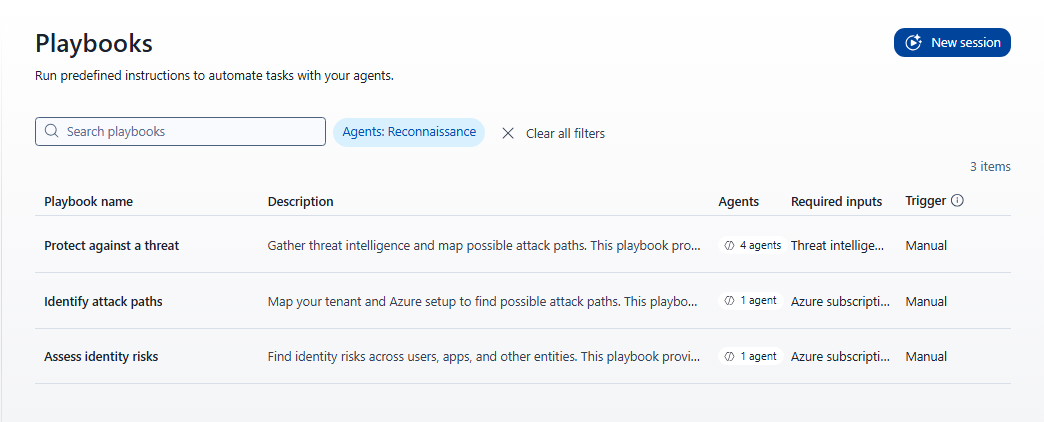
Recon Agent는 다음 플레이북에 참여합니다.
| 플레이북 | 필수 입력 |
|---|---|
| ID 위험 평가 | Azure 구독 및 관리 ID입니다. |
| 공격 경로 식별 | Azure 구독입니다. |
| 위협으로부터 보호 | 위협 인텔리전스 문서입니다. |
다음 단계를 사용하여 ID 위험 평가 세션을 시작합니다.
탐색 창에서 Perception>Sessions를 선택합니다.
새 세션을 선택합니다.
ID 위험 평가 플레이북을 선택합니다.
필요한 추가 입력 패널이 열립니다. 다음 두 개의 입력이 필요합니다.
Field 설명 Azure 구독 세션 범위를 지정하는 Azure 구독 ID 또는 이름입니다. 각 세션은 하나의 구독으로 제한됩니다. 관리자는 Recon Agent 설치 중에 이 목록을 미리 구성하며 미리 구성된 구독만 사용할 수 있습니다. 관리되는 아이덴티티 관리 ID를 선택합니다. 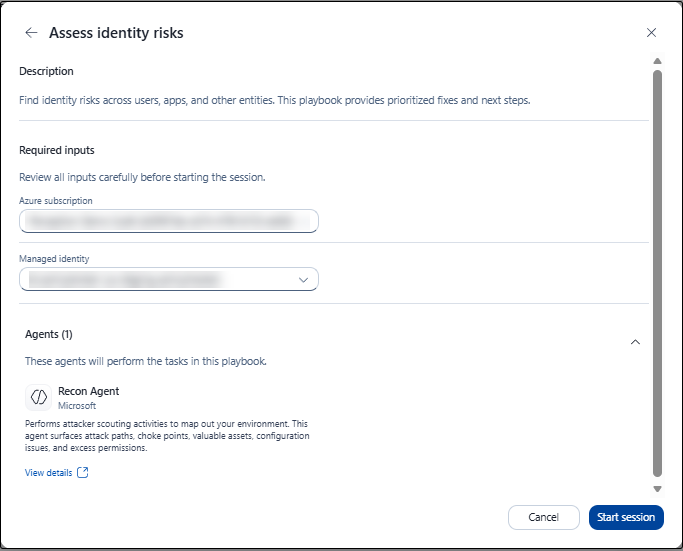
메모
공격 경로 식별 플레이북을 설정하면 세션 범위를 정의하기 위한 구독 선택기가 나타납니다. 선택기는 Recon Agent 애플리케이션이 아닌 로그인한 사용자가 사용할 수 있는 구독을 나열합니다. 플레이북을 시작하려면 로그인한 사용자가 전체 구독에 대한 읽기 권한이 필요합니다. 이 제한은 세션이 시작될 때만 적용됩니다. 세션이 시작된 후 정찰 에이전트는 정찰에 자체 ID를 사용합니다.
두 필드를 모두 입력하고 세션 시작을 선택합니다.
세션이 실행 중 상태로 열립니다. 에이전트는 작업 목록 초안을 작성하고 작업을 시작할 때 진행률을 표시합니다.
세션 진행률 모니터링
세션이 실행되는 동안 오른쪽 패널에 다음이 표시됩니다.
- 개요: 세션 요약 및 현재 상태를 표시합니다.
- 진행률: 완료된 단계를 추적합니다. 예를 들어 작업이 완료되면 값이 0/1 에서 1/1 로 변경됩니다.
- Recon Agent: 해당 세션의 활성 에이전트를 식별합니다.
- 입력: 제공한 대상 환경 및 사용 사례를 표시합니다.
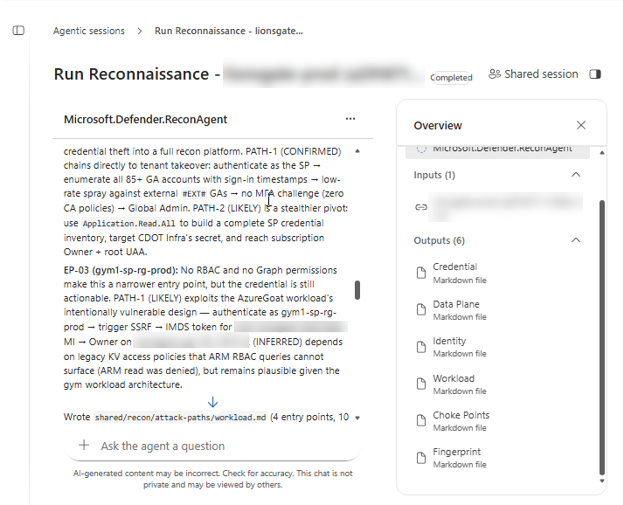
- 출력: 지금까지 생성된 파일을 나열하고 세션이 진행됨에 따라 업데이트합니다.
보고서 이해
보고서에는 다음 섹션이 포함되어 있습니다.
- 주요 결과: 악의적인 콘텐츠를 호스트하는 IP 주소 및 DNS 확인 기록과 같은 지원 증거가 포함된 가장 중요한 위험 및 지표를 요약합니다. 각 발견은 증거의 강도를 나타내기 위해 확인, 가능성이 또는 유추 레이블이 지정됩니다.
- 자산 인벤토리 테이블: 검색된 자산을 열 표시기, 유형, 위협 결과, 신뢰도 및 처음 본 것으로 나열합니다.
- 공격 경로 그래프: 공격자가 사용할 수 있는 실제 경로와 자산, ID 및 액세스 간의 관계를 보여 줍니다. 예를 들어 경로가 조직, 권한이 있는 사용자의 대리 토큰, 그리고 프로덕션 자산을 연결할 수 있습니다. 해당하는 경우 그래프는 가장 빠르고, 은밀하고, 가장 넓은 경로를 식별합니다.
- MITRE ATT&CK 매핑: 각 관련 결과를 MITRE ATT&CK 기술에 매핑합니다. 보고서는 현재 탐지에서 다루는 공격 노출 범위를 평가할 수 있도록 적용 가능하거나 해당되지 않거나부족한 데이터 로 기술을 분류합니다.
- 탐지 범위의 공백: 기존 Defender 탐지로는 포착되지 않는 공격 경로를 식별합니다. 해당되는 경우 보고서에는 관련 Defender 경고와 KQL(Kusto Query Language) 헌팅 쿼리가 포함됩니다.
Important
Recon Agent 출력은 AI에서 생성되며 읽기 전용 API 액세스를 통해 사용할 수 있는 데이터를 기반으로 합니다. 결과에서 정확도를 검토한 후 이를 사용하여 수정을 계획하거나 위험을 전달합니다. 보고서에는 "AI 생성 콘텐츠가 올바르지 않을 수 있습니다. 정확도를 확인하세요."
Recon Agent 출력 보기
세션은 Recon Agent 출력을 Markdown 파일로 표시합니다.