일관된 서식을 사용하면 특히 여러 사람이 동일한 코드베이스에 기여하는 경우 T-SQL(Transact-SQL)을 더 쉽게 읽고, 검토하고, 유지 관리할 수 있습니다. Visual Studio Code용 MSSQL 확장에는 내장된 SQL 포맷터(Preview)가 포함되어 있어 주문 시 실행할 수 있고, 저장 시 자동 서식 설정과 Visual Studio Code 설정을 통해 커스터마이즈할 수 있습니다.
MSSQL 확장 기능의 T-SQL 서식 기능은 ScriptDOM이라는 오픈 소스 .NET 라이브러리를 기반으로 구축되어 있으며, 이 라이브러리는 T-SQL을 구싱하고 추상 구문 트리를 기반으로 스크립트를 생성합니다.
필요 시 포맷
어떤 에디터 창에서도 T-SQL을 포맷할 수 있습니다. 포맷터는 문서 전체에 적용되거나 선택한 텍스트에만 적용됩니다.
주문 시 T-SQL을 포맷하려면 다음 방법 중 하나를 사용하세요:
컨텍스트 메뉴: T-SQL 편집기 창에서 오른쪽 클릭으로 문서 형식 또는 형식 선택을 선택하세요.
명령 팔레트: 문서 형식 실행 또는 형식 선택.
키보드 바로가기: 문서 형식은 Windows와 Linux에서 Shift+Alt+F를, macOS에서는 Shift+옵션+F를 누르세요. 포맷 선택은 Windows와 Linux에서는 Ctrl+K, Ctrl+F, macOS에서는 Cmd+K, Cmd+F를 누르세요.
저장할 때 서식 지정
Visual Studio Code에서는 표준 편집기 설정이 저장 시 포맷을 제어하며, 전용 MSSQL 포맷터 설정이 아닙니다.
파일을 저장할 때마다 자동으로 T-SQL을 포맷하려면 Visual Studio Code settings.json 파일에서 다음 설정을 사용하세요:
{
  "[sql]": {
    "editor.formatOnSave": true
  }
}
서식 옵션 구성
Visual Studio Code 설정 UI나 사용자 또는 작업 공간settings.json에서 서식을 설정하세요.
설정 편집기에서 Mssql>형식을 검색하면 사용 가능한 옵션을 볼 수 있습니다.
settings.json에서는 해당 mssql.format.* 설정을 사용하세요.
미리보기 포맷터는 기본적으로 활성화되어 있습니다. 그 옵션은 네임스페이스를
mssql.format.options.*사용합니다.미리보기 포맷터가 활성화된 상태에서도 다섯 가지 포맷터 설정은 여전히 이용 가능합니다. 미리보기 포맷터가
mssql.format.options.*설정을 추가합니다.
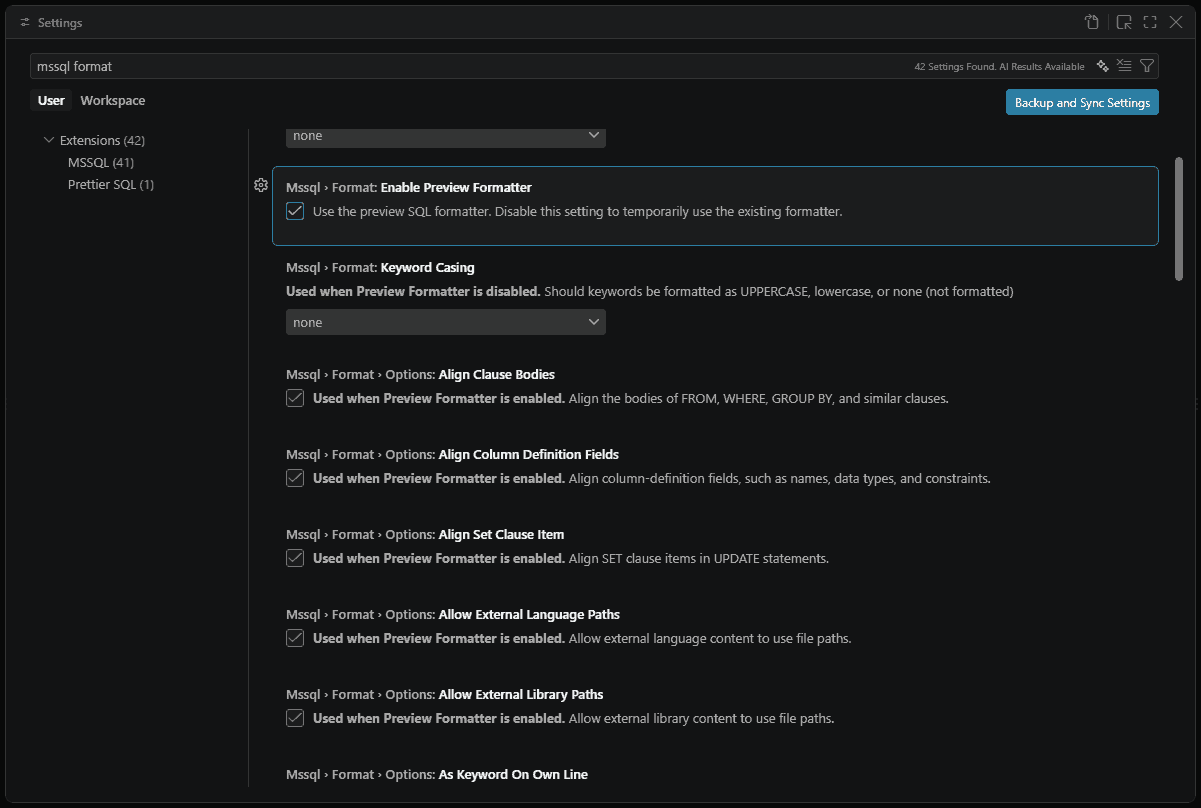
지원되는 설정
테이블에는 기존 포맷터 설정이 나열된 뒤에 미리보기 포맷터 설정이 있습니다.
기존 포맷터 설정
| Setting | Type | Default | Description |
|---|---|---|---|
mssql.format.alignColumnDefinitionsInColumns |
bool | false |
열 정의를 열에 맞춰 정렬하세요. |
mssql.format.datatypeCasing |
enum | none |
데이터 형식을 lowercase, none 또는 uppercase(형식화되지 않음)으로 지정하세요. |
mssql.format.keywordCasing |
enum | none |
키워드의 형식을 lowercase, none 또는 형식이 지정되지 않은 uppercase로 지정하세요. |
mssql.format.placeCommasBeforeNextStatement |
bool | false |
예를 들어 mycolumn1,와 같이 끝부분이 아니라, 예를 들어 , mycolumn2와 같이 목록의 각 항목 시작 부분에 쉼표를 넣으세요. |
mssql.format.placeSelectStatementReferencesOnNewLine |
bool | false |
문장에서 SELECT 참조를 별도의 줄에 배치하세요. 에 대해 SELECT C1, C2 FROM T1C1과 C2는 각각 별도의 선에 있습니다. |
미리보기 서식 지정 설정
이 설정들은 mssql.format.options.* 미리보기 포맷터를 활성화하면 기존 포맷터 설정에 추가됩니다.
일반
| Setting | Type | Default | Description |
|---|---|---|---|
mssql.format.enablePreviewFormatter |
bool | true |
SQL 포맷터(미리보기)를 사용하세요. |
mssql.format.showParseErrorNotification |
bool | true |
포맷터가 T-SQL을 완전히 파싱하지 못하면 알림을 보여줘. |
mssql.format.options.sqlVersion |
enum | sql170 |
T-SQL 버전은 구식 스크립트를 파싱하고 생성하는 데 사용되었습니다. |
mssql.format.options.sqlEngineType |
enum | all |
데이터베이스 엔진 타입은 형식화된 스크립트를 구싱하고 생성하는 데 사용됩니다. 유효한 값은 all, standalone 및 sqlAzure입니다. |
정렬
| Setting | Type | Default | Description |
|---|---|---|---|
mssql.format.options.alignClauseBodies |
bool | true |
FROM, WHERE, GROUP BY 및 유사한 절의 본문을 맞춥니다. |
mssql.format.options.alignColumnDefinitionFields |
bool | true |
이름, 형식 및 제약 조건과 같은 열 정의 필드를 정렬합니다. |
mssql.format.options.alignSetClauseItem |
bool | true |
SET 문에서 UPDATE 절 항목을 정렬합니다. |
Paths
| Setting | Type | Default | Description |
|---|---|---|---|
mssql.format.options.allowExternalLanguagePaths |
bool | true |
외부 언어 콘텐츠가 파일 경로를 사용할 수 있도록 허용하세요. |
mssql.format.options.allowExternalLibraryPaths |
bool | true |
외부 라이브러리 콘텐츠가 파일 경로를 사용할 수 있도록 허용하세요. |
서식
| Setting | Type | Default | Description |
|---|---|---|---|
mssql.format.options.asKeywordOnOwnLine |
bool | true |
AS를 별도 줄에 배치합니다. |
mssql.format.options.keywordCasing |
enum | uppercase |
키워드 대문자/소문자 스타일 유효한 값은 uppercase, lowercase 및 pascalCase입니다. |
mssql.format.options.preserveComments |
bool | true |
서식을 지정하는 동안 주석을 유지합니다. |
mssql.format.options.numNewlinesAfterStatement |
int | 1 |
각 문 뒤의 줄 바꿈 수, 0부터 5까지. |
들여쓰기
| Setting | Type | Default | Description |
|---|---|---|---|
mssql.format.options.indentSetClause |
bool | false |
SET 문에서 UPDATE 절을 들여씁니다. |
mssql.format.options.indentViewBody |
bool | false |
VIEW 본문을 들여씁니다. |
여러 줄
| Setting | Type | Default | Description |
|---|---|---|---|
mssql.format.options.multilineInsertSourcesList |
bool | true |
INSERT 소스를 여러 줄 형식으로 지정합니다. |
mssql.format.options.multilineInsertTargetsList |
bool | true |
INSERT 열을 여러 줄로 표시합니다. |
mssql.format.options.multilineSelectElementsList |
bool | true |
SELECT 열을 여러 줄로 표시합니다. |
mssql.format.options.multilineSetClauseItems |
bool | true |
SET 항목을 여러 줄로 지정합니다. |
mssql.format.options.multilineViewColumnsList |
bool | true |
VIEW 열을 여러 줄로 표시합니다. |
mssql.format.options.multilineWherePredicatesList |
bool | true |
WHERE 은 여러 줄로 조건합니다. |
새 줄
| Setting | Type | Default | Description |
|---|---|---|---|
mssql.format.options.newLineBeforeCloseParenthesisInMultilineList |
bool | true |
다중 줄 목록에서 닫은 괄호 앞에 새 줄을 넣으세요. |
mssql.format.options.newLineBeforeFromClause |
bool | true |
FROM 절 앞에 새 줄 |
mssql.format.options.newLineBeforeGroupByClause |
bool | true |
GROUP BY 절 앞에 새 줄. |
mssql.format.options.newLineBeforeHavingClause |
bool | true |
HAVING 절 앞에 새 줄 |
mssql.format.options.newLineBeforeJoinClause |
bool | true |
JOIN 절 앞에 줄바꿈. |
mssql.format.options.newLineBeforeOffsetClause |
bool | true |
OFFSET 절 앞에 새 줄 |
mssql.format.options.newLineBeforeOpenParenthesisInMultilineList |
bool | false |
다줄 목록에서 열린 괄호 앞에 새 줄이 있습니다. |
mssql.format.options.newLineBeforeOrderByClause |
bool | true |
ORDER BY 절 앞에 새 줄. |
mssql.format.options.newLineBeforeOutputClause |
bool | true |
OUTPUT 절 앞에 새 줄. |
mssql.format.options.newLineBeforeWhereClause |
bool | true |
WHERE 절 앞에 새 줄 |
mssql.format.options.newLineBeforeWindowClause |
bool | true |
WINDOW 절 앞에 새 줄. |
mssql.format.options.newlineFormattedCheckConstraint |
bool | false |
뉴라인 형식의 CHECK 제약 조건. |
mssql.format.options.newLineFormattedIndexDefinition |
bool | false |
뉴라인 형식 인덱스 정의. |
Spacing
| Setting | Type | Default | Description |
|---|---|---|---|
mssql.format.options.spaceBetweenDataTypeAndParameters |
bool | true |
예를 들어 VARCHAR (255), 데이터 형식과 괄호 사이의 공백. |
mssql.format.options.spaceBetweenParametersInDataType |
bool | true |
데이터 타입 내 매개변수 간 공간. |
예시 설정 파일
{
  "mssql.format.options.keywordCasing": "lowercase",
  "mssql.format.options.alignClauseBodies": false,
  "mssql.format.options.numNewlinesAfterStatement": 2,
  "[sql]": {
    "editor.formatOnSave": true
  }
}
기본 포맷터 설정하세요
MSSQL 확장을 기본값으로 설정하려면 '기본 포매터 구성 설정'을 선택하세요...>SQL Server (mssql)를 추가하거나 다음 구성을 추가할 settings.json수 있습니다:
{
  "[sql]": {
    "editor.defaultFormatter": "ms-mssql.mssql"
  }
}