이 문서에서는 단일 인스턴스의 Windows 애플리케이션에서 빠른 시작을 가속화하는 방법을 설명합니다. 실행 중인 프로세스 인스턴스를 등록하여 시작이 발생할 때 직접 알림을 받고 전체 시작 흐름과 관련된 오버헤드를 방지하는 방법을 알아봅니다. 이 방법은 이미 실행 중인 인스턴스와 통합되는 중간 프로세스를 제거하여 전체 대기 시간을 줄입니다.
현재 일반적인 흐름:

가속 출시:
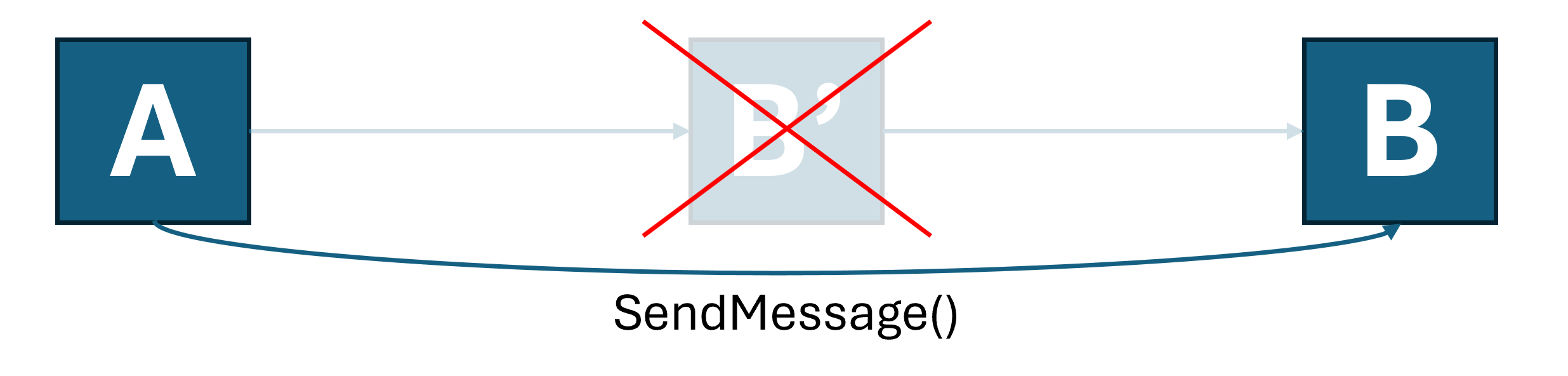
이 가속화된 시작 기능은 모든 버전의 Windows에서 모든 원본 애플리케이션에서 모든 종류의 시작을 다루지는 않습니다. 따라서 애플리케이션은 단일 인스턴싱의 자체 구현을 유지 관리해야 합니다(한 가지 방법은 앱 수명 주기 API를 사용한 앱 인스턴싱 참조).
이 문서의 나머지 단계에서는 가속 웜 시작 메뉴 및 프로토콜 시작을 지원하는 간단한 C++ WinUI 3 앱을 만드는 방법에 대해 설명합니다.
중요합니다
가속 실행 API는 제한된 Access 기능의 일부입니다(LimitedAccessFeatures 클래스 참조). 자세한 내용을 보거나 잠금 해제 토큰을 요청하려면 LAF Access 토큰 요청 양식 사용합니다.
새 project 만들기
Visual Studio 새 project 만듭니다. 이 예제의 경우 새 project 대화 상자에서 언어 필터를 C++로 설정하고 project 형식을 WinUI로 설정한 다음, WinUI Blank App(패키지)을 선택합니다. 이 템플릿이 표시되지 않으면 Visual Studio Installer에 WinUI 애플리케이션 개발 워크로드가 설치되어 있는지 확인합니다.
단일 인스턴싱 구현
선택한 기술을 사용하여 앱 내에서 단일 인스턴싱을 구현할 수 있습니다. 이 예제에서는 Windows 앱 SDK 앱 수명 주기 API 사용합니다.
void App::OnLaunched([[maybe_unused]] LaunchActivatedEventArgs const& e)
{
    AppInstance mainInstance = AppInstance::FindOrRegisterForKey(L"SingleInstance");
    if (mainInstance.IsCurrent())
    {
        // We're the main instance. Register to receive redirected launches.
        EventHandler<AppActivationArguments> handler(this, &App::OnRedirectedActivation);
        g_activatedRevoker = mainInstance.Activated(winrt::auto_revoke, handler);
        // Proceed with creating the main window.
        window = make<MainWindow>();
        window.Activate();

        window.SetMessage(L"Launched normally");
    }
    else
    {
        // We are a secondary instance. Redirect to the main instance and terminate when we're done.
        wil::unique_event redirectionComplete;
        redirectionComplete.create();

        auto redirectionOperation = mainInstance.RedirectActivationToAsync(mainInstance.GetActivatedEventArgs());
        redirectionOperation.Completed([&redirectionComplete](auto&&, auto&&)
        {
            redirectionComplete.SetEvent();
        });

        DWORD indexIgnored{};
        CoWaitForMultipleObjects(CWMO_DEFAULT, INFINITE, 1, redirectionComplete.addressof(), &indexIgnored);
        App::Exit();
    }
}

winrt::fire_and_forget App::OnRedirectedActivation(const IInspectable&, const AppActivationArguments& args)
{
    co_await wil::resume_foreground(window.DispatcherQueue());
    ::SwitchToThisWindow(GetWindowFromWindowId(window.AppWindow().Id()), TRUE);

    window.SetMessage(L"Launched via redirection");
}
앱에 대한 프로토콜 연결 추가
가속 프로토콜을 시작하려면 앱이 프로토콜 등록의 기본 대상이어야 합니다. 이 샘플에서는 패키지된 등록을 사용합니다. URI 구성표의 기본 처리기로 등록하는 방법에 대한 자세한 내용은 핸들 URI 활성화를 참조하세요.
Package.appxmanifest에서 프로토콜 연계를 위한 항목을 추가합니다.
<Applications>
  <Application Id="App" … />
    …
    <Extensions>
      <uap:Extension Category="windows.protocol">
        <uap:Protocol Name="acceleratedlaunchsample"/>
      </uap:Extension>
    </Extensions>
  </Application>
</Applications>
이제 시작 메뉴의 타일을 통해 또는 실행 대화 상자에 입력하여 acceleratedlaunchsample: 앱을 시작할 수 있습니다. 두 경우 모두 중간 프로세스가 시작되고 이미 실행 중인 인스턴스로 리디렉션됩니다.
가속화된 출시에 등록하세요
이제 앱이 최적화를 옵트인할 준비가 되었습니다.
가속 시작 메시지는 프로세스 내에서 HWND에 창 메시지로 전달됩니다. 당신은 시스템에 어떤 창이 메시지를 받아야 하고 어떤 메시지를 사용하고 싶은지를 인터페이스 IExperimentalAPIInvoker를 통해 CLSID_ExperimentalAPIInvoker에 설명합니다.
IExperimentalAPIInvoker 다음과 CLSID_ExperimentalAPIInvoker 같이 정의됩니다.
[uuid("6fb3e48c-ba77-4f80-b9c9-77635a08a7f8")]
interface DECLSPEC_NOVTABLE IExperimentalAPIInvoker : public IUnknown
{
    IFACEMETHOD(IsSupported)(PCWSTR methodName, BOOL* isSupported) = 0;
    IFACEMETHOD(Invoke)(PCWSTR methodName, INamedPropertyStore* args, BOOL* isSupported) = 0;
};

DEFINE_GUID(CLSID_ExperimentalAPIInvoker, 0x81AF2611, 0xE262, 0x4090, 0xA1, 0x5B, 0xC0, 0x88, 0x95, 0xB1, 0xA0, 0xF0);
IExperimentalAPIInvoker 를 사용하면 명명된 속성 저장소에 패키지된 인수를 사용하여 이름으로 메서드를 호출할 수 있습니다. 가속 시작 방법은 다음과 같습니다.
메서드: "RegisterAcceleratedUriLaunch"
대상 HWND로 WM_COPYDATA를 통해 전달되는 Null로 종료된 UTF-16 문자열(PCWSTR)로 프로토콜 시작을 등록할 수 있습니다. 이 메시지의 WPARAM은 호출자의 프로세스 ID(사용 가능한 경우)입니다.
개체 인스턴스당 IExperimentalAPIInvoker 한 번만 이 메서드를 호출할 수 있습니다. 등록한 후에는 등록을 취소할 때까지 개체를 해제하지 마세요.
| 매개 변수 이름 | 유형 | Description |
|---|---|---|
"targetWindow" |
VT_I8 |
등록된 URI 스키마에 대해 앱을 시작할 때 WM_COPYDATA 창 메시지를 받는 서명된 LONGLONG으로 캐스팅된 HWND입니다. |
"copyDataFormatId" |
VT_UI4 |
URI 문자열을 전달할 때 COPYDATASTRUCT.dwData로 전달되는 값입니다. |
"schemes" |
VT_LPWSTR \| VT_VECTOR |
등록할 URI 스키마 목록입니다. 호출 프로세스가 기본 처리기인 프로세스만 가속화됩니다. |
메서드: "UnregisterAcceleratedUriLaunch"
URI 실행에서 등록을 취소합니다. 인수가 없습니다. 이전에 등록한 개체와 동일한 개체에서 호출해야 합니다.
메서드: "RegisterAcceleratedTileLaunch"
선택한 창 메시지로 전달되는 타일 실행에 등록합니다. 이 메시지의 WPARAM은 호출자의 프로세스 ID(사용 가능한 경우)입니다.
각 IExperimentalAPIInvoker 개체 인스턴스에 대해 이 메서드를 한 번만 호출할 수 있습니다. 등록한 후에는 등록을 취소할 때까지 개체를 해제하지 마세요.
| 매개 변수 이름 | 유형 | Description |
|---|---|---|
"targetWindow" |
VT_I8 |
시작 메뉴 또는 작업 표시줄의 기본 타일에서 앱이 시작될 때 창 메시지를 받는 HWND를 부호 있는 LONGLONG으로 캐스팅한 값입니다. |
"messageId" |
VT_UI4 |
지정된 대상 창으로 이동되는 창 메시지 ID입니다. |
메서드: "UnregisterAcceleratedTileLaunch"
타일 실행에서 등록을 해제합니다. 이 메서드는 인수를 사용하지 않습니다. 이전에 등록한 것과 동일한 개체에서 호출해야 합니다.
함께 조립하기
이전 단계를 간소화하기 위해, 특히 기존 창 프로시저에 쉽게 접근할 수 없는 앱의 경우, 이 샘플은 작업자 창을 관리하고 빠른 실행을 위해 등록하는 독립형 도우미를 제공합니다. 활성 메시지 펌프(예: WinUI 앱의 UI 스레드)를 사용하여 스레드에서 이 개체를 만들어야 합니다.
먼저 다음 코드를 project 헤더 파일에 복사합니다.
#pragma once
#include <propsys.h>
#include <propvarutil.h>
#include <initguid.h>
#include <vector>
#include <functional>
#include <wil/result.h>
#include <wil/resource.h>

[uuid("6fb3e48c-ba77-4f80-b9c9-77635a08a7f8")]
interface DECLSPEC_NOVTABLE IExperimentalAPIInvoker : public IUnknown
{
    IFACEMETHOD(IsSupported)(PCWSTR methodName, BOOL* isSupported) = 0;
    IFACEMETHOD(Invoke)(PCWSTR methodName, INamedPropertyStore* args, BOOL* isSupported) = 0;
};

DEFINE_GUID(CLSID_ExperimentalAPIInvoker, 0x81AF2611, 0xE262, 0x4090, 0xA1, 0x5B, 0xC0, 0x88, 0x95, 0xB1, 0xA0, 0xF0);

class AcceleratedLaunchHelper
{
public:
    ~AcceleratedLaunchHelper()
    {
        if (m_hwnd != nullptr)
        {
            FAIL_FAST_IF(::GetWindowThreadProcessId(m_hwnd, nullptr) != ::GetCurrentThreadId());

            if (m_tileLaunchCallback)
            {
                BOOL isSupported;
                m_invoker->Invoke(L"UnregisterAcceleratedTileLaunch", nullptr, &isSupported);
            }

            if (m_uriLaunchCallback)
            {
                BOOL isSupported;
                m_invoker->Invoke(L"UnregisterAcceleratedUriLaunch", nullptr, &isSupported);
            }

            ::DestroyWindow(m_hwnd);
        }
    }

    inline bool TryRegisterForUris(
        const std::vector<PCWSTR>& uris, std::function<void(PCWSTR)> callback)
    {
        EnsureWorkerWindow();

        if (!m_invoker)
        {
            return false;
        }

        winrt::com_ptr<INamedPropertyStore> args;
        THROW_IF_FAILED(PSCreateMemoryPropertyStore(IID_PPV_ARGS(&args)));

        wil::unique_prop_variant targetWindowParam;
        THROW_IF_FAILED(InitPropVariantFromInt64(reinterpret_cast<LONGLONG>(m_hwnd), targetWindowParam.reset_and_addressof()));
        args->SetNamedValue(L"targetWindow", targetWindowParam);

        wil::unique_prop_variant copyDataFormatIdParam;
        THROW_IF_FAILED(InitPropVariantFromUInt32(0,
            copyDataFormatIdParam.reset_and_addressof()));
        args->SetNamedValue(L"copyDataFormatId", copyDataFormatIdParam);

        wil::unique_prop_variant schemesParam;
        THROW_IF_FAILED(InitPropVariantFromStringVector(
            const_cast<PCWSTR*>(uris.data()), uris.size(), schemesParam.reset_and_addressof()));
        THROW_IF_FAILED(args->SetNamedValue(L"schemes", schemesParam));

        BOOL isSupported{ FALSE };
        THROW_IF_FAILED(m_invoker->Invoke(L"RegisterAcceleratedUriLaunch", args.get(),
            &isSupported));

        if (isSupported)
        {
            m_uriLaunchCallback = callback;
            m_uriSchemes = uris;
        }

        return isSupported;
    }

    inline bool TryRegisterForTileLaunch(std::function<void()> callback)
    {
        EnsureWorkerWindow();

        if (!m_invoker)
        {
            return false;
        }

        winrt::com_ptr<INamedPropertyStore> args;
        THROW_IF_FAILED(PSCreateMemoryPropertyStore(IID_PPV_ARGS(&args)));

        wil::unique_prop_variant targetWindowParam;
        THROW_IF_FAILED(InitPropVariantFromInt64(reinterpret_cast<LONGLONG>(m_hwnd), targetWindowParam.reset_and_addressof()));
        args->SetNamedValue(L"targetWindow", targetWindowParam);

        wil::unique_prop_variant tileLaunchMessageIdParam;
        THROW_IF_FAILED(InitPropVariantFromUInt32(WM_USER,
            tileLaunchMessageIdParam.reset_and_addressof()));
        THROW_IF_FAILED(args->SetNamedValue(L"messageId", tileLaunchMessageIdParam));

        BOOL isSupported{ FALSE };
        THROW_IF_FAILED(m_invoker->Invoke(L"RegisterAcceleratedTileLaunch", args.get(),
            &isSupported));

        if (isSupported)
        {
            m_tileLaunchCallback = callback;
        }

        return isSupported;
    }

private:
    static inline LRESULT s_WorkerWndProc(HWND hwnd, UINT msg, WPARAM wParam, LPARAM lParam)
    {
        switch (msg)
        {
        case WM_NCCREATE:
        {
            auto pThis = reinterpret_cast<AcceleratedLaunchHelper*>(
                (reinterpret_cast<CREATESTRUCT*>(lParam))->lpCreateParams);
            if (pThis)
            {
                ::SetWindowLongPtr(hwnd, 0, reinterpret_cast<LONG_PTR>(pThis));
            }
            break;
        }
        }

        auto pThis = reinterpret_cast<AcceleratedLaunchHelper*>(GetWindowLongPtr(hwnd, 0));
        if (pThis)
        {
            return pThis->WorkerWndProc(hwnd, msg, wParam, lParam);
        }

        return 0;
    }

    inline LRESULT WorkerWndProc(HWND hwnd, UINT msg, WPARAM wParam, LPARAM lParam)
    {
        switch (msg)
        {
        case WM_COPYDATA:
        {
            const auto copyData = reinterpret_cast<COPYDATASTRUCT*>(lParam);
            if (copyData->dwData == 0)
            {
                const auto uri = reinterpret_cast<PCWSTR>(copyData->lpData);
                if (m_uriLaunchCallback)
                {
                    m_uriLaunchCallback(uri);
                }
            }
        }
        break;

        case WM_USER:
            if (m_tileLaunchCallback)
            {
                m_tileLaunchCallback();
            }
            break;
        }
        return DefWindowProc(hwnd, msg, wParam, lParam);
    }

    inline void EnsureWorkerWindow()
    {
        if (m_hwnd != nullptr)
        {
            return;
        }

        // Best-effort: Try to acquire the IExperimentalAPIInvoker.
        // If we can't, the OS does not currently support the feature.
        if (FAILED(CoCreateInstance(CLSID_ExperimentalAPIInvoker, nullptr, CLSCTX_INPROC_SERVER,
            IID_PPV_ARGS(&m_invoker)))
        {
            return;
        }

        WNDCLASSEX wcex{ sizeof(wcex) };
        wcex.lpszClassName = L"AcceleratedLaunchWorkerClass";
        wcex.cbWndExtra = sizeof(this);
        wcex.lpfnWndProc = s_WorkerWndProc;
        wcex.hInstance = GetModuleHandle(nullptr);
        ::RegisterClassEx(&wcex);

        m_hwnd = ::CreateWindowEx(0, wcex.lpszClassName, nullptr, 0, 0, 0, 0, 0,
            HWND_MESSAGE, 0, wcex.hInstance, this);

        FAIL_FAST_LAST_ERROR_IF_NULL(m_hwnd);
    }

    // Worker window for receiving notifications
    HWND m_hwnd{ nullptr };

    // Entry point for registration & unregistration
    winrt::com_ptr<IExperimentalAPIInvoker> m_invoker;

    // Callbacks
    std::function<void()> m_tileLaunchCallback;
    std::function<void(PCWSTR)> m_uriLaunchCallback;

    // Registered URI schemes
    std::vector<PCWSTR> m_uriSchemes;
};
이제 이 코드를 앱에 통합할 수 있습니다.
void App::OnLaunched([[maybe_unused]] LaunchActivatedEventArgs const& e)
{
    …
    if (mainInstance.IsCurrent())
    {
        …

        m_acceleratedLaunchHelper = std::make_unique<AcceleratedLaunchHelper>();
        m_acceleratedLaunchHelper->TryRegisterForTileLaunch(
            [this]() { OnAcceleratedTileLaunch(); });

        std::vector<PCWSTR> schemes = { L"acceleratedlaunchsample" };
        m_acceleratedLaunchHelper->TryRegisterForUris(schemes,
            [this](PCWSTR uri) { OnAcceleratedUriLaunch(uri); });
    }
    …
}

void App::OnAcceleratedTileLaunch()
{
    ::SwitchToThisWindow(GetWindowFromWindowId(window.AppWindow().Id()), TRUE);

    window.SetMessage(L"Launched via accelerated tile launch.");
}

void App::OnAcceleratedUriLaunch(PCWSTR uri)
{
    ::SwitchToThisWindow(GetWindowFromWindowId(window.AppWindow().Id()), TRUE);

    std::wstring message = L"Launched via accelerated URI launch: ";
    message += uri;
    window.SetMessage(message);
}
이 코드를 사용하면 앱이 이 기능을 지원하는 OS 버전에서 가속화된 출시의 이점을 누릴 수 있습니다.
관련 콘텐츠
GitHub에서 Microsoft와 공동 작업
이 콘텐츠의 원본은 GitHub에서 찾을 수 있으며, 여기서 문제와 끌어오기 요청을 만들고 검토할 수도 있습니다. 자세한 내용은 참여자 가이드를 참조하세요.

Windows developer