앱 알림은 앱 창 외부에 표시되는 UI 팝업으로, 사용자에게 적시에 정보 또는 작업을 제공합니다. 알림은 순전히 정보 제공이거나, 클릭할 때 앱을 시작하거나, 앱을 포그라운드로 가져오지 않고 백그라운드 작업을 트리거할 수 있습니다.
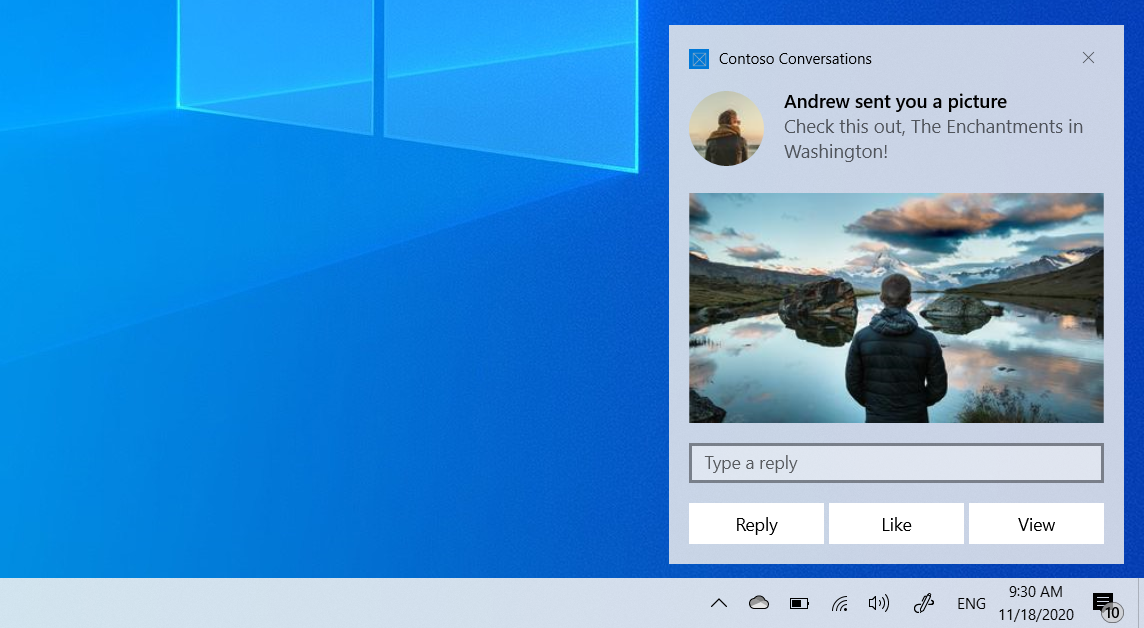
이 문서에서는 UWP 앱에서 앱 알림을 만들고 보낸 다음 사용자가 상호 작용할 때 활성화를 처리하는 단계를 안내합니다.
다른 프레임워크에 대한 앱 알림 및 지침에 대한 개요는 앱 알림 개요를 참조하세요.
이 문서에서는 로컬 알림을 다룹니다. 클라우드 서비스에서 알림을 전달하는 방법에 대한 자세한 내용은 푸시 알림 개요를 참조하세요.
사전 요구 사항
- Visual Studio UWP 앱 프로젝트
- Visual Studio 설치된 유니버설 Windows 플랫폼 개발 워크로드
앱 알림 보내기
UWP 앱은 Windows.UI.Notifications 네임스페이스를 사용하여 XML을 사용하여 알림을 생성하고 보냅니다. 이 섹션에서는 C# 및 C++를 사용하여 알림을 보내는 방법을 보여 줍니다.
using Windows.Data.Xml.Dom;
using Windows.UI.Notifications;
var xml = @"<toast launch=""action=viewConversation&conversationId=9813"">
<visual>
<binding template=""ToastGeneric"">
<text>Andrew sent you a picture</text>
<text>Check this out, The Enchantments in Washington!</text>
</binding>
</visual>
</toast>";
var doc = new XmlDocument();
doc.LoadXml(xml);
var notification = new ToastNotification(doc);
ToastNotificationManager.CreateToastNotifier().Show(notification);
활성화 처리
사용자가 알림(또는 포그라운드 활성화가 있는 알림의 단추)을 클릭하면 앱의 OnActivated 메서드가 호출됩니다.
OnLaunched은 앱이 닫혔거나 처음 시작되는 경우에도 알림 활성화를 위해 호출되지 않습니다. 공유 초기화 메서드를 결합하고 OnLaunchedOnActivated 사용하는 것이 좋습니다.
App.xaml.cs
protected override void OnLaunched(LaunchActivatedEventArgs e)
{
    OnLaunchedOrActivated(e.PreviousExecutionState);

    var rootFrame = Window.Current.Content as Frame;
    if (e.PrelaunchActivated == false)
    {
        if (rootFrame?.Content == null)
        {
            rootFrame?.Navigate(typeof(MainPage), e.Arguments);
        }
        Window.Current.Activate();
    }
}

protected override void OnActivated(IActivatedEventArgs e)
{
    OnLaunchedOrActivated(e.PreviousExecutionState);

    if (e is ToastNotificationActivatedEventArgs toastArgs)
    {
        var rootFrame = Window.Current.Content as Frame;
        if (rootFrame?.Content == null)
        {
            rootFrame?.Navigate(typeof(MainPage));
        }
        Window.Current.Activate();

        // Parse the notification arguments
        string argument = toastArgs.Argument;
        // TODO: Navigate to the relevant content based on the arguments
    }
}

private void OnLaunchedOrActivated(ApplicationExecutionState previousState)
{
    if (Window.Current.Content is not Frame)
    {
        var rootFrame = new Frame();
        rootFrame.NavigationFailed += OnNavigationFailed;
        Window.Current.Content = rootFrame;
    }
}
알림에 단추, 이미지, 입력, 오디오 및 기타 다양한 콘텐츠를 추가하는 방법에 대한 자세한 내용은 앱 알림 콘텐츠를 참조하세요.