Notiz
Zougrëff op dës Säit erfuerdert Autorisatioun. Dir kënnt probéieren, Iech unzemellen oder Verzeechnesser ze änneren.
Zougrëff op dës Säit erfuerdert Autorisatioun. Dir kënnt probéieren, Verzeechnesser ze änneren.
Important
This feature is in Public Preview.
This article explains how to use serverless usage policies to add cost attribution tags on serverless compute workloads.
Serverless usage policies consist of tags that are applied to any serverless compute activity incurred by a user assigned to the policy. The tags are logged in your billing records, allowing you to attribute serverless usage to specific budgets. For more on creating budgets, see Create and monitor budgets.
Serverless usage policy permissions
You must be a workspace admin to create serverless usage policies. Non-admins can manage policies if they are assigned Serverless usage policy: Manager permissions.
Workspace admins can manage and view serverless usage policies they created or the ones they have explicit permissions on. To view and manage all policies for a given account, the workspace admin must additionally have the Billing admin account-level role. This role is assigned in the account console.
By default, new policies can only be accessed by the policy creator and users with the billing admin role.
Because serverless usage policies are account-level resource objects, managers can manage policies from any workspace they have access to.
Create a serverless usage policy
Serverless usage policies are managed in your workspace admin settings. To create a new serverless usage policy:
- Click your username in the top bar of the Azure Databricks workspace and select Settings.
- Click Compute.
- Next to Serverless usage policies, click Manage.
- Click Create.
- Add a name and your tags then click Create.
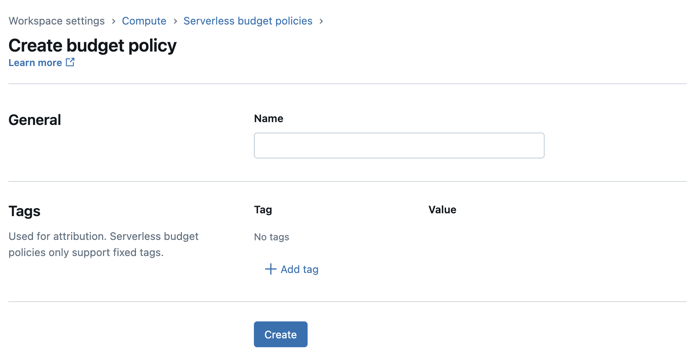
Manage serverless usage policy permissions
There are two types of permissions you can grant on your serverless usage policies:
- User: A serverless usage policy user can select the policy when they create a notebook, job, pipeline, or serving endpoint.
- Manager: Managers can use the serverless usage policy, but can also edit the policy's definitions and permissions. Any user in your workspace can be given the manager permissions.
If a user is only assigned a single policy, then that policy is automatically applied to the user's newly created resources. If a user is assigned multiple policies, they must select the appropriate policy when they create a new serverless notebook, job, pipeline, or serving endpoint. If a user doesn't select a policy, the setting defaults to whichever policy comes first alphabetically.
Assign permissions on a policy
To assign permissions on a serverless usage policy:
- On the policy's page, click the Permissions tab.
- Click Grant access.
- Select the user, group, or service principal you want to assign the policy to.
- Under Role, select the role(s) you want to give the user.
- To continue adding identities to the policy, click Add another.
- Click Save.
Update a serverless usage policy
To update an existing serverless usage policy's name or tags:
- Click your username in the top bar of the Azure Databricks workspace and select Settings.
- Click Compute.
- Next to Serverless usage policies, click Manage.
- Select the serverless usage policy you want to update, then click Edit.
- Make the updates then click Save.
Policy changes are only applied to usage initiated after the policy update. They are not applied to currently running serverless usage.
Analyze serverless usage policy tags in the billing records
After a policy is applied to a notebook, job, or Lakeflow Spark Declarative Pipelines, any tags contained in the policy propagate to your system.billing.usage system table in the custom_tags column.
Note
Serverless usage policy tags also propagate to the billing records emitted to Azure cost analysis.
If a notebook is run as part of a job, only the job's serverless usage policy is applied to the usage record.
Where to select the serverless usage policy
Users assigned to multiple serverless usage policies must select the appropriate policy whenever they create a new notebook, job, pipeline or model serving endpoint.
- Notebook: Users can select the serverless usage policy in the compute drop-down menu > More… or the Environment side panel. See Select a serverless usage policy.
- Job: Users select the serverless usage policy in the Job details section. See Select a serverless usage policy for your serverless usage.
- Pipeline: Users select the serverless usage policy when they create or edit the pipeline. See Configure a serverless pipeline.
- Serving endpoints: Users select the serverless usage policy when they create or edit the model serving endpoint. See Add a serverless usage policy for a model serving endpoint.
- Lakebase Provisioned: Users select the serverless usage policy when they create or edit a database instance. See Update a serverless usage policy of a database instance.
- Lakebase Autoscaling: Users select the serverless usage policy when they create or edit a project. See General settings.
Known limitations
Serverless usage policies have the following limitations:
- Existing notebooks, jobs, and Lakeflow Spark Declarative Pipelines are not automatically assigned policies after their owners are granted access to a policy. To add a serverless usage policy to an existing asset, you must manually update the asset's serverless usage policy setting in the UI.
- When creating a scheduled notebook job from the notebook page, the notebook's serverless usage policy defaults back to the first available policy by alphabetical order.
- Policy IDs stored with an asset remain even if the policy is deleted. These policies do not apply any tags.
- Updates to serverless usage policy tags are reflected on any serverless usage initiated after the change to the policy. For example, if a job is running while a serverless usage policy is updated, the update does not take effect for the existing job run. The next job run uses the updated tags.
- Git repo integration does not have repo-configurable serverless usage policies, the serverless usage policy defaults to the user's last chosen policy.
- Serverless usage policies do not apply tags to classic compute resources.
- Tags inherited from serverless usage policies do not appear on the Jobs list UI.
- Updates to tags won't be reflected in new pipeline updates if the pipeline is in Development mode. The changes take 24 hours to propagate.
- Pipelines triggered by jobs do not inherit the job's serverless usage policy. Users must set the pipeline's policy.