Notiz
Zougrëff op dës Säit erfuerdert Autorisatioun. Dir kënnt probéieren, Iech unzemellen oder Verzeechnesser ze änneren.
Zougrëff op dës Säit erfuerdert Autorisatioun. Dir kënnt probéieren, Verzeechnesser ze änneren.
Applies to:  SQL Server
Azure SQL Database
Azure SQL Managed Instance
Azure Synapse Analytics
Analytics Platform System (PDW)
SQL database in Microsoft Fabric
SQL Server
Azure SQL Database
Azure SQL Managed Instance
Azure Synapse Analytics
Analytics Platform System (PDW)
SQL database in Microsoft Fabric
This guide describes the structure of pages and extents, and the organization of pages and extents within data files.
A page is a fundamental unit of data storage in the Database Engine. The disk space allocated to a data file (.mdf or .ndf) in a database is logically divided into pages numbered contiguously from 0 to n. Disk I/O operations against data files are performed at the page level. That is, the Database Engine reads or writes whole data pages.
An extent is a collection of eight physically contiguous pages, used to manage pages efficiently. Every page belongs to an extent.
Transaction log files (.ldf) don't contain pages. They contain a series of log records which don't have a fixed size.
Pages
In a regular book, all content is written on pages. Similar to a book, the Database Engine writes all data rows on pages. The size of every page is the same: 8 KiB. In a book, most pages contain the data, or the main content of the book. Some pages contain metadata describing the content, for example, the table of contents and the index.
Similarly, most pages in the database contain actual rows of data. These are called data pages. Text/LOB pages also contain data, but are used only by large object (LOB) data types. Index pages contain index structures that help find data efficiently. Finally, a variety of system pages store the metadata describing the organization and properties of the data.
The following table describes page types.
| Page type | Type of stored data |
|---|---|
| Data | Data rows with all data. Data in columns using the LOB data types can also be partially stored on data pages. |
| Text/LOB | Data in columns using the LOB data types, such as text, ntext, image, varchar(max), nvarchar(max), varbinary(max), xml, and json. Data in variable length columns when the data row exceeds 8 KiB, for columns using data types such as varchar, nvarchar, varbinary, and sql_variant. |
| Index | Btree index structures. |
| Global Allocation Map (GAM) Shared Global Allocation Map (SGAM) |
Information about allocated and unallocated extents. |
| Page Free Space (PFS) | Information about page allocation and free space available on pages. |
| Index Allocation Map (IAM) | Information about the extents used by a heap or index in an allocation unit. |
| Bulk Changed Map (BCM) | Information about the extents modified by bulk operations since the last transaction log backup. |
| Differential Changed Map (DCM) | Information about the extents that have changed since the last full database backup. |
Each page begins with a 96-byte header that is used to store system information about the page. This information includes the page number, the page type, and can include other metadata such as the object ID and the index ID of the object and index that own the page.
A structure called the slot array is stored at the end of the page. Each 2-byte element in the slot array corresponds to a row stored on the page. A slot array element stores the byte offset of the row relative to the start of the page. The Database Engine uses these offsets to locate rows on a page.
When the Database Engine adds a row to an empty page, it stores the row immediately after the header. The slot array element for the first row is stored at the very end of the page. As more rows are added, they are stored one after another from the beginning to the end of the page, while the slot array grows from the end to the beginning of the page, as shown on the following diagram.
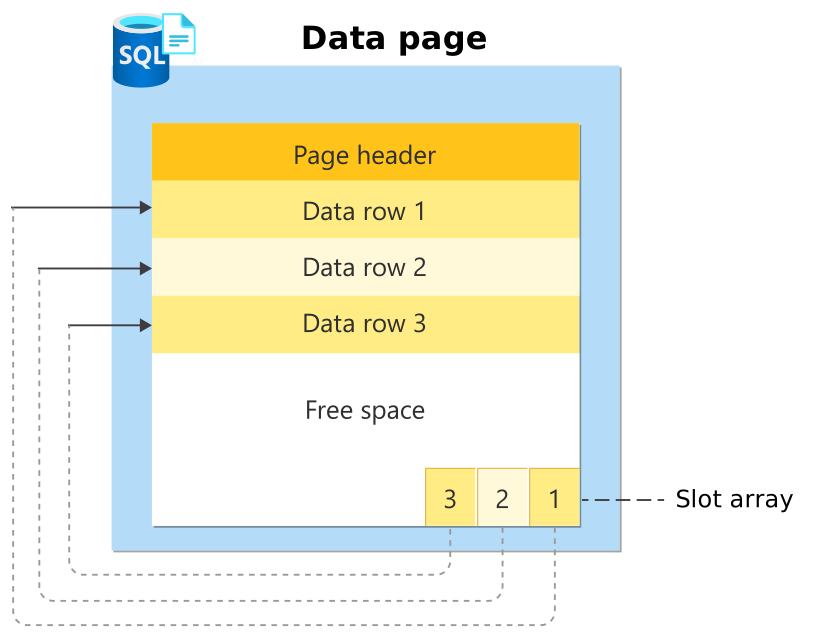
As rows on a page are deleted or updated over time, free space might appear among remaining rows. When a new row is added, it might be stored in this free space, if the space is sufficient. This means that rows on a page might not be physically stored in any particular order. However, the Database Engine maintains the slot array entries in a logical order. As a result, rows on a page are also accessed in a logical order, for example the order defined by the key of the BTree index that owns the page.
Large row support
To support large rows that don't fit on a single page, the part of the row that doesn't fit can be stored on other pages. The maximum size of data and overhead that can be contained in a single row on a page is 8,060 bytes.
The 8,060-byte restriction doesn't apply to the data in the columns using the LOB data types. By default for such columns, the data is stored in row if there's sufficient space. Otherwise, the row contains a 16-byte pointer to a separate tree of text/LOB pages storing the LOB data in a LOB_DATA allocation unit. The large value types out of row table option controls this behavior.
The 8,060-byte restriction is relaxed for tables and indexes that contain variable length columns using the varchar, nvarchar, varbinary, sql_variant, or CLR user-defined data types. When the total row size of all fixed and variable length columns in a heap or index exceeds the 8,060-byte limitation, the Database Engine dynamically moves one or more variable length columns to pages in a ROW_OVERFLOW_DATA allocation unit, starting with the widest column.
This is done whenever an insert or update operation increases the total size of the row beyond the 8,060-byte limit. When a column is moved to a page in a ROW_OVERFLOW_DATA allocation unit, a 24-byte pointer on the original page in a IN_ROW_DATA allocation unit is maintained. If a subsequent operation reduces the row size, the Database Engine dynamically moves the columns back to the original data page.
For example, a table can be created with two columns: one varchar(7000) and another varchar(2000). Individually, neither column exceeds 8,060 bytes, but combined they would do so if the entire width of each column is filled. If this happens, the Database Engine dynamically moves the varchar(7000) variable length column from the original page to the pages in a ROW_OVERFLOW_DATA allocation unit.
When a table or an index has varchar, nvarchar, varbinary, sql_variant, or CLR user-defined type columns that can exceed 8,060 bytes per row, consider the following:
Moving large rows to another page occurs dynamically as rows are lengthened based on update operations. Update operations that shorten rows can cause them to be moved back to the original page in a
IN_ROW_DATAallocation unit.This data movement results in extra disk I/O. Query processing operations such as sorts or joins on large records that contain row-overflow data might be slower.
Therefore, when you design a table with multiple varchar, nvarchar, varbinary, sql_variant, or CLR user-defined type columns, consider the percentage of rows that are likely to flow over and the frequency with which this overflow data is likely to be queried. To avoid slower performance, normalize the table to move some of these columns to another table to reduce or eliminate the likelihood of using row-overflow storage.
The length of individual columns must still fall within the limit of 8,000 bytes for varchar, nvarchar, varbinary, sql_variant, and CLR user-defined type columns. Only their combined lengths can exceed the 8,060-byte row limit of a table.
The sum of the lengths of other data type columns, for example char, nchar, and int data, must still be within the 8,060-byte row limit. However, columns using the LOB data types such as varchar(max), nvarchar(max), and varbinary(max) are exempt from the 8,060-byte row limit.
The index key of a clustered index can't contain varchar columns that have data in a
ROW_OVERFLOW_DATAallocation unit. If a clustered index is created on a varchar column and all existing data is in aIN_ROW_DATAallocation unit, but a subsequentINSERTorUPDATEstatement pushes the data off-row, the statement fails. For more information, see Index architecture and design guide.You can include columns that contain row-overflow data as key or nonkey columns of a nonclustered index.
The row size limit for tables that use sparse columns is 8,018 bytes. During conversion between sparse and nonsparse columns, when the converted data plus existing data exceeds 8,018 bytes, error 576 is returned. When columns are converted between sparse and nonsparse types, the Database Engine keeps a copy of the current row data. This temporarily doubles the storage that is required for the row.
To obtain information about tables or indexes that might contain row-overflow data, use the sys.dm_db_index_physical_stats dynamic management function. An index or partition has row-overflow data if the function returns rows where the
alloc_unit_type_desccolumn isROW_OVERFLOW_DATAand thepage_countcolumn is greater than 0.
Extents
An extent is a collection of eight physically contiguous pages. The size of each extent is 64 KiB.
There are two types of extents:
- Uniform extents are owned by a single object, for example a single table; all eight pages in the extent can only be used by the owning object.
- Mixed extents are shared by up to eight objects. Each of the eight pages in the extent can be owned by a different object.
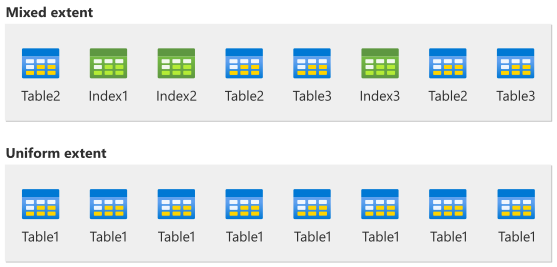
Up to, and including, SQL Server 2014 (12.x), the Database Engine doesn't allocate uniform extents to tables with small amounts of data. A new heap or index allocates pages from mixed extents. When the heap or index grows to the point that it uses eight pages, it then switches to uniform extents for all subsequent allocations. If you create an index on an existing table that has enough rows to generate eight pages in the index, all allocations to the index are in uniform extents.
Starting with SQL Server 2016 (13.x), the Database Engine uses uniform extents for allocations in a user database and in tempdb, except for allocations belonging to the first eight pages of an IAM chain. Allocations in the master, msdb, and model databases still retain the previous behavior.
Up to and including SQL Server 2014 (12.x), you can use trace flag (TF) 1118 to change the default allocation to always use uniform extents. For more information about this trace flag, see trace flag 1118.
Starting with SQL Server 2016 (13.x), TF 1118 has no effect. The functionality provided by TF 1118 earlier is automatically enabled for all user databases and for tempdb. For user databases, this behavior can be controlled by the MIXED_PAGE_ALLOCATION database option. The default value is OFF, which means that uniform extents are used. For more information, see ALTER DATABASE SET options.
Starting with SQL Server 2012 (11.x), the sys.dm_db_database_page_allocations system function can report page allocation information for a database, table, index, and partition.
Important
The sys.dm_db_database_page_allocations system function isn't supported and is subject to change. Compatibility isn't guaranteed.
Starting with SQL Server 2019 (15.x), the sys.dm_db_page_info system function returns information about a page in a database. The function returns one row that contains page header data, including the object ID, index ID, and partition ID. In many cases, this function can be used as a supported alternative for the unsupported DBCC PAGE command.
System pages
Each data file contains a small number of special system pages that track the metadata describing extents and pages. For example, system pages track which extents in a data file are allocated, and how much free space pages have. This section describes these system pages.
GAM and SGAM pages
The Database Engine uses two types of allocation maps to record extent allocation:
Global Allocation Map (GAM)
GAM pages record the extents have been allocated. Each GAM page covers an interval of approximately 64,000 extents, or about 4 gigabytes (GiB) of data, called a GAM interval. The GAM page has 1 bit for each extent in the interval it covers. If the bit is
1, the extent is free; if the bit is0, the extent is allocated.Shared Global Allocation Map (SGAM)
SGAM pages record which extents are currently being used as mixed extents and also have at least one unused page. Each SGAM page also covers an interval of approximately 64,000 extents, or about 4 GiB of data. The SGAM has 1 bit for each extent in the interval it covers. If the bit is
1, the extent is being used as a mixed extent and has a free page. If the bit is0, the extent isn't used as a mixed extent, or is a mixed extent where all pages are used.
To summarize, each extent has the following bit patterns set in the GAM and SGAM pages, based on its current use.
| Current use of extent | GAM bit setting | SGAM bit setting |
|---|---|---|
| Free, not being used | 1 | 0 |
| Uniform extent, or full mixed extent | 0 | 0 |
| Mixed extent with free pages | 0 | 1 |
To manage extents, the Database Engine uses the following conceptual algorithms:
- To allocate a uniform extent, the Database Engine searches the GAM page for a
1bit and sets it to0. - To find a mixed extent with free pages, the Database Engine searches the SGAM page for a
1bit. - To allocate a mixed extent, the Database Engine searches the GAM page for a
1bit, sets it to0, and then also sets the corresponding bit on the SGAM page to1. - To deallocate an extent, the Database Engine makes sure that the bit on the GAM page is set to
1, and the bit on the SGAM page is set to0.
Proportional fill allocation
The Database Engine allocates extents from those available in the filegroup using a proportional fill allocation algorithm. For example, in a filegroup with two files, if one file has double the free space of the other, two pages are allocated from that file for every one page allocated from the other file. This means that if allocations continue, all files in a filegroup end up with similar percentage of space used.
For more information, see File and filegroup fill strategy.
PFS pages
Page Free Space (PFS) pages record the allocation status of each page and the amount of free space on each page. A PFS page has 1 byte for each page it tracks. The byte records whether the page is allocated, and if so, whether it's empty, 1 to 50 percent full, 51 to 80 percent full, 81 to 95 percent full, or 96 to 100 percent full.
After an extent has been allocated to an object, the Database Engine uses PFS pages to track which pages in the extent have data or are free. This information is used when the Database Engine allocates a new page. The amount of free space in a page is only maintained for heap and text/LOB pages. This information is used when the Database Engine has to find a page with enough free space available to hold a newly inserted row.
BTree indexes don't require page free space tracking because the point at which to insert a new row is always determined by the index key values. If a page in a BTree index doesn't have enough free space, a new page is added, and approximately half of the original page data is moved to the new page.
GAM and PFS intervals
A new PFS, GAM, or SGAM page is added in the data file for every additional range that it keeps track of.
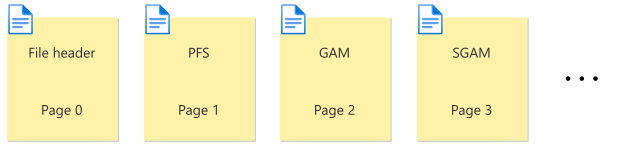
There's a new PFS page 8,088 pages after the first PFS page, and additional PFS pages in subsequent 8,088 page intervals. In a data file, page ID 1 is a PFS page, page ID 8088 is a PFS page, page ID 16176 is a PFS page, and so on.
Similarly, there's a pair of GAM and SGAM pages starting from pages 2 and 3 respectively, and repeating for every GAM interval of about 64,000 extents or 4 GiB.
The following diagram shows the first occurrence of PFS, GAM, and SGAM pages at the beginning of a data file following the file header page. As the file grows, new PFS, GAM, and SGAM pages appear at their respective intervals.
IAM pages
An Index Allocation Map (IAM) page maps the extents used by an allocation unit in a GAM interval. An allocation unit is associated with a partition of a heap or index, and can be one of three types:
IN_ROW_DATA
Holds non-LOB data pages, or portions of LOB data that might fit in row.
LOB_DATA
Holds LOB data pages, used by data types such as varchar(max), nvarchar(max), varbinary(max), xml, and json.
ROW_OVERFLOW_DATA
Holds LOB data pages used by variable length data types such as varchar, nvarchar, varbinary, or sql_variant when the data exceeds the 8,060-byte row size limit.
Each partition of a heap or index always contains at least one IN_ROW_DATA allocation unit. It can also contain LOB_DATA and ROW_OVERFLOW_DATA allocation units, depending on the data types and the row sizes present in the partition.
Similar to a GAM or SGAM page, an IAM page covers a 4-GiB interval in a file. If the allocation unit contains extents from more than one file, or more than one 4-GiB interval of a file, multiple IAM pages are linked in an IAM chain. Therefore, each allocation unit has at least one IAM page for each file where it has extents. There might also be more than one IAM page in a file, if the range of the extents allocated to the allocation unit in the file exceeds the range that a single IAM page can record. An IAM page in a file can track extents in that file, and in any other file of the same database.
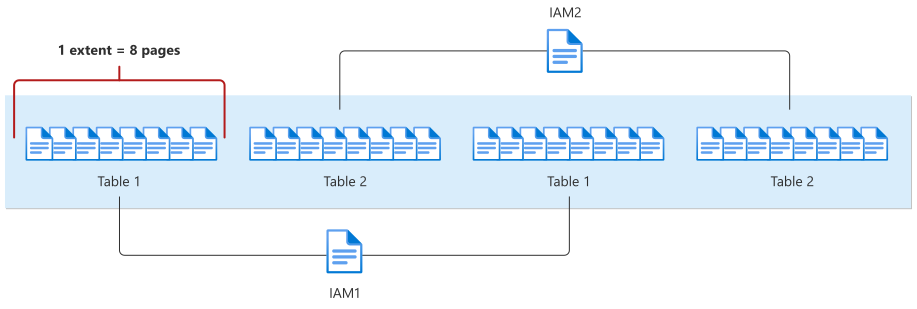
Unlike PFS, GAM, and SGAM pages that repeat at fixed intervals, IAM pages are allocated as required for each allocation unit. The sys.system_internals_allocation_units system view points to the first IAM page for an allocation unit. All the IAM pages for that allocation unit are linked in an IAM chain.
Important
The sys.system_internals_allocation_units system view isn't supported and is subject to change. Compatibility isn't guaranteed. This view isn't available in Azure SQL Database.
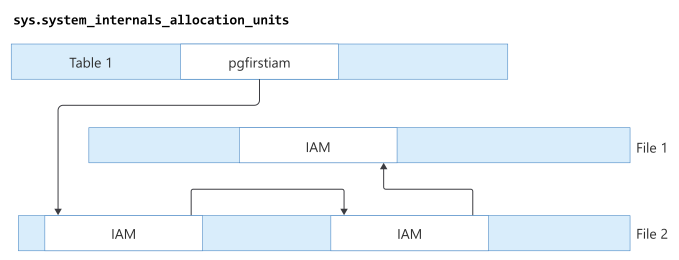
An IAM page has a header that indicates the starting extent of the range of extents mapped by that page. An IAM page also has a bitmap in which each bit represents one extent. The first bit in the map represents the first extent in the range, the second bit represents the second extent, and so on. If a bit is 0, the extent it represents isn't allocated to the allocation unit owning the IAM page. If the bit is 1, the extent it represents is allocated to the allocation unit owning the IAM page.
When the Database Engine has to insert a new row and no space is available in the current page, it uses IAM and PFS pages to find a page to allocate the row. For heap or text/LOB pages, it similarly uses IAM and PFS pages to find a page with sufficient space to hold the row. The Database Engine uses IAM pages to find the extents allocated to the allocation unit. For each extent, it searches the PFS pages to see if there's a page that can be used.
For BTree indexes, the insertion point of a new row is determined by the index key, but when a new page is needed, the previously described process occurs.
The Database Engine allocates a new extent to an allocation unit when it can't quickly find a page in an existing extent with sufficient space to hold the row being inserted.
DCM and BCM pages
The Database Engine uses two types of system pages to track extents modified since the last full backup, and extents modified by bulk copy operations.
Differential Changed Map (DCM) pages speed up differential backups. Bulk Changed Map (BCM) speed up bulk copy operations when a database is using the bulk-logged recovery model. Like the GAM and SGAM pages, these structures are bitmaps in which each bit represents a single extent.
DCM pages
These pages track the extents that have changed since the last full database backup. If the bit for an extent is
1, the extent has been modified. If the bit is0, the extent hasn't been modified.Differential backups read the DCM pages to determine which extents have been modified. This reduces the number of pages that a differential backup must read and write. The length of time that a differential backup takes is proportional to the number of extents modified since the last full database backup, and not the total size of the database.
BCM pages
These pages track the extents that have been modified by bulk-logged operations since the last transaction log backup. If the bit for an extent is
1, the extent has been modified. If the bit is0, the extent hasn't been modified.Although BCM pages appear in all databases, they are only relevant when the database is using the bulk-logged recovery model. In this recovery model, when a transaction log backup is performed, the backup process scans BCM pages for extents that have been modified. It includes those extents in the log backup to enable recovery if the database is restored from a database backup and a sequence of transaction log backups.
BCM pages aren't relevant in a database that is using the simple recovery model, because no bulk-logged operations are fully logged. They also aren't relevant in a database that is using the full recovery model, because that recovery model treats bulk-logged operations as fully logged operations.
The DCM and BCM pages are stored at the same GAM intervals of approximately 4 GiB as the GAM and SGAM pages. The DCM and BCM pages follow the GAM and SGAM pages in a physical file as follows:
