Notiz
Zougrëff op dës Säit erfuerdert Autorisatioun. Dir kënnt probéieren, Iech unzemellen oder Verzeechnesser ze änneren.
Zougrëff op dës Säit erfuerdert Autorisatioun. Dir kënnt probéieren, Verzeechnesser ze änneren.
Important
This feature is in Public Preview.
Memory allows AI agents to remember information from earlier in the conversation or from previous conversations. This lets agents provide context-aware responses and build personalized experiences over time. Use Databricks Lakebase, a fully-managed Postgres OLTP database, to manage conversation state and history.
Requirements
- A Lakebase instance, see Create and manage a database instance.
Short-term vs. long-term memory
Short-term memory captures context in a single conversation session while long-term memory extracts and stores key information across multiple conversations. You can build your agent with either or both types of memory.
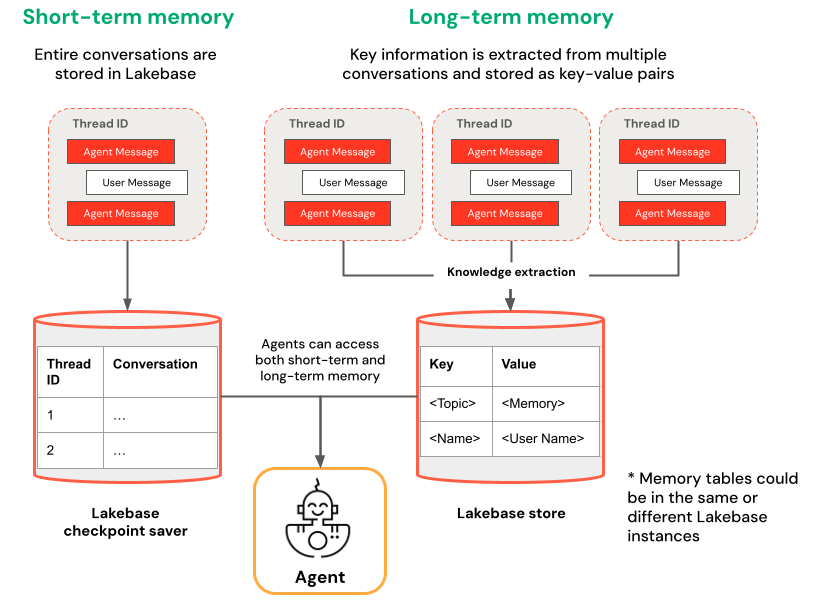
| Short-term memory | Long-term memory |
|---|---|
| Capture context in a single conversation session using thread IDs and checkpointing Maintain context for follow-up questions within a session Debug and test conversation flows using time travel |
Automatically extract and store key insights across multiple sessions Personalize interactions based on past preferences Build a knowledge base about users that improves responses over time |
Notebook examples
Agent with short-term memory
Agent with long-term memory
Query your deployed agent
After you deploy your agent to a Model Serving endpoint, see Query a deployed Mosaic AI agent for query instructions.
To pass in a thread id, use the extra_body param. The following example shows you how to pass in a thread ID to a ResponsesAgent endpoint:
   response1 = client.responses.create(
    model=endpoint,
    input=[{"role": "user", "content": "What are stateful agents?"}],
    extra_body={
        "custom_inputs": {"thread_id": thread_id}
    }
)
If you are using a client that automatically passes ChatContext like the Playground or Review app, the conversation id and user id will automatically be passed in for short-term/long-term memory use cases.
Short-term memory time travel
For agents with short-term memory, use LangGraph time-travel to resume execution from checkpoints. You can either replay the conversation or modify it to explore alternative paths. Each time you resume from a checkpoint, LangGraph creates a new fork in the conversation history, preserving the original while enabling experimentation.
In agent code, create functions that retrieve checkpoint history and update checkpoint state in the
LangGraphResponsesAgentclass:from typing import List, Dict def get_checkpoint_history(self, thread_id: str, limit: int = 10) -> List[Dict[str, Any]]: """Retrieve checkpoint history for a thread. Args: thread_id: The thread identifier limit: Maximum number of checkpoints to return Returns: List of checkpoint information including checkpoint_id, timestamp, and next nodes """ config = {"configurable": {"thread_id": thread_id}} with CheckpointSaver(instance_name=LAKEBASE_INSTANCE_NAME) as checkpointer: graph = self._create_graph(checkpointer) history = [] for state in graph.get_state_history(config): if len(history) >= limit: break history.append({ "checkpoint_id": state.config["configurable"]["checkpoint_id"], "thread_id": thread_id, "timestamp": state.created_at, "next_nodes": state.next, "message_count": len(state.values.get("messages", [])), # Include last message summary for context "last_message": self._get_last_message_summary(state.values.get("messages", [])) }) return history def _get_last_message_summary(self, messages: List[Any]) -> Optional[str]: """Get a snippet of the last message for checkpoint identification""" return getattr(messages[-1], "content", "")[:100] if messages else None def update_checkpoint_state(self, thread_id: str, checkpoint_id: str, new_messages: Optional[List[Dict]] = None) -> Dict[str, Any]: """Update state at a specific checkpoint (used for modifying conversation history). Args: thread_id: The thread identifier checkpoint_id: The checkpoint to update new_messages: Optional new messages to set at this checkpoint Returns: New checkpoint configuration including the new checkpoint_id """ config = { "configurable": { "thread_id": thread_id, "checkpoint_id": checkpoint_id } } with CheckpointSaver(instance_name=LAKEBASE_INSTANCE_NAME) as checkpointer: graph = self._create_graph(checkpointer) # Prepare the values to update values = {} if new_messages: cc_msgs = self.prep_msgs_for_cc_llm(new_messages) values["messages"] = cc_msgs # Update the state (creates a new checkpoint) new_config = graph.update_state(config, values=values) return { "thread_id": thread_id, "checkpoint_id": new_config["configurable"]["checkpoint_id"], "parent_checkpoint_id": checkpoint_id }Update the
predictandpredict_streamfunctions to support passing in checkpoints:Predict
def predict(self, request: ResponsesAgentRequest) -> ResponsesAgentResponse:
    """Non-streaming prediction"""
    # The same thread_id is used by BOTH predict() and predict_stream()
    ci = dict(request.custom_inputs or {})
    if "thread_id" not in ci:
        ci["thread_id"] = str(uuid.uuid4())
    request.custom_inputs = ci

    outputs = [
        event.item
        for event in self.predict_stream(request)
        if event.type == "response.output_item.done"
    ]

    # Include thread_id and checkpoint_id in custom outputs
    custom_outputs = {
        "thread_id": ci["thread_id"]
    }
    if "checkpoint_id" in ci:
        custom_outputs["parent_checkpoint_id"] = ci["checkpoint_id"]

    try:
        history = self.get_checkpoint_history(ci["thread_id"], limit=1)
        if history:
            custom_outputs["checkpoint_id"] = history[0]["checkpoint_id"]
    except Exception as e:
        logger.warning(f"Could not retrieve new checkpoint_id: {e}")

    return ResponsesAgentResponse(output=outputs, custom_outputs=custom_outputs)
Predict_stream
def predict_stream(
    self,
    request: ResponsesAgentRequest,
) -> Generator[ResponsesAgentStreamEvent, None, None]:
    """Streaming prediction with PostgreSQL checkpoint branching support.

    Accepts in custom_inputs:
    - thread_id: Conversation thread identifier for session
    - checkpoint_id (optional): Checkpoint to resume from (for branching)
    """
    # Get thread ID and checkpoint ID from custom inputs
    custom_inputs = request.custom_inputs or {}
    thread_id = custom_inputs.get("thread_id", str(uuid.uuid4()))  # generate new thread ID if one is not passed in
    checkpoint_id = custom_inputs.get("checkpoint_id")  # Optional for branching

    # Convert incoming Responses messages to LangChain format
    langchain_msgs = self.prep_msgs_for_cc_llm([i.model_dump() for i in request.input])

    # Build checkpoint configuration
    checkpoint_config = {"configurable": {"thread_id": thread_id}}
    # If checkpoint_id is provided, we're branching from that checkpoint
    if checkpoint_id:
        checkpoint_config["configurable"]["checkpoint_id"] = checkpoint_id
        logger.info(f"Branching from checkpoint: {checkpoint_id} in thread: {thread_id}")

    # DATABASE CONNECTION POOLING LOGIC FOLLOWS
    # Use connection from pool
Then, test your checkpoint branching:
Start a conversational thread and add a few messages:
from agent import AGENT
# Initial conversation - starts a new thread
response1 = AGENT.predict({
    "input": [{"role": "user", "content": "I'm planning for an upcoming trip!"}],
})
print(response1.model_dump(exclude_none=True))
thread_id = response1.custom_outputs["thread_id"]

# Within the same thread, ask a follow-up question - short-term memory will remember previous messages in the same thread/conversation session
response2 = AGENT.predict({
    "input": [{"role": "user", "content": "I'm headed to SF!"}],
    "custom_inputs": {"thread_id": thread_id}
})
print(response2.model_dump(exclude_none=True))

# Within the same thread, ask a follow-up question - short-term memory will remember previous messages in the same thread/conversation session
response3 = AGENT.predict({
    "input": [{"role": "user", "content": "Where did I say I'm going?"}],
    "custom_inputs": {"thread_id": thread_id}
})
print(response3.model_dump(exclude_none=True))
Retrieve checkpoint history and fork the conversation with a different message:
# Get checkpoint history to find branching point
history = AGENT.get_checkpoint_history(thread_id, 20)
# Retrieve checkpoint at index - indices count backward from most recent checkpoint
index = max(1, len(history) - 4)
branch_checkpoint = history[index]["checkpoint_id"]

# Branch from node with next_node = `('__start__',)` to re-input message to agent at certain part of conversation
# I want to update the information of which city I am going to
# Within the same thread, branch from a checkpoint and override it with different context to continue the conversation in a new fork
response4 = AGENT.predict({
    "input": [{"role": "user", "content": "I'm headed to New York!"}],
    "custom_inputs": {
        "thread_id": thread_id,
        "checkpoint_id": branch_checkpoint # Branch from this checkpoint!
    }
})
print(response4.model_dump(exclude_none=True))

# Thread ID stays the same even though it branched from a checkpoint:
branched_thread_id = response4.custom_outputs["thread_id"]
print(f"original thread id was {thread_id}")
print(f"new thread id after branching is the same as original: {branched_thread_id}")

# Continue the conversation in the same thread and it will pick up from the information you tell it in your branch
response5 = AGENT.predict({
    "input": [{"role": "user", "content": "Where am I going?"}],
    "custom_inputs": {
        "thread_id": thread_id,
    }
})
print(response5.model_dump(exclude_none=True))