Notiz
Zougrëff op dës Säit erfuerdert Autorisatioun. Dir kënnt probéieren, Iech unzemellen oder Verzeechnesser ze änneren.
Zougrëff op dës Säit erfuerdert Autorisatioun. Dir kënnt probéieren, Verzeechnesser ze änneren.
When Defender for Cloud finds a vulnerability in a container image, it can be hard to trace that image back to the original CI/CD pipeline run. This challenge is common whether the image is in a container registry or running in a Kubernetes cluster. Without pipeline context, it's harder to find the right developer and start remediation quickly. Defender Cloud Security Posture Management (CSPM) includes DevOps security capabilities that map container workloads from code to cloud, so teams can start remediation faster.
This article explains the available mapping methods, the prerequisites for each, and how to verify the resulting code-to-runtime mapping in the Azure portal. Before you begin, make sure the required Defender CSPM or Defender for Containers prerequisites are met.
Code to runtime – technical prerequisites
The following prerequisites are required to establish code to runtime relationships.
General prerequisites (all methods)
The following prerequisites apply regardless of the mapping method used:
- Defender CSPM (Cloud Security Posture Management) or Defender for Containers must be enabled in your cloud environment.
- A limited set of mapping capabilities is included with Defender for Containers.
- Container images must be built through a CI/CD pipeline.
- Images that are manually built and pushed aren't supported, although some manually built images might still appear in mapping results.
- Container images must be discoverable by Defender for Cloud, either by:
- Being stored in a supported container registry, or
- Running in a supported Kubernetes environment
Option 1: Connect your code environment to Defender for Cloud
When you connect an Azure DevOps or GitHub environment to Defender for Cloud, a set of automated tools is triggered automatically. The automated tools do not affect your existing DevOps workflows and enable code-to-runtime mapping.
Note
- Currently supported for Azure DevOps and GitHub
- Container images built and deployed prior to connecting may have limited support
For steps to connect a code environment to Defender for Cloud, see:
Option 2: Docker labels–based mapping
Docker labels-based mapping relies on metadata that is embedded directly in the container image at build time. Defender for Cloud extracts this metadata from the OCI/Docker image manifest and uses it to correlate the image to its source repository.
For more information about Docker labels-based mapping, see:
- OCI Docker image annotations specification
- Add OCI/Docker labels in Azure DevOps
- Add labels in GitHub
- Manually provide labels using the Dockerfile
LABELinstruction
Note
- Docker labels-based mapping does not require a DevOps connector.
- Mapping is performed for Kubernetes environments covered by Defender CSPM or Defender for Containers.
Option 3: GitHub attestations-based mapping
Attestation-based mapping uses cryptographically verifiable provenance metadata generated during GitHub Actions workflows. These attestations link container images to their exact source repository, commit, and build identity.
For more information about attestation-based mapping, see:
Verify your code to runtime mapping (Azure portal)
Regardless of which mapping method you use (DevOps connector, Docker labels, or GitHub attestations), you can verify the resulting code-to-runtime mapping in the Azure portal. The following example shows how to view mapping results after building a container image in an Azure DevOps CI/CD pipeline and pushing it to a registry. Use Cloud Security Explorer to view the mapping:
Sign in to the Azure portal.
Go to Microsoft Defender for Cloud > Cloud Security Explorer. Container image mapping can take up to four hours to appear.
To see basic mapping, select Container Images > + > Pushed by code repositories.
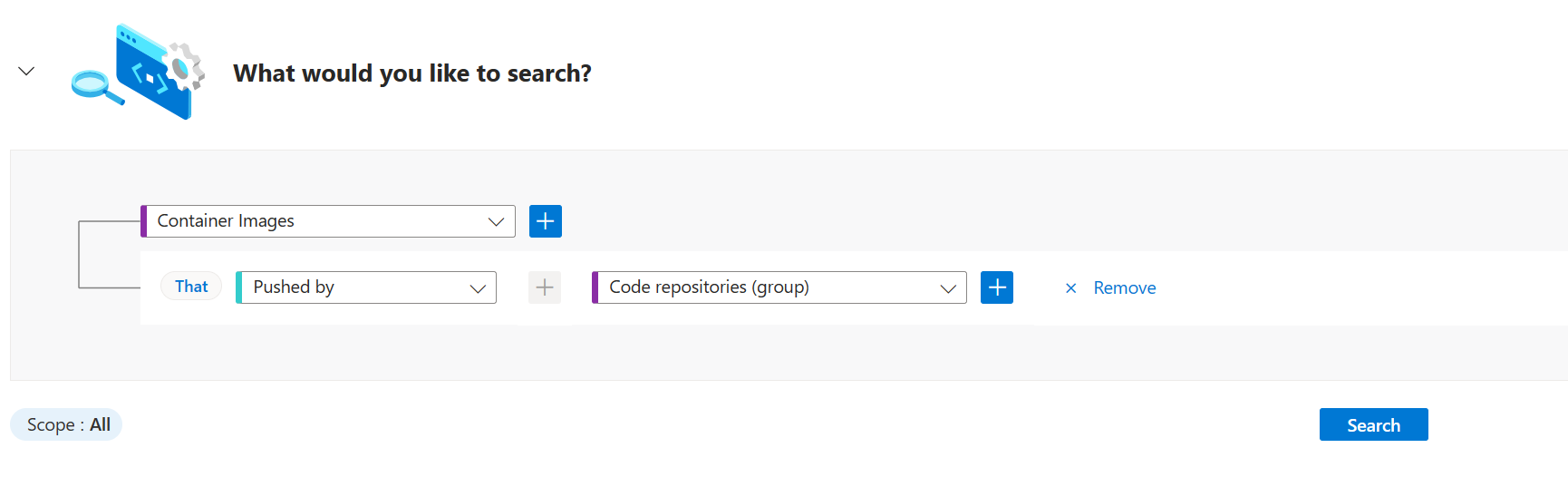
(Optional) Select + by Container Images to add filters to your query, such as Has vulnerabilities, to show only container images with common vulnerabilities and exposures (CVEs).
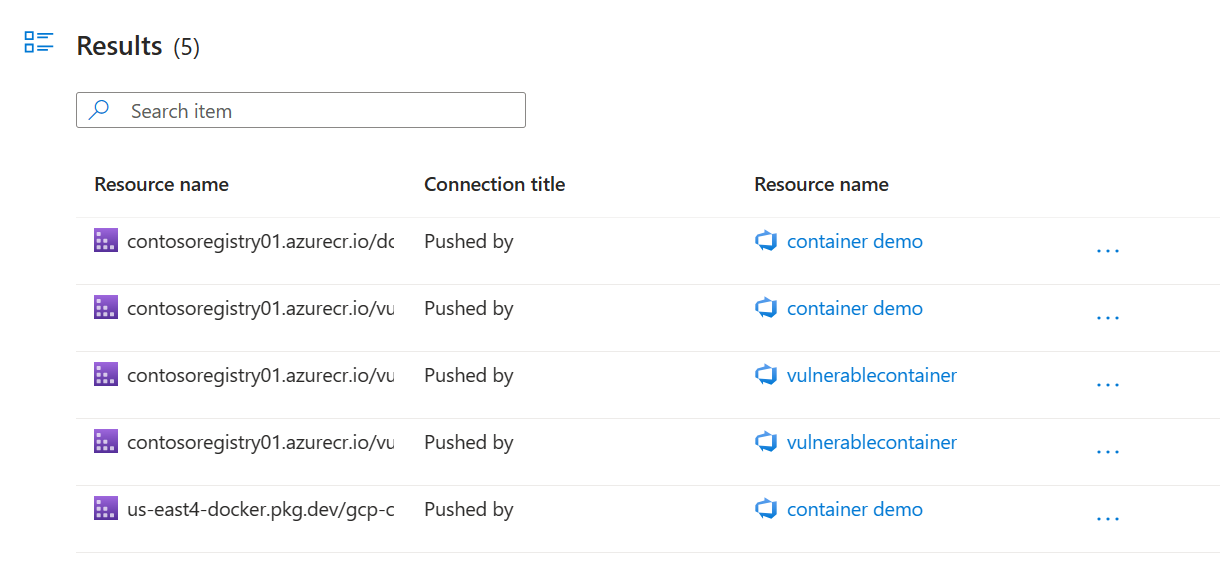
After you run the query, you see the mapping between the container registry and the pipeline. Select ... next to the connecting line (edge) to see more details.
Next steps
- For more information, see DevOps security in Defender for Cloud.
- For more information, see Code to runtime for recommendations.