Notiz
Zougrëff op dës Säit erfuerdert Autorisatioun. Dir kënnt probéieren, Iech unzemellen oder Verzeechnesser ze änneren.
Zougrëff op dës Säit erfuerdert Autorisatioun. Dir kënnt probéieren, Verzeechnesser ze änneren.
Use this article as the starting point for migrating Azure Synapse Spark workloads to Microsoft Fabric. It helps you decide which guidance to use, what can be migrated directly, and where manual refactoring or validation is still required.
Fabric Data Engineering supports lakehouse, notebook, environment, Spark job definition, and pipeline items. Most Synapse Spark migrations involve some combination of item migration, data access changes, metadata migration, code refactoring, and post-migration validation.
Before you migrate
Before you begin, confirm that Fabric Data Engineering is the right destination for your workload. Review the Spark runtime, security model, pool model, environment model, and data access patterns that your current Synapse implementation depends on.
Start with these articles:
If you're migrating an existing Synapse workspace, plan to create or use an existing Fabric workspace as the migration target. This article doesn't cover full workspace provisioning or non-Spark workload migration.
What can you migrate?
Synapse-to-Fabric migration usually spans several workstreams.
| Migration area | Typical scope | Primary guidance |
|---|---|---|
| Planning and assessment | Inventory Spark pools, notebooks, Spark Job Definitions, lake databases, linked services, and blockers | Phase 1: Migration strategy and planning |
| Items, code refactoring, pools, configs, and libraries | Notebooks, Spark Job Definitions, Spark pools, lake database mappings, mssparkutils, linked services, file paths, catalog APIs, connector auth, environments, custom pools, Spark properties, library compatibility |
Phase 2: Spark workload migration |
| Hive Metastore and lake metadata | Databases, tables, partitions, managed vs. external tables | Phase 3: Hive Metastore and data migration |
| Data access and pipelines | OneLake shortcuts, ADLS Gen2 access, copy activities, pipeline migration | Migrate data and pipelines |
| Security, validation, and cutover | Roles, connections, governance, verification, cutover planning | Phase 4: Security and governance migration |
Choose your migration path
Use the path that matches your goal.
- You need an end-to-end migration plan. Start with the 4-phase best practices series. This is the best entry point for most production migrations.
- You want to move supported Spark items quickly. Start with the Spark Migration Assistant and then use the refactoring and validation articles to close the gaps.
- You only need help with one area. Use the task-specific articles for notebooks, Spark Job Definitions, pools, libraries, Hive Metastore metadata, or data/pipeline migration.
Recommended reading order
For most teams, the fastest way to approach a Synapse Spark migration is:
- Review Compare Fabric and Azure Synapse Spark: Key Differences.
- Read Phase 1: Migration strategy and planning.
- Run the Spark Synapse to Fabric Spark Migration Assistant where applicable.
- Refactor notebooks, Spark jobs, pools, and libraries using Phase 2: Spark workload migration.
- Validate data access, metadata, security, and cutover readiness using the remaining best-practices articles.
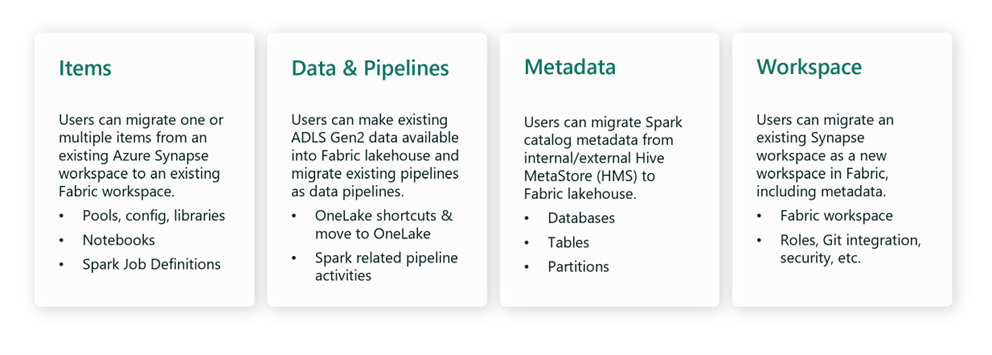
Migration from Synapse Spark to Fabric is usually a copy-and-adapt process rather than a direct in-place move. You can migrate many assets quickly, but you should still expect to validate runtime behavior, replace Synapse-specific integrations, and align security, metadata, and operational patterns with Fabric.
Best practices series
Use the best practices series for a structured, end-to-end migration path:
- Phase 1: Migration strategy and planning
- Phase 2: Spark workload migration
- Phase 3: Hive Metastore and data migration
- Phase 4: Security and governance migration
Task-specific migration articles
If you need targeted guidance for a specific migration task, use these articles:
- Spark Synapse to Fabric Spark Migration Assistant
- Migrate Azure Synapse notebooks to Fabric
- Migrate Spark Job Definitions from Azure Synapse to Fabric
- Migrate Spark Pools from Azure Synapse to Fabric
- Migrate Spark configurations from Azure Synapse to Fabric
- Migrate Spark Libraries from Azure Synapse to Fabric
- Migrate Hive Metastore metadata
- Migrate data and pipelines
Related content
- Compare Fabric and Azure Synapse Spark: Key Differences
- Phase 1: Migration strategy and planning
- Spark Synapse to Fabric Spark Migration Assistant
- Learn more about migration options for Spark pools, configurations, libraries, notebooks, and Spark job definition
- Migrate data and pipelines
- Migrate Hive Metastore metadata