Notiz
Zougrëff op dës Säit erfuerdert Autorisatioun. Dir kënnt probéieren, Iech unzemellen oder Verzeechnesser ze änneren.
Zougrëff op dës Säit erfuerdert Autorisatioun. Dir kënnt probéieren, Verzeechnesser ze änneren.
Applies to: ✅ Warehouse in Microsoft Fabric
This article provides a high-level overview of the development and deployment workflows available to developers working with Fabric Data Warehouse. Whether you're building in the Fabric web editor, working locally in an integrated development environment (IDE), deploying through Fabric's native deployment pipelines, or integrating with CI/CD pipelines in Azure DevOps Services or GitHub, this article can help you understand your options.
Important
This feature is in preview.
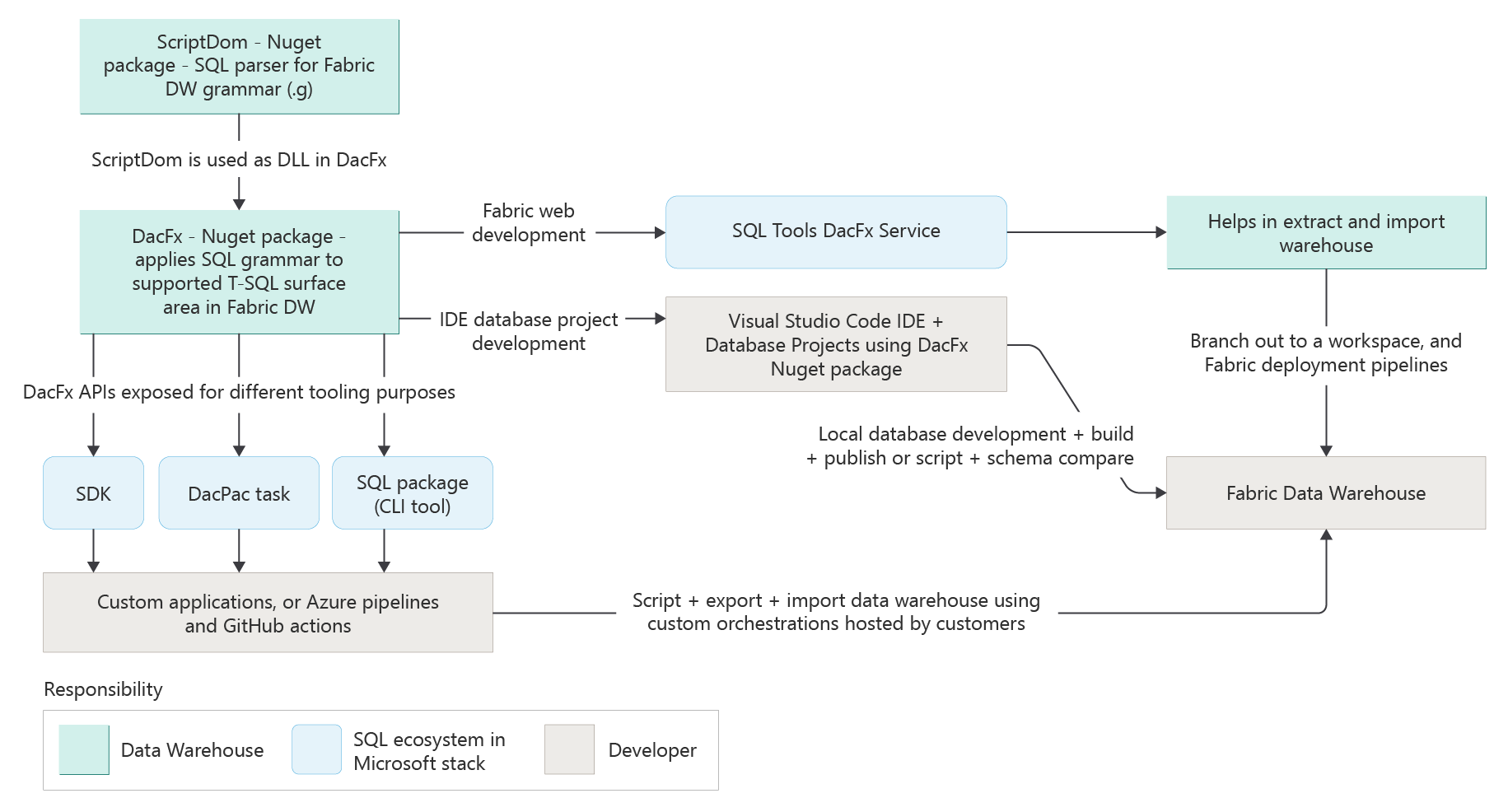
Fabric Data Warehouse offers flexible development and deployment options tailored to different developer preferences:
| Mode | Tools and features |
|---|---|
| Fabric web (no Git) | Live development, no version control |
| Fabric web (with Git) | Live development, version control, and continuous integration with workspace branching |
| IDE / local development | Visual Studio Code with DacFx for schema management and scripting, SSMS for interactive development |
| Fabric deployment pipelines | Automated deployment, deployment tracking, stage promotion |
| External CI/CD | Azure DevOps, GitHub, REST APIs for automation |
Development in the Fabric portal
The Fabric portal offers a rich, integrated experience for developing warehouses directly in the browser. Developers can choose between two modes:
Without Git integration
- Changes you make in the warehouse are live and immediately reflected, but not version controlled, so the system doesn't track changes.
- This mode is appropriate for individual development scenarios without collaboration with a team, version history, or pre-production development environments.
With Git integration
- Connect your workspace to a Git repository (Azure DevOps Services or GitHub). - Enables version control, branching, and collaboration.
- Key capabilities:
- Commit workspace changes to Git.
- Sync updates from Git into the workspace.
- Revert to previous commits.
- Branch out to feature workspaces for isolated development.
- Git integration is workspace-level and supports bi-directional sync.
- Developers can automate Git workflows by using Fabric REST APIs, including commit, sync, and branch operations.
For more information on the Git integration process, see:
IDE-based development (client tools)
You can develop Fabric Data Warehouse solutions by using client tools such as:
Visual Studio Code supports modern database development for Fabric Data Warehouse through database project-based workflows, version control integration, schema comparison, and continuous integration. By using the MSSQL extension for VS Code, developers can create SDK-style database projects that streamline development and automation. It offers a lightweight yet powerful environment tailored for iterative and DevOps-friendly workflows.
Database projects in SQL Database Projects extension for Visual Studio Code use the DacFx (Data-Tier Application Framework) package to build and publish database projects, compare schemas, script changes, and extract or deploy .dacpac files. For more information, see Data-tier applications (DAC) overview.
To get started developing a warehouse project in the SQL Database Projects extension for Visual Studio Code, see Develop warehouse projects in Visual Studio Code.
SQL Server Management Studio (SSMS) also supports development on Fabric Data Warehouse. SSMS provides a robust, full-featured environment that is familiar to database administrators and developers. SSMS enables advanced querying, performance tuning, security management, and object exploration. It's especially well-suited for tasks such as monitoring query plans, executing complex scripts, and managing security roles within the warehouse. SSMS is an essential tool for both development and administrative workflows.
Deployment workflows
To deploy to a warehouse, use Fabric deployment pipelines or Fabric's built-in continuous integration/continuous development (CI/CD).
Fabric deployment pipelines
- Fabric deployment pipelines support workspace branching and promotion across environments (for example, dev → test → prod).
- You can map Git-connected workspaces to branches, which enables structured CI/CD.
- You can trigger pipelines manually or through automation by using Fabric APIs.
- To get started, see Get started with deployment pipelines.
CI/CD with Azure DevOps or GitHub
- Developers can use external CI/CD systems to automate build and deployment.
- Supported via DacFx tasks, SQLPackage CLI, and REST APIs.
- Git integration for Fabric Data Warehouse enables seamless collaboration and versioning across teams.
- To get started, see Get started with Git integration.